How to pay Excel less?

Author :

React :

Comment

We no longer present Excel. Its use, from finance to marketingThis allows you to manipulate data, automate calculations, visualize information in graphical form and more.

It is essential software for many professional sectors., that it's possible to pay less by reading this comprehensive guide.

The Excel software logo, included in the Microsoft Office 365 package. It is available alongside Word, OneNote, and PowerPoint, to name a few. Finally, owners of Mac or PC (Windows) devices can purchase a license to use it. ©️Dramsey for Alucare

By way of preamble, we need to ask ourselves another question. Is it possible to obtain Excel individually ? And if so, how much does it cost? We explain it all.

Can you buy Excel on your own?

To answer your question: yes, you should know thatExcel can be obtained separatelyIn other words, you're not just buying the classic Microsoft package with Word, PowerPoint and OneNote, to name but a few.

However, while this one-off purchase allows you to use the spreadsheet with no commitment and for life, you won't have to worry about no access to updates over the years. So be prepared for a version destined to be on the bangs of Excel's new functionalities in the future.

How much does Excel cost?

Now that you've got all the information you need about buying Excel independently, there's the question of the license fee for :

Software

License type

Price

Microsoft Excel

Definitive license (one-off purchase)

159€

As you can see, the price is set at €159. Some users may find it excessive, but let's not forget that all Excel features make him a extremely versatile tool.

Every professional sector can find a use for the spreadsheet. All this, without forgetting the software-integrated safety features that guarantee trouble-free use.

How to pay Excel less in 2025?

1. Get Microsoft Office 365 with Coosub

As you can see, it would be more advantageous for you to take a Microsoft Office 365 subscription rather than Microsoft Excel on its own. You'll save money and be able to take advantage of NEW FEATURES developed for the software.

But even greater savings can be achieved through the use of a subscription sharing platform such as Coosub. Here is a price comparison table :

Software License type Price
Microsoft 365 Personal Shared subscription with Coosub 2.17/month
Microsoft 365 Personal Official monthly subscription 7/month
Microsoft Excel Official definitive license (one-off purchase) 159€

Coosub allows you to access the Microsoft 365 suite, i.e., all Microsoft software, including Excelto a unbeatable price. We'll show you how:

  • Go to Coosub.
Welcome to Coosub. This subscription-sharing platform offers, among other things, applications and software from the Microsoft Office 365 package at a discounted price. At the same time, its offers are rich and varied. An opportunity to indulge yourself with the purchase of various products at lower cost.
Welcome to Coosub. This subscription sharing platform offers Microsoft Office 365 applications and software at reduced prices. At the same time, it has a wide and varied range of offers. It's a great opportunity to treat yourself to a variety of products at a lower cost. ©️Dramsey for Alucare
  • Create an account.
Subscribe to the Coosub platform. This way, you'll have access to a catalog offering you services ranging from specialized security applications (VPN) to, of course, a license like Microsoft Office 365 at a more than affordable price.
Sign up for the Coosub platform. This will give you access to a catalog offering services ranging from specialized security applications (VPN) to, of course, licenses such as Microsoft Office 365 at a more than affordable price. ©️Dramsey for Alucare
  • In the category bar, select “Tool“.
Filter your search to find the subscription you want more easily. As this is a software product, you'll find the Microsoft Office 365 subscription in "Tool".
Filter your searches to find the subscription you want more easily. Since this is software, you will find the subscription on Microsoft Office 365 in “Tool“©️Dramsey for Alucare
  • Then look for the “Microsoft Office 365 Family” subscription.
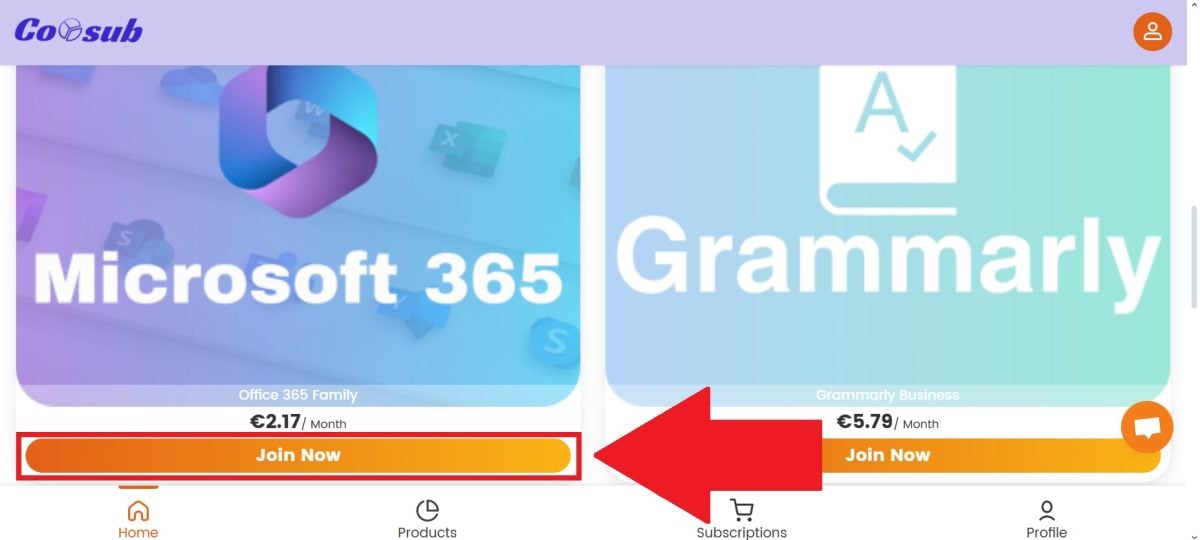
With Coosub, the Microsoft Office Family subscription starts at €2.17 per month.
With Coosub, a Microsoft Office Family subscription is available starting at €2.17 per month. ©️Dramsey for Alucare
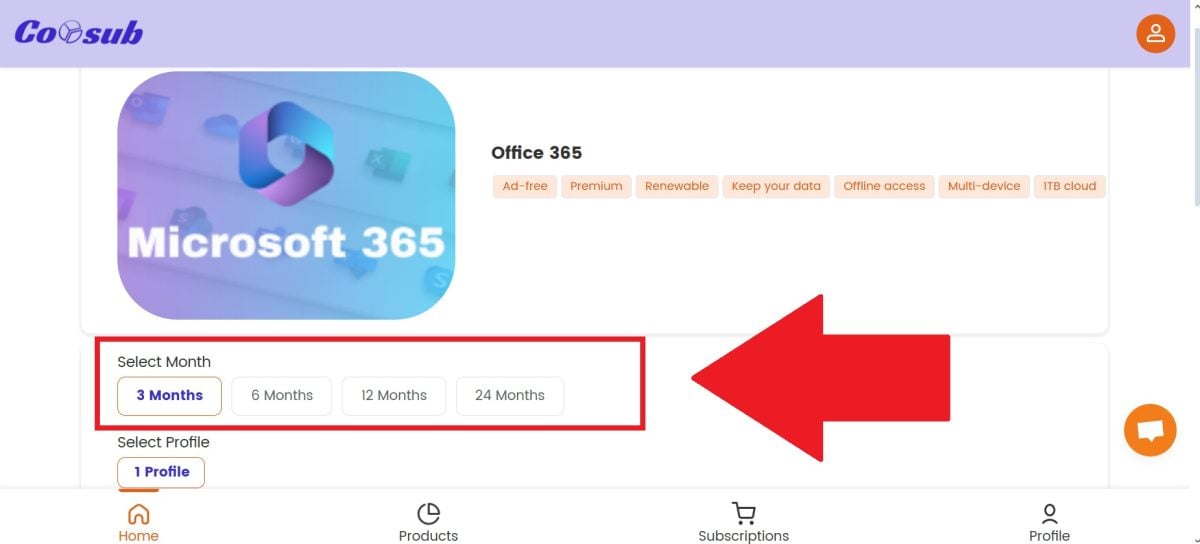
  • Choose your subscription package.
The packages available involve a subscription to Microsoft Office 365. Your devices will benefit from the applications in this comprehensive package. In addition to Excel, Word, PowerPoint and OneNote are also available. You'll be able to make your company or personal business flourish.
The available options for subscribing to Microsoft Office 365. This will allow your devices to benefit from the applications in this package with full content. In addition to Excel, you will also have access to Word, PowerPoint, and OneNote. This will enable you to grow your company or personal business. ©️Dramsey for Alucare
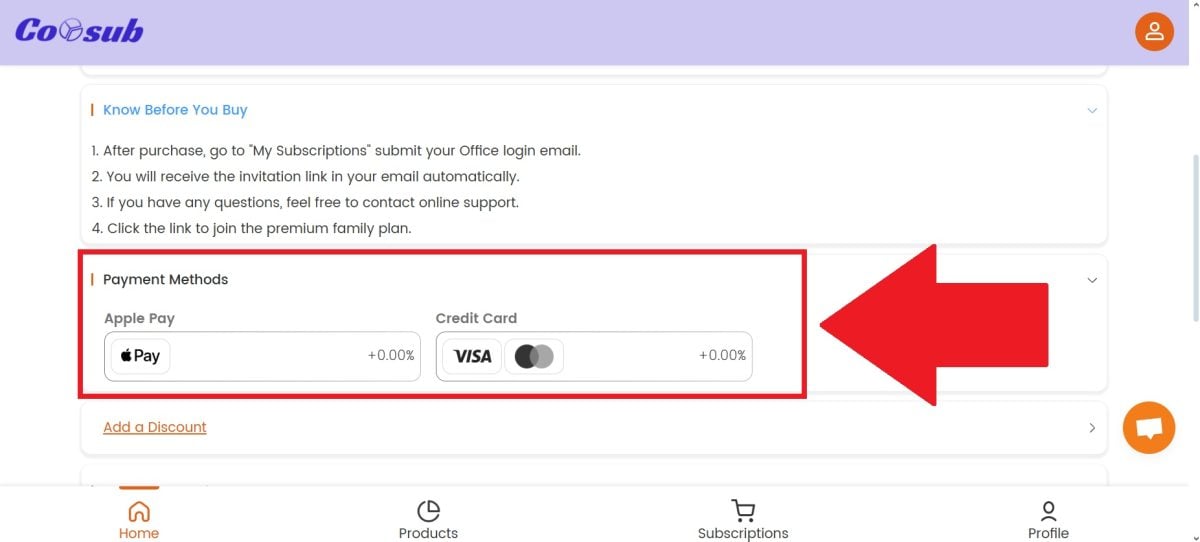
  • Select your payment method.
Before choosing your payment method, please consult the "Know Before You Buy" section to find out how to proceed after purchasing your Microsoft Office 365 subscription.
Before choosing your payment method, please consult the section “Know Before You Buy” to find out what to do after purchasing your Microsoft Office 365 subscription. ©️Dramsey for Alucare
  • Proceed with the transaction.
Payment for Microsoft Office 365 at a discounted price on Coosub. Once you've done so, your product will be delivered very quickly. In addition to Excel, Word, PowerPoint and OneNote are also available. A comprehensive package that will help your company or personal business to flourish.
Pay for Microsoft Office 365 at a reduced price on Coosub. Once you've done so, your product will be delivered very quickly. In addition to Excel, you'll also have access to Word, PowerPoint, and OneNote. A comprehensive package that will help your company or personal business flourish. ©️Dramsey for Alucare
  • Take advantage of the Office package, including Excel.

To find out more, we invite you to read our article on Office 365 cheaper by clicking on the link in question.

2. Buy a cheap Excel activation key

Another scenario includes purchase of an activation key for Excel at low cost. As a reminder, an activation key is a unique code made up of numbers and letters, enabling the activation of software or an operating system.

This is how they check whether the license you have is an official one and not a counterfeit. In short, it is a security measure. Several online platforms allow you to purchase it.

The best-known are Amazon and CDiscount. Key delivery is almost instantaneous and installation, and then downloading the software is fairly quick. This means you can use Excel to improve the management of your business and personal projects.

3. Use the free version of Excel

Finally, you have the option use Excel completely free of charge using the web version intended for the general public. So :

  • Go to the Microsoft 365 site, then register for free.
  • Click on the Excel icon.
The Excel software logo, included in the Microsoft Office 365 package. It is available alongside Word, OneNote, and PowerPoint, to name a few. Finally, owners of Mac or PC (Windows) devices can purchase a license to use it. ©️Dramsey for Alucare
  • Click on “New”
The place to create a new Excel file to process your data. No payment or download is required for the product; everything is available on the online web version. Note: the image shown is of the desktop version (Windows or Mac devices), but this is essentially how it will be presented. No download or installation is required; you can use it directly through your browser. ©️Dramsey for Alucare
  • You can use the free version of Excel!
The Excel spreadsheet, where you can use the software for business or personal purposes to process your data. Note: the online web version will not look exactly like the image, as some features are only available in the paid version. So no installation or download required! ©️Dramsey for Alucare

Naturally, you will note that This version of Excel has limited functionality.. So think of it as a way of testing out the software before you take out a Microsoft Office 365 subscription or go ahead and buy it individually.

All in all, Excel is an essential piece of software in the field of data management, whether your use is professional or personal.

Several offers are available to suit your needs, between a permanent license, an annual or monthly Microsoft Office 365 subscription, or the purchase of an activation key.

In any case, whether you're on Windows or Mac, you'll get a quick download and installationall with secure software activation.

We therefore invite you follow this guide to take advantage of the software's services. And while you're at it, why not check out what Coosub has to offer? Our opinion on Coosub right here.

Found this helpful? Share it with a friend!

This content is originally in French (See the editor just below.). It has been translated and proofread in various languages using Deepl and/or the Google Translate API to offer help in as many countries as possible. This translation costs us several thousand euros a month. If it's not 100% perfect, please leave a comment for us to fix. If you're interested in proofreading and improving the quality of translated articles, don't hesitate to send us an e-mail via the contact form!
We appreciate your feedback to improve our content. If you would like to suggest improvements, please use our contact form or leave a comment below. Your feedback always help us to improve the quality of our website Alucare.fr


Alucare is an free independent media. Support us by adding us to your Google News favorites:

Post a comment on the discussion forum