Word doesn't sell itself. To use it legally, you have to go through a suite Microsoft Office, or a subscription Microsoft 365, or a bachelor's degree Office 2024 as a one-time purchase.
There are three ways to pay less: the free web version, a discounted activation key, or a shared subscription via GamsGo.
Here's how to choose the right one based on your needs, at Windows, Mac Where Android.

Can I buy Word alone?
Direct answer: no, you can no longer buy Word alone as a standalone application on the official website of Microsoft. Word processors still exist, but they are always bundled with the rest of the office suite.
In practical terms, there are two official options available to you:
- l'subscription Microsoft 365 (Work or Family), which includes the apps Word, Excel, PowerPoint, Outlook and OneNote, with storage space OneDrive in the cloud; ;
- one-time purchase Office 2024 (perpetual consumer license), which includes the applications Word, Excel and PowerPoint in a single package, with no subscription required.

If you want the details regarding spreadsheets, you can also check out the article on how to pay Excel less, who explains how he acquired it as part of the pack Microsoft Office.
How much does a Microsoft subscription with Office cost?
To use Word Legally speaking, over time, you go through a subscription Microsoft 365, which also includes the apps Excel, PowerPoint, Outlook and OneNote.
Here are the official prices What you need to know before choosing your plan.
| Offer | Subscription type | Price |
| Microsoft 365 Personnel | Monthly subscription | 10/month |
| Microsoft 365 Personnel | Annual subscription | 99/year |
| Microsoft 365 Famille | Up to 6 users | 129/year |
| Microsoft 365 Business Basic | For companies, web version | Of the €5.60/month |
| Microsoft 365 Business Standard | Word, Excel, PowerPoint and Outlook | Of the €11.70/month |
L'Job Openings Suitable for a single user with a account Microsoft dedicated.
Microsoft 365 Family is divided among up to 6 people in the household, each with their own account and files in the cloud.
Both plans include a storage space OneDrive to back up and sync your documents.
Offers Business add features designed to boost team productivity, as well as advanced security tools for businesses.
Each subscription gives you access to the apps on multiple devices: computer, Mac, Android and iOS, including tablets.
These prices change regularly: check the official website of Microsoft before making any payment to ensure that current rate.
How can I pay less for Word in 2026?
There are three ways to use Microsoft Word without breaking the bank: the free web version, a activation key at a discounted price, or a shared subscription via GamsGo.
1. Use the free online version of Word
If your use of Word Keep it simple, the free web version of Microsoft is more than enough.
It is legal and accessible with just a account Microsoft It's free and requires no subscription or download. Your documents are saved directly to the cloud via OneDrive.
The steps are quick:
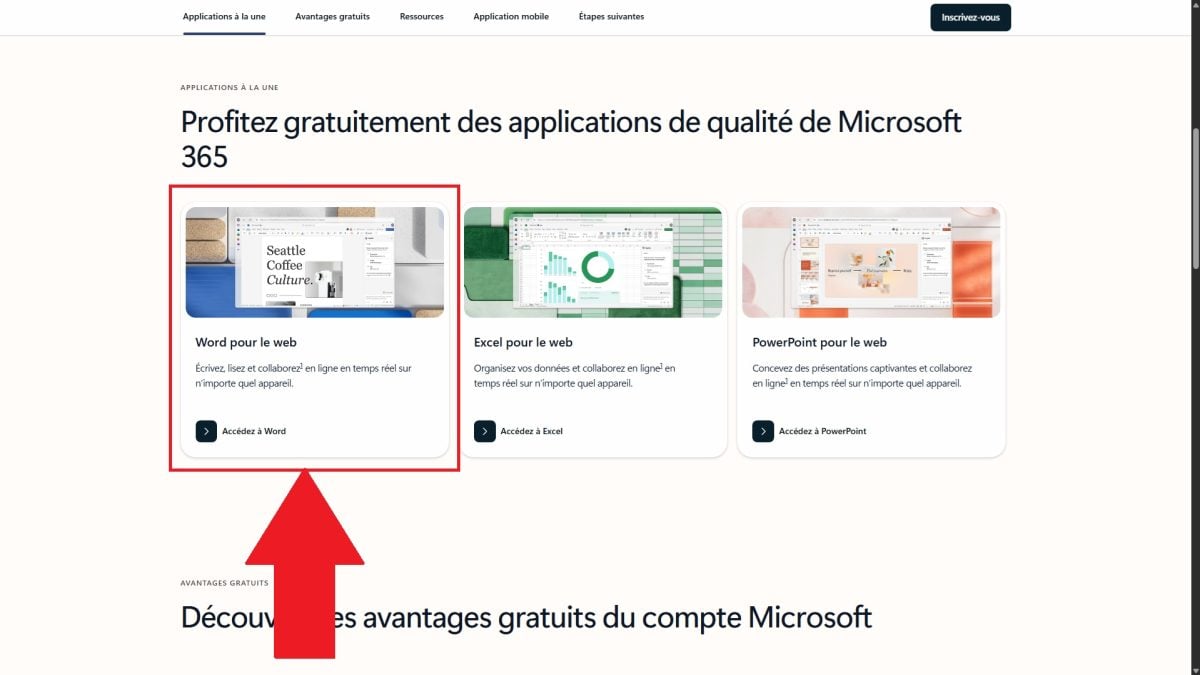
- Go to the website Microsoft 365 and create your account Microsoft.

- Click «Go to Word ".
- Create a new document.
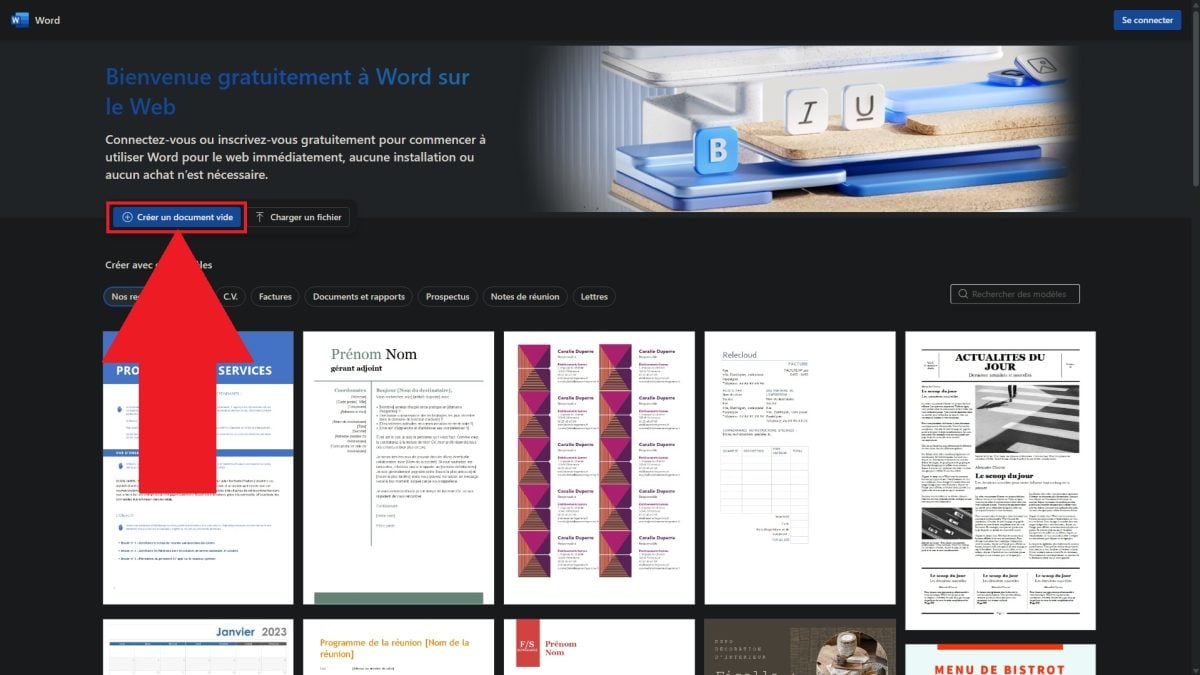
- Enjoy the online app for free.
This version remains limited in features Compared to the desktop application: no advanced macros or certain complex page layouts. For quick and easy writing for documents, it is more than enough.
Your files remain accessible from any device thanks to cloud storage OneDrive.
2. Buy an inexpensive Word activation key
Another option: buying a activation key. It is a unique code consisting of numbers and letters that activates Office 365 or an operating system such as Windows Where macOS.
This key serves as security measure to verify the authenticity of your license and avoid counterfeits.
Several platforms offer them at affordable prices. The two best-known ones are Amazon and Cdiscount, which are reliable marketplaces that offer delivery almost instantaneous.
Then all you have to do is activate, download, and install the apps Microsoft Office 365 on your device.
An important precaution: buy uniquely from reputable sellers on these platforms. Keys sold at bargain prices on questionable websites may turn out to be invalid.
3. Get Microsoft Office 365 with GamsGo
If the official prices make you cringe, platforms like subscription sharing as GamsGo help lower the bill. The idea is to connect users who share the cost of a subscription to an online service.
It should be noted that sharing outside the home remains a gray area in accordance with the terms of use of Microsoft.
Here are the steps to get Microsoft Office 365 via this website:
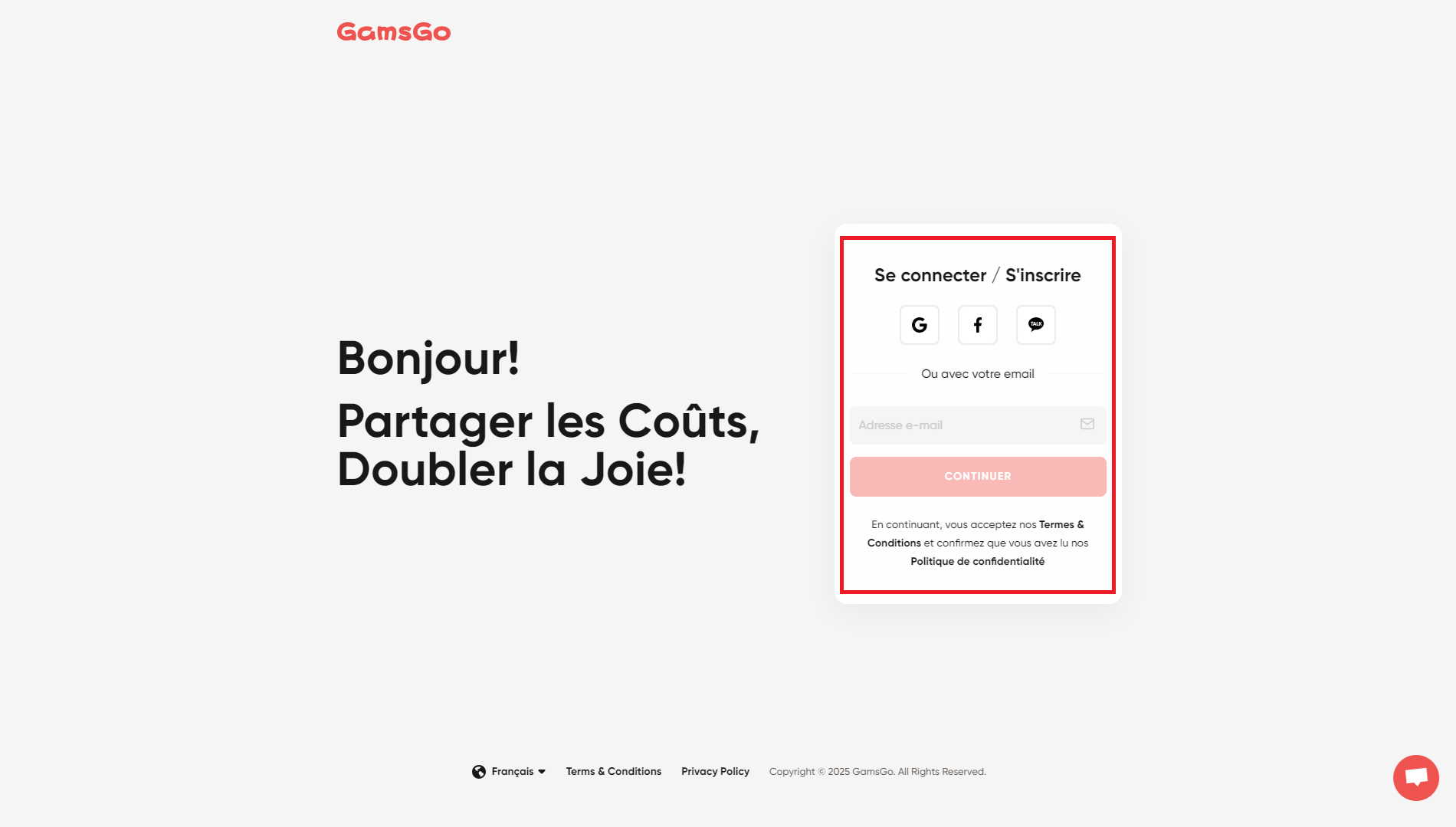
- Sign up on the website GamsGo with your account Microsoft or your email address.
- On the home page, select Office 365 then «Buy Now.».

- Choose your subscription plan (3 or 6 months).
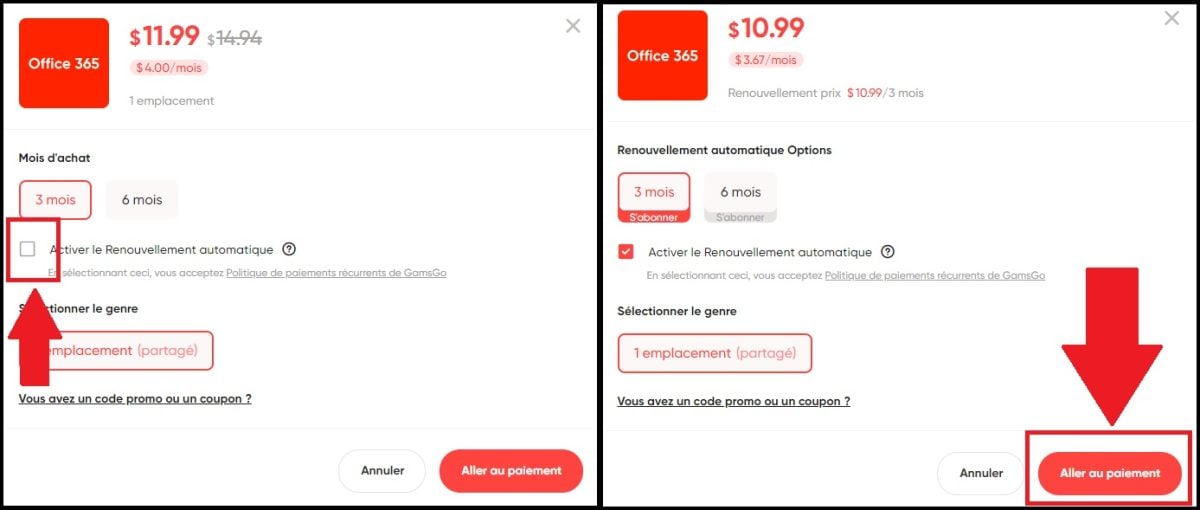
- Complete the transaction after selecting your payment method.
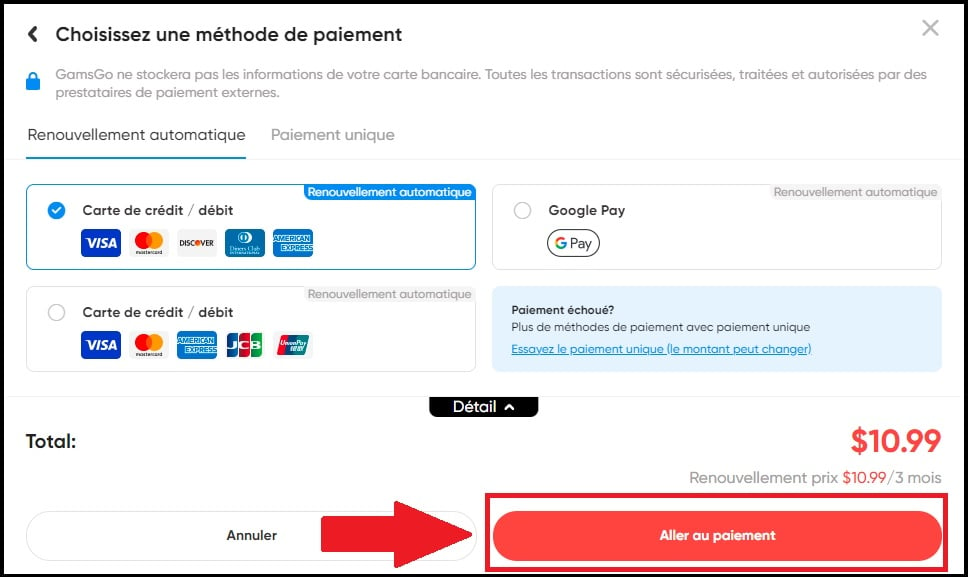
- Make the most of your subscription Microsoft Office 365 at a lower price !
And if you'd like to learn more about the platform, feel free to check out our reviews of GamsGo.









 FR
FR  RU
RU  EN
EN  ES
ES  IT
IT  DE
DE  ZH
ZH  PT
PT  ID
ID  JA
JA  DA
DA