Are you having trouble with your subscription? GamsGo ? The good news is that most of the problems on netflix , Spotify Where Youtube are settled in 2 to 3 minutes from your subscription page, without having to contact anyone. For more serious issues (service suspension, refunds), customer service will take over.
This guide lists all the solutions to common problems related to your shared subscriptions on GamsGo.

1. Solutions to Netflix-related problems on GamsGo
Some honest advice before you get started: on netflix , subscription sharing causes the most recurring issues, despite its lower price. If you're looking for a alternative If you're looking for a more stable option, there are some available.
Can't connect to Netflix with GamsGo: what can I do?
Method 1: Reset the password
- Log in to GamsGo.
- Go to your subscription page, then in the section Netflix.
- In the password section, locate the option REINITIALIZE and click on it to generate a new code.
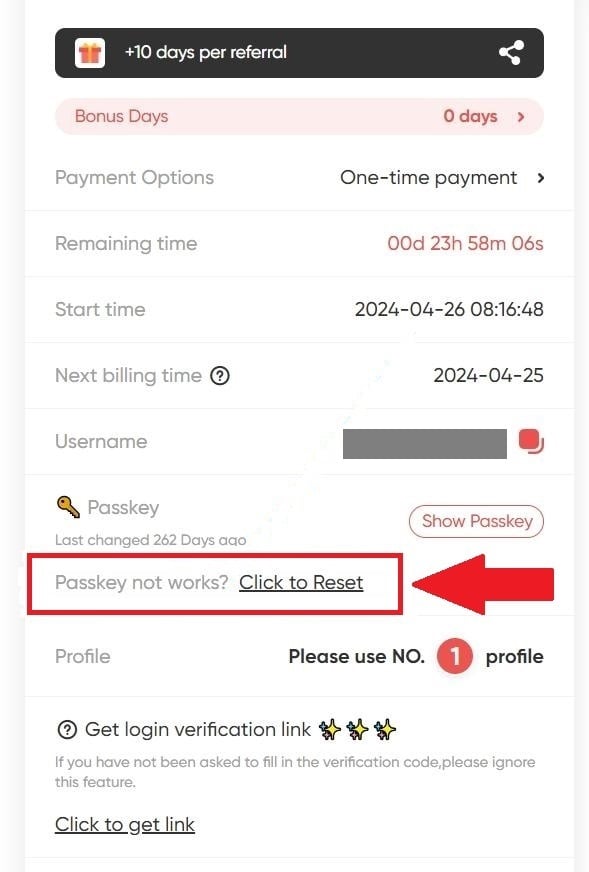
Patient 5 minutes, then refresh the page. A new password will appear, which you can use right away to access your account.
Method 2: Test from a computer
If you can't log in from your TV or the mobile app, here's what to do:
- Go to your computer and Test the password on the official Netflix website.
- If it works, the app on your TV or phone needs a update.
- If that doesn't work either, go back to GamsGo.com to request a new code.
How to resolve the "Not part of the Netflix household" error?
Method 1: Retrieve the verification code
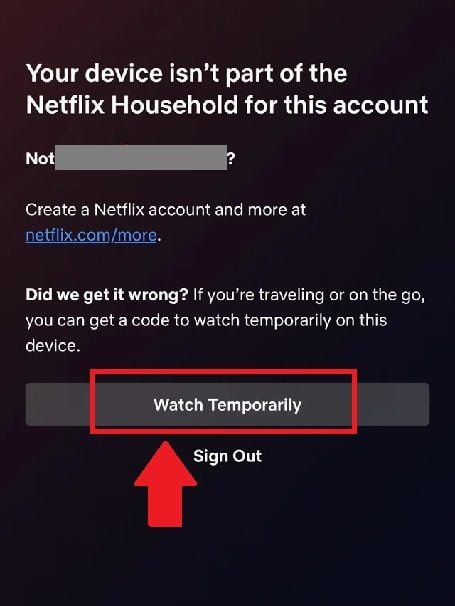
- Stay logged in to your Netflix account and select "I travel Where "Watching temporarily".
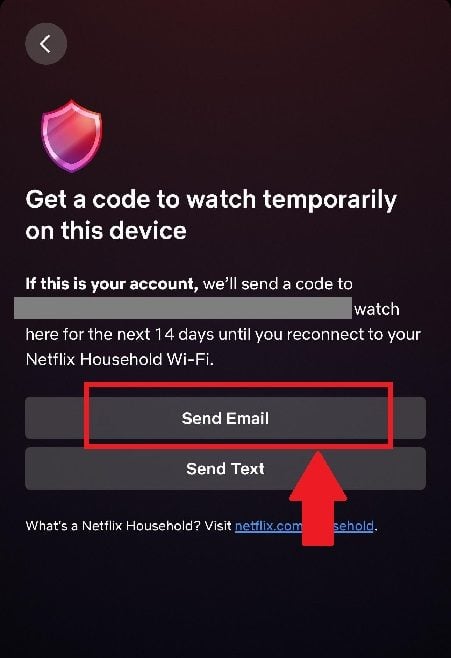
- Choose "Send an e-mail (not «Send a text message»).
- Go to GamsGo.com, then go to your subscription page.
- In the Netflix section, click on "Click for link, right at the bottom.
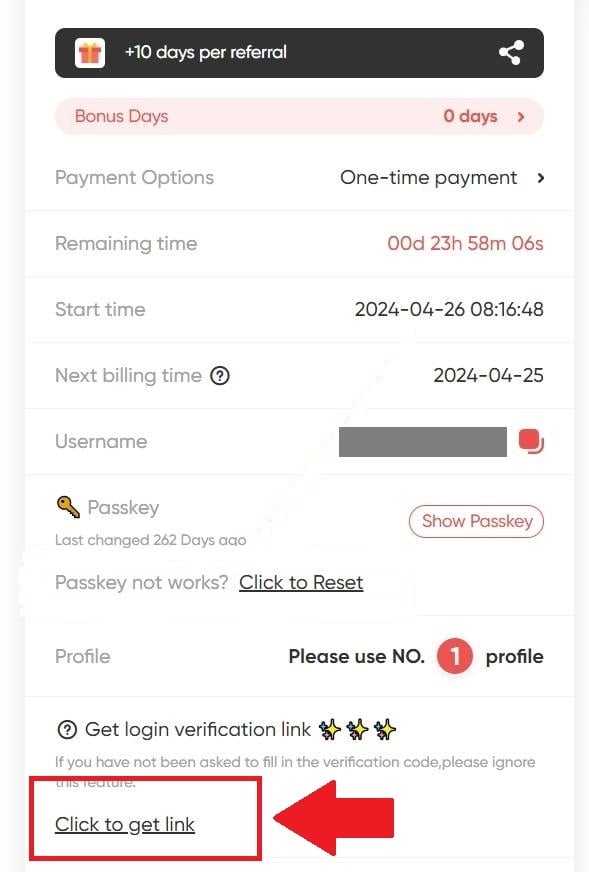
- Select "Open the link to see the verification code"..
- Use the username provided to log in to your account.
Important : if unsuccessful, wait 24 heures before requesting the verification link again.
Method 2: Restart the connection
- Log out.
- Restart the router or modem for your Smart TV.
- Reconnect.
I can't find the "I'm traveling" or "Watch temporarily" option on Netflix: what should I do?
- Click on "Updating the Netflix home.

- Select "Send an e-mail.
- Go to your Netflix subscription page at GamsGo.com.
- Click on "Click for linkthen on "Open the link to see the verification code"..
- You are being redirected to the streaming site. Enter the series of numbers to update your account.
Why is my profile blocked on Netflix?
On a subscription sharing via GamsGo, co-subscribers often change. When a user leaves, their account is reassigned to a newcomer. Sometimes, the profile remains locked by the the previous subscriber's PIN, and the new user finds themselves locked out.
The solution is simple: you have to change password.
- Click on your profile.
- Select «Forgot Password», at PIN's request.
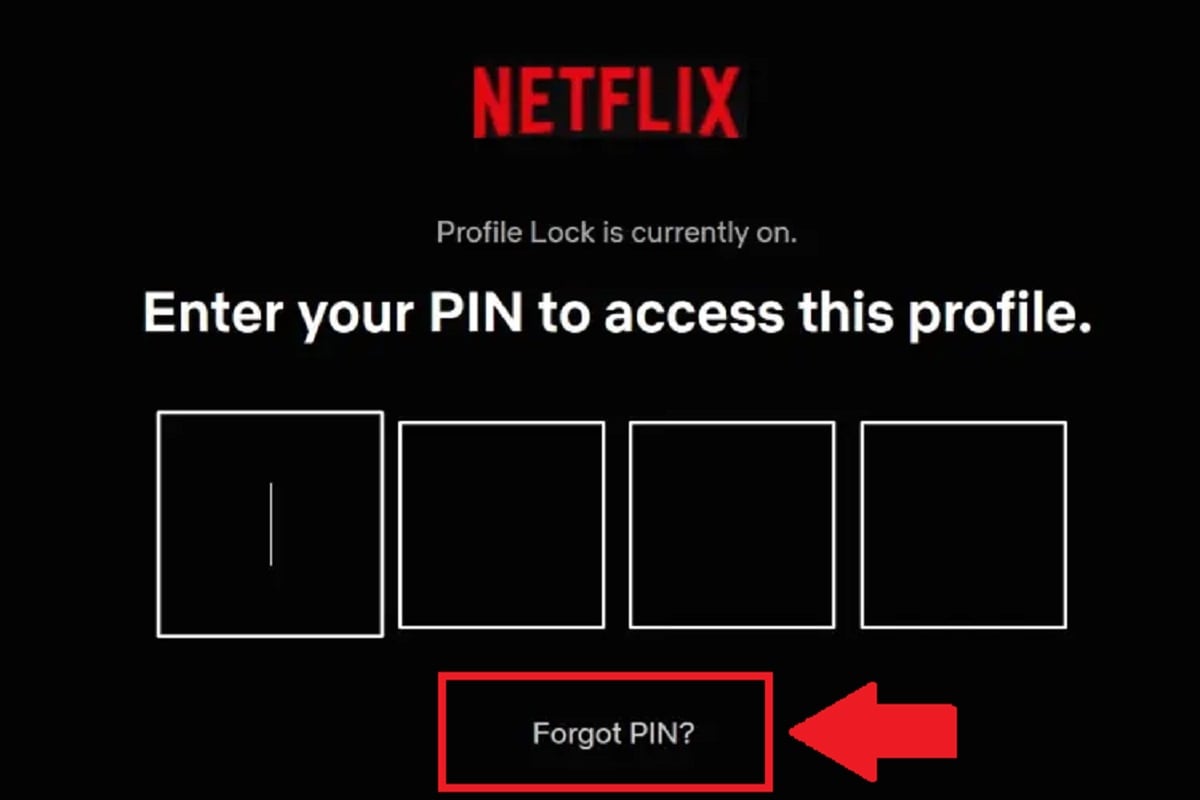
Your request has been received by GamsGo, which provides you with a new password in the Netflix section. Use this code to set up the profile and create your own PIN.
2. Solutions to problems with Spotify on GamsGo
How do I connect to Spotify with GamsGo?
Go to Spotify.com and connect with the credentials provided by GamsGo after your purchase. You can do this from a web browser, the desktop version, or the mobile app.
For a detailed step-by-step guide, check out our dedicated article that explains how to connect to Spotify with GamsGo.
What if my Spotify account is no longer Premium?
You received a notification stating that your account has reverted to free mode, or you've lost access to the features Premium Overnight? This issue should be resolved directly with the after-sales service.
- Go to Gamsgo.com and go to the page after-sales service.
- Contact a representative via the cat.
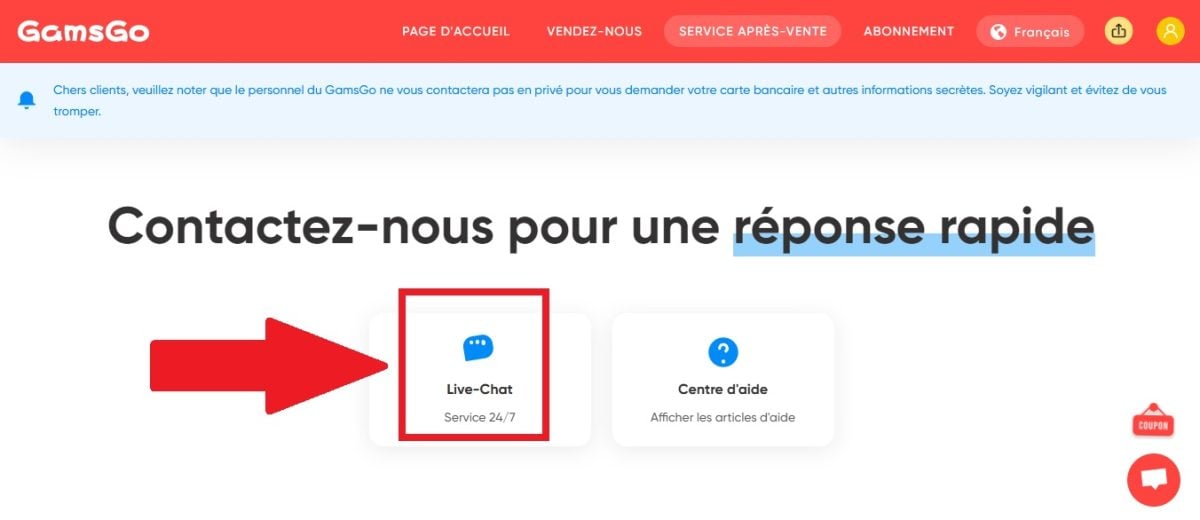
- Explain your problem clearly and provide your order number.
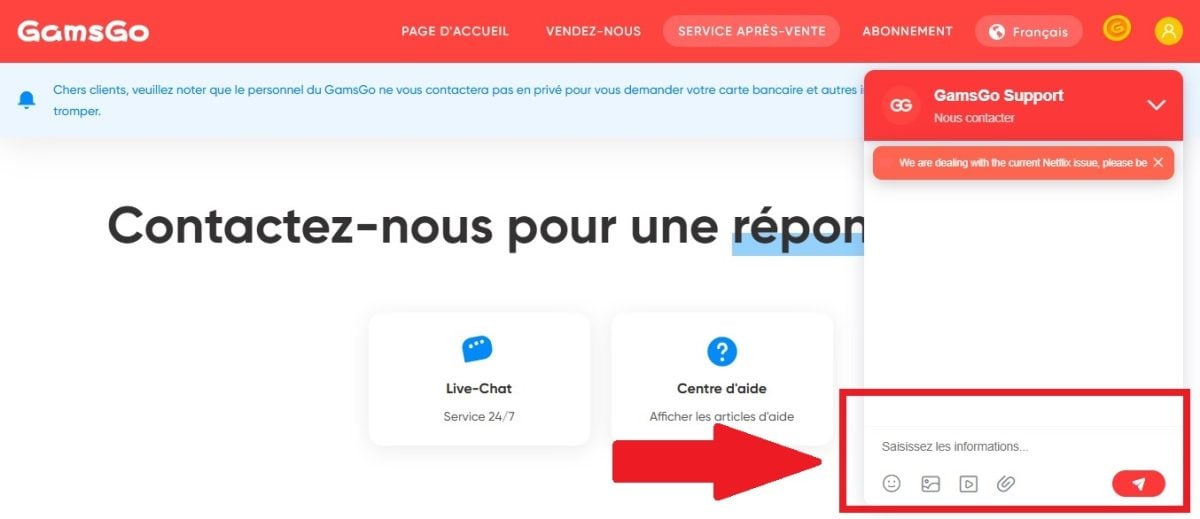
- Support will then process your request.
How do you transfer your Spotify playlist to the account provided by GamsGo?
Are you switching accounts but want to keep your securities? The transfer is completed in two quick steps.
Step 1: Copy the link to your playlist
- Log in to your old account.
- Select the playlist that you want to transfer, and then press " ... " (more options).

- Select SHARE, then "Copy link to playlist.
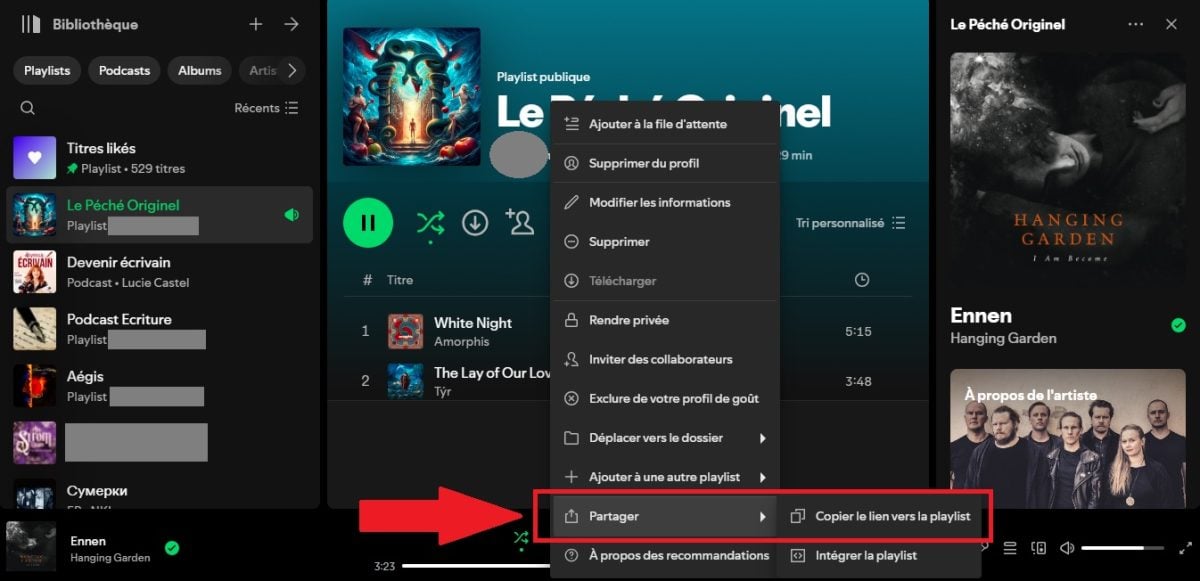
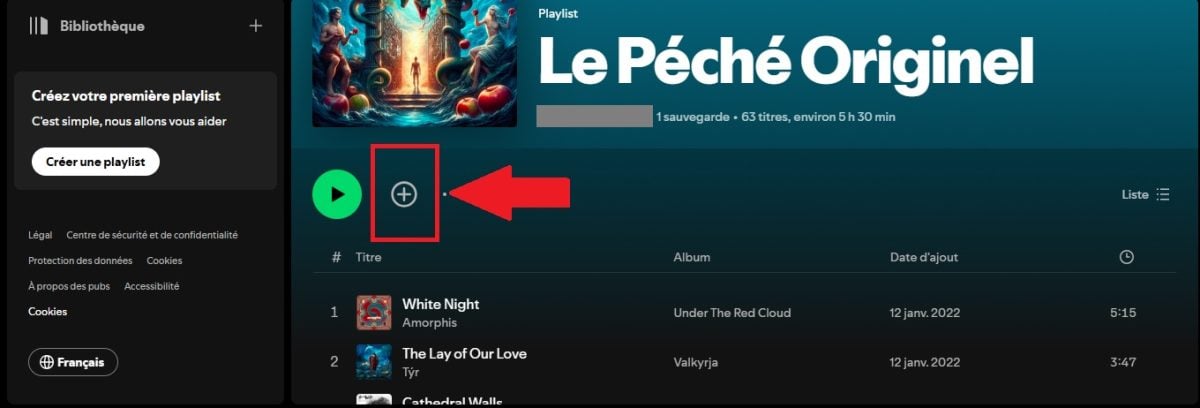
Step 2: Save to your new account
- Go to your new account and Paste the link to the playlist in the search bar.

- Tap the icon + Where heart to save the playlist to your new account.
3. Solutions to YouTube-related problems on GamsGo
How do I activate my YouTube subscription on GamsGo?
- Go to your subscription page, then in the section YouTube.
- Fill in the box "YouTube login email and press SUBMIT.

- You receive a invitation link by email. Open it in private browsing.

- Click on JOIN, then JOIN THE FAMILY. Your subscription has been activated.

I don't have a YouTube Premium account: what should I do?
You've joined the family group, but YouTube Will it remain a free version? All you have to do is activate it manually.
- Go to YouTube.com and tap your avatar to open the settings.
- Select "Manage your Google Account, then "Users and sharing.
- Go to Sharing at home and at the very bottom, tap "Show home sharing".
- the YouTube Premium Family Plan appears. Click on it to turn it on.
Important : If it's just your home page that isn't showing "Premium," please wait about 3 hours Then refresh the page. If it's just a temporary delay, everything should be back to normal. If none of these solutions work, contact the GamsGo customer service who will take care of everything.
What are the requirements for joining a YouTube family group?
- You must have a Google account.
- You must live in a country compatible with the conditions of GamsGo and YouTube.
- You must not already be a member of another Google family group, nor have I changed any of them in the Last 12 months.
How do I solve the "It seems you're not in the same country as the person who invited you" error?
The invitation link indicates that the person sending the invitation is not in the same country What about you? You have two options.
Method 1: Close the payment profile
- Go to the Google Pay page and open the Settings section.
- Go to Payment Profile Status, right at the bottom.
- Select "Close payment profile.

Then go back to the invitation link at GamsGo.com. The error should no longer occur.
Method 2: Contact support with a screenshot
- On the Google Pay page, go to the menu COUNTRY/REGION, in the upper-left corner.
- Make a screenshot on this page.
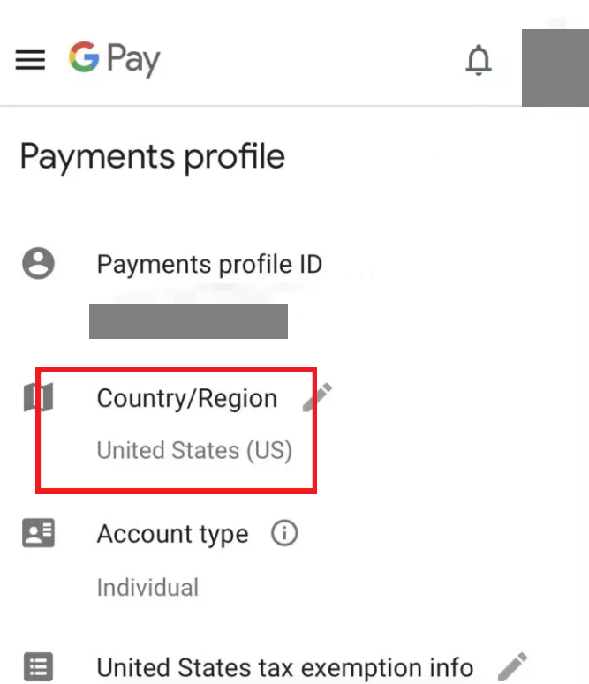
- Send the screenshot to customer service at GamsGo via the online chat. The teams will take care of the rest.
4. Solutions to GamsGo account problems
A problem with your subscriptions, a refund request or a connection that dropped? Most of these problems can be fixed from your subscription page or via the customer service. GamsGo allows you to enjoy netflix , Spotify Where YouTube Premium at discounted price thanks to sharing, but there are a few limitations you should be aware of.
To note : GamsGo now offers a marketplace with independent sellers, separate from its standard offerings. This section does not accept any promo codes, and netflix It is not recommended to stay there.
What should I do if my access expires after a few weeks?
It's the most commonly reported problem. Everything works fine, but after a few weeks, your access is cut off or reverts to the non-premium version. In most cases, it's not your fault: the The shared group has been dissolved, either because the’The primary subscriber canceled, or because the subscription has ended.
In practical terms, this means:
- a Netflix Blocked at Home ;
- a family outing YouTube, resulting in the loss of your listening history and playlists; ;
- a response from Spotify in the free version.
Here's how to respond:
- Contact support via the online chat, with your order number and a screenshot of the problem.
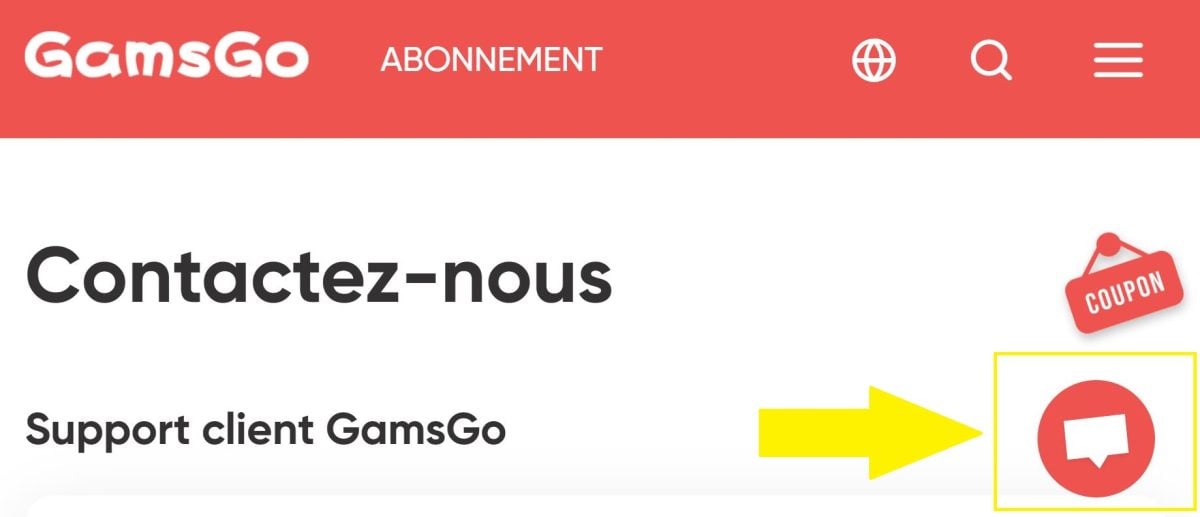
- The first response is often automated. If it doesn't resolve the issue, follow up by explicitly asking to speak to a human.
- Requires either a seat change, or a reimbursement.
- Set a deadline for yourself of 48 to 72 hours. If nothing has changed, proceed directly to the refund request.
If the blockages keep happening, there are other subscription-sharing sites sometimes more reliable.
How do I request a refund on GamsGo?
By default, GamsGo reimburses in internal credits. Be sure to explicitly mention if you want a wire transfer to your card Where PayPal.
- Log in to your GamsGo account, tap your avatar.
- Go to «Order History».

- You'll find all the details there. Contact support if anything is unclear.
To save time, here's a sample message you can copy and paste to customer support:
«Hello, my order # (XXXX) has not been working since (date). I am requesting (a replacement / a refund) via my payment »via the original payment method (credit card/PayPal), not credits. Please confirm the amount and the timeframe."
My payment was successful on GamsGo, but I did not receive a subscription. Why not?
There are several possible reasons for this delay:
- The subscription you purchased is out of stock.
- The package is still in presale.
In both cases, the delivery of the identifiers may take 1 to 2 days. If you paid via a local, offline payment method, the wait is even longer: GamsGo doesn't receive your money until 3 to 7 days, and the usernames come only after that.
Has the deadline passed and you still haven't received anything? The online customer service is available at any time to handle your complaint promptly.
How do I renew my GamsGo subscription?
- Go to your subscription page and select the plan you want to edit.
- Press "Renew now.
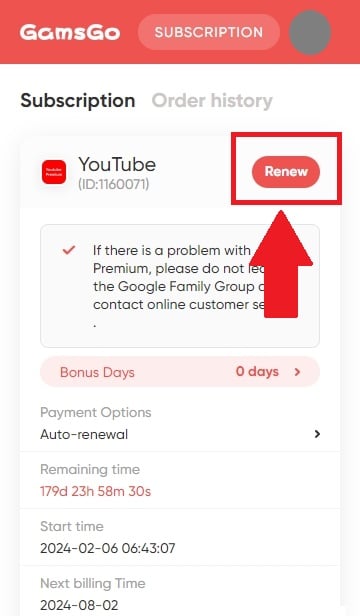
- Select the desired renewal period.
- Click on "Go to payment, choose your payment method, fill in your banking information, and valid.
If that doesn't work, contact customer service at any time via the online chat. See also the notice other users on our page dedicated to GamsGo To learn more about the available subscription plans. Have another question? Feel free to ask it in the comments.









 EN
EN
Zugang nach 2 monaten von Spotify einkassiert, keine Reparatur/Erstattung von Gamsgo
Qual è il problema
Achtung ‼️ Zugang nach einem Monat nur noch über gratis Abo mit Werbung möglich.
Noch keine Rückmeldung von Gamsgo erhalten. Werde berichten! Liebe Grüße