Check out all the active gift codes to Tower of Fantasy in October 2026.
Disclaimer: This article will be updated regularly to include any new codes that become available.
BONUS for Tower of Fantasy :
You can earn money by playing Tower of Fantasy :
PS : To get your bonus of 5€, install at least 1 game within 24 hours.
List of usable codes
Here is the list of valid codes:
- TOF2NDANNIV (New)
- TOFWITHMIA (New)
- LetsGoToF
- TOFHANABI
- TOFBNSP24
- TOFEOY23
- TOF2024VALENTINE
- TOFCNY24
- ToF0124thanks
- 0211gentou549
- tof1500spgift
- ToFAnnivLiveGift
- EP7000Plotti
- Kyuikifinale
- ToFNewYear
- TOFBN34
- TOFHALLOWEEN
- TOFBRVIP
- MYTOFYEAR
- TOFSEAnniversary
- zeke0808myoukei
- TOFHAPPYBDAY
- TOFHBD
- ToF1stSPGift
- ToF1stAnniv
- 0811gentou1st
- shirli0811nemesis
- SEIKANTSUUSHIN1st
- TOFDOMINOSEA
- TOFGALAXY
- LETSGODOMAIN9
- Link2Domain9
Feel free to copy and paste the code from our article to make sure you don't make a mistake when using it. These codes expire quickly: try them out starting today before they are removed.
Each exchange can yield nucleus SR or some parts special offers. Check back often on this page, and feel free to share any codes in the comments that we haven't added yet.
How do I use the Tower of Fantasy codes?
To redeem a gift code, go to the menu Exchange of the game. The method varies slightly depending on your platform, but the basic principle is the same across all platforms.
On PC and Mobile
- Progress Throughout History : Complete the tutorial and reach at least the level 6 to unlock access to the rewards menus.
- Open the Gifts menu : Click on the’icon shaped like a small gift package in the upper-right corner of your screen. On computer, hold down the key ALT to display the cursor and click the icon.
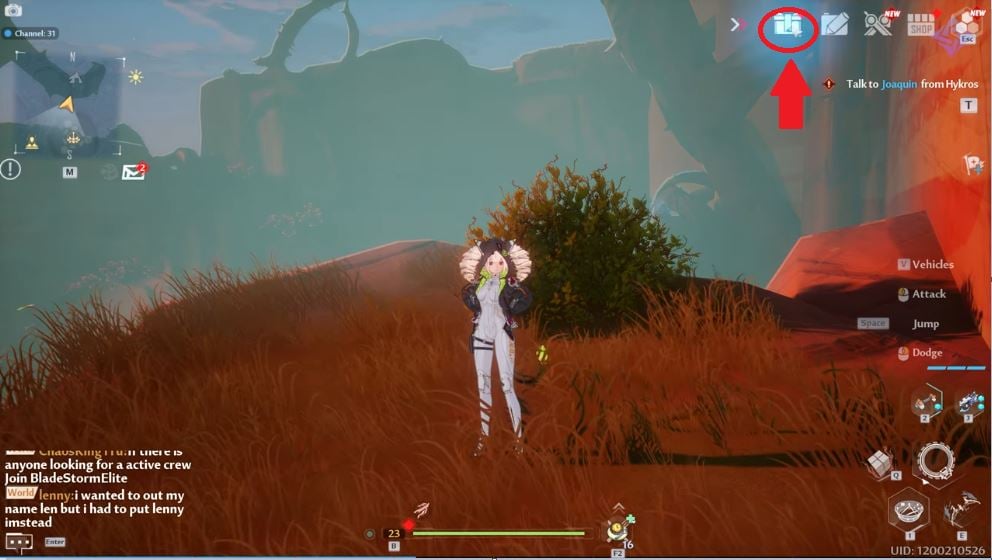
- Go to the «Rewards» tab» : Once the menu is open, look at the bottom of the screen and select the tab «Awards».
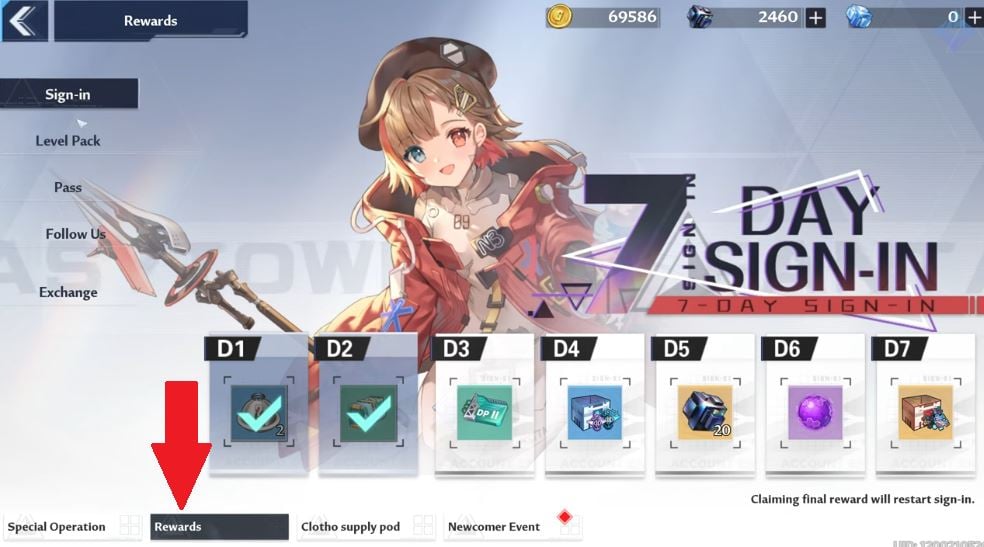
- Select «Exchange» in the vertical list on the left.
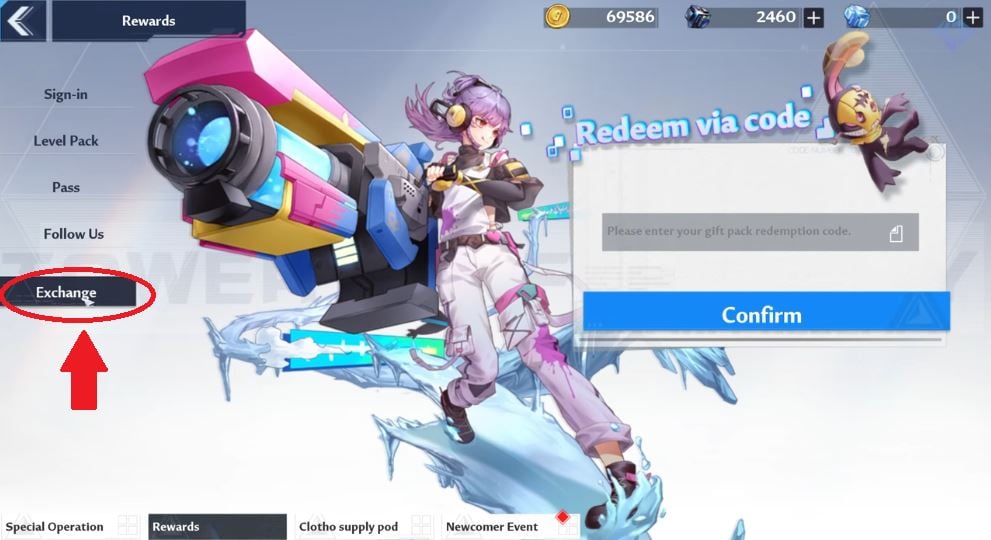
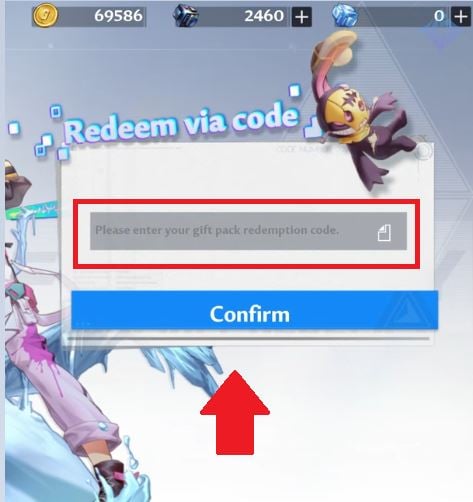
- Validate your code : Type or paste the code into the field provided, then click «Confirm». The rewards are added to your account.
On PlayStation (PS4 / PS5)
- Hold down the key R1 held down and use the right stick to select the’gift icon.
- Navigate to the submenu «Awards» using the key R1.
- Go to the tab «Exchange» using the left stick.
- Press the Enter key, then enter your coded.
Why isn't my code working?
If a code is rejected, first check the date : These codes are valid for a limited time and often expire a few days after they are posted.
Also, make sure you've entered it correctly and without a space, because the codes are fragile.
Another common scenario: code that already used on your account cannot be redeemed a second time, regardless of which server you're on.
For more codes for other games:
- Discover all the codes for Space Shooter
- Don't miss the Saint Seiya Legend of Justice codes








 FR
FR  RU
RU  EN
EN  ES
ES  IT
IT  DE
DE  ZH
ZH  PT
PT  ID
ID  JA
JA  DA
DA