To add a friend on Pokémon GO, The quickest way: open your profile (bottom left) → «Friends» tab → «Add friends», then exchange your trainer code (12 digits) or scan the other player's QR code.
No minimum level is required. There are 4 methods in all, and if you don't know anyone to add, we also tell you where to find active friend codes.
We'll also look at the reasons why some people can't add friends on Pokemon GO !
Method 1: Add friends by friend code on Pokémon GO
The friends feature arrives on your profile Pokémon GO from the start. Here's how to get there:
- Click on your profileat the bottom left of your screen,

- Select the tab: FRIENDS up,
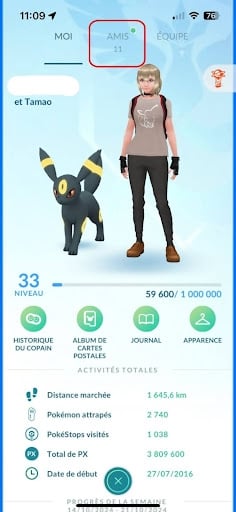
- Next, go to: Add friends,
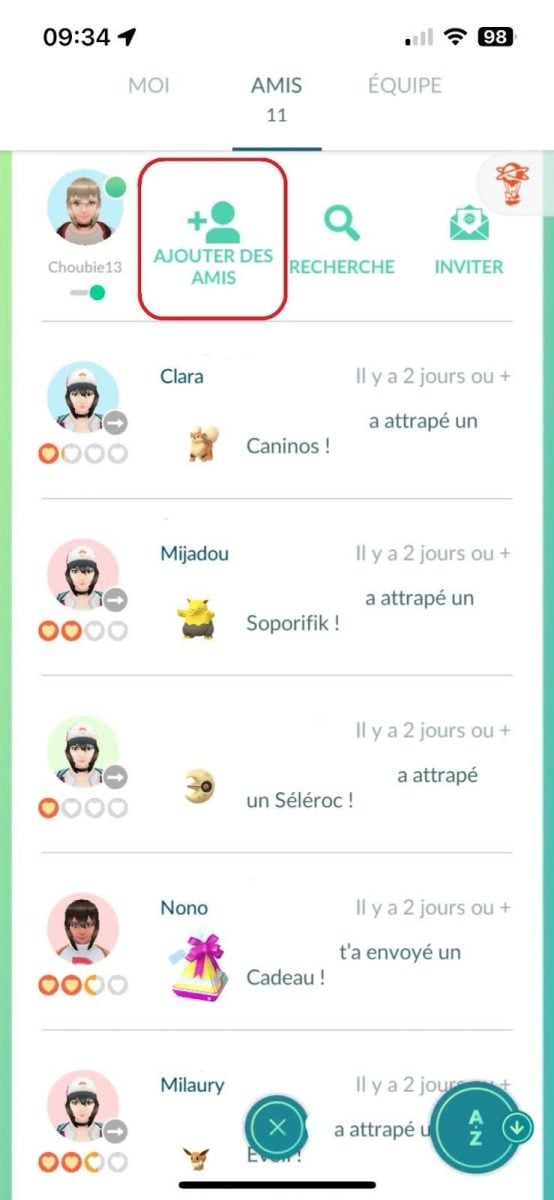
Click on Add friends on Pokémon GO. ©️Karen for Alucare.fr - You can now share your friends code to whoever you like, either by code or QR code. And your friends can enter your friend code just below.

Now you know the easiest way to be able to add your friends on Pokémon GO.
Method 2: Scan your friends' QR codes
Your friend has sent you his QR code But you're not sure how to use it? Don't worry—we'll walk you through it! Follow the same steps as before until you reach the "Add Friends" screen.
All you have to do is select the tab: QR code in the upper right corner and scan your Pokémon GO friend's QR code.
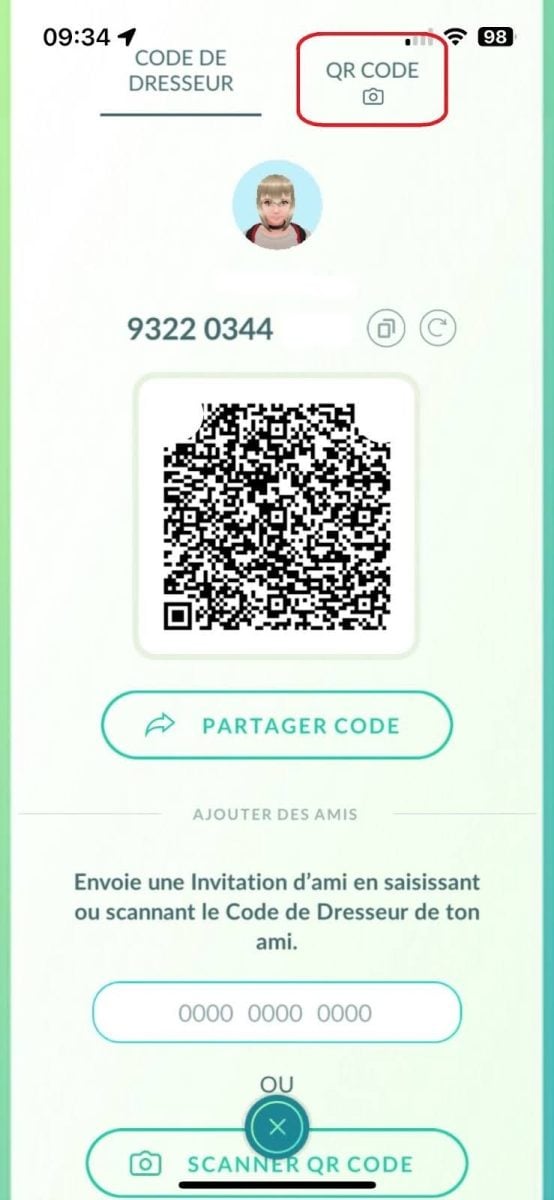
You can now add whoever you like thanks to QR codes.
Method 3: Add friends by synchronizing contacts
Pokémon GO also has a feature for add contacts directly in the game. The basic process is the same as for the first method.
All you have to do is scroll to the bottom of the page to find the tabs: Add friends on Facebook and Add friends from contacts.
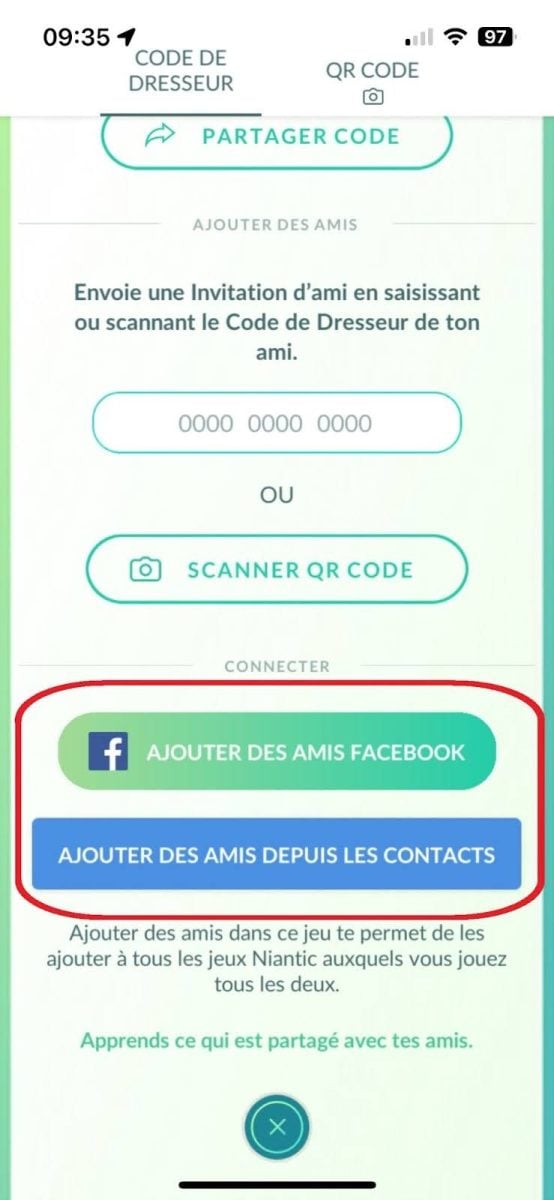
You can now add all your friends who have connected their Facebook account or contact to the game.
Method 4: Add friends by invitation on Pokémon GO
Your friends don't yet play Pokémon GO and you'd like to help them on their new adventure? You can send an invitation via a sponsorship which will let both of you earn rewards! Follow the same steps as in the first method until you reach the friends screen, then go to: Invite.
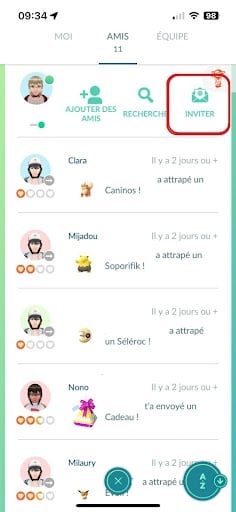
You will then have a sponsorship code with a link so you can send it to him and unlock rewards as his new Pokémon GO adventure unfolds!
Where can I find friends on Pokémon GO?
To make new friends on Pokémon GO, here are the most active locations.
- Reddit, in r/PokemonGoFriends A quasi-continuous flow of codes. Add several at once.
- The websites sharing sites such as Pokemongofriendcodes.com: you post your code, and collect those of others.
- the account X @PokeGoFriends and Facebook groups dedicated to Pokémon GO.
- Regarding the apps dedicated which group together active friend codes.
On most of these platforms, the codes are classified as follows by country, For example, if you want to play raids in the same time zone, stick with codes from France; if you want to collect Pokémon and postcards linked to regions, add players from other countries.
Advice If you want to add a Pokémon GO friend, choose active players (those who send a gift every day).
Furthermore, open your gifts daily, that's what makes your links grow and rewards accumulate.
How can you strengthen your friendships in Pokémon GO?
Having friends isn't just about filling out a list:
- You earn from XP ;
- Your exchanges cost a lot cheaper ;
- You get Pokemon Lucky; ;
- You receive more objects (and exclusive 7 km eggs via gifts); ;
- You fight raid more easily.
Once you have add your friends on Pokémon GO, The friendship link can climb 5 levels: Good Friend → Great Friend → Ultra Friend → Best Friend → Forever Friends (new since December 2025). Reaching Forever Friends unlocks Remote Trading with this trainer.
The link goes up a notch in interacting once a day (open a gift, exchange, or go on a raid together) :
- A good friend 1 day
- Great friend : 7 days
- Ultra friend 30 days
- Best friend 90 days (cumulative, not necessarily in a row)
- Forever Friends 90 more interactions after Best Friend
Two major interests These include a huge XP bonus for Ultra Friend (50,000 XP) and Best Friend (100,000 XP), and a big reduction in the cost of stardust for special exchanges (chromatic, legendary, or Pokémon absent from your Pokédex).
The higher the link, the cheaper the exchange, hence the interest in climbing the friendship ladder before exchanging a rare Pokémon.
💡 From Best Friend, Every day, you have a small chance of becoming Lucky Friends: your next exchange transforms both Pokémon into Lucky Pokémon (better IVs, cheaper upgrades).
👌 Our advice : When the game displays «1 day left to become Best Friends,» coordinate with your friend to activate a Lucky Egg right before opening the day’s gift—this will double your XP reward.
Add friends from all over the world for postcards and Vivillon?
An excellent reason to add friends abroad, is postcards. Each gift received contains a postcard indicating the region of the world from which it was sent.
Pinning cards from regions various, As you progress through the 18 patterns of Vivillon, this Pokémon whose wings change according to the map's geographic zone of origin.
To get them all, you need friends distributed all over the world. In practical terms, it's best to complete your list with players from all over the world:
- In Europe (France, Luxembourg) ;
- In Asia (Hong Kong, Taiwan, Israel); ;
- In Africa (Madagascar, Ghana, Senegal, Seychelles); ;
- In the Americas (Canada, Costa Rica, Guyana) ;
- In Oceania (Vanuatu).
The more countries you cover in your friends list, the more likely you are to complete this collection, and that's why the friend codes often classify players by region.
1. Send and open gifts
As you go around the PokéStops, you will sometimes find a gift. These gifts are for friends only (you can't open your own).
We'll show you how:
- Click on your profileat the bottom left of your screen
- Select the tab: FRIENDS at the top, then click on one of your friends,
- Next, click on: Present then give her the gift of your choice
Now all your friend has to do is open it and enjoy the rewards. Wondering what the rewards are?
Above all, a gift contains Poké Balls and berries, In some cases, the prizes are potions, stardust or an evolutionary object, and more rarely a 7 km egg. Niantic does not publish official probabilities: beware of overly precise tables.
Please note You store 20 gifts by default, rising to 40 as you progress.
Attention : As long as your friend hasn't opened the gift you've sent, you won't be able to send any more. If getting Poké Balls in Pokémon GO our article!
2. Trading Pokémon
Trading Pokémon with friends can be very useful if you have missions with specific Pokémon that you can't manage to capture.
- To access this feature, you need to be a level 10 trainer and a friend in the game.
- The exchange function is essential if you wish to complete your Pokédex. Indeed, certain Pokémon evolutions can only be obtained by trading.
Once you've reached level 10 and are friends, you can trade normally. Special trades (legendary, chromatic or Pokémon not in your Pokédex) require at least level A good friend.
Attention When trading, you'll need more or less stardust, depending on the Pokémon's rarity and/or power.
3. Fighting as a team
Join your friends on a raid hunt!
You'll have a better chance of winning the battle against powerful Pokémon. All you and your friends have to do is go to a raid in progress and to launch the confrontation !
And for choosing the right team in Pokémon Goclick on this article!
FAQs
Why don't I have the Friends option on Pokémon GO?
The Friends tab is available right from the start, at the top of your profile (bottom left). If you don't see it, two reasons possible :
- Your application is out of date.
- Your account is a account child.
Niantic restricted social features (friends, gifts, exchanges) to players who have reached the age of digital consent in their country (13 in most regions, up to 16 in some EU countries).
For a child's account created via Niantic Kids or Pokémon Trainer Club, a parent can activate these functions via the parents' portal, otherwise they remain disabled regardless of the player's level.
If you want a tutorial, let us know in the comments!
When can you make friends in Pokémon GO?
Right from the start Pokémon: adding friends does not require any particular level. You need to be at least level 10 to exchange Pokémon.
Why can't I have friends on Pokémon GO?
You can no longer add friends once the limit of 650 friends reached. To add new friends, you must first delete some.
How long does it take to become Best Friends?
90 days, by interacting at least once a day. Days need not be consecutive.
Do friend requests expire?
Yes An unsuccessful application expires after 7 days.
You can now add all your friends on Pokemon GO, in the way you want and that's easiest for you. The choice is yours!
And for even more tips and tricks related to codes pokemon GO, we invite you to read our article on active promo codes of the game. Useful missions and rewards await you!









 English
9597 9457 6416