In Roblox Public Bathroom Simulator, commands are typed directly into the cat, with a / or one : in front. They allow you to Customize your avatar, add visual effects, and, if you unlock the administrator mode, to completely transform your gaming experience.
This game offers access free featuring visual effects that are usually paid for on Roblox, which makes it a game enjoyed by many players.
Controls for customizing your avatar in the Roblox game Public Bathroom Simulator
These commands all begin with the prefix / and are confirmed by pressing Enter. They give you access to free to looks that usually cost money on Roblox, such as the pack Korblox or the effect headless.
- /korblox : Assemble the pack Korblox.
- /unkorblox : removes the theme Korblox and restore your avatar to its normal state.
- /headless : removes your character's head for a certain look headless.
- /unheadless : Undoes the previous effect and restores your avatar's head.
- /yum : apply to the face Yum.
- /sshf : apply to the face Super Happy Face.
These effects are purely cosmetic: they change your appearance during the current game, without giving you any particular advantage. The players appreciate these kinds of options for standing out on the server.
Administrator commands in Roblox Public Bathroom Simulator
The admin commands are based on the script Kohl’s Admin, which is very common in Roblox. Type them into the chat with the prefix : (colon). This prefix can be configured by the game creator, so some servers use ! instead.
Here are the main commands available once admin access has been enabled:
- :god : you become invincible and immune to all damage.
- :noclip : You pass through walls and obstacles in the game.
- :spawnitem [item code] : displays a specific object (replaces [item code] (by the code of the desired item).
- :setmoney [amount] : Sets your in-game currency (replaces [amount] (by the desired amount).
- :bighead [player] : Enlarges the targeted player's head.
- :blackify [player] : Sets the targeted player's color to black.
- :cape [player] [color] : Adds a cape to the player in the selected color.
- :cmds : Lists all the orders available for your account.
- :credit : displays the script's credits (its authors).
- :crm [player] [color] : Changes a player's color or other attributes.
- :crowncolor [player] [color] changes the color of a player's crown.
- :crownrainbow [player] : applies an effect rainbow to the crown.
- :face [player] [number] : Changes the player's facial expression using a number.
- :fire [player] [color] : Adds a fire effect to the player in the desired color.
This list is not exhaustive: Kohl’s Admin handles dozens of other commands. It is one of the most popular scripts on the kind on Roblox.
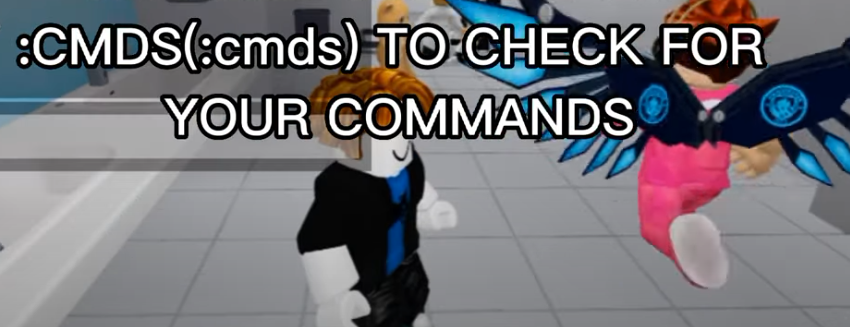
Tape :cmds in the game to see all the ones you have access to.
What are the steps to switch to administrator mode?
Step 1: Check the admin system in the chat
Open the chat and type :credit. A window displays the script credits and confirms that the game does indeed use Kohl’s Admin.

Click on OK to close the window.

Step 2: Purchase the «Kohl’s Admin VIP Donation» admin pass»
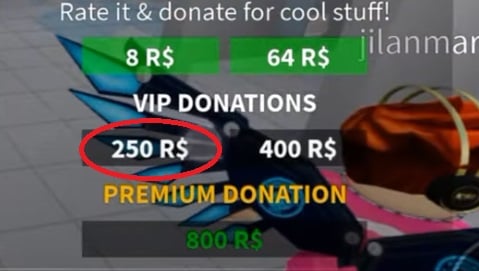
To unlock the controls, purchase the pass at 250 R$ in the game's VIP donation category. This donation is what grants you administrator status.
Step 3: Test the controls
Get back in the game and type :cmds in the chat. You'll see a complete list of the commands that are now active on your account. Now's the time to explore everything the game has to offer.
Use admin commands responsibly
These commands give you real control over the server: you can expel, to silence or ban A player who doesn't follow the rules. This helps maintain a positive atmosphere when multiple players are playing together.
This power also involves your responsibility. Banning others without cause, spamming effects, or disrupting others constitutes abuse. This type of behavior may result in a report or even the loss of your access, depending on the creator's policy.
The idea is still for you to have fun the whole time while respecting the community. Join the game's community server to share your experiences and discover more tips from players around the world.








 FR
FR  RU
RU  EN
EN  ES
ES  IT
IT  DE
DE  ZH
ZH  PT
PT  ID
ID  JA
JA  DA
DA