Are you tired of looking for the heart symbol ♥ (heart symbol) on your Windows, Mac and Linux computers, but also on your phone?
We show you which buttons on the keyboard use to display it through the following sections:
- Make heart symbol ♥ with keyboard on PC (Windows)
- Make the heart symbol ♥ on Mac
- Making the heart symbol on Linux
- How to type the heart symbol ♥ on a phone keyboard
1. Make the heart symbol ♥ with the keyboard on PC (Windows)
It's relatively easy to make a heart symbol with a Windows PC keyboard. ISimply press the following key combination: Alt + 3.
For more details, here are the steps to follow with illustrative images for to display the symbol ♥ (heart symbol) on your keyboard:
- First, it is necessary to maintain the Alt key (it is located to the left of the space bar).

Image of the Alt key on the keyboard. Mia for Alucare.fr - Next, type the figure 3.
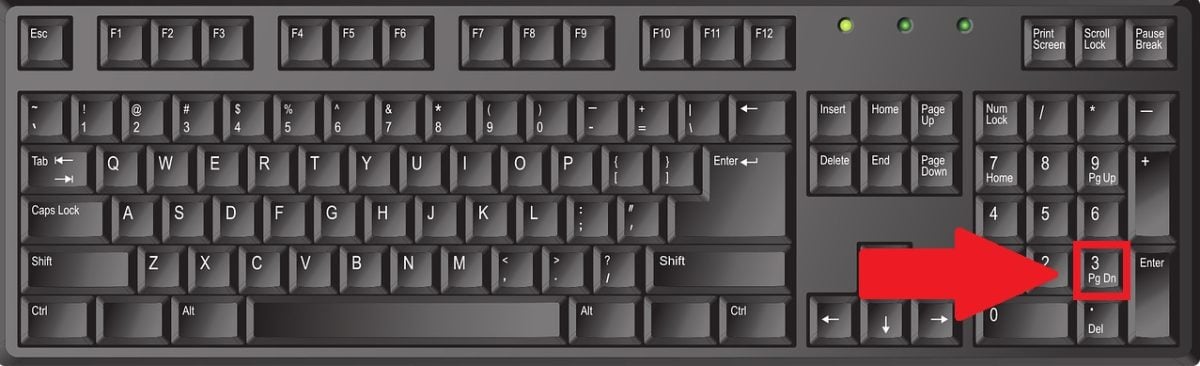
Image showing button 3 on the keyboard. Mia for Alucare.fr - Then, release the Alt key and the symbol ♥ (heart symbol) will appear.
Note however :
- The method is the same, whether you have a keyboard QWERTY, QWERTY Where QWERTZ.
- You can't use the number row above your keyboard. Only the key 3 on numeric keypad on the right side allows you to obtain this symbol using this technique.
- To get started, activate the NumLock (or Num Lock), or hold down the fn.
You can use this method in Word and most Windows word processors. Still in the digital realm, the technique is also used to insert hearts into HTML interfaces and e-mails.
Discover also how to make a thumbs up 👍 with the keyboard and insert this emoji into your text using our article on the subject. Other similar articles are available on our website, so feel free to take a look!
2. Make the heart symbol ♥ on Mac
On a Mac keyboard, the technique for typing the "heart symbol" does not involve the Alt key, but rather the key fn. This key, combined with another key or on its own, can display the character viewer to write a ♥ (heart symbol) on the Mac. Here are some more details.
Get the symbol ♥ with a keyboard shortcut
This method is the easiest to use on the Mac. To obtain the ♥ (heart symbol), you can press the keys
- “fn” + “E »
This keyboard shortcut allows you to display the keyboard viewer and insert characters into the content more easily. So, if you frequently use the heart symbol (heart symbol) in your text, this shortcut is very useful.
Have the symbol ♥ using the Fn key
Please note that you can only press the Fn key to access the character viewer and emojis on Mac to get the ♥ (heart symbol).
However, you do need to a few adjustments before you can access this feature. Follow the steps illustrated in the following images:
- Go to “System preferences " on your Mac, then click "Keyboard ".

Keyboard section in the System Preferences menu on Mac. Mia for Alucare.fr - Click on the button "Show emoji and symbols ".
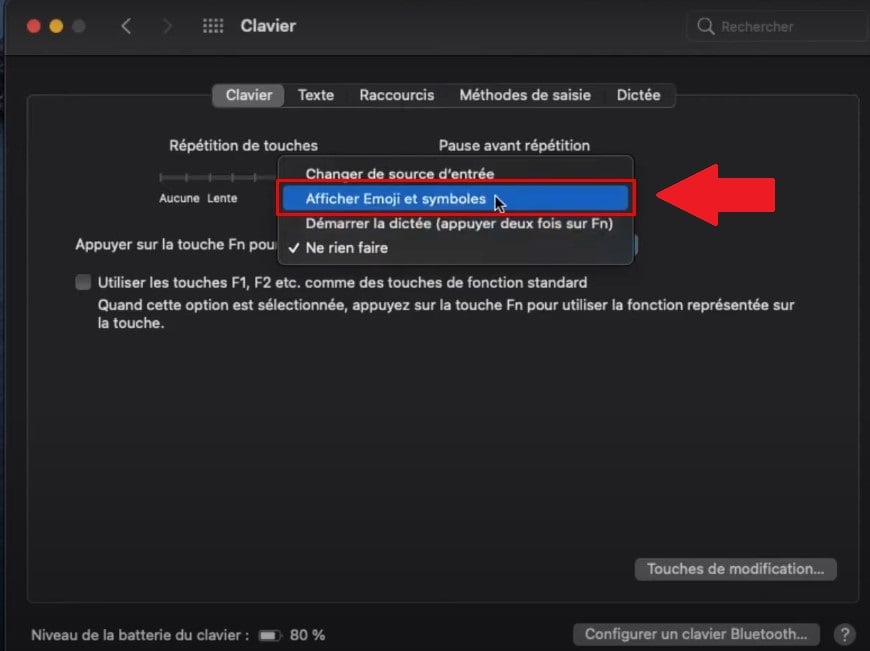
Select the Show emoji and symbols option on Mac. ©Mia for Alucare.fr - In the window that opens, type "heart" Where "heart ", then click on the ♥ symbol to insert it into your text.

Field to fill in to search for the "heart" in emojis and symbols. ©Mia for Alucare.fr
Remarks :
- It is also possible to scroll the list of symbols and search for the "heart" symbol without having to type it on the character display.
- You can also use the Character Viewer on Mac to find other symbols and special characters.
3. Make the heart symbol ♥ on Linux
You can do a “heart symbol” on Linux using a few buttons on your keyboard. Here, in pictures, is how to proceed if you want to get the classic ♥ symbol:
- Press the Ctrl + Shift + U.

Ctrl, Shift and U keys on a QWERTY keyboard. Mia for Alucare.fr - Then type 2665.

Numbers 2, 6, and 5 on the numeric keypad of a keyboard. ©Mia for Alucare.fr - Press the "Entrance” to confirm.

Enter key on keyboard. Mia for Alucare.fr
4. Make the heart symbol ♥ using a phone keyboard
In most cases, it is not possible to access the ♥ (heart symbol) on a phone. However, you can use the emojis to replace it. Here's how.
How do I type ♥ on an Android phone?
The first method consists of successively type “<” and “3” without using spaces (<3) to make a "heart" on your phone. This technique is simple and accessible to everyone.
However, to make a heart on a keyboard using an Android phone, you can also:
- Launch the app you want to write the heart on, then tap the field to be completed to bring up the keyboard.
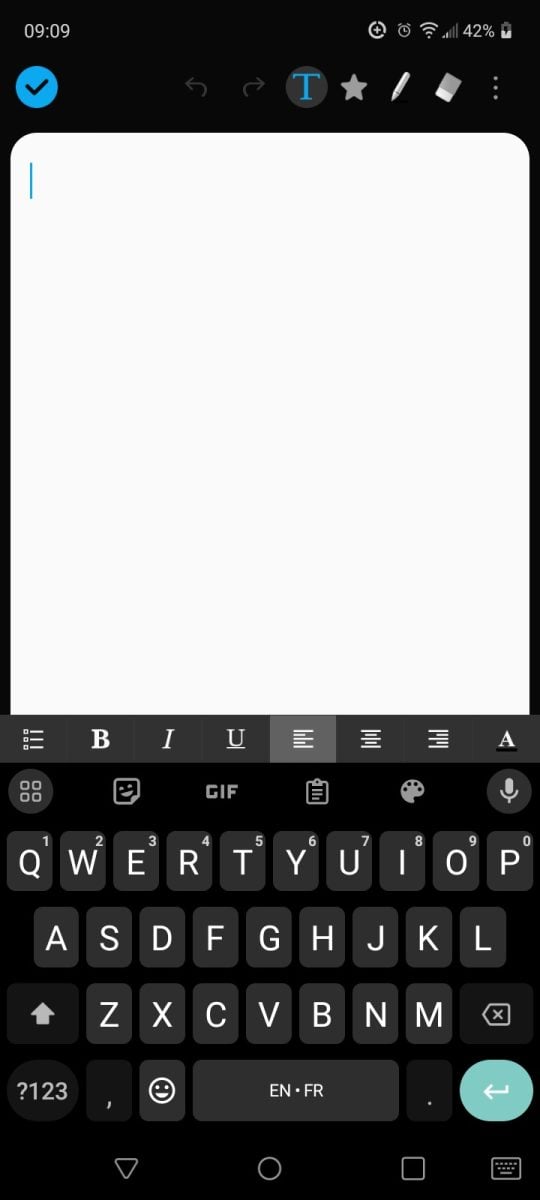
Display the keyboard on Android. Mia for Alucare.fr - Go to the section containing emojis on the keyboard, represented by a smiling face.
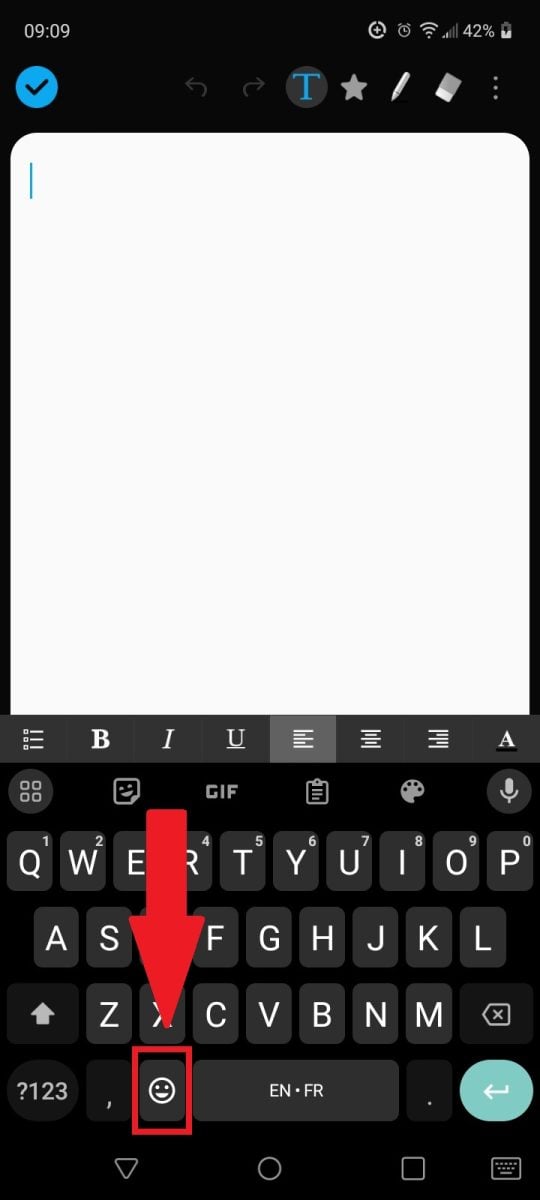
Go to the emoji section on Android. Mia for Alucare.fr - Among the characters displayed, select emoji to meet your requirements.

Heart emoji on an Android phone. Mia for Alucare.fr
Note that Android keyboards organize their emojis by theme. You'll need to access the section containing hearts to write a heart in the field in question.
How to type ♥ on an iPhone?
The method for typing a heart on an iPhone is the same as that used on AndroidHowever, if you have an iPhone with iOS 10 or higher, you can access the feature on the keyboard that allows you to type the word "heart" to display the corresponding emoji.
FAQs
How to make an empty heart ♡?
The empty heart (♡) is also a symbol widely used in online communication. The code to obtain this version of the "heart symbol" is: U + 2661 on Windows and Mac. On Linux, you need to copy the symbol (♡).
Can I type a heart on a laptop keyboard?
Your laptop must have a numeric keypad to be able to make a heart with the keyboard. This is because the keys corresponding to the numbers at the top of the alphabet cannot be used to make a heart.write a heart on a laptopWhether it's a PC, a Mac or any other device.
However, there is an alternative if your Mac, Linux, or Windows laptop keyboard is not not equipped with a numeric keypad.
You can use the Fn key to turn the right-hand side of your keyboard into a numeric keypad. You can then make combinations with the Alt key and the Option button as mentioned earlier in the article.
What are the alternatives for making a "heart symbol"?
You can to copy the "heart symbol," then paste it onto the platform where you need it. Remember to use reliable sources such as our website to copy the symbol. Here is the heart in case you didn't have a chance to copy it: ♥.
What are the uses of the heart symbol ♥?
The form of this symbol, as we use it today, originated in the Middle Agesfirst depicted around 1340 in the French manuscript "Le Roman d'Alexandre". Here are a few details on its current use.
On social networks
After centuries and centuries, the little ♥ symbol is still relevant today, and its popularity continues to grow. In particular, it is used in postson the social networks and on the Web in general to translate :
- The feeling of love ;
- Family love;
- Friendship;
- Life and health.
You can combine the heart symbol with other emojis such as the laughing face in a text. Others emojis symbolizing joy can also be used with this symbol.
In company logos
This symbol is also frequently used in certain categories of company logos, as it conveys the idea of positiveversatility, benevolence and conviviality.
It has an attractive shape and has always been associated with life and to love. So, which business sector opts most for the cordiform logo? These include :
- Companies offering services and/or products related to romance and love;
- The health and well-being ;
- Professional photographers, especially those who photograph happy events such as weddingscommunions, baptisms, etc.
- Charitable associations and institutions;
- The nurseries and crèches ;
- Luxury resorts.
It's important to know that the heart ♥ offers a certain versatility in terms of graphic design. In a logo, it can replace the letters a - b - c - m - o - u - v - y. It can also be associated with handshakes or paw prints.
On posters and in some advertisements
It is also possible to use this symbol in posters, especially if they relate to love, couples, family, friendship, etc. Advertisements related to these topics on the web also often contain the "heart symbol ".
Can I use heart emojis instead of the classic symbol?
It is entirely possible to use emojis (❤️, 💖, 💘, …) instead of the classic symbol (♥). If you are on a phone, this approach is highly recommended.
Make sure, however, that you use emojis that relate to the context of the message you're writing. For example, in a professional context, make sure your audience is used to to use emojis when communicating before using them.
Which emojis are associated with the heart, and how do I use them?
Here is the meaning of each version of the "heart" emoji according to its color and shape:
| 👉 Emoji categories | ✨ Meaning |
|---|---|
| Heart emoji red❤️ | This is the classic version of the heart. It represents love and passionYou can send this type of "heart symbol" to the person you love. |
| Heart emoji orange 🧡 | This emoticon is used to send positive energy to someone. This emoji also symbolizes friendship. |
| Heart emoji yellow 💛 | Yellow is a sign of of happiness and friendship. We use this symbol to send love to a family member or friend. |
| Heart emoji green 💚 | Green is a sign of jealousy. Nevertheless, this emoji can be used to try to reconcile with someone. The green heart can also symbolize nature. |
| Heart emoji blue 💙 | This emoji indicates loyalty, respect trust and friendship. |
| Heart emoji mauve 💜 | This emoji indicates desire and sexual attraction, so it is important toto be used in specific cases ! On the other hand, mauve can also represent honor or wealth. |
| Heart emoji white 🤍 | White is a sign ofpure lovebut platonic. |
| Heart emoji brown 🤎 | This emoji can be interpreted as a heart covered in chocolate! You can send it to someone you want to give a sweet dose of love. |
| Black heart emoji 🖤 | This emoji indicates dark humor. It is often used to express irony or make a joke. In some cases, it also symbolizes grief or sorrow. |
| Heart emoji broken 💔 | A broken heart indicates heartbreak or sadness. |
| Heart emoji with a point ❣️ | This type of "heart" can be interpreted as a exclamation markYou can use it when something makes you happy. |
| Heart emoji growing 💗 | This emoticon indicatesevolving love, nervousness, or butterflies in your stomach. |
| Heart emoji that beats 💓 | This emoji indicates love strong and passionate. It also symbolizes life. |
| Emoji two hearts 💕 | The two hearts symbolize a mutual love. You can send them to your partner or best friend. |
| Two hearts emoji that turn 💞 | This emoji is a sign of understandingIt is used to apologize after a conflict or as a sign of support for someone who needs love. |
| Heart emoji that shines 💖 | This shiny emoji indicates the happinessYou can send it to someone you are proud of or who has just shared good news with us. |
| Heart emoji packaged 💝 | This emoji is reserved for someone to whom you are dedicatedIt can also be a sign of a kind gesture, such as a favor or a gift. |
| Heart emoji with an arrow💘 | The arrow represents Cupidus. This emoji represents someone who is falling in love. |
If you would like to find out more about keyboards and their usesOther articles on this topic are available on our page. Guides & How-To's.
In conclusion, in the digital world and especially on the web, the use of symbols is frequent and essential to communication. Please note that:
- It's very easy to make the heart symbol on a computer keyboard.
- However, the method is different on PCs (Windows), Macs, Linux and phones. On Windows, the Alt key is essential. The Option button and keyboard viewer are required on the Mac. With Linux, the Ctrl and Shift keys are required.
- Hearts are not always used in the context of love. They can be used in the professional environment, provided you choose the right categories of people to send it to.
- It is possible to replace the heart with emojis or accompany it with other symbols.
A computer with a keypad is almost always necessary to type a ♥ on a PC, Mac, or Linux computer. However, if you can't type the "heart symbol" with your keyboard, you can always copy the heart from this article and paste it where you need it.
Don't hesitate to put in comment the techniques you used to make a "heart" with a keyboard in your text! Browse our site to explore other guides and articles on the subject of digital technology.








 English
how to make this heart ♡?
We modified the tutorial to add to also make the heart you put 🙂