To make the heart symbol ♥ On your keyboard, the shortcut varies depending on your operating system.
- On Windows, it is Alt + 3 (number pad).
- On Mac, you access the emoji menu by Fn + E (Where Globe + E).
- On linux, you use Ctrl + Shift + U then the code 2665.
- On a phone, the emoji keyboard gets the job done in just a few seconds.
1. Make the heart symbol ♥ with the keyboard on PC (Windows)
On Windows, the quickest shortcut is Alt + 3. You keep the Alt key while holding it down, type 3 on the keypad, then let go.
The ♥ symbol will appear immediately in your text field.
Here are the steps in detail, with images to help you identify each key:
- Keep the Alt key pressed (to the left of the space bar).

Image showing the Alt key on the keyboard. ©Antonin for Alucare.fr - Type number 3 on the keypad (to the right of the keyboard, not the top row).
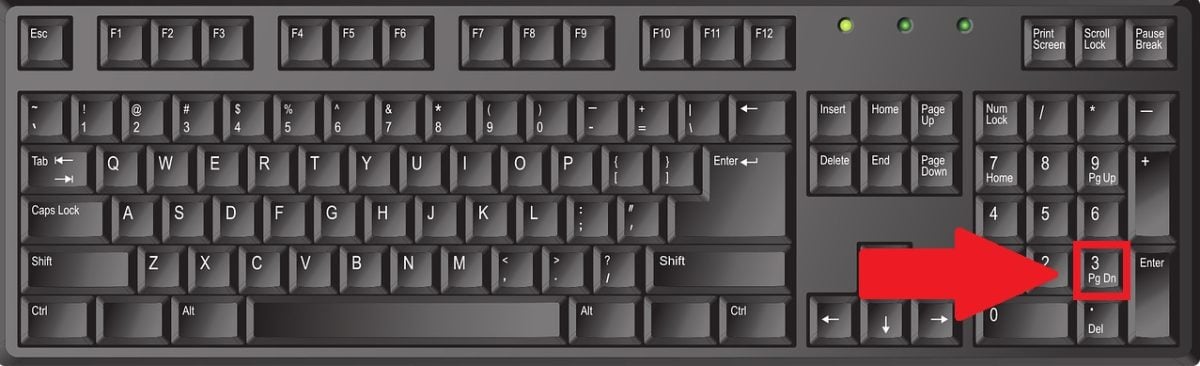
Image showing button 3 on the keyboard. ©Antonin for Alucare.fr - Release the Alt key : THE heart symbol ♥ is displayed.
A few important points to keep in mind:
- The shortcut works whether your keyboard is AZERTY, QWERTY Where QWERTZ.
- Only the 3 on the numeric keypad works, not the one in the top row.
- Enables the feature VerrNum (Where Num Lock) before you begin, otherwise the keyboard won't respond.
Why Alt+3 Doesn't Work for You
If nothing happens, it's almost always a matter of keypad. The shortcut reads the number only from this pad, not from the standard row.
On a Laptop without a dedicated numeric keypad, keep the Fn key to activate the hidden numeric keypad. It is usually located on the keys U I O J K L. Also make sure that VerrNum is very active.
The method without a numeric keypad: the character table
No numeric keypad at all? Type “character table” into the menu’s search bar Welcome, open the tool, then search for the heart ♥ in the list. Select it, click “Copy,” and then paste it wherever you want.
This solution works in any software, including Word, and also to insert the symbol into pages HTML or emails.
Looking for more shortcuts? Check out how to make a thumbs up 👍 with the keyboard.
2. Make the heart symbol ♥ on Mac
On Mac, you don't use the Alt key, but rather the Emoji and Symbols Menu of macOS. There are two quick ways to insert a ♥ into your text.
Get the ♥ symbol with a keyboard shortcut
Place your cursor in the field where you want to type, then press Fn + E (Where Globe + E on recent Macs). The character viewer opens. Press heart Where heart in the search bar, then click ♥ to insert it.
Get the ♥ symbol with the Fn key
You can also configure the key fn to open the character viewer. Here's how:
- Go to System settings (Where System Preferences), then click on Keyboard.

"Keyboard" section in the "System Preferences" menu on a Mac. ©Antonin for Alucare.fr - Click on Show emoji and symbols.
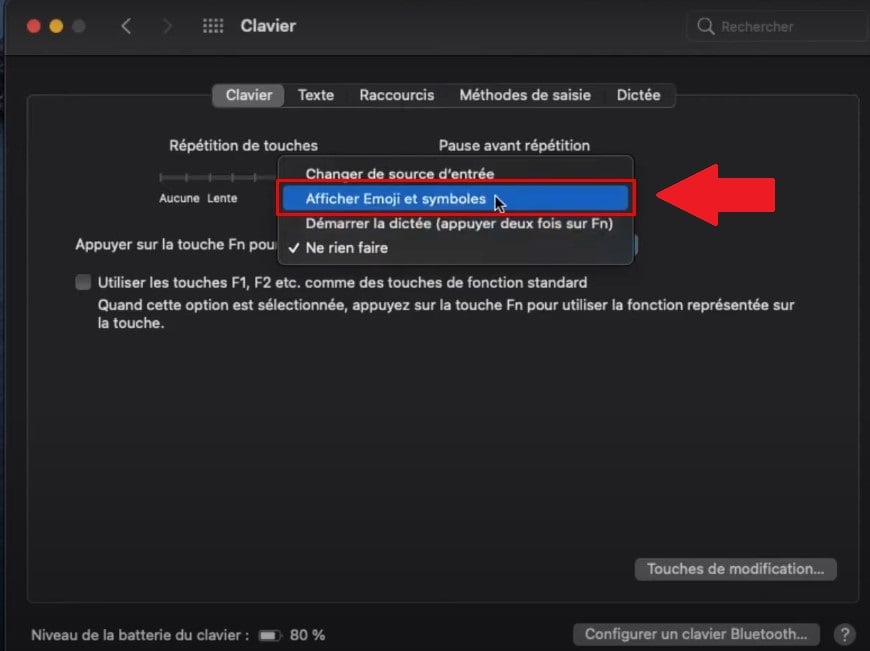
Select the "Show Emoji and Symbols" option on a Mac. ©Antonin for Alucare.fr - In the window that opens, type heart Where heart in the search field, then click ♥ to insert it.

Field to fill in to search for the heart among the emojis and symbols. ©Antonin for Alucare.fr
Here are two more tips:
- You can also scroll Look at the list of symbols and find the heart with an eye in it, without typing anything.
- You can use the same viewer to find others special characters useful for everyday life.
3. How to type the heart symbol ♥ on Linux
On linux, you can get the ♥ symbol by using the Unicode code character, without needing a numeric keypad.
- Hold down the keys Ctrl + Shift + U, then let go.

The Ctrl, Shift, and U keys on a QWERTY keyboard. ©Antonin for Alucare.fr - Type hexadecimal code 2665 (Unicode value U+2665 (from the heart).

Enter the code 2665 on the keyboard. ©Antonin for Alucare.fr - Valid with the Enter key (or the spacebar): the symbol ♥ appears in your text field.

The Enter key on the keyboard. ©Antonin for Alucare.fr
This method works for other symbols, too: give it a try 266A for ♪, for example. However, it may fail in certain applications or in a terminal emulator.
In this case, copying the symbol from a character table is still the most reliable solution.
4. Make the heart symbol ♥ using a phone keyboard
On a phone, the emojis work very well on Android just like on an iPhone.
How do I type ♥ on an Android phone?
The fastest method: type <3 (the “less than” symbol followed by the number 3, with no space). This code creates a recognizable heart in a message or email.
To insert a real heart emoji, here's what to do:
- Open the app you want to write in, then tap the text field to bring up the keyboard.
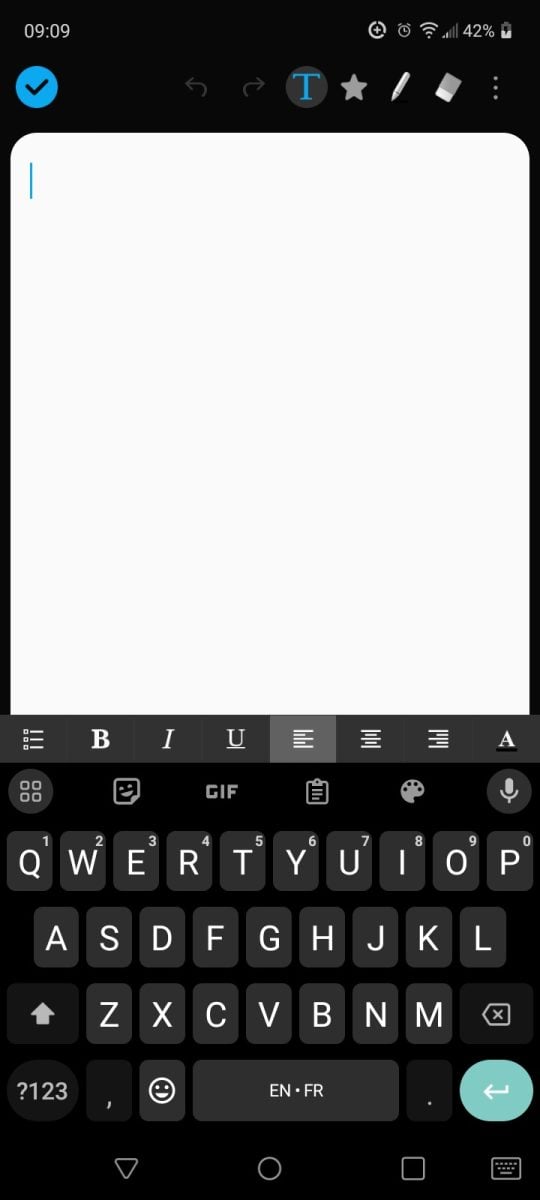
Display the keyboard on Android. ©Antonin for Alucare.fr - Go to the Emoji section, represented by a small smiling face.
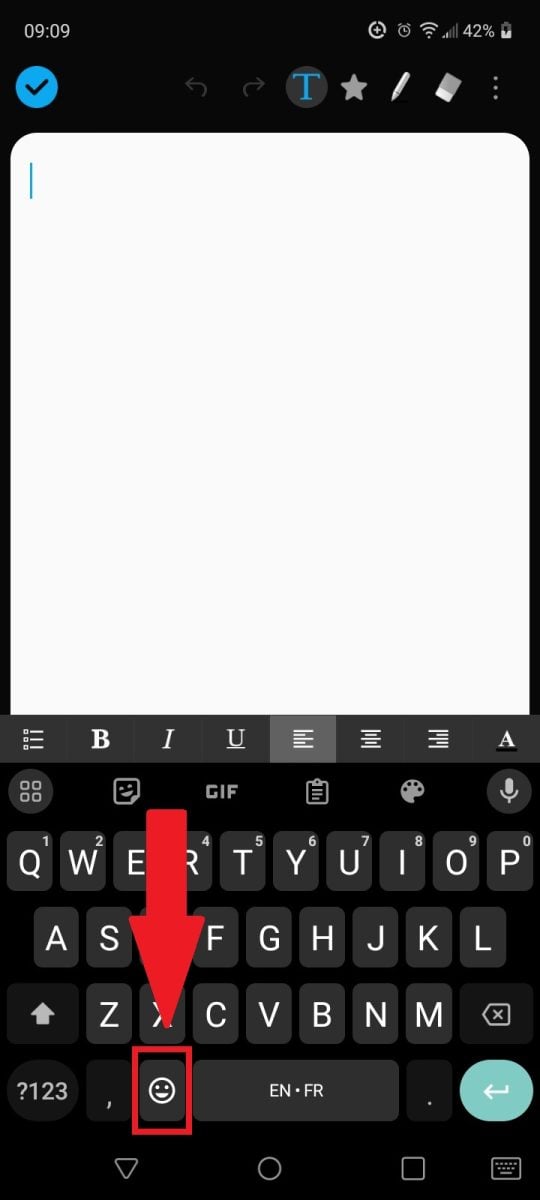
Access the emoji section on Android. ©Antonin for Alucare.fr - Browse the hearts section and select the emoji that suits you best.

Heart emoji on an Android phone. ©Antonin for Alucare.fr
How to type ♥ on an iPhone?
The method is the just like on Android : Use the emoji keyboard. With iOS 10 or later, you can even type the word heart directly into your text field. Your keyboard will then suggest the corresponding heart emoji, which you can select with a single click.
FAQs
How to make an empty heart ♡?
the empty heart (♡) has the Unicode code point U+2661. On Windows, the easiest way is to go through the character table or copy this symbol directly: ♡.
On Mac, search for “white heart” in the character viewer. On linux, use Ctrl + Shift + U then type 2661. In any case, the copy and paste remains the most reliable method regardless of the system.
Can I type a heart on a laptop keyboard?
The shortcut Alt + 3 requires a dedicated numeric keypad. The numbers aligned above the letters do not work for this shortcut.
On a Windows Laptop without a paving stone, keep the Fn key and use the keys marked with small numbers on the right side of the keyboard (often U, I, O, J, K, L). Then you keep Hold down Alt and you type 3 on this hidden numeric keypad.
On a Mac laptop, use Fn + E (Where Globe + E), then search for “heart” in the viewer. This is the fastest way.
What's the difference between ♥ and ❤️?
the ♥ (U+2665) is a typographic symbol : It takes on the color of the text (often black) and appears the same everywhere, just like a traditional letter. It is simple and universal, perfect for a document Word or a PDF.
the ❤️ is a colorful emoji whose appearance varies depending on the device: the image isn't exactly the same on iOS, Android or Windows. The ❤️ is more expressive—perfect for social media.
What do heart emojis mean based on their color?
Each version of the heart emoji has a different meaning depending on its color and shape. Here are the main ones:
| Emoji | Meaning |
|---|---|
| Heart red ❤️ | Love and passion. The classic version, to send to the person you love. |
| Heart orange 🧡 | Positive Energy and friendship. |
| Heart yellow 💛 | Happiness and friendship. Perfect for a friend or a family member. |
| Heart green 💚 | In conjunction with the jealousy, but also to reconciliation. |
| Heart blue 💙 | Loyalty and trust. |
| Heart mauve 💜 | Desire and attraction. |
| Heart white 🤍 | Pure Love and platonic. |
| Heart black 🖤 | Black humor, irony, or mourning. |
| Heart broken 💔 | The Pain of Love or sadness. |
| Heart with an arrow 💘 | The arrow from Cupidus : someone who falls in love. |
What is the heart symbol ♥ used for?
On the social networks and in messages, the ♥ symbol expresses’love, friendship, or support. You can combine it with other emojis to add emphasis to a message.
What are some alternatives for making a heart?
The simplest method is still the copy and paste : Copy the symbol below and paste it into your message, email, or document.
♥
Another option: the online symbol generators, which are free and bring together all the different variations of heart symbols in one place.
Can I use heart emojis instead of the classic symbol?
Yes, you can definitely use emojis (❤️, 💖, 💘…) instead of the classic ♥ symbol. On a phone, it’s actually the most convenient option using the emoji keyboard.
Just be sure to choose the emoji that fits the context. In a professional setting, make sure your audience is comfortable with emojis before including them in an email.
Check out our other guides on the page Guides & How-To's.








 English
how to make this heart ♡?
We modified the tutorial to add to also make the heart you put 🙂