You want to make a live TikTok but your account doesn't meet all the requirements? Don't worry, there is a way to activate the LIVE TikTok functionality without too much delay.
👉 To make a live sound without have 1,000 subscribers on TikTok, the only method that still works in 2026 is to :
- Contact TikTok support via the form “Report a problem” then manually request the unlock Live function.
This article explains free method via TikTok support - which currently works in around 1 in 3 cases. If all else fails, find out how to reach 1,000 subscribers without buying fake accounts.
How to unlock live without 1000 subscribers
TikTok normally requires 1,000 subscribers to authorize lives. In the U.S. and many other countries, the threshold has remained at 1,000 subscribers, but in some regions it can be lower (500) or higher.
To request a manual release with a support moderator, here are the steps to follow:
- Optional Go to the application's home page and capture this interface to prove that you don't have the LIVE option.
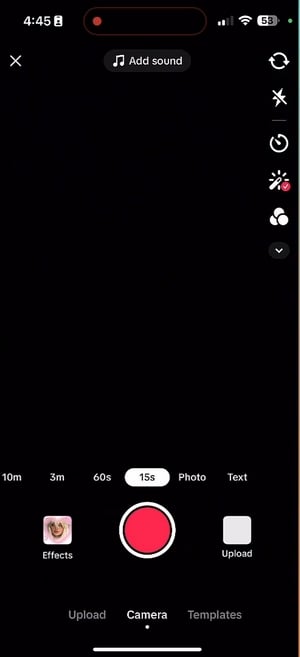
- Open your TikTok application and go to your profile
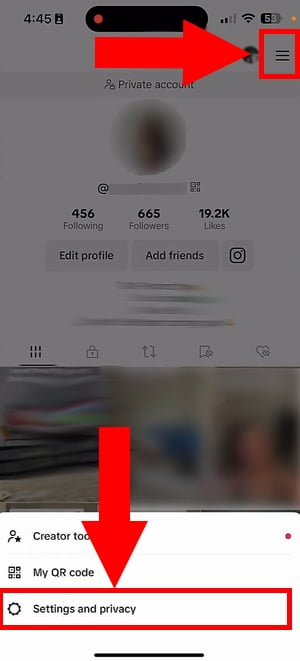
- Go to the top right and click on the 3 horizontal lines at the top right.
- Select menu Settings and privacy
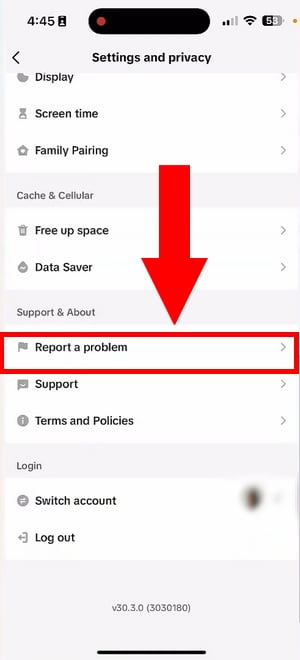
- Scroll down to Assistance / Assistance or Support and click on the“to report a problem“
- Scroll down to: “LIVE/Payment/Rewards“
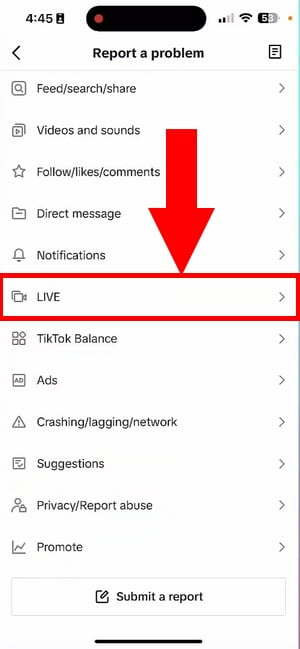
- Select the “Host a Live“
- Then on “I can't start from Live“
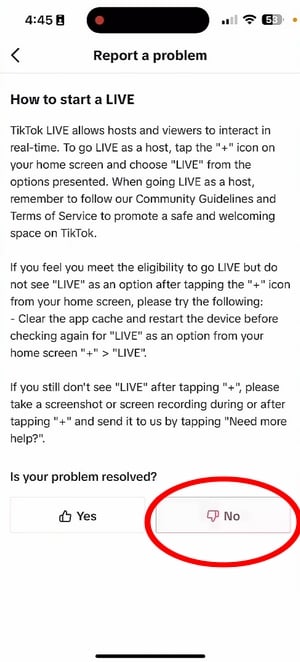
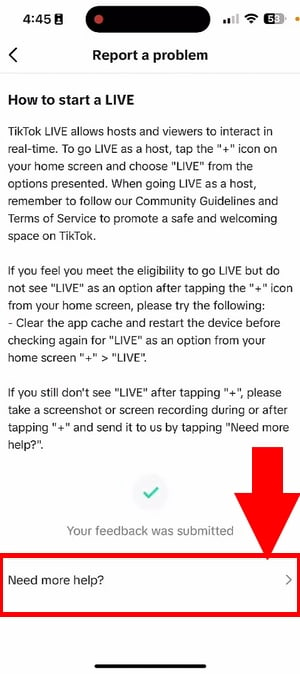
- To the question “Is your problem solved?”, answer “No". Then click on "I still have a problem“
- In the screen used to insert the essay, insert this message and send the screenshot taken earlier as proof:
“Hi, I’d like to request access to the LIVE feature on my account. I’m an active creator and my community would love to interact with me in real time. Could you please review my account for LIVE access? Thank you.”
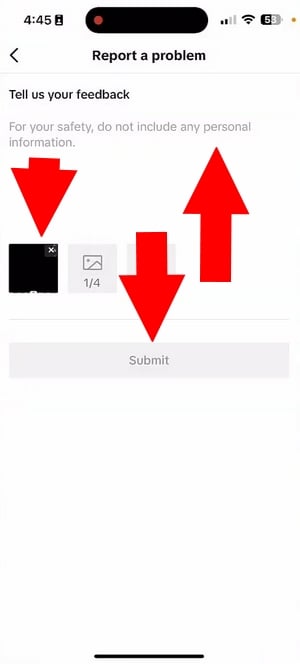
- Thanks to this request, a TikTok moderator will be able to check your content and perhaps unlock the broadcast button manually. How to be patient is the key: usually, the answer arrives within a few days.
Remember to put a comment below when you've made a request. Then, if you don't hear back within 72 hours, come back to the page to reply to your comment and tell us if you've had a problem!
⚠ Things to know before you send
This method worked very well until 2023. Now TikTok accepts requests on a case-by-case basis - it is estimated that 1 in 3 successful applications. For this to be a success, your account must look serious:
✅ What helps:
- Account active for 2-3 months,
- 300+ subscribers,
- No reports,
- Message in English.
❌ The downside:
- Newly created account,
- Few videos,
- Repeated requests within a few days of each other, the answer is often no to the question of unlocking.
💬 Tell us in comments whether it worked for you, and with how many subscribers.
Another way to unblock the live stream on TikTok
If TikTok says no to the unlock request, you need a solution to increase your subscribers!
So how do you go live?
The best way is to use the Alugift server on Discord :
- Join this server by Alugift on Alucare via this button:
Join the Discord Alugift server
- Click on the Accept invitation
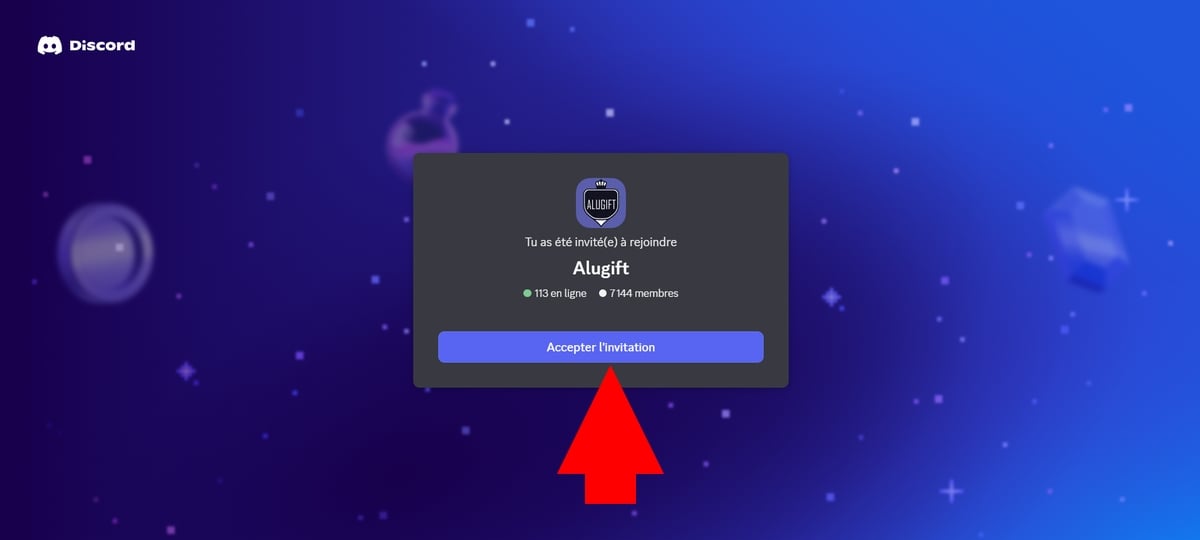
- Once a member, test/play video games to earn points
- Redeem points to get real TikTok followers and start lives with peace of mind.
It's an effective way to gain real followers, which allows you to move on to 1,000 subscribers rapidly (within a few weeks) without spend a euro and buy fake accounts.
What you need to know about TikTok lives in 2026
In fact, some users may not see the “ " button.“Start live broadcasting” on TikTok.
But even after this feature has been unlocked, certain rules apply for launch a live broadcast on TikTok:
- Have Minimum age 18 to launch a live
- Must be at least 18 years old to send/receive messages TikTok gifts during a live (19 years in South Korea)
- Have 1,000 subscribers (unless manually unlocked using the above method)
How can I get more subscribers on Tiktok?
To win over this social network's audience and algorithm, follow these tips:
- ✅ Publish contents more regularly :
Instead of one video a day, try publishing two. Users and the TikTok algorithm favor active accounts.
- ✅ Cross-promote from your other networks (Instagram, YouTube, Facebook or your website)
Share your social networks on the TikTok platform, especially on your Instagram profile! The goal is to then announce on your social media accounts that you have started broadcasting. Where live performances on Tiktok to bring in more people.
Your audience, who are more on Instagram, will surely come and say hello.
- ✅ Taking care of your title and your profile photo
To seduce the TikTok algorithm, it is crucial to choose the right title for your content and distribution. Having a quality profile photo that makes users want to subscribe is also a plus.
- ✅ Study the Viral TikTok of your theme for inspiration
Take a look at the list of people who get the most views on TikTok in your field and get inspired, It's the best possible guide.
FAQs
How do you live TikTok on your iPhone or Android?
To start a live stream on TikTok here are the steps to follow:
- Open the application or go to reception of TikTok
- At the bottom, click on the +,
- You will see your camera, and there will be a red button labeled “Register”
- You have the choice between “video" Where "live“
- Click on "Live”if the button is available
- Give a title to your broadcast. Also, avoid insults or other words forbidden by TikTok, otherwise you risk being banned!
- All that's left to do is press “.“GO LIVE” and your live will be launched.
Is it possible to run a live TikTok on a PC?
Yes, via the TikTok Live Studio downloadable from the official website.
This allows you to broadcast video games or content from your computer with better technical quality.
How do I join a multi-guest TikTok live session?
- During another designer's live show, press the “Multi-guest” at the bottom of the screen,
- Then click on “Request”.
- When the creator accepts, set up your camera/microphone and press “Go live”: you'll be connected in 5 seconds.
💡 You don't need 1,000 subscribers on TikTok to join a live event as a guest - this limit only applies to starting your own live event.
Do you have a question about the procedure? Have you tried it and it worked (or not)? Comment with your number of subscribers at the time of request, it helps other readers!










 English
Live
how to get sponsored by raid shadow?
Stream but no RSL
I wanted to start a live
you were able ?
Buona sera ragazzi forza mandarmi un leone su tik tok live Italy vi aspetto
I invite you to put comments below if you have questions about:
– How to launch a live Tik Tok
– If you have trouble launching a live Tik Tok
– How to do a live on tiktok without having 1k