" Moderator TikTok »What is it exactly? The term actually refers to two different things:
- Either a viewer you designate for managing your cat during a live session (it's free, and only takes 2 clicks),
- Either a TikTok employee whose daily job is to moderate reported content.
In this guide, we'll talk about both: how to add one to your account, what a live mod really does, and what the work of the moderation at TikTok or its subcontractors.
TikTok Live moderator: How do you add it to your account?
Add a moderator on a live TikTok literally takes less than a minute. It's a way to improve commitment but also to keep an eye on your community's comments.
Here's how to optimize your commitment:
Before the live show :
- Press the central +, then scroll through the capture tools until you reach LIVE
- Then click on Settings
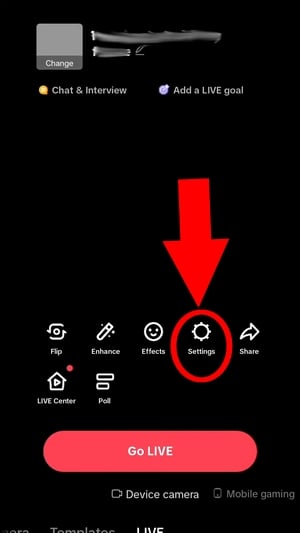
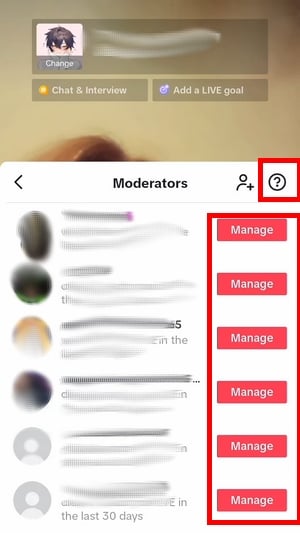
- Scroll to the Moderators

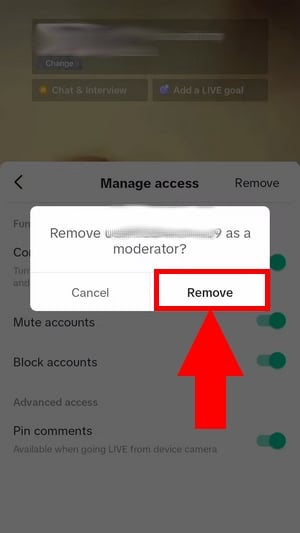
- You can choose add users as moderators (by clicking on +) or to delete moderators of your choice by clicking on To manage then Delete.
During a live show :
- During a live broadcast, open the list of spectators by clicking on the icon at top right
- Keep your finger on the pseudo of the person to be promoted
- Click on To manage
- Select: “Add as moderator“
That's it: designated users (or the user) can now expel or mute problematic accounts from your chat to protect your community!
What are the roles and limits of a TikTok live moderator?
The TikTok live moderator is responsible for managing users during live TikTok. He is not paid by the platform, but creators can pay their own moderators if they wish, as part of a private service or commercial collaboration.
A live moderator on this social network is also responsible for :
- ✅ Enforcing the rules : limit Where to block users who violate the terms of use or send inappropriate messages during a live session (the current live session and/or all future live sessions)
- ✅ Manage comments : manage and report comments to TikTok to maintain healthy content
- ✅ Filter keywords : Protect the creator of undesirable behavior by blocking specific keywords or variants
- ✅ Put mute: prevent a user from commenting on the live stream
- ✅ Expanding the team : to add ofother moderators to help him deal with spectators.
However, please note that a TikTok moderator will not have access to the following features:
- ❌ Read and consult posts
- ❌ Stop live broadcasting
- ❌ Access to confidential information or to earnings of gifts sent during the live show.
The job of a content moderator at TikTok
The business of content moderator at TikTok consists of examining hundreds of reported videos per day, per moderator. On a platform-wide scale, this means millions of pieces of content processed every month. In fact, content monitoring on this social network is known to be psychologically challenging.
In fact, a number of journalistic investigations have referred to trials launched against TikTok, Meta (Facebook, Instagram) and YouTube regarding their working conditions in recent years.
Contrary to what you might think, the moderators are almost never directly employed by TikTok: the platform delegates to subcontractors such as Teleperformance or Majorel. Salaries therefore vary according to the service provider, the country and the work on offer.
French-speaking moderators can be found working remotely or face-to-face. Discover how much does a TikTok moderator earn? to find out more.
FAQs
How many moderators can I have on my live stream?
You can add up to 20 TikTok live moderators.
Can my moderator see my private messages?
Rest assured, although a moderator has certain tools at his or her disposal to help you manage your spectators during a live event, he or she will not be able to never see your private messages or your confidential data.
Is there a minimum number of subscribers required to add a mod?
There is no specific threshold to add people as moderators: if you can launch a live event, you can appoint a moderator.
The threshold concerns the live event itself (historically 1000 subscribers, but this varies according to region and TikTok features under test).
How do I know if I'm a moderator on TikTok?
The most reliable way to find out if you are a live moderator:
- During the live designer, you'll see the icon shield Where settings appear above the cat.
- If you don't see it, you're not a moderator (yet).
How do I remove a TikTok moderator?
If you want to remove moderator rights from certain people during a TikTok live :
- Open the moderators from the settings icon
- Hold your finger on the nickname
- Remove it as a moderator.
To delete a moderator after the live show :
- Go to Settings
- Then Live
- And finally To manage moderators
- Then click on the user and confirm with To delete
Can a moderator ban me permanently?
Yes. A moderator can ban a user permanently from the chat room. This is a moderation system which aims to protect an account from inappropriate behavior in public.
Now you know all about TikTok moderators.
But if you're still struggling to reach the 1,000 subscribers required to go live, take a look at our tip for go live without 1000 subscribers.








 English