If you are an active Instagram user, you have probably liked several posts. Would you like to know how view liked publications on Instagram ?
This article offers you various tricks so you can easily access them! Let's go!
How can I view my likes on Instagram with a smartphone or tablet?
To find content on which you have left likes on Instagram, follow these steps, which we mention below:
- On your profile, find the three horizontal lines at top right.
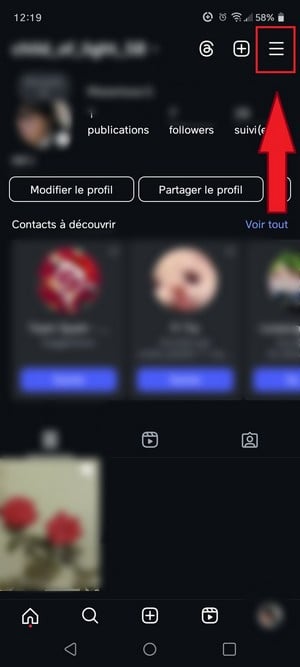
Button for accessing settings on Instagram. ©Mia for Alucare.fr - Select “Your business” in the parameter list.

See your Instagram activity on phone. ©Mia for Alucare.fr - Click on “I like”.
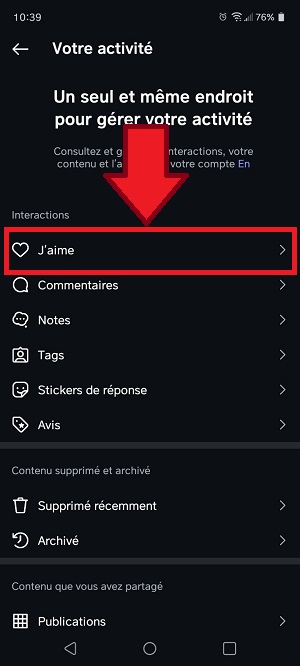
View likes made on your Instagram account using a phone. ©Mia for Alucare.fr
Once you have completed these steps, you will have access to all the posts to which you reacted on Instagram. You'll be able to see the actual likes on Instagram as well as the photos.
This feature lets you discover which images and videos touch and motivate you the most. It's also an effective way of finding all the content you've enjoyed, and of finding new ones. exciting accounts to follow.
How can I view liked Instagram posts from a PC?
The web version of Instagram does not display liked posts as it does on mobile. For see the publications you've liked on Instagram from a computer, here are some possible solutions:
Using an Android emulator
You can use a Android emulator such as Bluestacks or Noxplayer to run the Instagram app on your computer.
This will allow you to access your account and see the posts you have liked. To do this, launch the emulator and repeat the method used for mobile devices.
Using websites third
Some Web sites as Karma fan page Where Snoopreport give you the possibility of finding your favorite publications by connecting your Insta account to them.
However, it is essential to remain vigilant, as certain platforms will have access to your account, which can increase the risk of an Insta hack.. Make sure you choose sites Reliable and secure websites.
FAQs
Are liked publications permanently saved?
No. You can remove likes that you posted on Instagram if you've changed your mind. Read on to find out how.
How do I delete a like from an Insta post?
Here are the steps to follow to remove a post from all the content you have liked on the Instagram platform: by removing the like added above :
- Access the list of posts as mentioned above.
- When you find the publication in question, press the heart-shaped icon under the image or video to remove the like. The heart will turn into an empty outline, indicating that you have removed your like.

Remove a like from an Instagram post. ©Mia for Alucare.fr
Is it possible to view posts liked by my friends on Insta?
On Instagram, he is currently impossible to watch directly the publications liked by our friends. Unlike some other social media platforms, Instagram doesn't provide a native feature to access the full list of publications your friends have liked.
Your friends' "like" history remains private and confidentialThis measure aims to protect users' privacy and preserve the confidentiality of their interactions on the platform.
If you want to find out about Instagram likes or other activities of a particular person, be sure to check out our article: how to see someone's activity on Instagram.
Who can see my likes on Instagram?
Once you have liked a post, your like is visible to all users who have access to the publication.
Your subscribers can also see your username under a post you liked on their news feed.
In conclusion :
- It is very easy to access the likes on Instagram with a mobile device such as a smartphone or tablet.
- It is not possible to see liked posts on Instagram on the web version. Choose a Android emulator to access Instagram from your computer to view likes.
- It is entirely possible to remove a like from an Instagram post.
- Even if you can consult your likes on Instagram, you will not have access to your friends' posts unless you use a third-party tool.
If you need more articles about the social network Insta, check out our page. instagram. You will find a wealth of information on this platform. Feel free to leave a comment if you have a question.








 English