Do you want to blow up an Instagram account ? If it's yours, you can permanently delete where the temporarily disable directly from the app.
If it belongs to someone else, the only legitimate option is to alert to Instagram, which then makes the final decision.
How do you delete another Instagram account?
It is impossible to Delete the profile yourself another person's: that would violate the rules of Privacy and Security of the platform.
However, if an account posts inappropriate content or violates the rules, three procedures give you the best chance of getting a share. Instagram provides reporting tools accessible directly from the app.
Report account to Instagram
This is the best option in the event of’identity theft, of harassment or of fake account. If you want to first identify who owns an Instagram account Before reporting it, it's a good idea to do this. Here's how to proceed:
- Go to the profile from the user to report.
- Press the three dots top right of the screen.
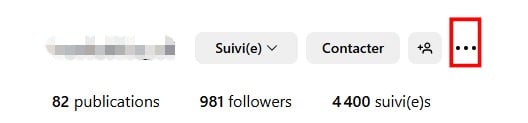
- Select the option Signaler.

- Indicates the reason of the report.
- Add other reasons if necessary, to clarify your request.
Report each publication
This procedure is useful when the person posts problematic content without violating the rules as a whole. The moderation services Instagram then processes each post separately. It takes a long time, but it's targeted.
To report a post:
- Open the post in question.
- Press the three dots top right of the screen.

- Choose Signaler in the menu that appears.

- Enter the reason of the report.
- Add some further information to explain why the content is problematic.
Contact Instagram support
If it's an emergency and the standard reporting process doesn't work, you can contact support directly from the app or the official website.
- Press Plus, at the very bottom of the menu on the left.
- Choose Signaler un problème in the menu.

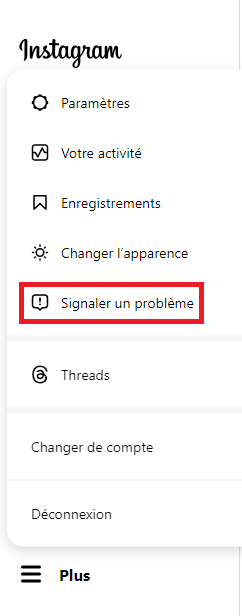
- Explain your situation and Request to delete the profile in question. Provide as much detail as possible and attach files to support your request.

In any case, the The final decision always rests with Instagram. These procedures simply provide you with the best ways to bring a profile that violates the rules to the attention of the moderation team.
How many reports does it take to delete an account?
There is no no official figures. Instagram does not specify any particular threshold, and an Instagram account is never automatically deleted after a certain number of reports. Each report is reviewed individually by the moderation services.
What really matters is the Reported content, not the volume. A the only well-founded report may be sufficient when the profile seriously violates the community guidelines, for example in the case of nudity, of violence, of harassment oridentity theft.
For more ambiguous content, multiple reports increase the likelihood that a profile will be reviewed. In practice, it’s better to file a report very detailed only about ten vague alerts.
Beware of false reports
Mass-reporting an Instagram account without a valid reason is considered a misuse of the platform. Instagram has tools to detect false reporting campaigns.
Not only do these reports get you nowhere, but your own profile could be penalized. The rule is simple: only report content that actually violates the community guidelines.
Is it legal to try to get an Instagram account suspended?
Reporting an account that violates the platform's rules is perfectly legal. In fact, this is the approach recommended by Instagram and digital authorities. However, some methods are illegal and can have serious consequences.
Try to hack or taking control of an Instagram account without authorization is a criminal offense.
In France, unauthorized access to a computer system is punishable under Article 323-1 of the Penal Code: up to 2 years in prison and a €60,000 fine. The’identity theft Digital piracy is also punishable by law.
The only legal procedures for having a third-party account deleted are still the reporting via the app where the Instagram Support Contact.
No third-party tool, online service, or hacking technique can legally delete another user's profile.
What should you do if Instagram doesn't remove the content even after you've reported it?
Instagram doesn't always respond as quickly as we'd like. If your reports go unanswered, you have several options:
- Contact Support Directly using the in-app issue reporting form, and attaching evidence (screenshots, messages, posts).
- Report via the Digital Services Act (DSA) : Since 2023, major platforms like Instagram have been required to provide avenues for appeal. You can report illegal content using the official form at Meta intended for that purpose.
- Contact the CNIL If the account discloses your personal data without your consent, the CNIL may take action against the platform.
- File a complaint with the appropriate authorities in cases of harassment, identity theft, or serious threats. The police and the gendarmerie have units dedicated to cybercrime.
In all cases, preserves the evidence : Screenshots of posts and messages before they are deleted.
How do I delete my Instagram account?
If it's your own account, you have two options right in the app, both accessible via the’Account Area of Meta (shared between instagram and Facebook) :
- Permanent deletion : Permanently delete your profile, photos, and data. For more information on this process, see our comprehensive guide on delete an Instagram account.
- Temporary deactivation : Pauses your account. Instagram keeps your data, and your profile will reappear the next time you log in. If you change your mind, you can also find out more about Reactivate your Instagram account in the event of a problem.
Delete or Deactivate My Instagram Account
The procedure is identical for both actions. Only the final choice change: On the final screen, select either Delete account, that is Deactivate account, depending on your needs.
On Android
- Open the’application Instagram on your phone Android.
- Press the three bars at the top right of the screen.

- Go to «Settings and Activity» then «Accounts Area».

- Open «Personal Information».
- Select «Account Ownership and Control».
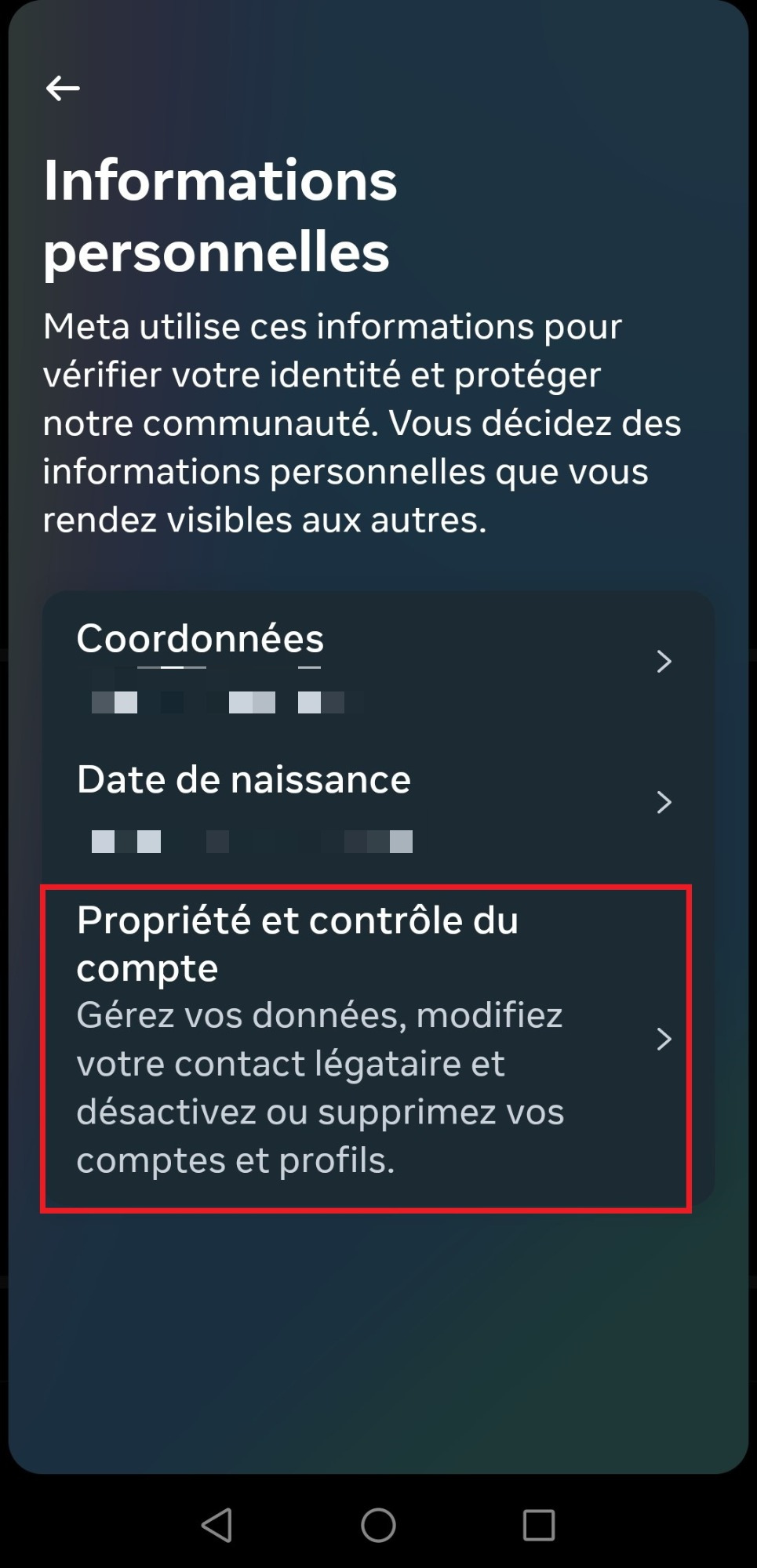
- Press «Deactivation or Deletion».
- Choose the instagram account in question.
- Check the option that applies to you: Delete account Where Deactivate account.

- Select the pattern, then press " Continue ".
- Fill in your password.
- Confirm the action.
On iPhone
The steps on iPhone are the same as on Android, with slight differences in wording.
- Open the app Instagram on your iPhone.
- Press the three horizontal lines at the top right of the screen.

- Go to «Settings and Privacy» then «Accounts Area».
- Open «Personal Information».

- Choose «Account Ownership and Control» then «Deactivation or Deletion».
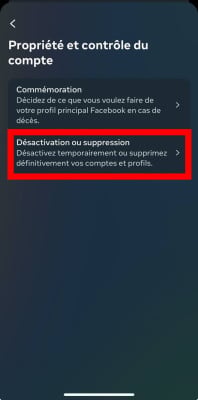
- Select the account in question.
- Choose Delete account Where Deactivate account, enter the reason, enter your password and confirms.
On computer
- Log in to your account Instagram since web browser from your computer.
- Paste this link directly into the address bar: https://accountscenter.instagram.com/personal_info/account_ownership_and_control/deletion_and_deactivation/

- Choose the account to be processed.
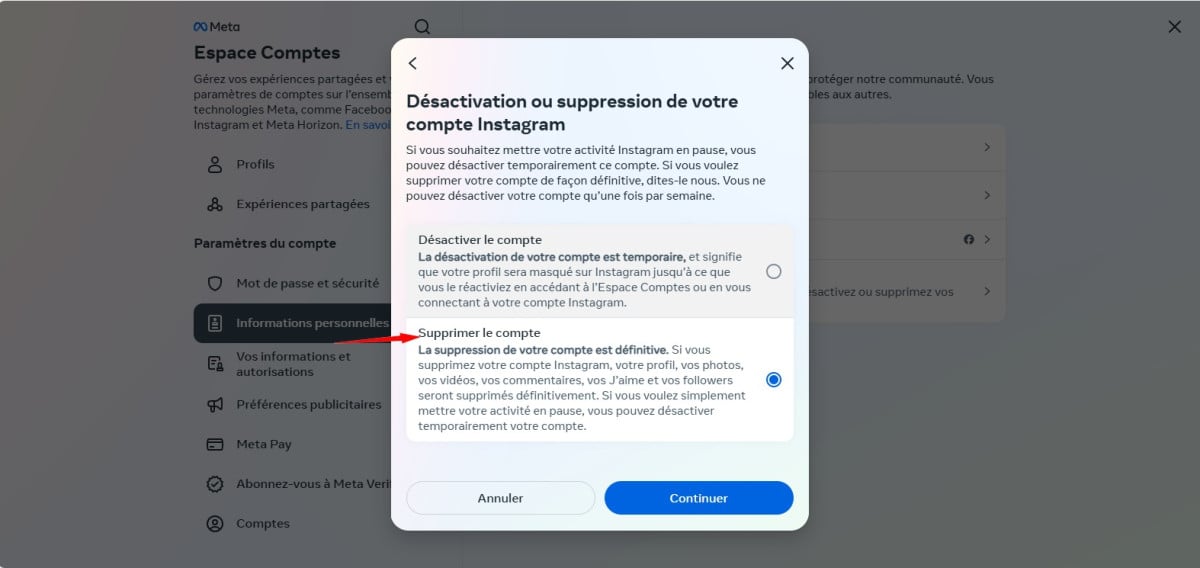
- Choose Delete account Where Deactivate account, depending on what you want to do.
- Indicates the pattern, then press " Continue ".
- Fill in your password and confirms the action.
Can Instagram blow up an Insta account?
Yes. Instagram can suspend or delete a profile on his own initiative in several situations:
- Violation of Community Guidelines : inappropriate or violent content, or harassment.
- Fraudulent or illegal activity : identity theft or the sale of illegal products. Knowing how to recognize a fake account can help you better target your reports.
- Spam and bots : accounts that use bots to inflate their popularity are specifically targeted.
- Repeated reports for abusive behavior or problematic content.
- Copyright Infringement : Repeated publication of protected content without authorization.
- Minimum age not met.
Please note: If you don't want to go so far as to delete your profile, you can also make it less accessible by switching to private account.
How can you protect your Instagram account?
Before you find yourself in a situation that makes you want to deactivate your profile, it's better to strengthen the Instagram account security. Here are some best practices to start implementing today.
Enable two-factor authentication
L'two-factor authentication is the most effective protection against hacking. With this option enabled, even if someone gets your password, they can't access your account without the second verification code.
To enable it on Instagram:
- Go to your settings then in «Safety».
- Press «Two-Factor Authentication».
- Choose your method: authentication app (recommended) or text message.
- Follow the steps below to complete the activation.
Use a strong password
A correct password for Instagram must be unique (not reused on other sites) and include at least 12 characters combining letters, numbers, and symbols. Use a password manager so you don't have to remember them all.
Check for connected third-party apps
Some apps get a access to your Instagram account during installation. Go to your settings, then to «Safety» and «Apps and Websites» to view the list and remove any accesses you don't recognize.
Protecting Your Personal Data
Instagram collects a lot of personal data : interests, location, browsing behavior.
You can limit these data collections in the privacy settings in the app. Also, avoid posting sensitive information (address, phone number) directly on your profile or in your posts.
Why blow up an Instagram account?
Reasons for wanting to delete or deactivate your account are varied. Here are the most common ones:
- Privacy policy : Many users are concerned about the collection of their personal data and the resulting targeted advertising.
- Waste of time: Instagram is particularly time-consuming. Closing your account allows you to refocus on more fulfilling activities.
- Digital Disconnection: as part of an effort to mental well-being, digital detox is becoming increasingly popular. Deleting one's profile is becoming a step toward a more balanced life.
- Harassment and Cyberbullying: If you are a victim of harassment campaigns, deleting your account can be a drastic measure to put an end to the situation, in addition to reporting it.
- Hacking or identity theft: when an account is hacked or hijacked, the owner sometimes prefers to delete it to protect their information. Enable the’two-factor authentication Taking preventive measures remains the best way to avoid this type of situation.
Whether it's your profile or someone else's, always respect the platform rules and assesses the consequences of each action.
If you are being harassed or notice any inappropriate content, the reporting to Instagram That's still the first step to take.








 English
I wanted to close an Instagram account that I no longer use. Thank you for this article.