You lost your android Or was it stolen from you? Google offers a free, integrated solution for the return to : Find My Device (also known as the app Locate).
From any browser, you can locate your phone or tablet, the to ring Where remotely erase one's data.
To locate a device quickly :
| Find My Device from Google | Features |
|---|---|
| Prerequisites |
|
| Assets |
|
| Free? | Yes |
| Review | 4,3/5 on the Google Play Store |
| Offline availability | Last known location only |
How do I locate my cell phone with Google Find My Device?
To find a lost or stolen smartphone, you need to make sure a few conditions are met before you even open a card. Here are the steps to follow, one by one.
1. Check that the device can be located in the event of loss or other damage.
First and foremost, check these three things on your phone.
a) The app is installed on the device
L'"Find" app is present by default on all recent Android devices (phones, tablets, and watches running Wear OS).
If that's not the case, you can download Find My Device for free starting on Google Play Store.
The position requires at least Android 6 and Google services.
b) The device is linked to your Google account
To check the connection:
- Go to Settings, then Google. the name and thee-mail address Your account details should appear here.
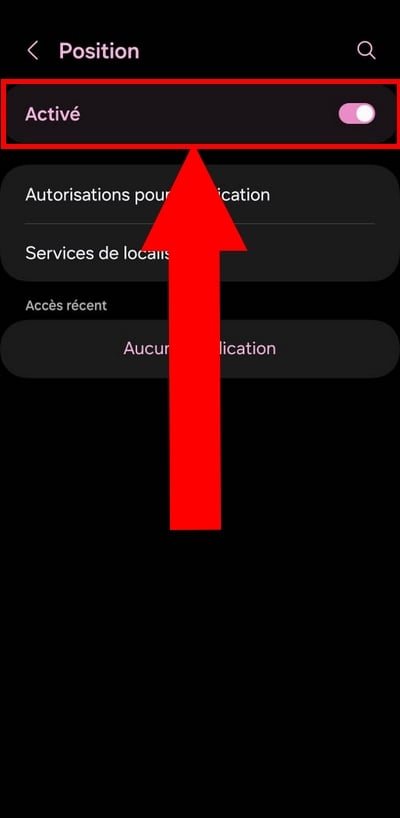
c) Localization is activated
To activate :
- Open Settings, then Position, and turn on the switch if you haven't already.
Without these three requirements (app installed, account logged in, location enabled), it is impossible to track the device remotely.

2. Locate the Android device
Are the prerequisites in place? Let's move on to localization.
a) Sign in to your Google account online

From a computer or another mobile device, log in with the same Google account the same one used on the phone to be located:
- Go to android.com/find.
- Click on the’account icon in the upper-right corner and log in.
b) Locate the Android device on the map
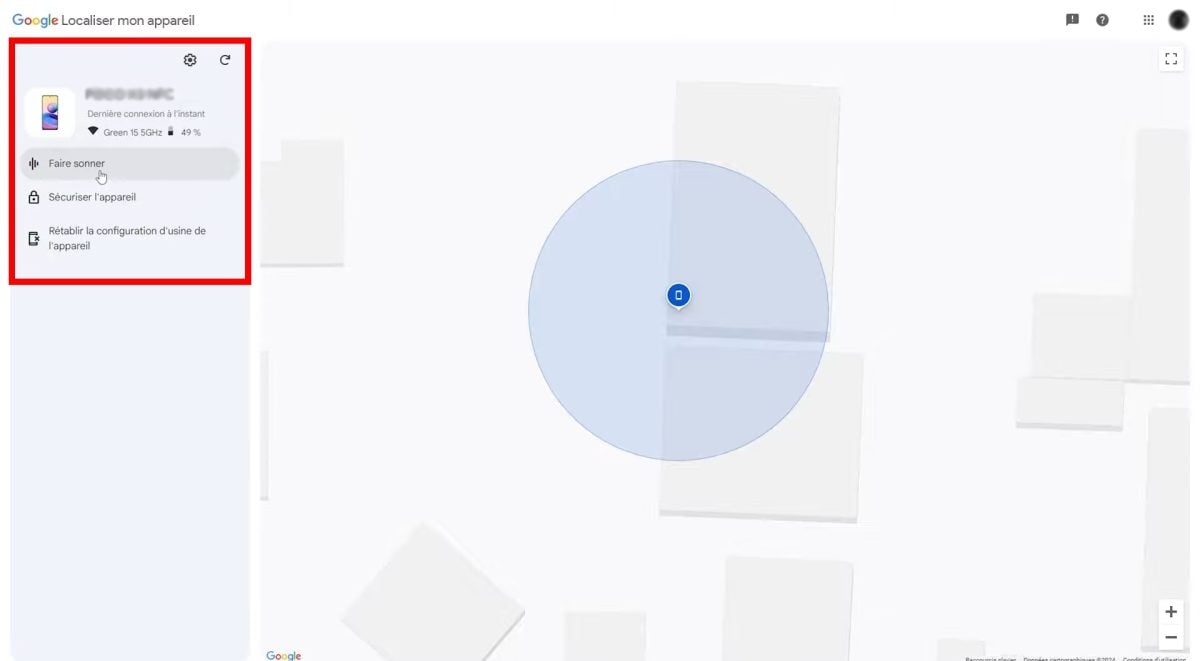
Once you're logged in, the card displays the approximate position from your device, as long as it's turned on and connected. If it's turned off or offline, you'll only be able to retrieve its last known location.
You can then choose from three options:
- Ring the phone
- the lock remotely with a message on the screen
- Erase data as a last resort
Is this app not right for you?
How to Track a Phone Effectively
What are the features of Google's Find My Device?
In addition to locate a phone for free, the app offers you three remote actions once you're connected to your Google account.
1. Make your device ring
This option does make your phone ring for 5 minutes, even when it's in silent mode. This is especially handy when the device is simply lost under a pillow or in another room.
To ring the bell:
- Log in to the website with your Google account.
- In the left pane, select the device in question, then click «To ring».
To stop the ringtone, press the power button on your phone or click on «Turn off the ringer» from the website.
2. Secure your device remotely
If you suspect theft, the option Securing the device allows you to lock remotely without erasing your data. This is the best option for your security and the security of your data: this measure prevents your information from falling into the wrong hands.
To lock your phone:
- Click on Locate my device in the left pane, then click Securing the device.
- If you don't have a screen lock yet, set a password and click on Next.
3. Remotely erase all data
As a last resort, the option Erase data launches a Complete and irreversible reset. Use this only when you're certain you won't be able to recover the device lost or stolen.
Warning: Once the data is deleted, you I also lose the location from the device, and you won't be able to track it via GPS anymore.
To delete the data:
- In the left pane, click Erase data of the unit.
- Click again on Erase data to confirm.
- Finish by clicking on "Delete.
Other efficient location applications!
Whether Find My Device That's not enough—here are two alternatives to consider, each with its own limitations.
1. GEOfinder.mobi
GEOfinder.mobi works differently: the service send a text message to the phone number to be located. If the person with the device Click on the link you received and agrees to share their location, you'll get their location.
The Location therefore depends on an action by the other person. This is useful as a last resort if someone has taken your cell phone lost, but it's no substitute for Find My Device.
Please note : GEOfinder.mobi is not free, it offers a trial version at 1 $ for one day.
| GEOfinder.mobi | Features |
|---|---|
| Prerequisites |
|
| Assets |
|
| Free? | No. Find out more here about the price of GEOfinder |
| Review | Discover a Full review of GEOfinder |
| Offline availability | Nope |
To find your devices:
Find out where my smartphone is right now
2. Google Maps
Google Maps does not allow you to locate a stolen device. Its useful feature here is the real-time location sharing Among contacts: You choose who to share your location with and for how long.
So it's handy for finding out where a loved one is who has enabled sharing, not to track a lost phone without your knowledge. Before locate a device with Google Maps, here's what you need to know:
| Google Maps | Features |
|---|---|
| Prerequisites |
|
| Assets |
|
| Free? | Yes |
| Review | Highly rated on the Google Play (Check the current rating directly on the app's page) |
| Offline availability | Nope |
Want to efficiently determine the location of a device?
FAQs
Why can't I locate my phone?
There are several reasons that may prevent you from locate your device :
- The phone is off or hasn't running out of battery.
- It is not connected to the Internet (neither Wi-Fi nor mobile data).
- He switched to airplane mode.
- The service of location is not enabled in the settings.
In these cases, you only get the last known position of the device, not its real-time location. The network Find My Device can sometimes estimate the proximity of a device lost via the Bluetooth other nearby Android devices, even when offline, but this feature is limited depending on the model.
Can I share the location of my devices with other people?
Yes. In addition to your phone, you can share the location from your other connected devices (headphones, watch, tablet, etc.) with your loved ones. Here's how:
- Open the’application and Select the device to share.
- Press Share device.
- Follow the instructions to send the’invitation to the person of your choice.
- Wait until the recipient accept the invitation.
- Once accepted, confirms the split And that's it.
To Stop sharing, go back to the device's details page and simply remove the person from the list.
How do I locate an iPhone?
On iOS, the native app is called Localiser. She is free of charge and helps you find an iPhone lost, to make it ring, to lock remotely or to delete its data. It is highly regarded for its accuracy.
How do I locate my Samsung?
Users of Samsung have a dedicated department: Find My Mobile.
To locate a device without authorization and free of charge With this tool, you must first log in to your account Samsung before the device is lost or stolen.
What's a good alternative for finding a device?
You can fill it out Google with GEOfinder.mobi (affiliate link), a service compatible with any device.
It's not a direct replacement for the Google solution, but it's a useful option when someone has taken your phone and Find My Device no longer gives you access to the device.
Find your smartphone now:







 FR
FR  RU
RU  EN
EN  ES
ES  IT
IT  DE
DE  ZH
ZH  PT
PT  ID
ID  JA
JA  DA
DA