ChatGPT is handy for quickly writing content, but you can spot its text from ten meters away: it’s formulaic, with sentences of the same length and no unique perspective. As a result, the content lack of depth and maybe spotted as generated by AI.
Fortunately, with a few simple steps, you can Convert ChatGPT text in human text and credible.
And if you're dealing with large volumes of work, these tools can speed things up—without any promises of miracles; we'll be honest with you about their limitations.
In this article, we show you How to make a ChatGPT text sound more human, step by step.
The main methods for humanizing a ChatGPT text

Using artificial intelligence for writing is a a fairly common practice, whether to save time or increase productivity. OpenAI has, in fact, released several versions of ChatGPT to meet the needs of as many users as possible.
But for your production to have a real impact on your audience, you need to’humanize.
To help you on your journey, I'd like to share with you the main methods Follow these steps to make your ChatGPT-generated content sound more human.
1. Tailor your writing style to your audience
Let's start by making your AI-generated text more engaging and human by following these tips:
- ✅ Avoid technical jargon:
Avoid using technical terms and complicated expressions. If you do need to use such terms, please define them clearly so that your audience can understand them fully.
- ✅ Use simple, accessible language:
I strongly recommend that you use simple, clear, and concise words and sentences.
- ✅ Use casual, everyday expressions:
Feel free to use common phrases to make your ChatGPT-generated text more lively and authentic.
- ✅ Vary your sentence structure:
Unlike AI, human text does not follow a predefined model and is characterized by its variety. Take advantage of this feature to alternate between short and longer sentences to create a rhythm and dynamic that is pleasant to read.
- ✅ Use a more natural tone:
Forget the formal, impersonal tone often associated with AI. Instead, let your personality and enthusiasm shine through in your writing.
By following these tips, your text generated by ChatGPT will become more engaging, which will help generate tangible results.
2. Enrich your text with “human” elements”
Let's move on to the “human” side that AI is not yet capable of reproducing despite technological advances. I actually think that's a good thing, because I'm not likely to lose my job to text generators. Have you seen them?
I made a joke, which will perfectly illustrate the ideas I'll share with you on how to make ChatGPT's text more human.
- ✅ Include anecdotes and concrete examples :
Illustrate your points with stories and real-life examples that will help your readers relate to your message and understand it.
- ✅ Sharing personal stories:
I'm not asking you to tell your life story with every post, but rather to share your experiences and your anecdotes related to the topic you're discussing. This will help you build an emotional connection with your readers, making your writing more authentic.
- ✅ Use metaphors and comparisons:
Enrich your text with metaphors and similes to make your words more vivid and memorable.
- ✅ Add touches of humor and emotion:
Depending on the subject and target audience, feel free to add a touch of humor or emotion to your text. This will make it more lively and enjoyable to read.
By incorporating these elements, your production will become more humane and will capture your readers' interest more effectively than something that's purely automated.
3. Pay attention to the format and presentation of your AI-generated content
Let's move on to the next part of our treatment and focus this time on the’appearance of an AI text who, let's be honest, isn't really pleasing to the eye.
Imagine you have a choice between a croissant and a fruit tart. Chances are you'll be tempted by the fruit tart, even if you like croissants.
The same applies to the presentation of a website or your content. As long as it's enjoyable to read, you'll naturally attract an audience.
Here are a few tips to follow to ensure that AI-generated content is well-written and well-presented:
- ✅ Organize the text in a clear and logical manner:
Organize your content in a coherent, flowing manner to follow a logical thread. Divide your text into short, concise paragraphs, and use transitions to facilitate reading.
- ✅ Use relevant headings and subheadings:
Make sure they are clear and descriptive so that readers can easily navigate your text.
- ✅ Add images and videos to illustrate your points:
Including relevant visuals can make your content more appealing and easier to digest. However, make sure they are of good quality and that they truly illustrate the points made in your text.
- ✅ Use bulleted lists or tables when necessary:
These are invaluable tools for presenting information clearly and concisely.
- ✅ Carefully check your spelling and grammar:
Careful proofreading is essential for correct any spelling mistakes and of grammar. In fact, careless mistakes could undermine the credibility of your content.
So I recommend that you take as much time as you need to proofread your work.
Tools for Humanizing AI-Generated Text (and Their Real Limitations)

The manual method is still the most reliable. But it takes time, especially if you're dealing with a lot of content.
👉 That’s where the humanizers : tools that automatically rewrite your ChatGPT text to make it sound more natural and reduce the risk of it being flagged as AI. Some of the best include:
Undetectable.ai
The most humanizing known in 2026. You paste your text generated by ChatGPT, the tool rewrites it, and then tests it again against the leading plagiarism detectors (GPTZero, Turnitin, Originality.ai).
Compatible with several languages, including French. The free version is limited to a few hundred words.
WriteHuman
A direct competitor of’Undetectable.ai, often cited for its more natural rendering of long texts. Very simple interface. Freemium model.
StealthGPT
Focused on academic and professional content. Offers a « Stealth »a more thorough process that fundamentally rewrites the structure of sentences, not just the words.".
What they (really) know how to do—and what they don't do
- ✅ Reduce a text’s score from «95 % AI» to «30–40 % AI» on most detectors.
- ✅ Save you time on a first draft.
- ❌ Guaranteed 0% detection rate. It’s a constant technological race between humanizers and detectors: a tool that passes Turnitin today may be flagged in a month.
- ❌ Replacing human proofreading. A text that’s been over-translated can sometimes sound awkward, with phrases that ring false. You’ll always have to go back and review it.
⚠️ Our tip:
Use a humanizer for the first pass, then apply the manual method (personal anecdote, reading it aloud…) about the result. That’s the combination that works best.
With these tips, you’ll turn your AI-generated draft into something visually appealing, easy to read, and a pleasure to browse.
When used effectively, it will help enhance your audience’s overall experience and maximize the impact of your message.
Other tips and tricks for humanizing a ChatGPT text

In addition to the various steps I've shared with you for creating content AI-generated To make it more human, here are some additional tips and tricks to follow.
Read the text aloud
Reading AI-generated text aloud is a simple yet effective way to make it sound more natural and improve it. This will help you identify areas that need correction, such as:
- Clumsy or off-key phrases:
When you read a text aloud, you'll find it easier to spot sentences that don't flow smoothly or seem contrived.
- Passages requiring reformulation :
By taking the time to reread your text in this way, you can better identify passages that lack clarity or could be better formulated.
- The rhythm and tone of your writing:
You can then identify sentences that are too long or too complex, and adjust them to create a text that's more pleasant to read and listen to.
Thanks to how simple this tip is, you'll be able to make AI-generated text sound more human.
Have the modified text proofread by a third party
Don't view this step as a potential criticism of your work, but rather as a essential assistance which will help you make the AI-generated text sound more human.
- An outside perspective can identify areas for improvement:
By asking a friend, a coworker, or a family member to proofread your text, you get a objective opinion and impartial.
They can identify grammatical errors, awkward phrasing, or passages that lack clarity—things you might not have noticed yourself
- Ensure that the text is clear and understandable:
A proofreader can also help you make sure your text is clear and easy easy for your readers to understand. They can point out passages that might be too complex or lack sufficient explanation.
- Seek outside input:
A fresh pair of eyes can also help you make sure your text is tailored to your audience and that he uses a tone appropriate to the subject at hand.
Even though this isn't AI-generated text, you can use this method for any other content.
In addition, to get the most out of this step, I also recommend that you Choose a proofreader who has knowledge and experience in the field you are dealing with.
Your humanization workflow, in 4 steps
Remember that ChatGPT is just another tool and should be used wisely. Even though it is one of the fastest ways to generate AI text, its creation should not be considered as the final product.
So, here’s what you should do every time you start with a ChatGPT text:
- 1. Rewrite To make it more personal: add your own personality, your own words, and your own examples.
- 2. Adapt for your audience: anecdotes, tone, vocabulary level.
- 3. Check Note: ChatGPT may be incorrect on recent or niche topics, so please verify the information.
- 4. Test with a detector : Use Copyleaks or Lucide AI to verify that your text passes (see above).
It is this complete cycle that transforms an AI-generated draft into publishable text.
Check your humanized text with an AI detector
Once your text has been humanized, how can you tell if it still comes across as AI-generated content? The answer: by testing it yourself with a detector, before your teacher, client, or Google does it for you.
Here are the two most reliable detectors for verify the authenticity of a text:
Copyleaks
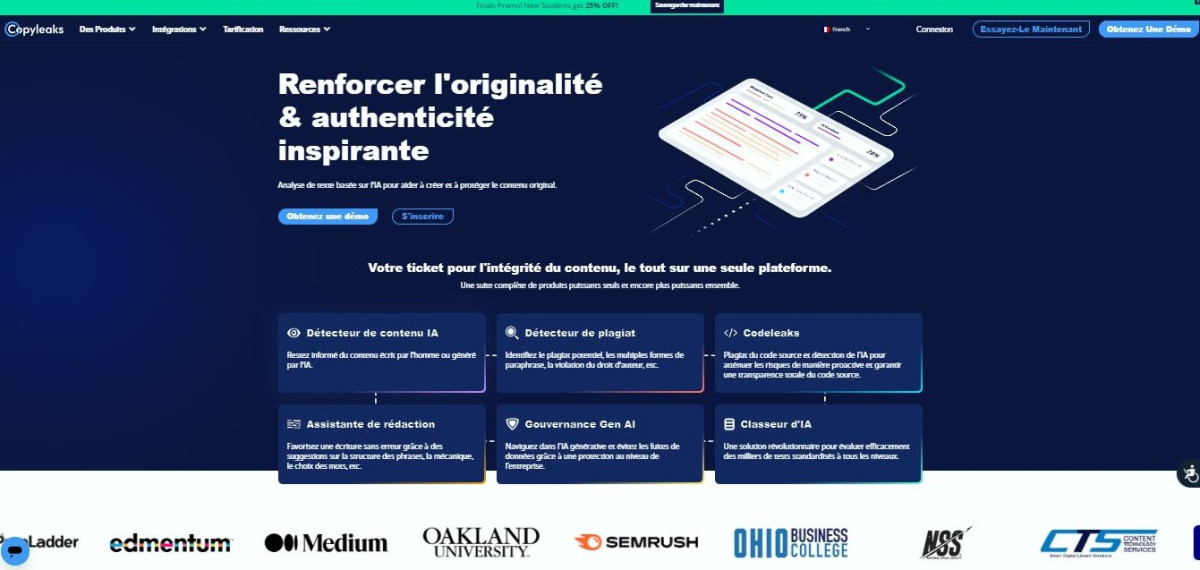
It is an AI-based plagiarism detection tool. Copyleaks has the unique feature of’use advanced algorithms enabling the identification of copied content even if it has been paraphrased or modified.
| Copyleaks features | Advantages of Copyleaks |
|
|
Copyleaks offers two types of subscriptions Annual and monthly.
| Plan | Monthly (credits/month) | Monthly price | Annual (credits/month) | Annual price |
|---|---|---|---|---|
| Personal | 100 credits (25,000 words) | $16.99 per month | 1,200 credits (300,000 words) | 13,991 TP70T/month (167,881 TP70T/year) |
| Pro | 1,000 credits (250,000 words) | 99,991 TP70T/month | 12,000 credits (3,000,000 words) | 74,991 TP70T/month (899,881 TP70T/year) |
Lucid AI

This is another powerful AI detection tool that goes beyond plagiarism. Lucide AI allows you to analyze your content to Identify content generated by artificial intelligence.
Discover our Lucide AI review in this video:
Explanatory video in French by Alucare, ideal complement to the page. View video (you can use YouTube's automatic translation)

| Lucide AI features | Benefits of Lucide AI |
|
|
Lucide AI offers two types of subscriptions: annual and monthly, both based on a credit system.
| Plan | Monthly (credits/month) | Monthly price | Annual (credits/month) | Annual price |
|---|---|---|---|---|
| Discovery Pack Subscription | 100 credits | €9/month | 1,200 credits | €6.30/month (€75.60/year) |
| Abo Pack Essentiel | 385 credits | $27/month | 4,620 credits | €18.90/month (€226.80/year) |
| Advanced Pack Subscription | 670 credits | €47/month | 8,040 credits | €32.90/month (€394.80/year) |
Test your text on Copyleaks Where Lucid AI Checking before publication helps you avoid unpleasant surprises. If the AI score is still too high, switch back to the manual method or run a second pass with a humanizer.
Why is it important to humanize a ChatGPT text?
Although ChatGPT can generate a large volume of informative articles, the quality isn’t always up to par, especially from a human perspective. In fact, this is one of the main reasons why this humanization step is essential.
In addition, humanizing a ChatGPT text offers many benefits:
- Better readability and understanding: Structured content with short sentences and simple vocabulary is easier to read and understand.
- Greater emotional involvement for the reader: By using natural language and giving your text personality, you create a bond with your reader and make them receptive to your message.
- Increased content credibility: A natural and original text is much more likely to be credible and reliable for your audience.
- Reduced risk of detection by anti-spam algorithms: Humanized content is less likely to be considered spam and has a better chance of reaching its audience, unlike text written by artificial intelligence.
By following all of these tips, you now have the tools you need to ensure that your cAI-generated content be more humans.
I may not know a magic formula for writing a perfect text, but with some the practice and theopenness to constructive criticismyou'll improve your handwriting.








 English