Do you want to Create an ad using AI But you don't know where to start? Here's 6 Tools Tested and Compared that cover all uses: the video with avatar, advertising copy, or pure generation based on a simple prompt.
- To get started free, Vidnoz AI offers a very comprehensive free version
- For a professional quality, Synthesia remains a leader in advertising video by artificial intelligence
Each ad generator Each has its own strengths; the table below helps you choose at a glance:
| AI tool | Free? | Ideal for |
|---|---|---|
| Vidnoz AI | Yes (free version) | Getting Started Without a Budget, Creating a video all-in-one |
| Synthesia | Free trial | The Professional video with an avatar for a company |
| Blaze AI | Free trial | Contents text and the game's social networks |
| Creatify AI | Free trial | E-commerce and the product ad |
| AdCreative AI | Free trial | The visuals and large-scale marketing campaigns |
| Sora | Through a subscription ChatGPT | Storytelling and Creative Scenes |
Vidnoz AI: The All-in-One Tool for Your Advertising Videos
Vidnoz AI is a comprehensive alternative to Synthesia. Simple, fast, and free In its basic version, this video generator lets you create professional ads with avatar and voice-over.
It's an ideal solution for companies, them content creators where the marketing teams who are looking for an affordable tool. In practice, you can generate a advertising video Complete in just a few minutes, without a camera or editing.
Explanatory video in French by Alucare, ideal complement to the page. View video (you can use YouTube's automatic translation)

Here are the main pros and cons of Vidnoz AI :
| Advantages | Disadvantages |
|---|---|
| Free use with premium options | Fewer advanced options than Synthesia |
| Simple, intuitive interface | Avatars a little less realistic in some cases |
| Numerous models available | Limited voice translations |
| Natural voices in several languages | No API support yet |
| All-in-one tool (avatar, voice, editing) | Constantly evolving functionalities |
And with the coupon code Vidnoz AI, you'll get a 15% discount on all your subscriptions.
How does Vidnoz AI work?
With Vidnoz AI, just enter a script. There platform takes care of everything: avatar, voice, animation, and final rendering. Everything is automatically generated starting from your text.

The main features of the tool are :
- Video generation with AI avatars.
- Voice off in several languages.
- Models of ready-to-use videos.
- Personalization background, text, logo and animations.
- Quick export in HD.
- Version free of charge available.
Here's how to create your first video ad in less than 10 minutes on the platform.
Step 1: Create an account.
Go to vidnoz.com and create your account in just a few seconds.

Step 2: Choose a video template.
Go to the "Templates" section and select one advertising template tailored to your message.
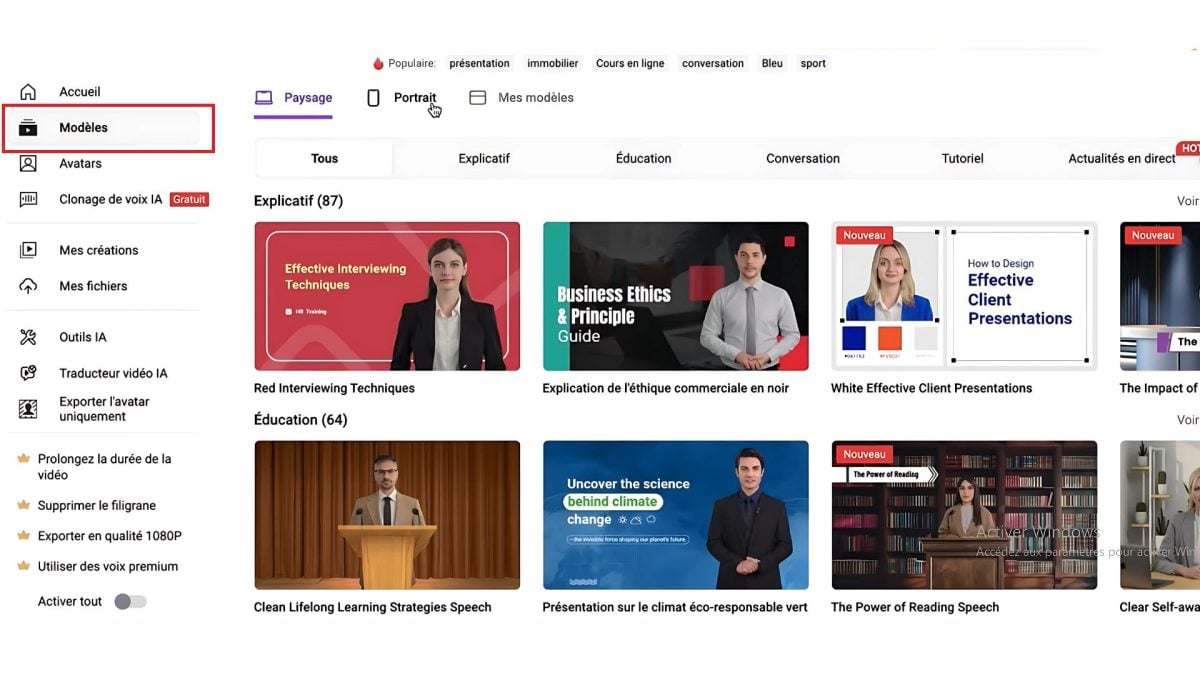
Step 3: Select an avatar.
Go to the Avatars section and choose one AI avatar (a man or a woman) who will embody your message.
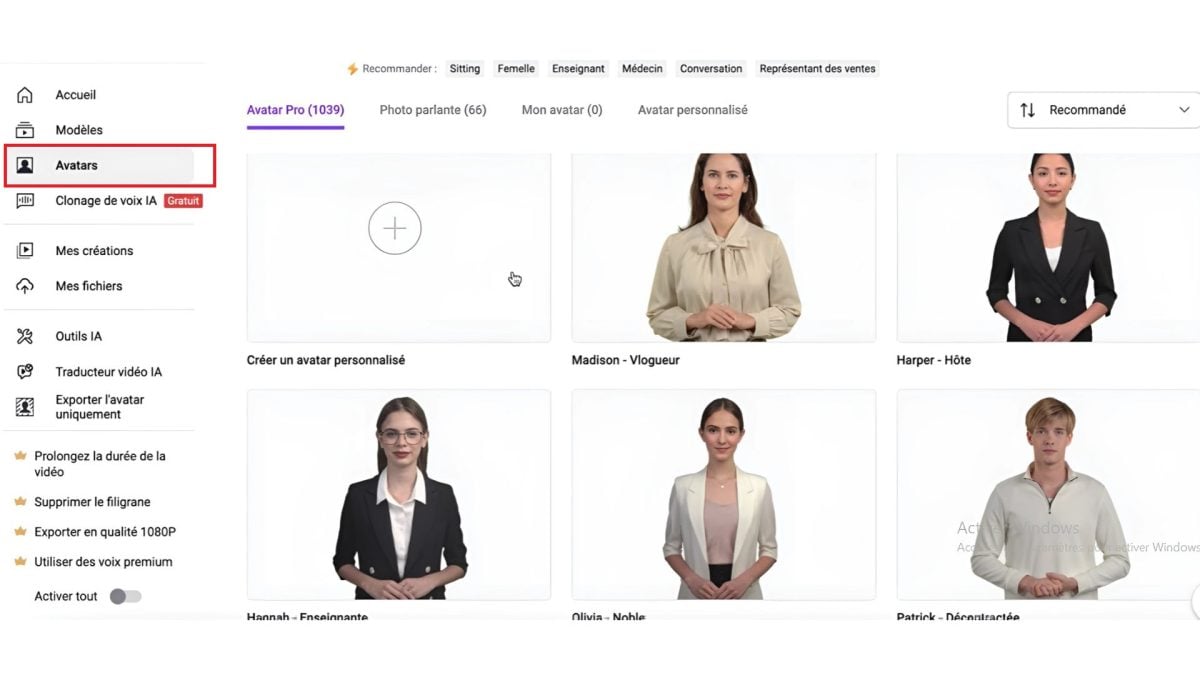
Step 4: Choose the voice.
Go to the section AI voice cloning. You have access to a variety of text-to-speech options, with a range of voices. You can adjust the intonation, language, and accent.

Step 5: Enter the script and customize the set.
You write the text that the avatar must say. Then, you personalize the decor : background, image, background video, logo, product visuals, animated text, and avatar position.
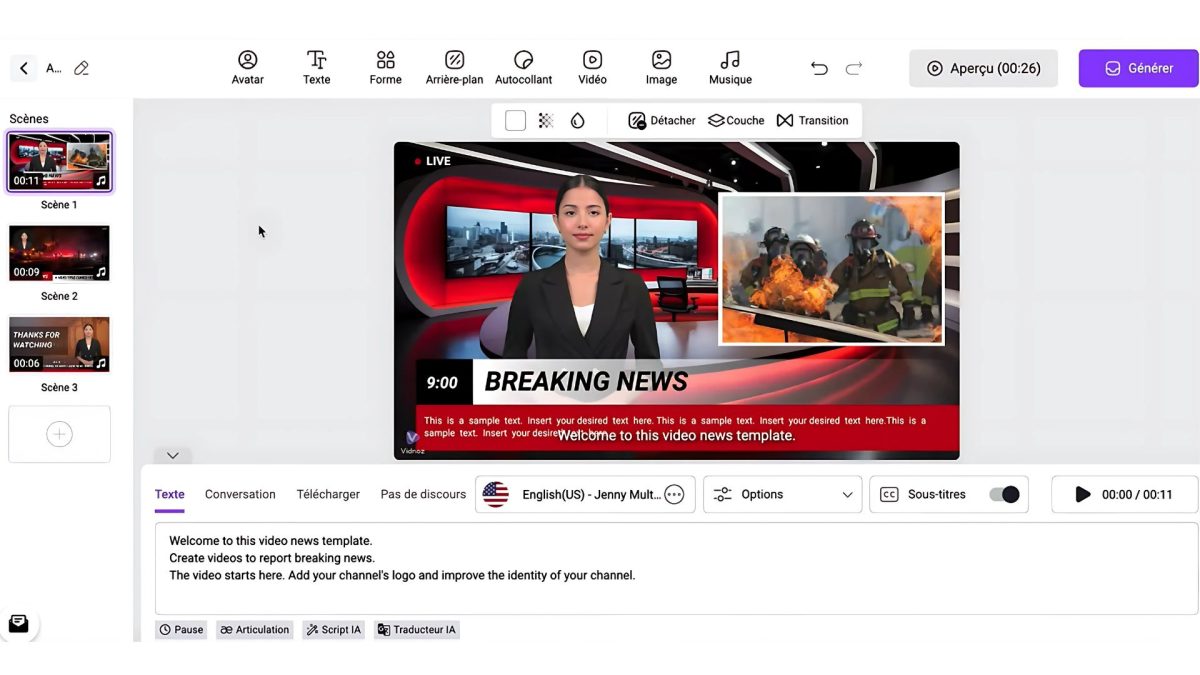
Step 6: Download the video.
Once you've set up the video, click Generate, export in HD, then download or share your advertising via a link.
What are Vidnoz AI's prices?
Here's a clear overview of Vidnoz AI formulasfree and paying :
| Plan | Monthly price | Video minutes | AI avatars | Voice | Resolution |
|---|---|---|---|---|---|
| Free | 0 $ | 3 min/day | 250+ | 170+ | 720p |
| Starter | 14,99 $ | 15 min/month | 250+ | 470+ | 720p |
| Business | 37,49 $ | 30 min/month | 250+ | 470+ | 1080p |
| Enterprise | On request | Personalized | Personalized | Personalized | Up to 4K |
What do people think of Vidnoz AI?
Vidnoz AI has received generally positive reviews from users. They appreciate its ease of use, its speed of production, and its excellent value for the price.
On Trustpilot, Vidnoz AI has an average rating of 3.2 stars out of 5.

Here are the strengths and limitations of Vidnoz AI according to users:
1. Vidnoz AI highlights :
- Ease of use
- Rapid creation
- Realistic AI voices
- Media library
- Predefined templates
- Online accessibility
- Affordable cost
2. Weaknesses of Vidnoz AI:
- Limited personalization
- Variable quality
- Lack of human creativity
- Poor customer support
Want to learn more? Check out our Full Review of Vidnoz AI !
Synthesia: the leader in AI video advertising
Synthesia is a artificial intelligence platform specializing in Creating videos from text. You no longer need a camera, a microphone, or even a host.
With just a few clicks, you Create a professional video driven by a AI avatar who speaks the language of your choice. It's one of the tools the most comprehensive on the market for video ad, with HeyGen as its main competitor.
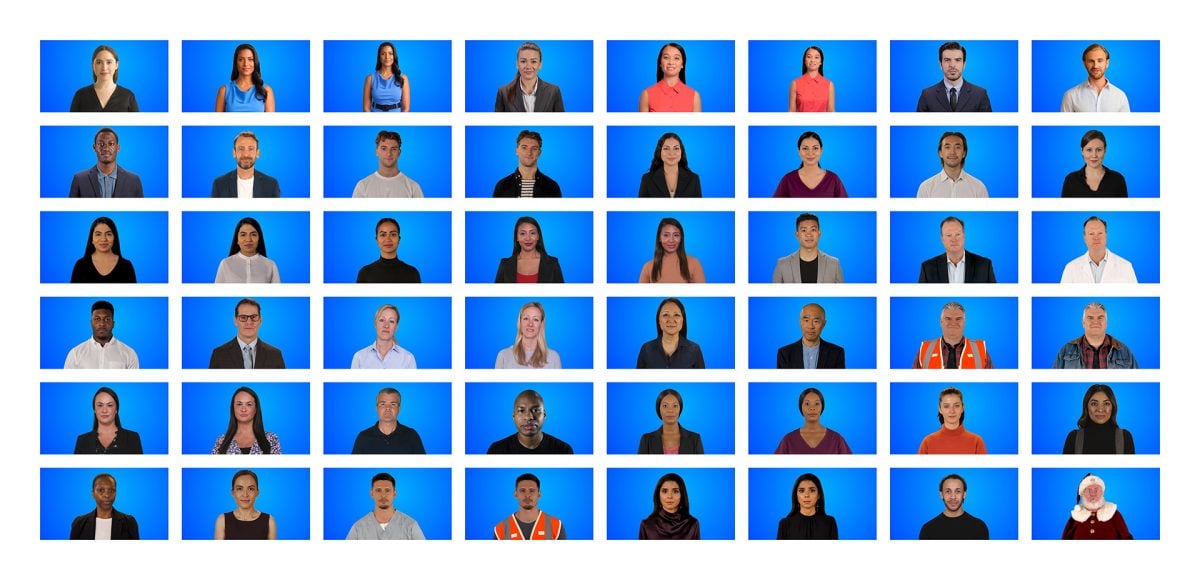
Synthesia is now a leader in its segment. It’s an excellent solution for your advertising videos, your tutorials and your e-learning content.
Here are the main pros and cons of Synthesia:
| Advantages | Disadvantages |
|---|---|
| Easy to use, intuitive interface | Less customizable than live shooting |
| Fast video generation | Avatars can lack natural emotion |
| +140 languages available | Paid subscription |
| Realistic, professional avatars | Limited to certain video formats |
| Considerable time savings | Direct competition from HeyGen in the field of avatar movements |
How does Synthesia work?
Synthesia is based on a artificial intelligence who automatically creates videos. Just enter a text and AI transforms it into a video clear. Next, choose the human avatar that suits you best. It takes the place of a presenter and speaks in the language of your choice.
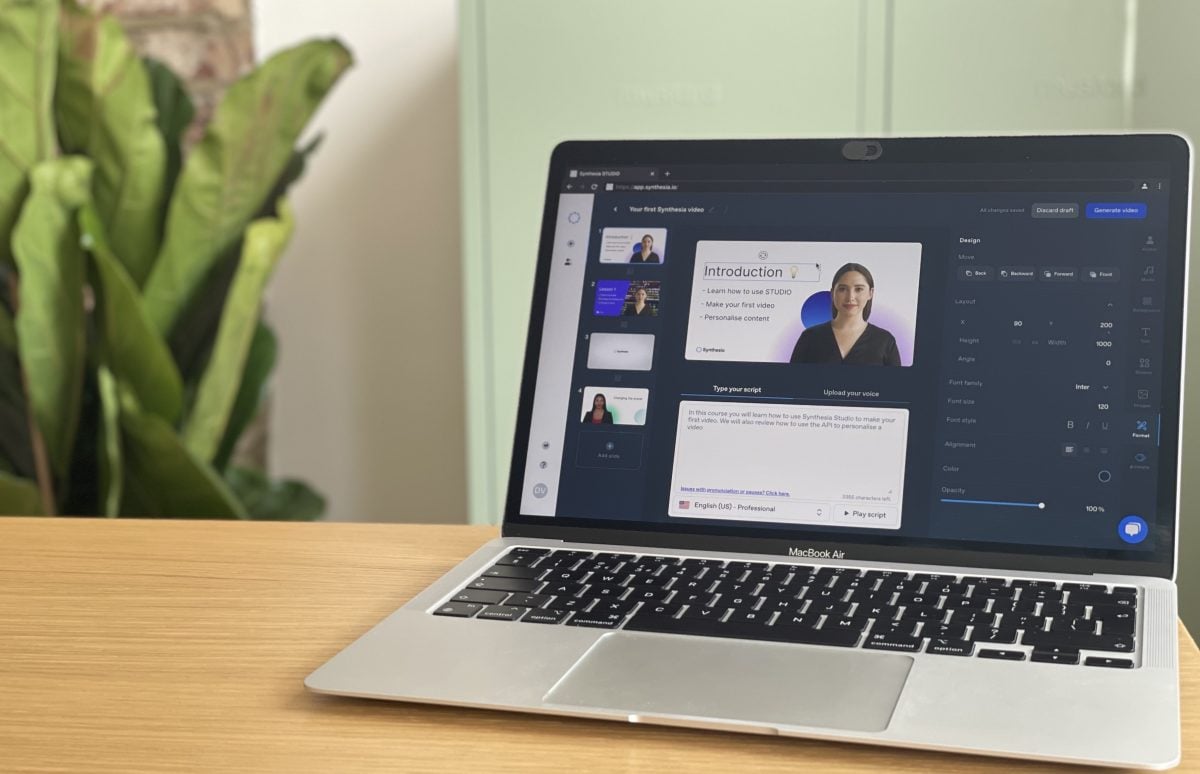
The main Synthesia features are :
- The video creation based on a text.
- A AI avatar library realistic.
- the multilingual support (+140 languages).
- Regarding the professional video templates.
- The personalization text, background, and visuals.
- The addition of automatic subtitles.
- The integration of music, ofpictures and of videos.
- L'HD export, easy sharing, or direct integration into your website.
Here's how to create your first AI video advertising in less than 10 minutes on the Synthesia platform.
Step 1 : Create an account.
Go to Synthesia.io and create your account (trial or subscription).

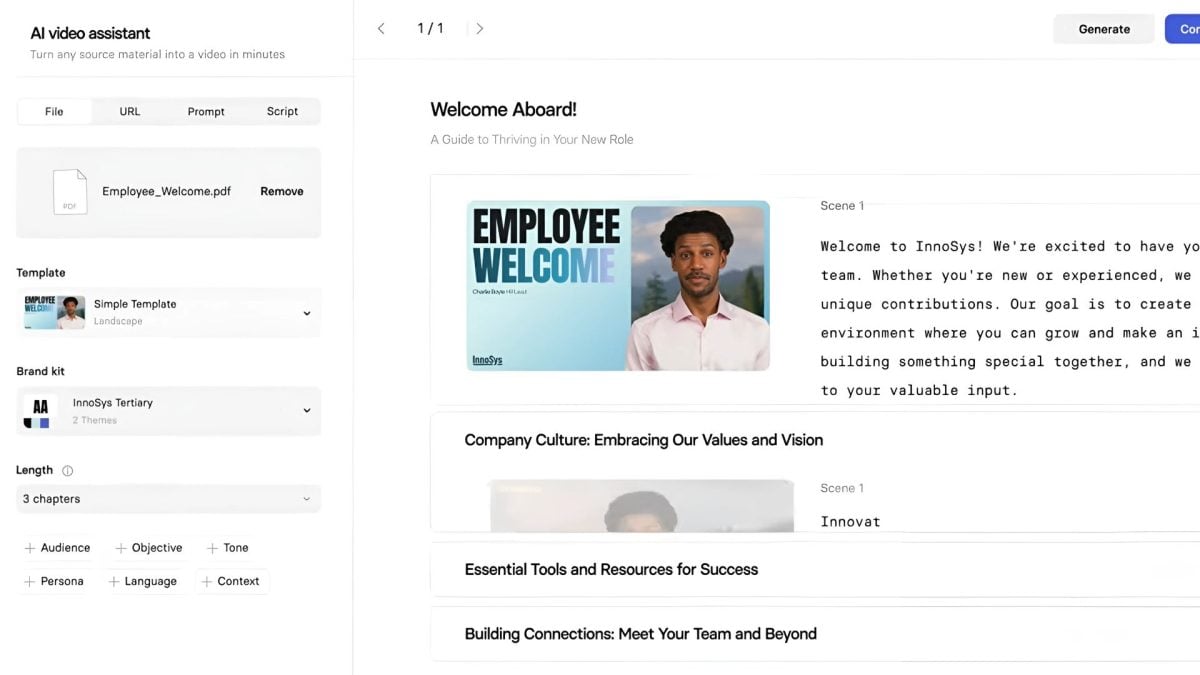
2nd step : Enter the information.
- Upload a file or document to your Mark.
- Choose the model of your choice.
- Select your brand kit business.

Step 3 : Choose a video template.
You get a editable plan with a script, images, and videos that reflect your brand.
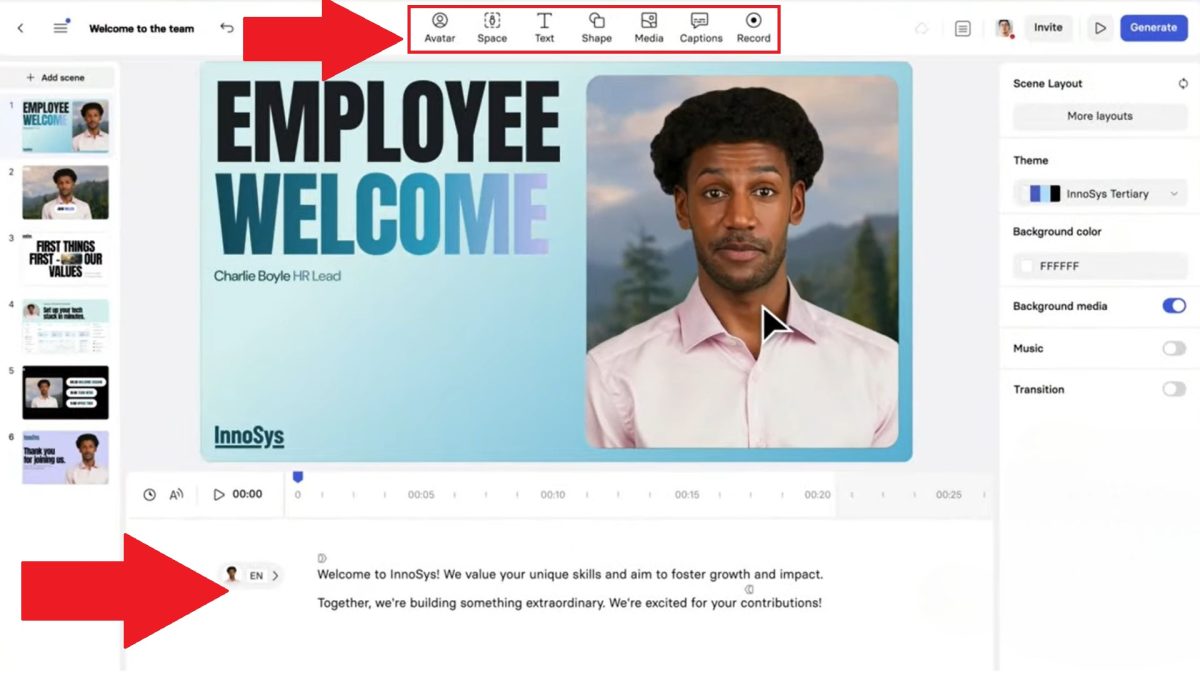
Step 4 : Customize the video.
Depending on your goal, you can modify details video: script, avatar, text, images, voice-over, etc.
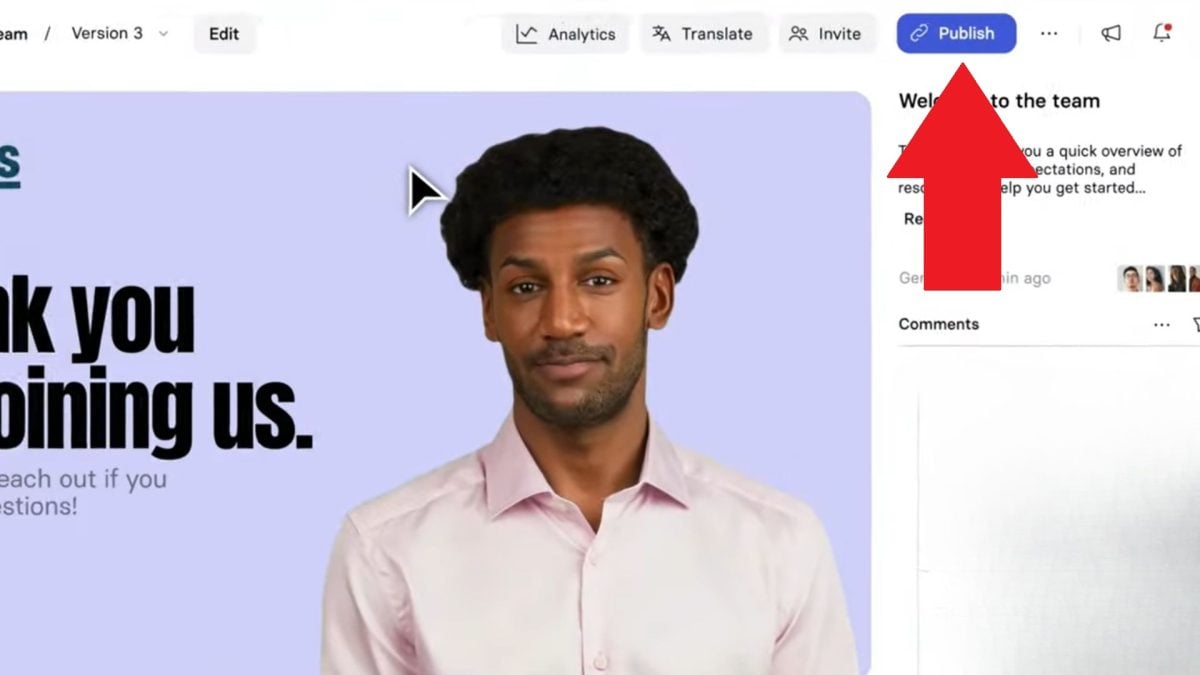
Step 5 : Download the video.
Once you've set up the video, click Publish, export to HD, then download the file or share it via a link.
What are Synthesia's prices?
Here's an overview of formules by Synthesia, for all needs and for all budgets:
| Plan | Monthly price | Video limit | AI avatars | Collaboration |
|---|---|---|---|---|
| Free | 0 $ | 3 minutes/month | 9 AI avatars | Nope |
| Starter | 29 $ | 10 minutes/month | 125+ AI avatars | 1 publisher + 3 guests |
| Creator | 89 $ | 30 minutes/month | 180+ AI avatars | 1 publisher + 5 guests |
| Enterprise | On request | Unlimited minutes | 230+ AI avatars | Unlimited number of users |
What do people think of Synthesia?
Synthesia enjoys an excellent reputation among its users. They praise its simplicity, the the quality of its videos and the power of its AI avatars.
On Trustpilot, Synthesia has an average rating of 4.3 out of 5 stars.
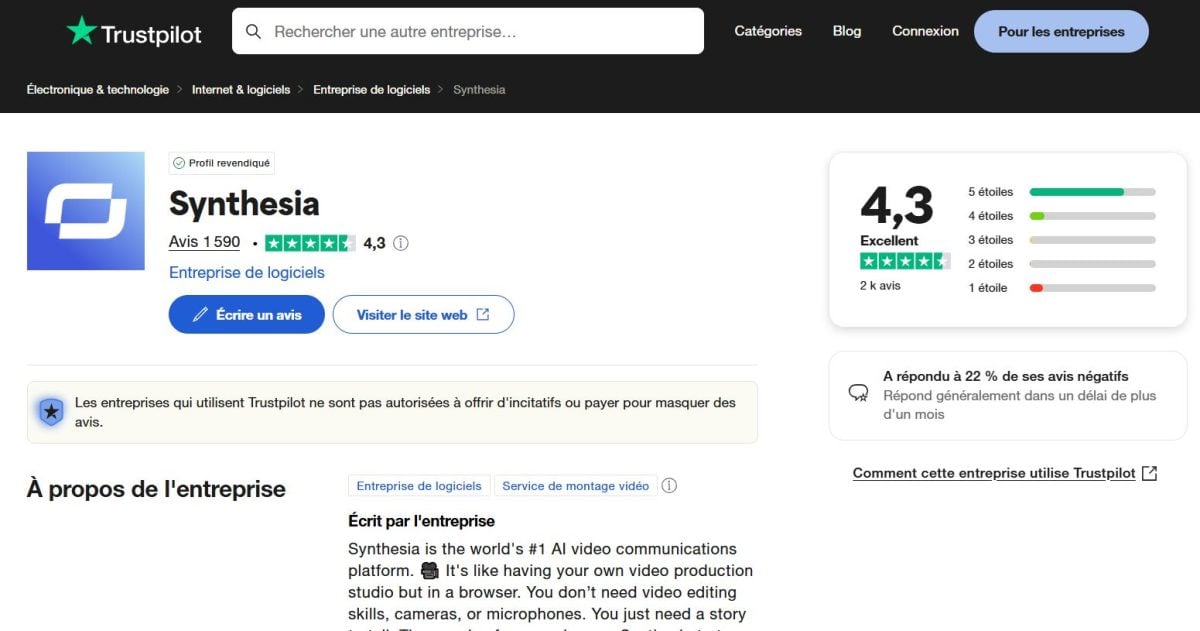
Here are Synthesia's strengths and limitations, as reported by users.
1. Synthesia highlights :
- Ease of use
- Professional quality
- Wide choice of avatars and languages
- Time-saving
- Responsive customer support
2. Synthesia's weaknesses :
- High cost of advanced plans
- Limited customization compared to an actual film shoot
- Synthetic voices that sometimes sound unnatural
Blaze AI: Your AI Partner for Designing Advertising Campaigns
Blaze AI is a platform which lets you create different marketing contents based on simple instructions. You generate advertising, posts for your social networks, articles, and scripts for your videos or even emails.
Designed for entrepreneurs, them freelancers and the game's agencies, this artificial intelligence product of content in just a few minutes.

Here are the strengths and limitations of Blaze AI :
| Advantages | Disadvantages |
|---|---|
| Intuitive interface | Limited personalization |
| Rapid generation of quality content | May require manual adjustments |
| Wide range of templates for various types of content | Some advanced features reserved for higher planes |
| Brand voice integration | Learning Curve for Unlocking Full Potential |
| Real-time collaboration tools | Not well suited for those unfamiliar with digital marketing |
How does Blaze AI work?
Blaze AI works like a intelligent marketing assistant. You give him a brief, and he comes up with content ideas advertising custom-made. The result adapts to your target and the tone of your Mark.

His main features are :
- Creation of multi-channel content.
- System for brand voice : You set your tone and style, and the tool adapts to them automatically.
- Planning and generation campaigns.
- IA Strategic Assistant.
- Collaboration as a team.
- Models optimized for performance.
Here are the steps to generate a advertising in just a few minutes.
Step 1: Create an account on Blaze AI
Sign up at blaze.ai.
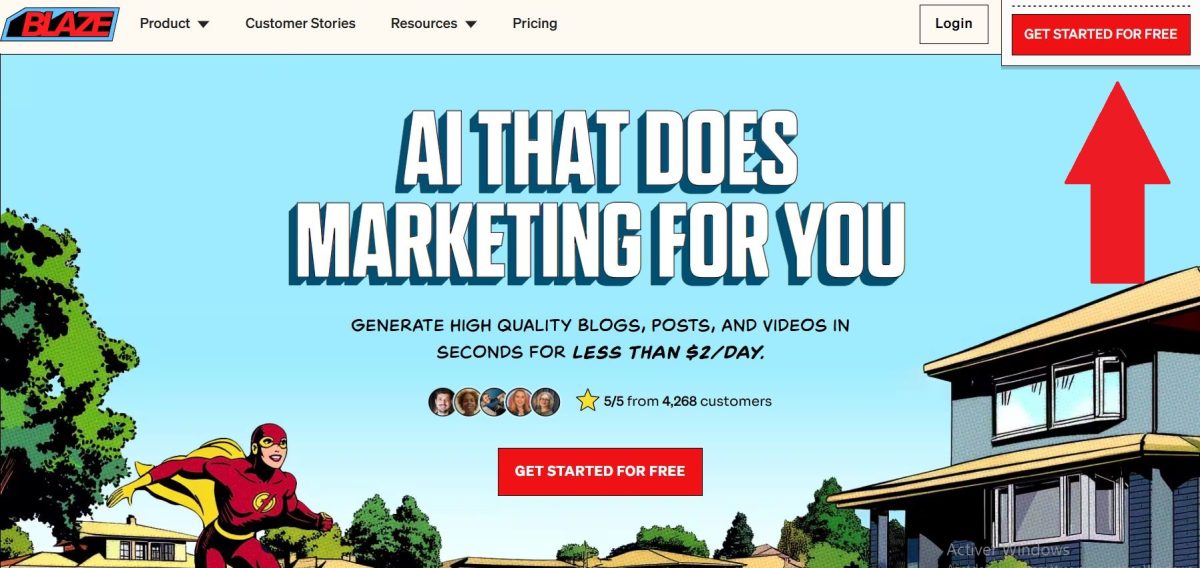
Step 2: Create a new project and choose a content type
Click on Create a New Project. Next, select the type of content you want: Facebook Ads, video script, Google ad, etc.
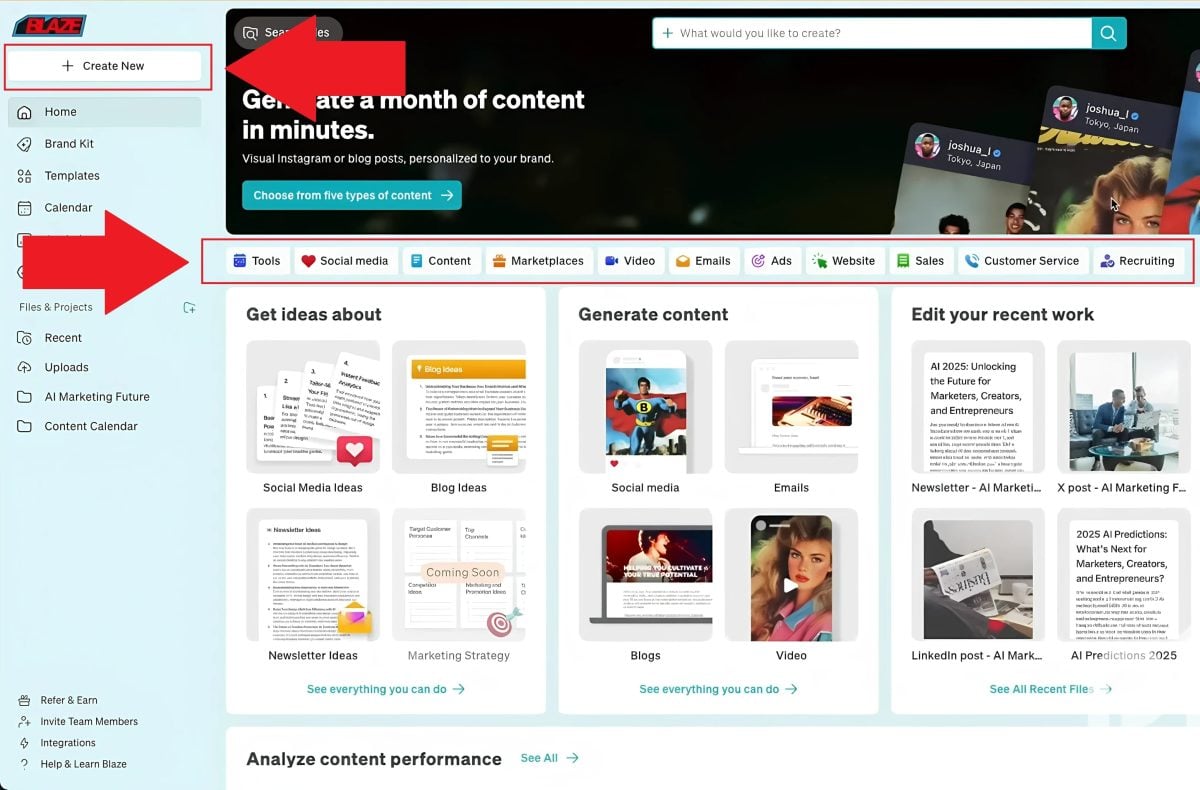
Step 3: Define Your Brand in the Brand Kit
- Brand Styles : Connect a social media account, and the AI will generate your brand's style by analyzing the content on your account.
- Brand Voice : Enter the link to your webpage, paste some text, or upload a file. The AI will create your brand voice based on this data.

Then give a quick briefing to AI. Specifies the product or the service to be promoted, the benefits to be highlighted, and the target audience.
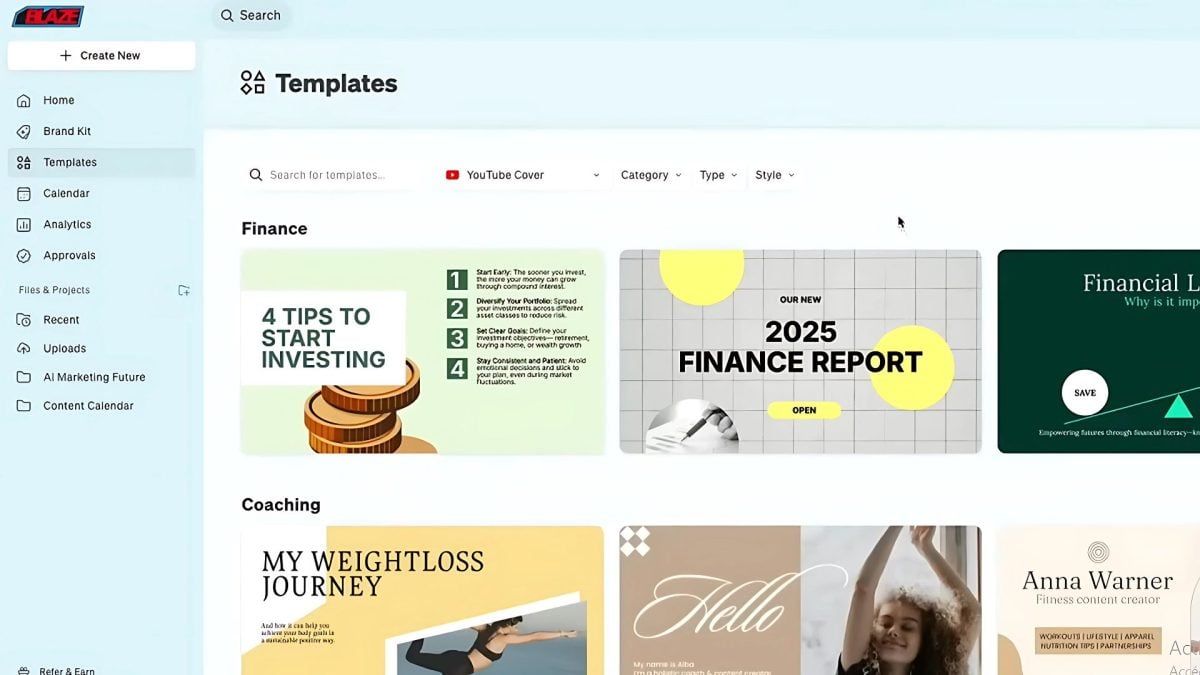
Step 4: Choose a model
Choose the model you like for your video.
How much does Blaze AI cost?
Blaze AI offers several subscriptions depending on your needs and budget:
| Plan | Monthly rate | Annual fee | Users |
|---|---|---|---|
| Creator | 34 $/month | 312 $/year | 1 |
| Pro | 49 $/month | 444 $/year | 1 |
| Team | 79 $/month | 708 $/year | 3 |
| Agency | 200 $/month | 1800 $/year | 5 (up to 10) |
| Enterprise | On request | 4788 $/year | Personalized |
What do people think of Blaze AI?
Blaze AI appeals to many users thanks to its generating power its content and simplicity. The feedback has been very positive overall.
On Trustpilot, the tool has a rating of 4.5 out of 5 stars.

Here are the strengths and limitations of Blaze AI according to users.
Highlights :
- Creating high-quality content.
- Customizing the brand's voice.
- Marketing automation.
- User-friendly interface.
Weaknesses to consider:
- A learning curve at the beginning.
- Customization options for visuals are sometimes limited.
- The most advanced features are reserved for higher-tier paid plans.
Creatify AI: Your Video Production Studio
Creatify AI is an online platform based on the’artificial intelligence. It allows you to create advertising videos from a text, a website's URL, or’pictures, all with just a few clicks.
Thanks to its realistic avatars, to its smart editor and its batch generation, you quickly produce engaging content for your campaigns.
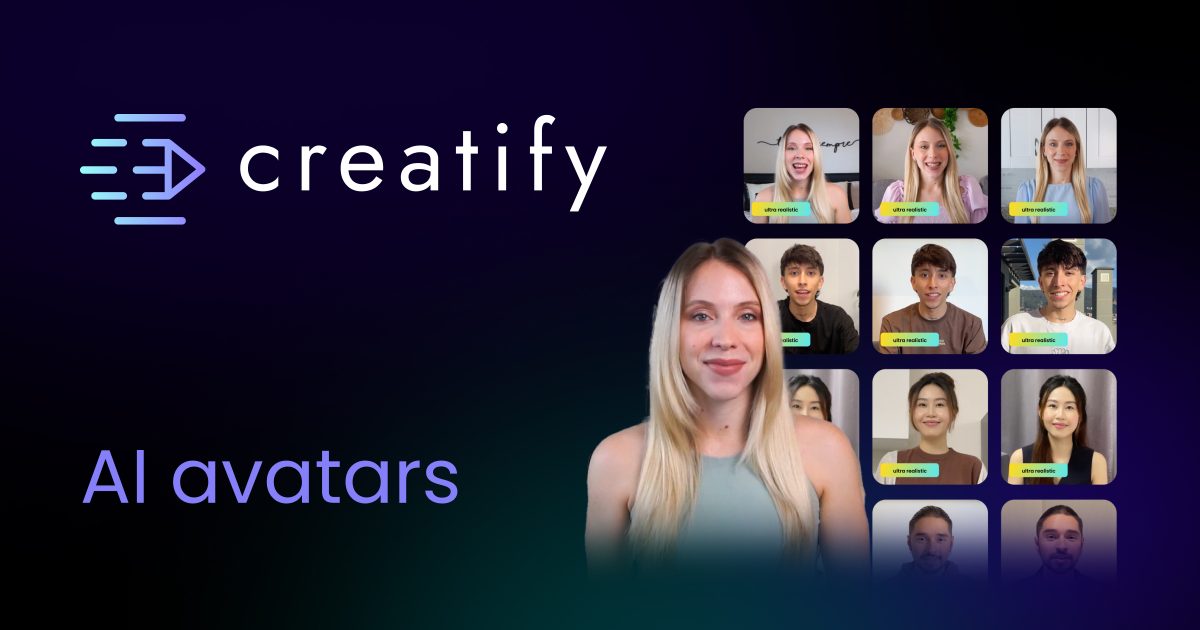
This tool helps brands produce optimized content for social media platforms such as TikTok, Instagram and YouTube.
Here are the main pros and cons of Creatify AI :
| Advantages | Disadvantages |
|---|---|
| Ultra-fast video creation | Limited avatar options in the basic plan |
| Realistic AI avatars | Potentially high cost |
| Intuitive interface | Video rendering sometimes slow |
| Batch generation of 5 to 10 videos | Limited tone customization |
| Smart Video Editor | Advanced features available only on paid plans |
How does Creatify AI work?
It's easy to use. You Write your script or you post a link, then the’AI takes care of the rest automatically. With just a few clicks, you'll have your promotional video!
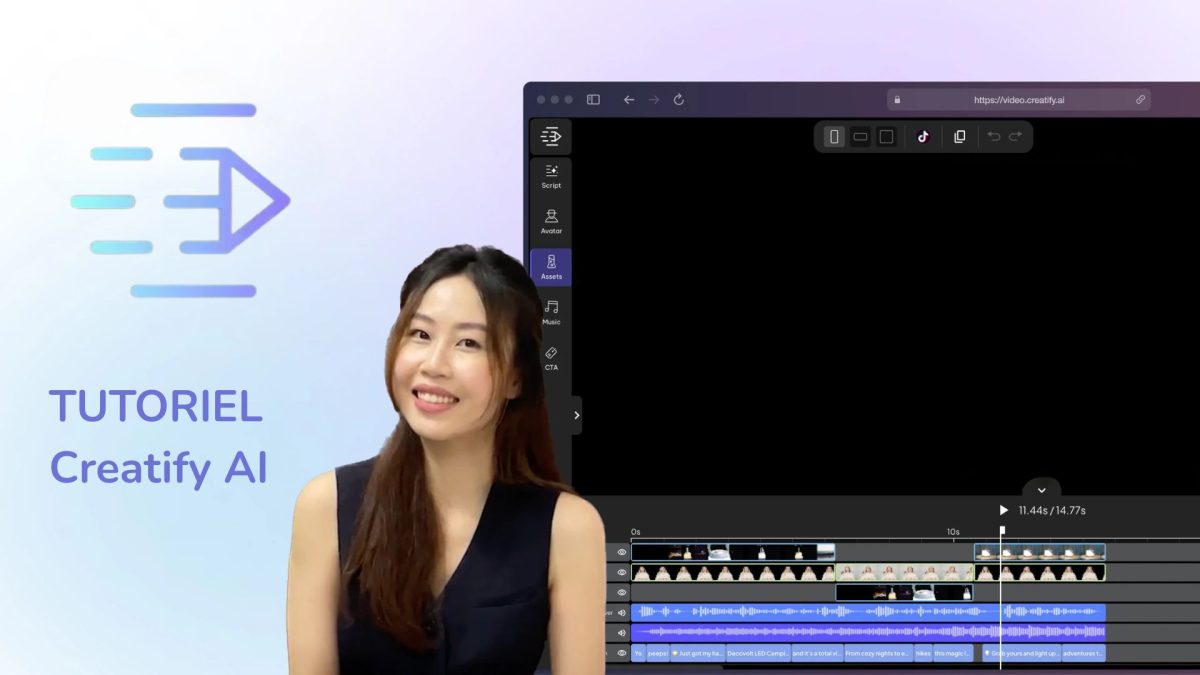
The platform is designed to create videos in record time. It uses AI to:
- Automatically generate an advertising script.
- Offer an AI avatar or a voice-over.
- Add visual effects, subtitles, and animations.
- Create several versions of the video.
- Optimize formats for social media.
Here's how to generate a video ad in just a few minutes:
Step 1: Create an account on Creatify AI
Go to creatify.ai and create an account (trial or subscription).
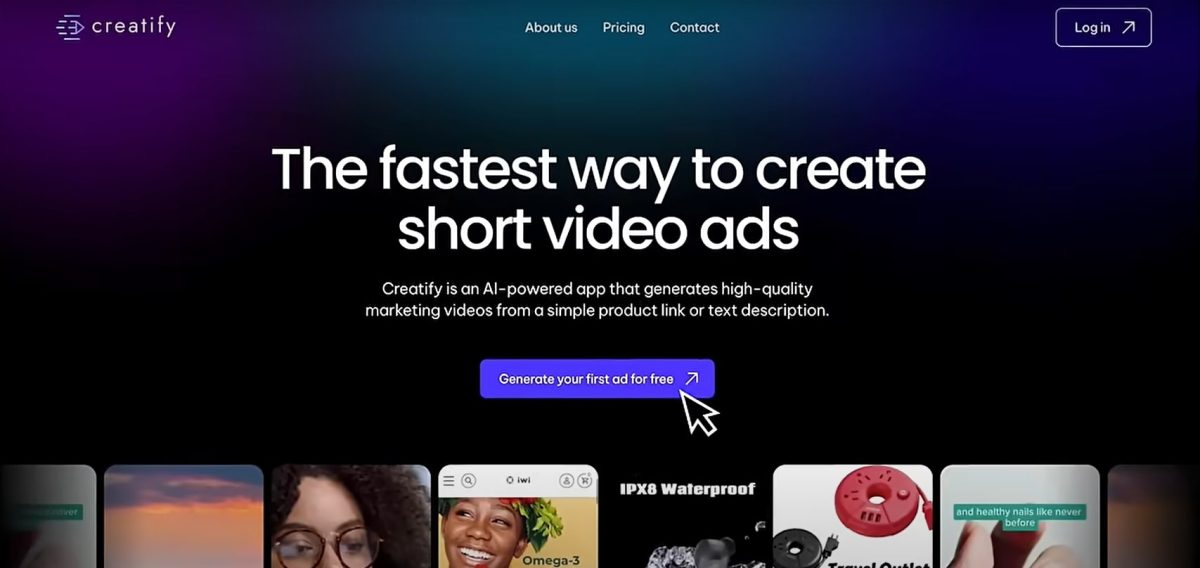
Step 2: Enter the key information
You can paste the product URL.
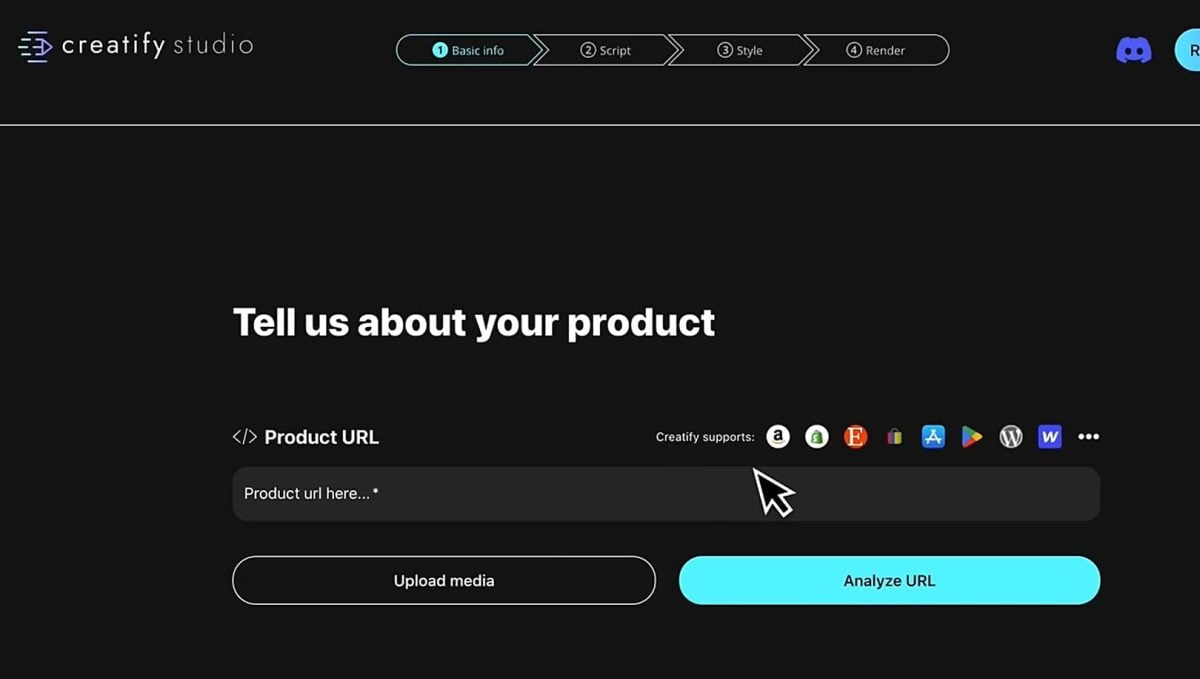
You can also write your own script to enter the product information.

Step 3: Customize the video
You can choose the format that works best for you, the duration, and the language used.

Step 4: Review the script type
You can let Creatify generate an automatic script or write your own script.

Step 5: Select an AI avatar or voice-over
Choose a realistic virtual presenter or an AI-generated voiceover. Once you've completed all the steps, start the rendering process by clicking «Render.» .

How much does Creatify AI cost?
Here are the different pricing plans offered by Creatify AI:
| Plan | Monthly price (billed annually) | Credits/year | Users | AI avatars | Supported video formats | Export without watermark |
|---|---|---|---|---|---|---|
| Free | 0 € | 120 (approx. 24 videos) | 1 | Limited library | 9:16 only | Nope |
| Starter | 33 € | 1200 (approx. 240 videos) | 1 | 170+ avatars | 9:16, 16:9, 1:1 | Yes |
| Pro | 49 € | 2400 (approx. 480 videos) | 2 | 500+ premium avatars | 9:16, 16:9, 1:1 | Yes |
| Company | On request | Unlimited | Unlimited | Customizable | All formats | Yes |
What are the opinions about Creatify AI?
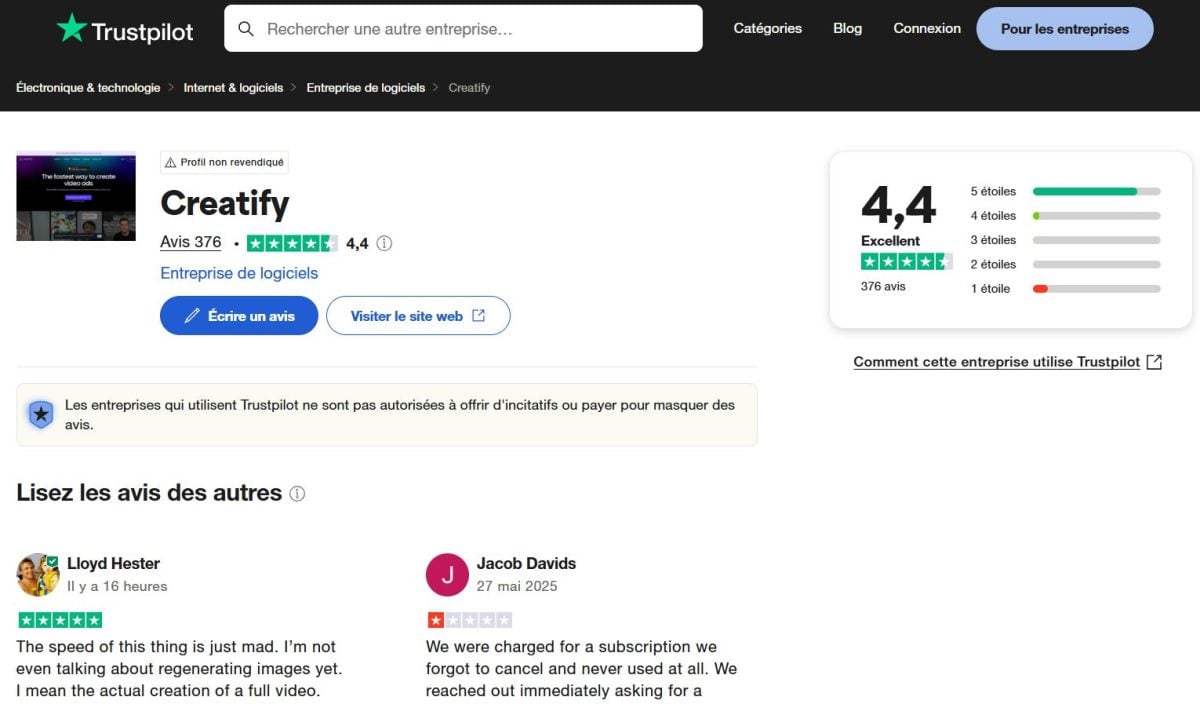
Creatify AI is widely praised by its users. They highlight its ease of use, the quality of its AI avatars, and how quickly it creates videos.
With an average rating of 4.4 out of 5 stars on Trustpilot, the platform stands out for its performance and accessibility.
Here are the strengths and limitations of Creatify AI according to users:
Highlights :
- Intuitive, flexible interface
- Realistic, customizable AI avatars
- Responsive customer support
- Significant time savings
Weaknesses to consider:
- Limited customization of tone and emotion
- Cost for small businesses
AdCreative AI: a French AI video tool for your marketing needs
AdCreative AI is an innovative French platform. It is designed to boost the performance of your ad campaigns by automatically generating visuals, videos, and text.
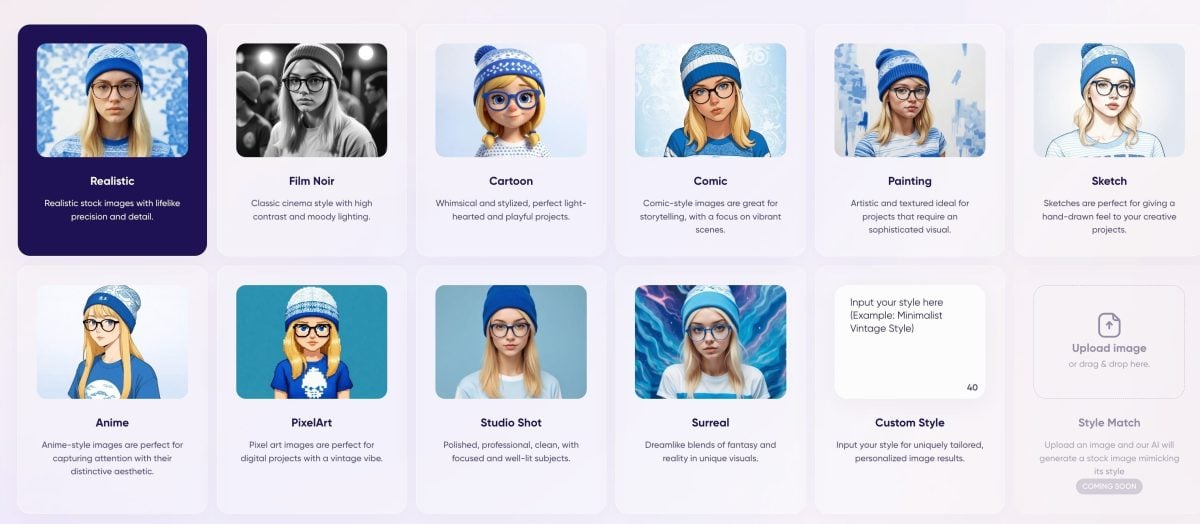
The content generated by the platform is optimized for conversions while maintaining brand consistency.
In the following table, you'll find the main pros and cons of AdCreative AI:
| Advantages | Disadvantages |
|---|---|
| Intuitive interface | High cost |
| Fast generation | Limited personalization |
| Multiple integration | Data dependency |
| Competitive analysis | Learning curve |
| Scalability | Dependence on Automation |
How AdCreative AI works
AdCreative AI is based on an automated yet customizable process. It doesn’t involve entering a script like you would with video generators. Instead, you’ll provide basic elements that the AI will use to create optimized visuals and ad copy.
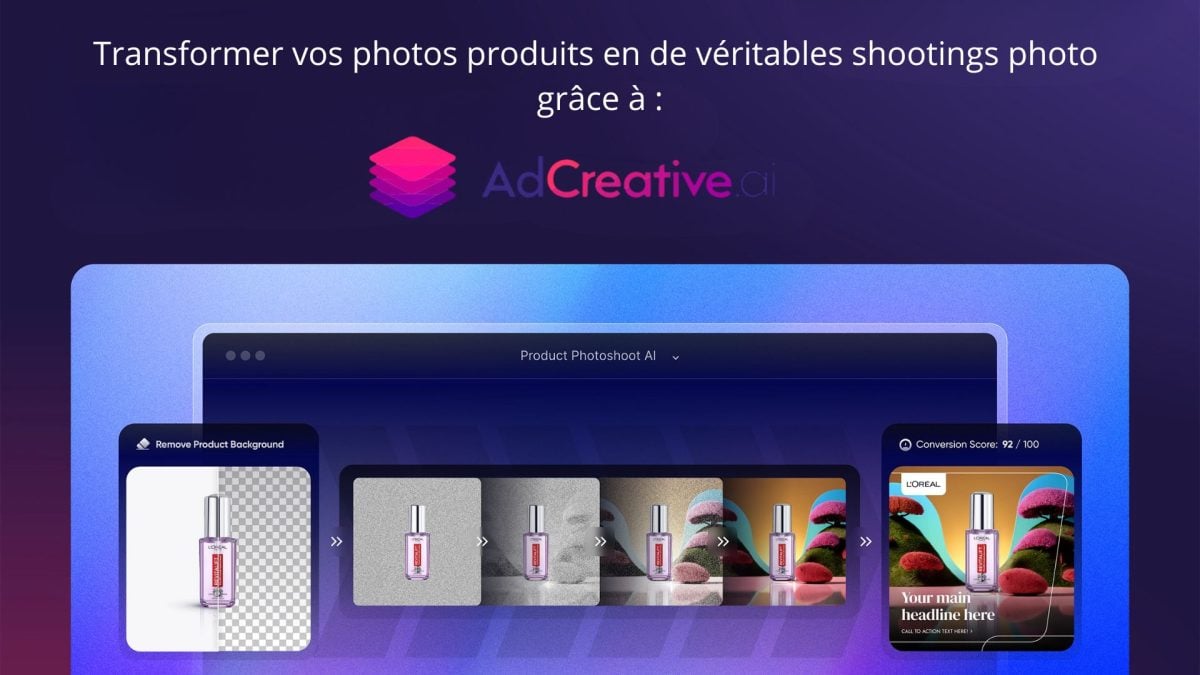
The main features of AdCreative AI are as follows:
- Creation of advertising visuals.
- Generation of advertising copy.
- Targeting suggestions.
- Competitive Analysis.
- Multichannel optimization.
- Collaborative team.
- Smart Library.
Here are the steps for creating an advertisement with the platform:
Step 1: Create an AdCreative AI account
Go to adcreative.ai and create an account (trial or subscription).

Step 2: Create a Brand
This step involves providing brand information: logo, slogan, colors, fonts, etc.

Step 3: Set up your brand information
Enter the URL of your website, if you have one. The tool will automatically detect the information (logo, color, etc.) and insert it. If you don't have a website, you can enter everything manually.

Once you've created the brand, you can launch your new project.
Step 4: Start a new project and choose a goal
Click "Generate," then select the type of content you want: ad copy, ad videos, ad creatives, etc.
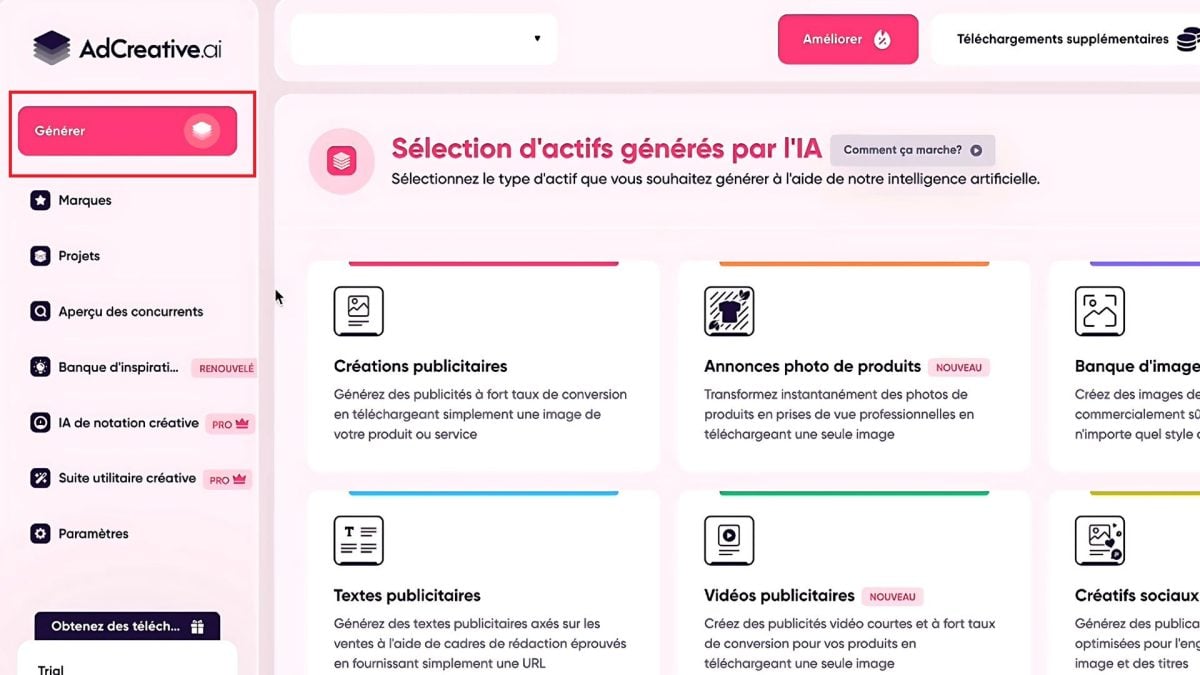
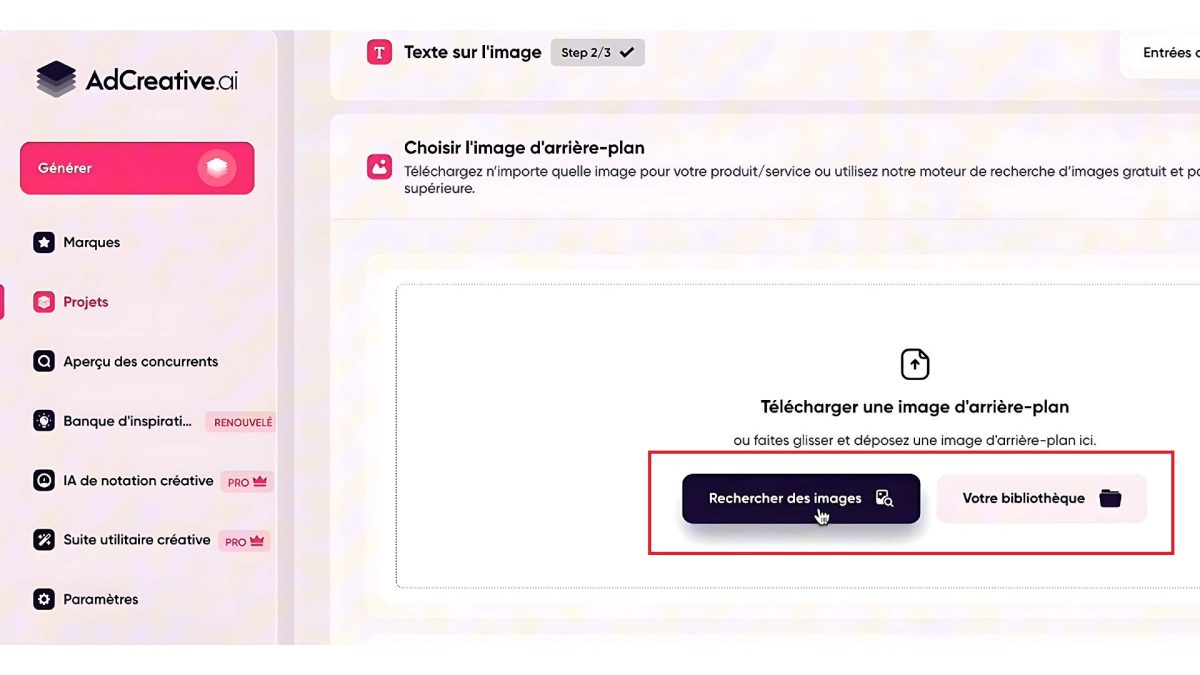
Step 5: Upload an image or search the image library
You can import a product image or browse the AdCreative AI image library.
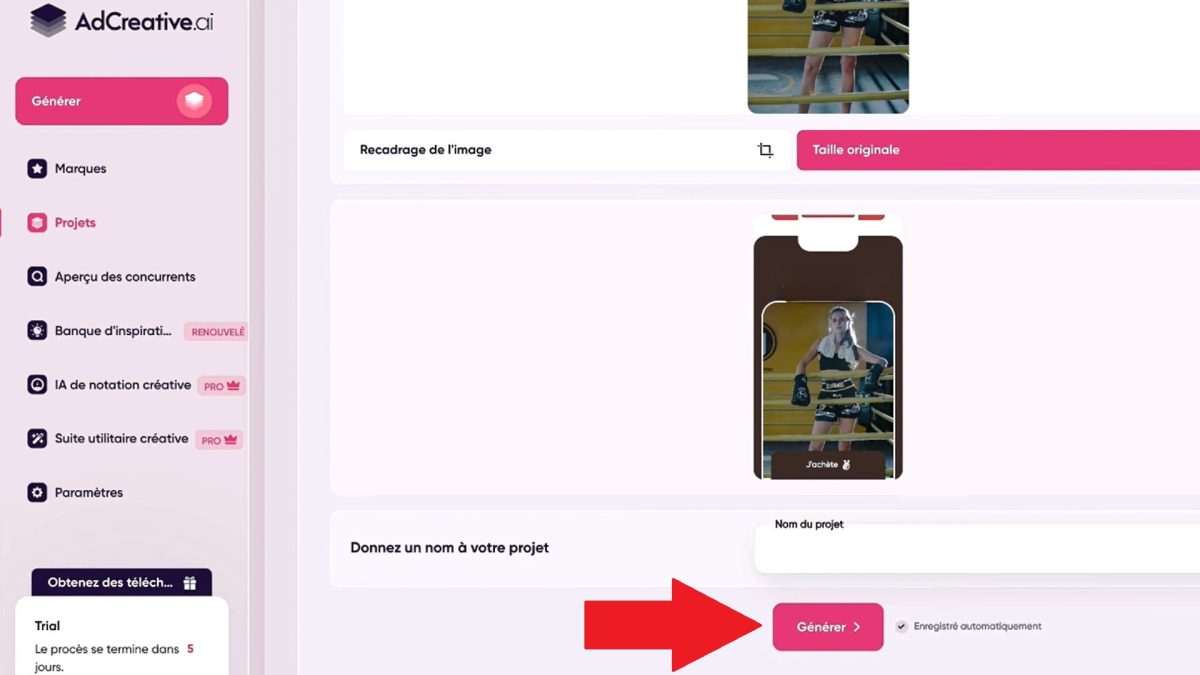
Step 6: Generate the designs
Click "Generate." The platform instantly suggests several ad variations.
Step 7: Analyze the estimated performance
Each ad is rated based on a projected conversion score derived from advertising data.

Once you're satisfied, download the images or connect your advertising account.
How much does AdCreative AI cost?
In the following table, you'll find the plans available from AdCreative AI:
| Plan | Monthly price | Monthly credits | Brands | Users |
|---|---|---|---|---|
| Free trial | 0 $ | 10 | 1 | 1 |
| Startup | From 29 $ | 10 à 100 | 1 à 2 | 1 à 4 |
| Professional | From 189 $ | 100 à 500 | 5 à 20 | 5 à 15 |
| Agency | From 499 $ | 500 à 2000 | 50 à 200 | 20 à 40 |
What are the opinions about AdCreative AI?
User reviews of AdCreative AI are generally mixed, with an average rating of 3.8 out of 5 stars on Trustpilot.

Here are the strengths and limitations of AdCreative AI according to users:
Highlights :
- Rapid generation of advertising content
- User-friendly interface
- AI-Based Optimization
Weaknesses to consider:
- Billing problems
- Responsive customer service
- Variable design quality
Sora: OpenAI's video generator
Developed by OpenAI, Sora is a revolutionary tool capable of transforming simple text descriptions into realistic, dynamic videos.
It is primarily designed for creators, marketers, and storytellers, and allows users to produce visual content without advanced technical skills.

This tool pushes the boundaries of video creation by automating every step of the production process.
In the following table, you'll find the main pros and cons of Sora:
| Advantages | Disadvantages |
|---|---|
| Easy to handle | Limited personalization |
| Fast generation | Data dependency |
| Multiple integrations | Requires some time to get used to |
| Competitive analysis | High cost |
| Scalability | Dependence on Automation |
How does Sora work?
Sora is based on advanced AI technology that generates videos from simple text descriptions. It is designed to interpret complex scenes and understand movements, objects, visual styles, and more.

Sora's main features are as follows:
- Video transcript.
- Visual comprehension.
- Taking time into account.
- Customizable visual style.
- Smart Editing.
Here are the steps for creating videos on Sora:
Step 1: Access ChatGPT
Refine your ideas using ChatGPT and create a «storyboard» for your video before you start production.

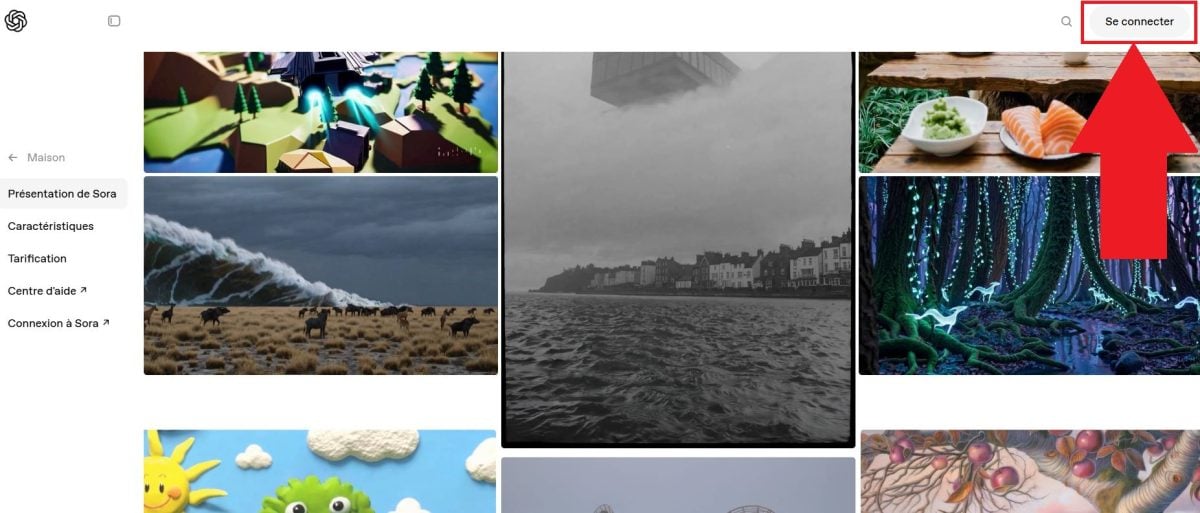
Step 2: Go to the Sora platform, then log in
Log in to the platform via ChatGPT or by typing in the Sora OpenAI search bar (Pro subscription or beta access to Sora).
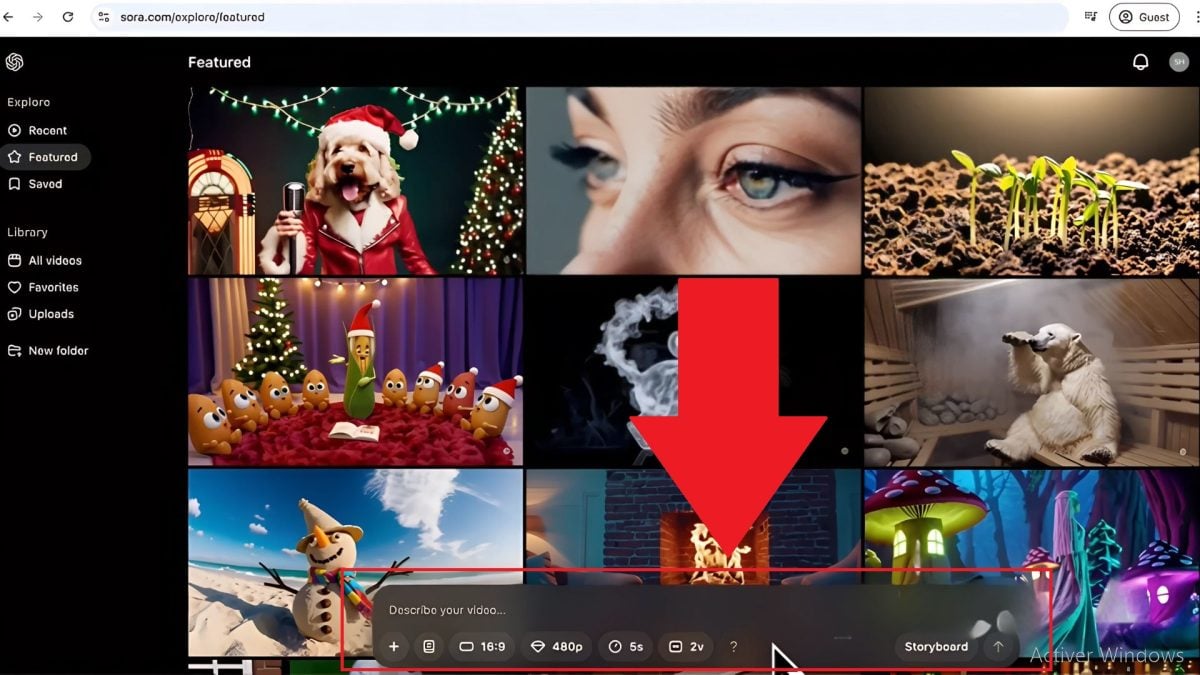
Step 3: Describe your video
You can use the storyboard provided by ChatGPT as a guide to describe your video.
Step 4: Import Visual Elements
You can import your own photos or videos and manage each step. Choose from the available formats. Once you're satisfied with the result, you can create and download the video.

What are Sora's prices?
Here is an overview of Sora's pricing plans, which are included in the ChatGPT Plus and Pro subscriptions:
| Plan | Monthly price | Videos generated per month | Resolution | Max. duration | No watermark |
|---|---|---|---|---|---|
| ChatGPT Plus | 20 $ | Up to 50 videos (1,000 credits) | Up to 720p | 5s | Nope |
| ChatGPT Pro | 200 $ | Up to 500 priority videos | Up to 1080p | 20s | Yes |
- The Plus subscription includes Sora at no extra charge.
- With the Pro subscription, you get ten times as many generators.
What are the opinions about Sora?
Some users praise Sora’s speed. In less than 5 minutes, you can get a realistic 3- to 5-second video. Others consider the quality to be rather average.
Here are the strengths and weaknesses of Sora OpenAI according to users:
Highlights :
- Fast generation
- Intuitive interface
- Contextual understanding
Weaknesses to consider:
- Limited resolution
- Results vary according to complexity
- Negative opinions on ethical issues and bias
How to choose the best AI tool for creating ads?

With so many different AI tools available, it can be hard to know which one to choose. Here are a few tips to help you make the right choice:
- Define your needs: type of ad, format, level of customization, voice-over, avatars, etc.
- Try the free versions.
- Compare features: customization, multilingual voice, rendering style, etc.
- Consider the value for money.
- Read user reviews.
- Keep compatibility in mind: Some tools integrate better with platforms like Canva, YouTube, Shopify, etc.
Here are the key criteria to compare:
| Criteria | What to Watch For |
|---|---|
| Advertising objective | Format, duration, rendering style |
| Features | AI avatar, text-to-video, voice-over, templates, etc. |
| Rates | Monthly price, freemium plan, annual discount |
| Ease of use | Intuitive interface, assistance, guided templates |
| Languages and localization | Number of languages, localized voices, subtitles |
| User reviews | Trustpilot, Reddit, Forums, Youtube feedback |
| Integrations | Canva, Zapier, Google Drive, etc. |
In conclusion, choose the tools based on your needs, budget, and goals. Synthesia, Vidnoz AI, Blaze AI, Creatify AI, AdCreative AI, and Sora each stand out for their respective strengths.
Have you tried a tool? Share your thoughts in the comments!
Read also:








 FR
FR  RU
RU  EN
EN  ES
ES  IT
IT  DE
DE  ZH
ZH  PT
PT  ID
ID  JA
JA  DA
DA