Create an account Twitter (X) takes less than 5 minutes. All you need is a mail address or one phone number, and here we go.
X is one of the most widely used social media platforms in the world for sharing tweets, following the news, and connecting with other users.
Go to the Twitter (X) website
Since 2023, Twitter is officially called X. The registration address is x.com/i/flow/signup.
Type it directly into your browser's address bar, as shown in the image below. The old address twitter.com/signup automatically redirects to this same page.

Would you rather talk on the phone?
- Download the app X on Android Where iOS.

- Press the button «Create an account» right from the home screen.

Register
You can sign up with a Google account, an Apple account, or a phone number.
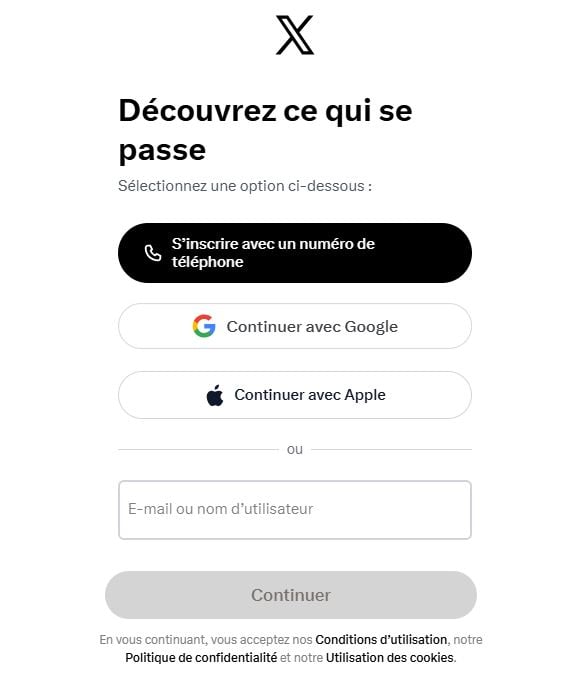
Create an account
The window Create Your Account appears and guides you step by step through creating your profile. You fill in your information one item at a time, at your own pace. Here's what X asks you:
- Your name (the one displayed on your profile; you can change it later).
- Your phone number or your e-mail address, as desired.
- Your date of birth, which is required to verify access to the platform.
Once you've entered your information, click Next to proceed to the confirmation step.
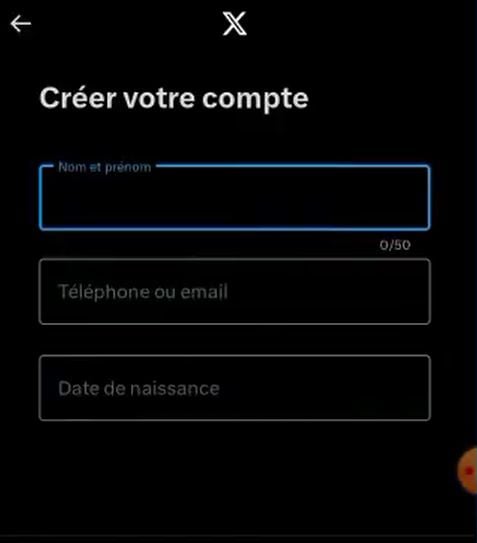
The confirmation
X then asks you to verify your account. The method depends on what you entered in the previous step.
- With a e-mail address : a message containing a verification code will arrive in your inbox. Open it and enter the code shown on the screen to log in to your account.
- With a phone number : You'll receive the code via SMS. Enter it to verify your account.
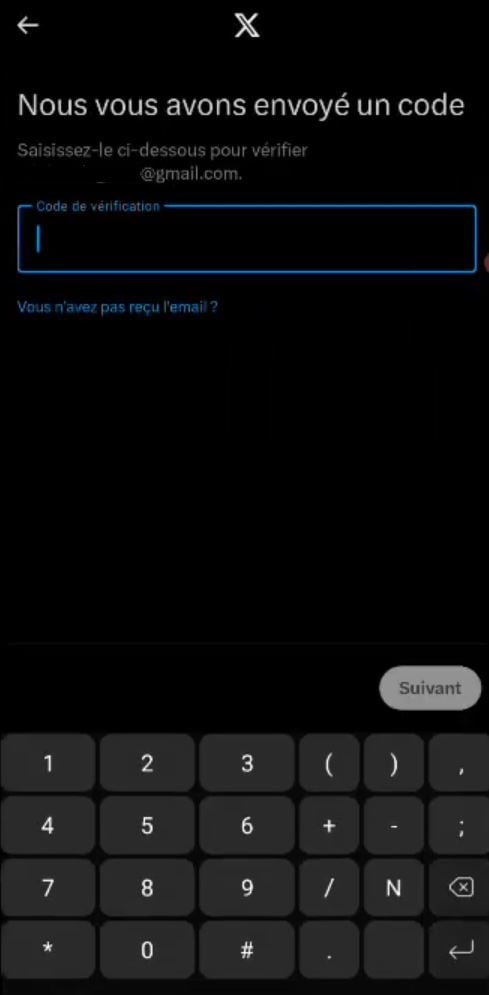
Not getting anything? Here's what to do:
- Wait a few minutes before clicking «Resend Code.».
- Check the file spam from your email inbox.
- Make sure there are no typos in your phone number or address.
- On your phone, make sure you have network to receive the text message.
Once the code has been verified, your registration is almost complete. Next, you'll create a password and customize your profile.
Choose Your Password
All that's left is for you to create your password. Choose a strong one by combining numbers and uppercase letters. Then click on Register.
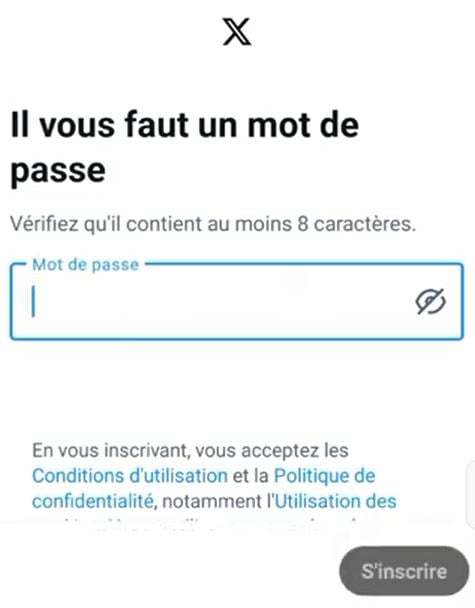
What now?
Take two minutes to fill out your Twitter profile : profile picture, customization, a short bio, and follow a few accounts to liven up your feed.
If you want to quickly grow your community and earn subscribers, check out our tips for buy Twitter followers.
And if you ever want to close your profile, check out our guide to Delete a Twitter account.








 FR
FR  RU
RU  EN
EN  ES
ES  IT
IT  DE
DE  ZH
ZH  PT
PT  ID
ID  JA
JA  DA
DA