You want analyze an X account (Twitter), but you're not sure how to do it? On this social network, the process depends mainly on the account you want to view:
- Your own account : X shows you the statistics for each post (views, likes, reposts) from the mobile app. But you need to sign up for a paid X Premium subscription to access the full dashboard.
- Another account (competitor, influencer): X doesn't let you analyze other people's accounts. You'll need to use a third-party service to do that!
In both cases, you can use Fanpage Karma, an analytics tool that offers a free trial so you can test it out before committing.
This tool gives you access to data and statistics for an X (Twitter) account, whether it's your own or a public account. We'll explain everything in the rest of this article.

Free Method: What X Still Shows You (and What It No Longer Shows)
What's still free on the X mobile app:
- ✅ Statistics per post impressions, engagements, likes, reposts, replies
- ✅ Accessible from every tweet (statistics icon below the post)
How to View the Statistics for One of Your Posts on a Computer
To view these statistics, you must first switch your account to a professional profile. It's free, instant, and can be reversed at any time.
On x.com, follow this path:
- «More» menu → « Premium and Business » → « Professional Profile » → « Switch to Professional Profile » → Select a category → confirm.
Here's how to view your post statistics:
- Go to post to analyze from your profile
- Below the post, click on the’bar-shaped icon (to the right of the likes and reposts) or by clicking the « View post statistics »
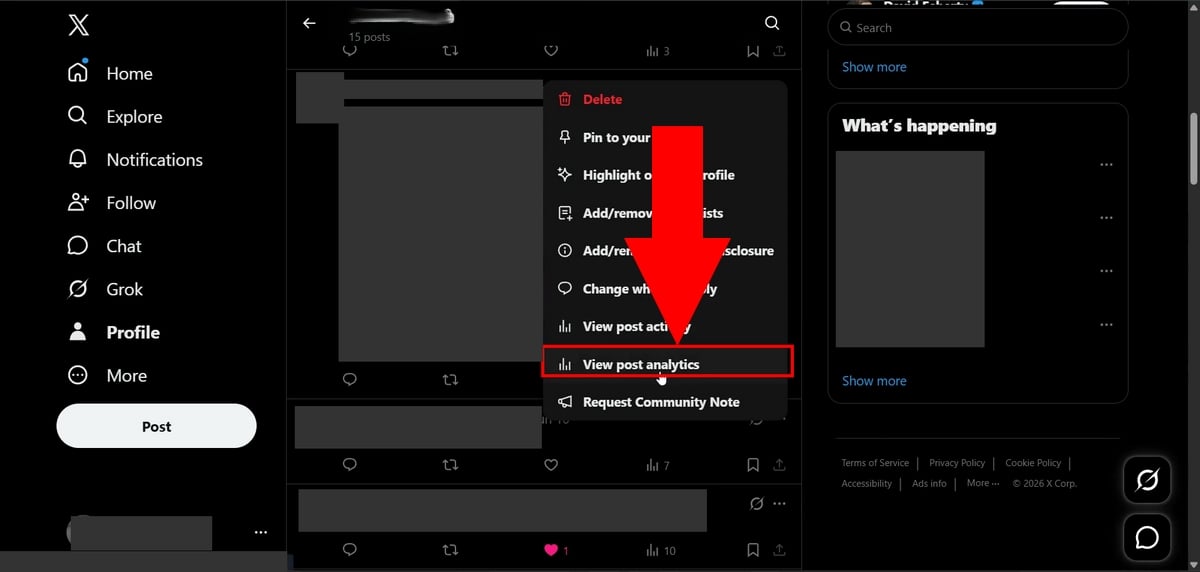
- The statistics Detailed information is displayed in a new panel

You'll get: impressions, profile views, new followers gained, clicks on media, as well as details on likes, replies, reposts, and bookmarks.
⚠ These statistics are visible only to your own posts. You cannot access detailed statistics for other users' posts; only the public view counter is visible below their tweets.
Here's what's included in the X Premium subscription (≈ €9/month):
- ❌ Your aggregate account dashboard
- ❌ Subscriber Growth Over Time
- ❌ Your audience's demographics (country, language, interests)
- ❌ A comprehensive analysis of the hashtags you use
So if you're looking for a free overview from your X (Twitter) account: that feature no longer exists natively. And if you wanted to analyze an account other than your own, X has never offered that analysis for free—not even before.
That’s why third-party tools like Fanpage Karma are useful for retrieving this data from the social network.
Analyze Your Own X Account with Fanpage Karma
On your own behalf, Karma fan page reconstructed the dashboard (the analytics) that X (Twitter) moved behind the Premium paywall.
This analytics tool goes even further than the built-in statistics: it tracks the reach, impressions, and engagement of your posts, and also provides competitive intelligence to compare your activity with that of other accounts.
How it works ?
- Visit the Fanpage Karma's official page
- Create an account (free trial, no obligation)
- Go to the Dashboard
- Click + to create a new dashboard
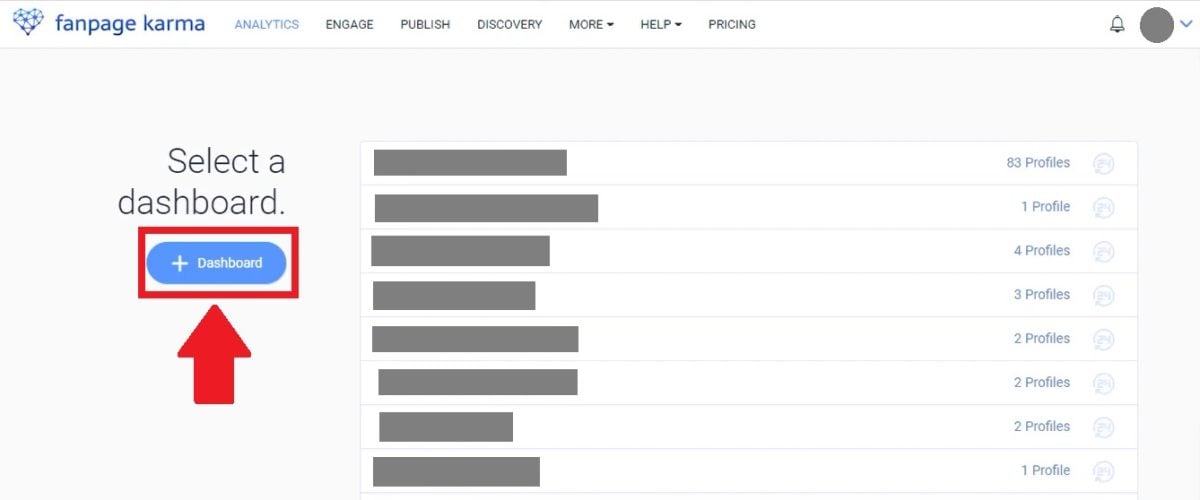
- Name your dashboard
- Select the social network you want to analyze
- Search for your X account
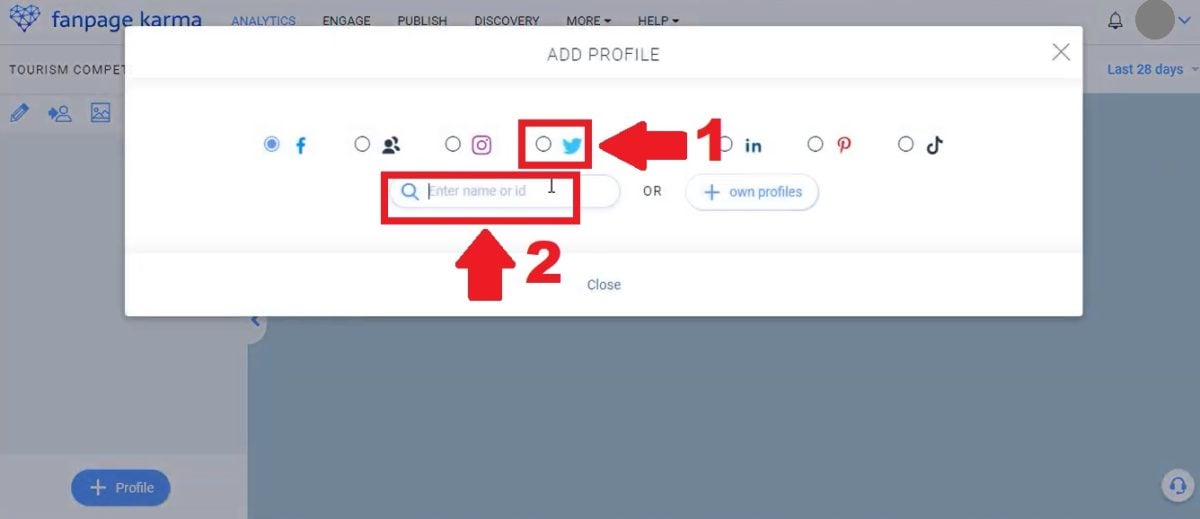
- Add it to your dashboard Then click Update
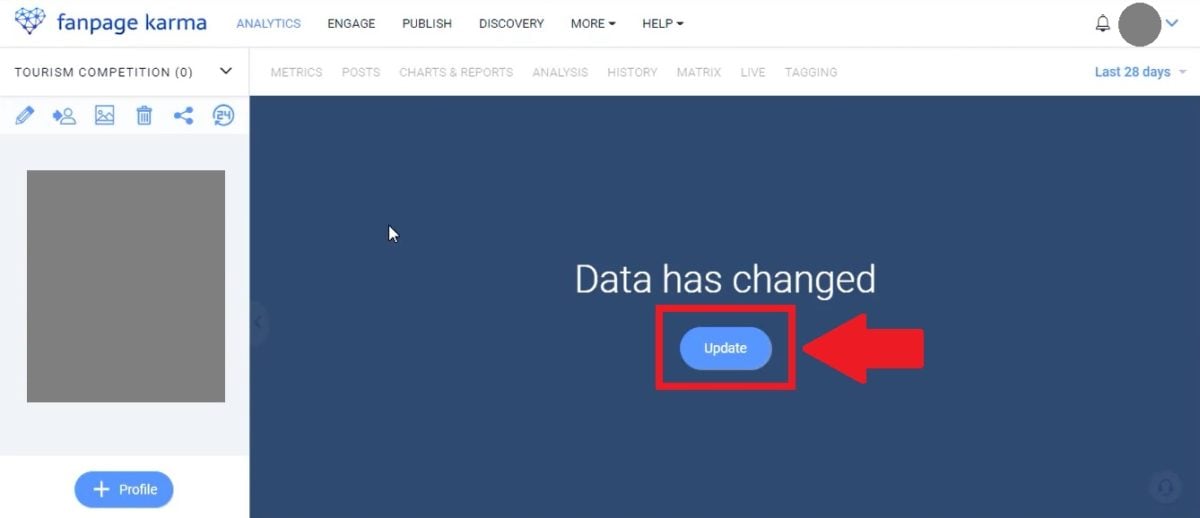
All you have to do is view your statistics (number of followers, engagement rate, interactions, and post performance) and explore all the other features Fanpage Karma has to offer!
What Fanpage Karma Analyzes in Depth
👥 Analysis of your followers
The analysis of your followers covers:
- Their location (cities, countries, languages)
- Their hobbies and their profession
- Their distribution by age and gender
Fanpage Karma provides you with this demographic data to help you create content and campaigns that truly resonate with your audience.
The more you know about your followers (their profiles, locations, and interests), the easier it is to tailor your content and improve your performance on X (Twitter).
🏷️ Hashtag analysis
The hashtags are a strong indicator for understanding the performance of an X (Twitter) account and the type of content that generates the most engagement.
The Analysis Tool Karma fan page shows you:
- Trending hashtags in your sector
- A word cloud with the hashtags associated with your theme
- Influencers who use these hashtags
- Usage trend over the past 2 months
- The language and countries where each hashtag circulates the most
🌟 Identifying influencers
Partnering your brand with relevant influencers boosts your credibility. Karma fan page helps you find them: verified accounts whose followers share the same interests as you. You get:
- Each account's influence score
- His best-selling publications
- The engagement rate of its community
Limits to be aware of
- Getting started : it takes a little time to explore all the features
- Paid after the free trial : Consider signing up for a subscription if you decide to use the tool
- Third-party accounts public data only (see previous section)
Analyze an X account that isn't yours with Fanpage Karma
You want monitor a competitor, research an influencer before partnering with them, or figure out why a certain Twitter account is going viral?
X won't give you anything out of the box: the data and analytics are reserved for the account owner.
That's where a third-party tool really comes into its own for analyzing the content and performance of a public account.
With Karma fan page, enter the URL of a public account, and you'll get:
- The curve of growth subscribers
- The posts that work the best (top engagement)
- The hashtags the ones used and their performance
- The influential accounts who interact with him
- The comparison directly with your own account (benchmarking)
⚠ Honesty : For accounts you do not own, Fanpage Karma relies on public data. Internal impressions, detailed audience demographics, and reach remain inaccessible, as X only shares this information with the account owner.
No third-party tool can bypass this—be wary of anyone who promises otherwise.
In short: which solution for which need?
Here is a summary to help you choose the right tool based on your X (Twitter) analytics needs:
| Your needs | The best solution |
|---|---|
| Quickly view the stats for one of your posts | App X mobile, free |
| Complete dashboard of your own account | X Premium (≈ 9 €/month) or Fanpage Karma |
| Analyzing an account that isn't yours | Fanpage Karma (no native alternative) |
Fanpage Karma is most useful if you want to take your analysis of your X (Twitter) account to the next level:
- Avoid Pay for Premium
- Follow competitors or influencers
- Centralize Multiple accounts in a single dashboard
So? Ready to analyze your first account? The free trial only takes 2 minutes!
Start your free trial of Fanpage Karma
And to analyze accounts on other social media platforms:








 FR
FR  RU
RU  EN
EN  ES
ES  IT
IT  DE
DE  ZH
ZH  PT
PT  ID
ID  JA
JA  DA
DA