Instagram lets you delete a comment that you have posted on your own post or on another user's post. You can also delete someone's comment on your posts.
But how do you do it? In this article, we'll show you next steps to achieve this. Let's go!
Delete a comment on a publication
If you want delete a comment that you wrote under your post or under someone else's post, here's what to do. These steps also allow you to delete someone's Instagram comment on your post:
- Go to the Instagram publication and long press on the comment you wish to delete.
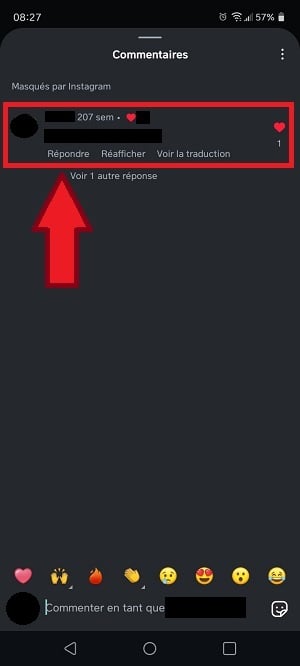
Preview of the comment to delete on Instagram. ©Mia for Alucare.fr - From the pop-up menu, select Click on "Delete".
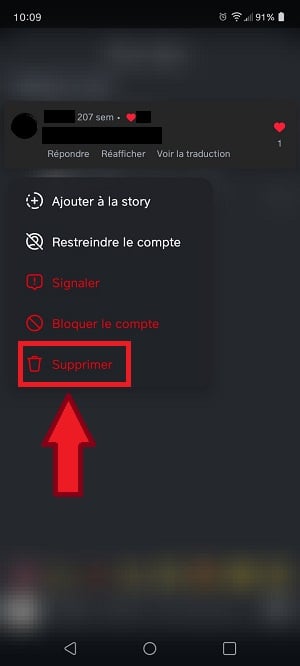
Delete a comment on Instagram. ©Mia for Alucare.fr
Note that these steps apply to Android. On iPhone, simply drag a comment to the left to delete it.
There is no specific location for deleted comments on Instagram. However, you can view the Instagram basket to check the content you have deleted such as photos and videos.
Delete multiple comments on Instagram
You can delete comments one by one using the previous method, but this may take some time. Here's a more efficient way to remove several comments on an Insta post:
- Scroll to the content on which you wish to delete comments, then press the three dots top right of the publication.
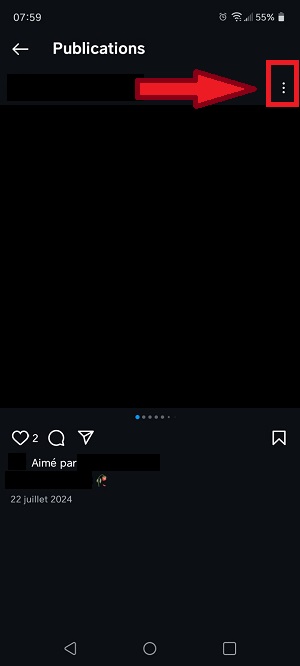
Three dots at the top right of the Instagram post. ©Mia for Alucare.fr - Click on "Disable comments ".
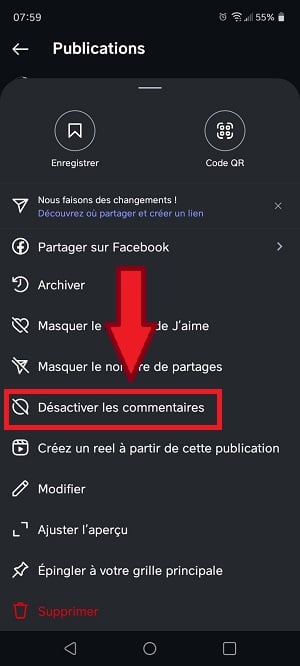
Disable comments on an Instagram post. ©Mia for Alucare.fr
Note that with this method, not only the old comments will be invisible (hidden), but you and Insta users will no longer be able to comment on the post in the future. It is still possible to reactivate comments if you change your mind.
Filter comments on Instagram
If you regularly receive unwanted, abusive or spammy comments, you can use the filtering Instagram comments.
This feature allows you to hide automatically comments containing certain keywords defined by you. Here's how it works:
- Go to your profile, then click on the three horizontal lines at the top right of the screen.

Button for accessing settings on Instagram. ©Mia for Alucare.fr - Press “Masked words ".

Masked words option on Instagram. ©Mia for Alucare.fr - Press “Manage custom words and phrases" to define the words or phrases to be hidden.

Manage custom words and phrases to hide on Instagram. ©Mia for Alucare.fr - Activate theHide comments "This will automatically hide comments containing words commonly reported as offensive.

Enabling the Hide Comments option on the Instagram app. ©Mia for Alucare.fr
In this context, comments will be only hidden and not deletedYou can display them again after disabling the "Hide comments" option.
FAQs
What's the difference between masking and deleting a comment on Instagram?
Here's what you need to know about delete and of hide comment :
- Hide comment This approach makes it possible to hide the comment will be hidden from public view, but you and the author will still be able to see it. No notification will be sent, and the action is reversible.
- Delete a comment This makes it possible to make disappear completely delete a comment on Instagram. No one will be able to access it after deletion. This action cannot be undone.
Why delete a comment on Instagram?
There are many reasons to delete a comment on Instagram :
- You made a error in a comment and you cannot modify it.
- You have changed my mind in relation to the post you commented on.
- The comment was posted by a someone you dislike.
- The person has written offensive language in the comments.
- The user who commented wrote things that are unrelated to the post.
- You don't want other people see a comment in particular.
What happens when you delete someone's comment?
Once you delete someone's comment on a post, it disappears without a traceIt is therefore no longer possible to reply to this comment, report it, or use it for other activities.
Does Instagram notify the person if you delete their comment?
No. The user is not warned if you delete their comment on your own post. This action also does not appear in the "Activity" section on Instagram.
However, the user in question will be able to see that their comment has been deleted by checking the post. on your profile.
How do I see a deleted comment on Instagram?
On Instagram, you can't Recover a deleted comment. It is therefore important to think carefully about the consequences before deleting your comment or someone else's.
How can I avoid offensive comments?
There is no specific way to avoid offensive and hateful comments. However, you can try these tips to limit them :
- Avoid answering aggressive to one person.
- Stay courtesy even if the person provokes you.
- Avoid provocations.
- Do not approach the political issues.
- Sort your followers to find out who might post offensive comments.
- Set your account to private mode.
- Disable comments on your publication.
Also check that the profile commenting is not a fake account who just wants to provoke you. If this is the case, avoid responding and simply delete the comment. You can also block the user.
How can you prevent users from commenting on your Instagram posts?
If you wish to prevent certain people from commenting on your posts, you can disable comments on them.
The method is the same as that used for delete multiple comments on an Instagram post mentioned earlier in the article. Note that you can only apply this technique to a post that has already been published.
Why can't you delete a comment on Instagram?
Sometimes, when you delete a comment, you receive a message indicating that it cannot be deletedThis may mean that the comment has already been deleted on Instagram's system, but it continues to appear because you are viewing an older version of the page.
Please note that Instagram ensures that solve this type of problem as soon as possible. If the problem persists, it may be worthwhile to contact Instagram support.
Also keep in mind that you cannot delete a comment on someone else's post. You can only act only on your own posts.
In conclusion :
- If you follow the above steps, you will be able to manage your Instagram comments in all simplicity.
- This means you can take full advantage of this social network without having to suffer the inconveniences associated with unwanted comments.
Don't miss our latest articles on this platform in the instagram on our website. If you have any questions, please feel free to ask them in the comments.








 English
ese es el problema de instagram, en facebook borrar un comentario te demoras 1 minuto en instagram minimo es 3 minutos a 4 minutos, y si estas en computadora un lio, en vez de borrar comentario sale denunciar, habia una persona que me escribia en mis fotos pero me demore 10 minutos en borrar ese comentarios mas me daba opcion a póner emojis que a borrar ese comentario... deberia ser facil borrar un comentario y no lo es, tanto que para borrar un comentario tuvieron que crear un link con pasos