How to respond to a MP on Instagram ? What are the next steps ?
In this article, we'll explain how to respond correctly and effectively to a message on Instagram, whether from your smartphone or your computer.

How do you reply to an Insta message from your smartphone?
Depuis votre smartphone, voici la démarche à respecter pour répondre à un message sur Instagram. Notez que vous devez d’abord ouvrir l’application pour ensuite vous connecter. Puis, vous n’avez qu’à appuyer sur l‘icône de l’avion en papier situé juste en haut à droite de votre écran d’accueil pour accéder aux MP.
Vous aurez devant vous la liste de vos conversations privées avec d’autres utilisateurs. Pour ouvrir une conversation, veuillez tout simplement cliquer dessus. Ainsi, vous verrez tous les posts you've exchanged with your contact.
Sachez qu’il est possible de répondre en utilisant des emojis, un sticker, des photos ou des vidéos. Two types of approach are possible:
Option 1
- Press the message you wish to reply to, then take him to the right en faisant glisser votre doigt jusqu’à ce qu’une flèche apparaisse.

Arrow for replying to a post on Instagram. ©Mia for Alucare.fr - The message will then read attached just above in the message entry area.

Message to reply to on Instagram. ©Mia for Alucare.fr - Enfin, il vous reste à taper le texte servant de réponse et à l’envoyer en appuyant bien évidemment sur “Envoyer”.

Type the reply to the message on Instagram. ©Mia for Alucare.fr
Option 2
C’est un peu la même démarche :
- Press and hold on the message you wish to reply to.
- Cliquez ensuite puis l’option “Répondre” parmi celles qui s’affichent.

Reply option in Insta messages ©Mia for Alucare.fr - The message will also be attached right at the top of the message entry area. Finally, all you have to do is type message servant de réponse et à l’envoyer en appuyant bien évidemment sur “Envoyer”.
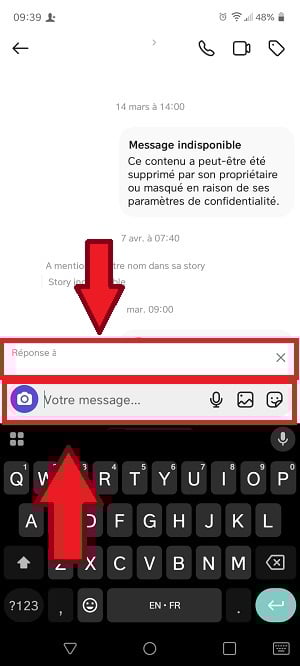
Message to reply to attached above the field to fill in to reply to the PM. ©Mia for Alucare.fr
How do I reply to an Insta message from my computer?
To reply to an Insta message if you are logged in on your PC, click on the little message icon located on the left-hand side of your screen.
Vous aurez alors accès à la liste de vos conversations privées avec d’autres utilisateurs. Pour se mettre dans une conversation en particulier, il faut tout simplement cliquer dessus. Vous aurez un message overview exchanged with your contact.
To reply to a message on PC :
- Move your cursor over the message and you'll see a little arrow on the right.

Reply to a message on Instagram web version. ©Mia for Alucare.fr - Press it pour répondre au message. Puis, il vous reste à taper le message servant de réponse et à l’envoyer en appuyant bien évidemment sur “Envoyer”.

Type the message as a reply on Instagram web. ©Mia for Alucare.fr
FAQs
How do I set up an automatic reply on Instagram?
Unlike other social networks, Instagram doesn't have an auto-reply function as such. However, you can a few adjustments for quicker answers to frequently asked questions.
Il est essentiel d’avoir un professional Instagram account to access this feature. In this context :
- Accédez aux paramètres via le bouton à trois barres horizontales sur votre profil, puis appuyez sur “Creator tools and controls ".

Creator tools and controls option on Instagram. ©Mia for Alucare.fr - Entrez dans “Questions & Answers ".

Q&A feature on Instagram. ©Mia for Alucare.fr - Add your question and answer correspondante dans les champs qui s’affichent.

Add a question and answer on Instagram. ©Mia for Alucare.fr
The companies and brands are the most concerned by this feature, in order to facilitate responses to anyone who contacts them on Instagram. Automatic responses can save time.
Why can't I reply to messages on Instagram?
Si vous avez rencontré des difficultés à répondre à un message en particulier sur Instagram malgré plusieurs tentatives, voici quelques raisons qui peuvent être à l’origine du problème et des solutions that you might find useful.
| 🏸 Reasons for the problem | 📃 Details |
|---|---|
| Need for mettre à jour l’application instagram |
|
| Operating system obsolete |
|
| Internet connection faulty |
|
Why respond to messages on Instagram?
Les MP sur Instagram permettent de se rapprocher davantage de nos followers et de nos amis. Il s’agit d’un moyen direct de communiquer sur la plateforme sociale Instagram. Voici les benefits reply to messages on this platform:
- Replying to a message allows you to avoid getting lost in the conversation avec quelqu’un et de pouvoir répondre à une question ou un propos de manière correcte.
- It also helps to facilitate communication between users.
- La fonctionnalité permet d’avoid confusion (especially in large groups).
- Replies to messages are ideal for favoriser l’engagement on Instagram.
What new features are available for Insta messages?
PMs on Insta are not limited to the text. Plusieurs fonctionnalités vous sont aussi disponibles telles que l’envoi de photos, de vidéos, de GIFs, de stickers, d’émojis, de sondages, de questions, de comptes à rebours, de quiz, d’autocollants ou encore de réactions.
You also have the option of replying to your caller with Voice and video MPs et de créer un groupe de conversation Instagram. Voici d’autres éléments que vous pourrez trouver sur cette plateforme.
| ✨ Features | 📃 Details |
|---|---|
| The editing messages |
|
| The possibilité d’épingler une discussion in the mailbox |
|
| L’activation ou la désactivation des reading confirmations in DM |
|
| The musical stickers |
|
| Access to features |
|
| The group conversation |
|
| L'registration your favorite stickers |
|
How to optimize replies to posts on Instagram?
Propriétaire d’un profil Instagram professionnel ? Envie de cartonner auprès des clients et des prospects ? Voici quelques conseils pour utiliser les réponses sur Instagram pour improve your business.
| 👉 Tips | 📃 Details |
|---|---|
| Create personalized answers |
|
| Keep the same tone in your answers. |
|
| Reply to all messages. |
|
In conclusion, instagram peut être utilisé sur différents dispositifs mobiles tels qu’iOS et Android et sur ordinateur.
- The direct message reply function is present on all these platforms.
- Unlike replying to a comment, the steps for replying to direct messages are as follows depend on the tools used.
- To reply specifically to messages, follow all the instructions given in this article.
- Make sure you use the right application and device up-to-date et restez bien évidemment sous une connexion internet stable afin d’éviter les soucis pour répondre aux MP dans la messagerie sur Instagram.
- Répondre aux MP d’un utilisateur Instagram permet de getting closer to the person et de favoriser l’engagement sur la plateforme.
Sachez que d’autres articles similaires à celui-ci sont disponibles sur notre page instagram. Si vous avez des questions, n’hésitez pas à poster un comment.








 English