Before we begin, let us remember that in September 2021, The Rythm bot has ceased operations. It is in June 2024 that he did his return to Discord.
This grand return comes with some major changes:
Unlike the previous version, Rhythm is no longer a bot that joins your voice chat room, it is now a fully integrated application at Discord, that you can launch and control visually with a single click.
This new version also includes:
A more user-friendly interface aesthetics,
Legality and stability : no risk of being banned by YouTube,
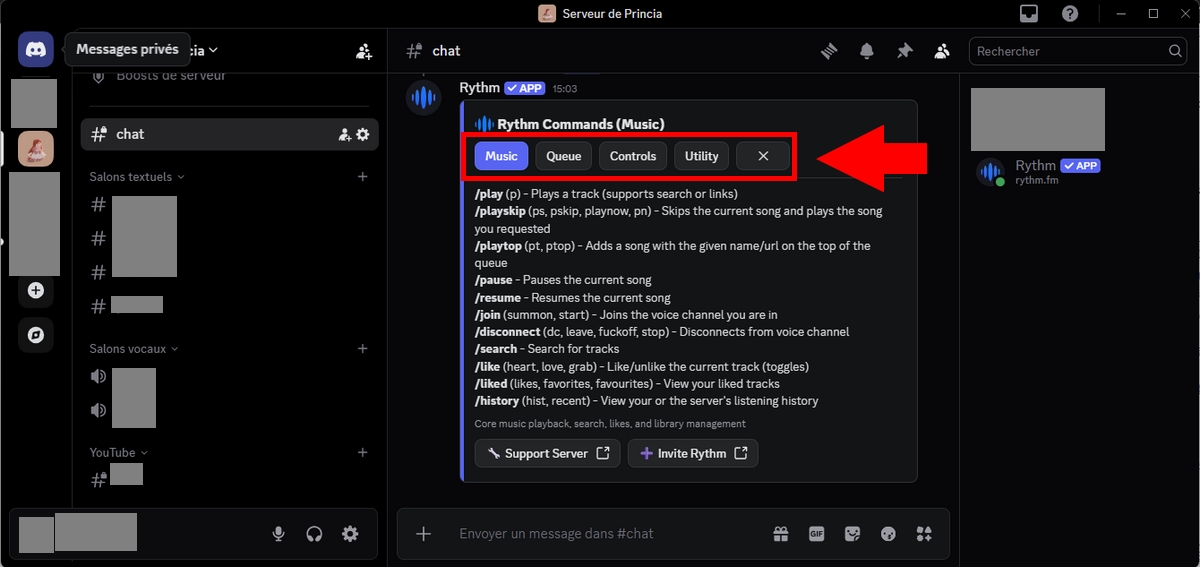
Transition to Slash Commands : All commands now begin with “/”.
However, just as before, Rhythm offers two versions: the version free of charge which allows you to enjoy the essentials, and the version paid, which offers additional and more comprehensive features.
1. Before connecting the Rhythm activity to your server
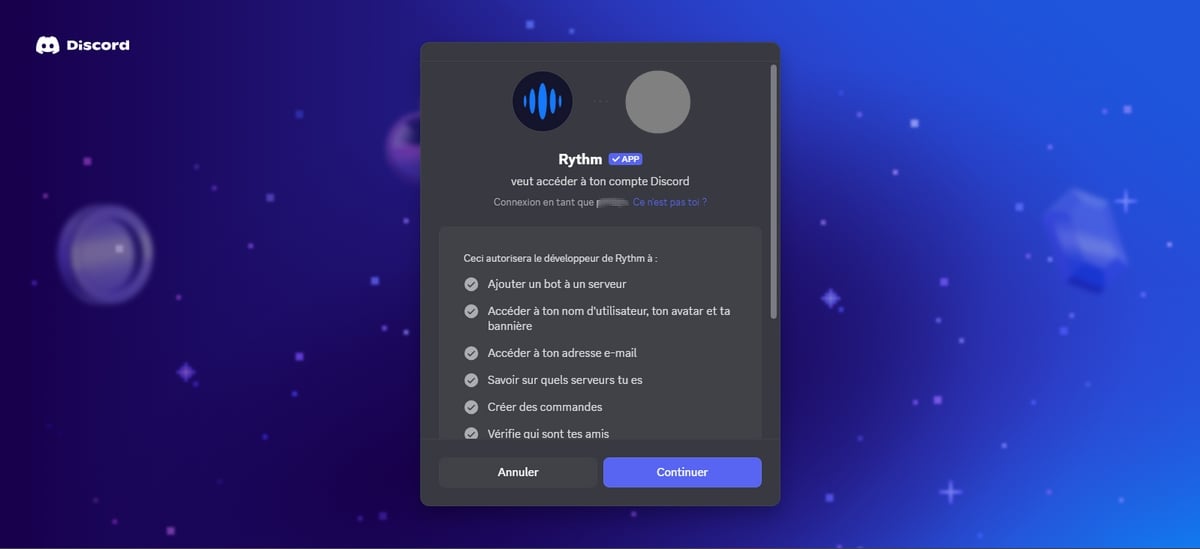
Before succeeding in connect Rythm to a server Discord, Here are some necessary prerequisites:
Be connected to your account Discord via the browser,
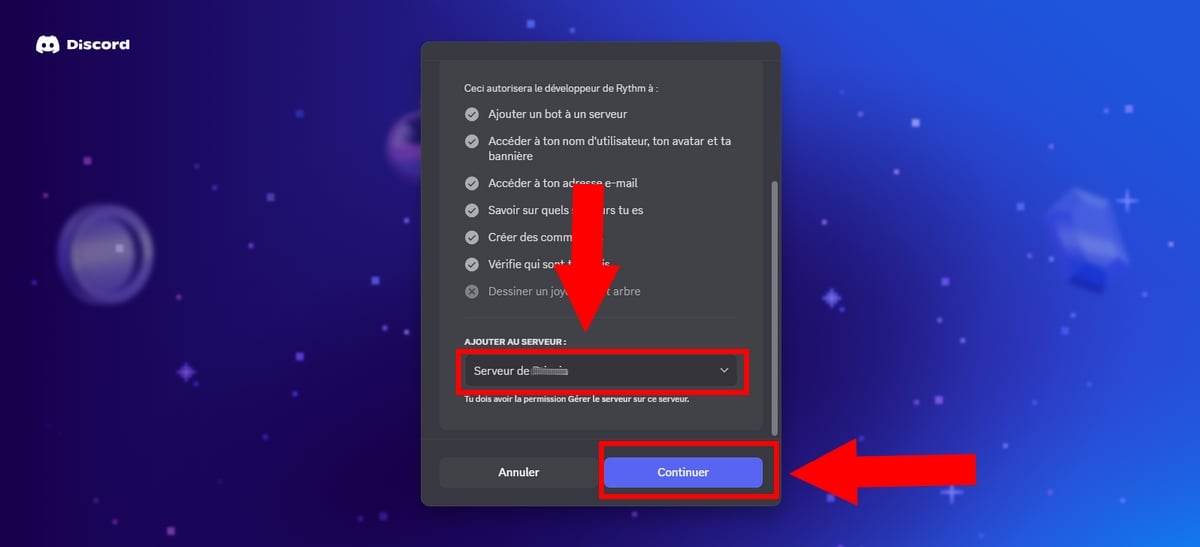
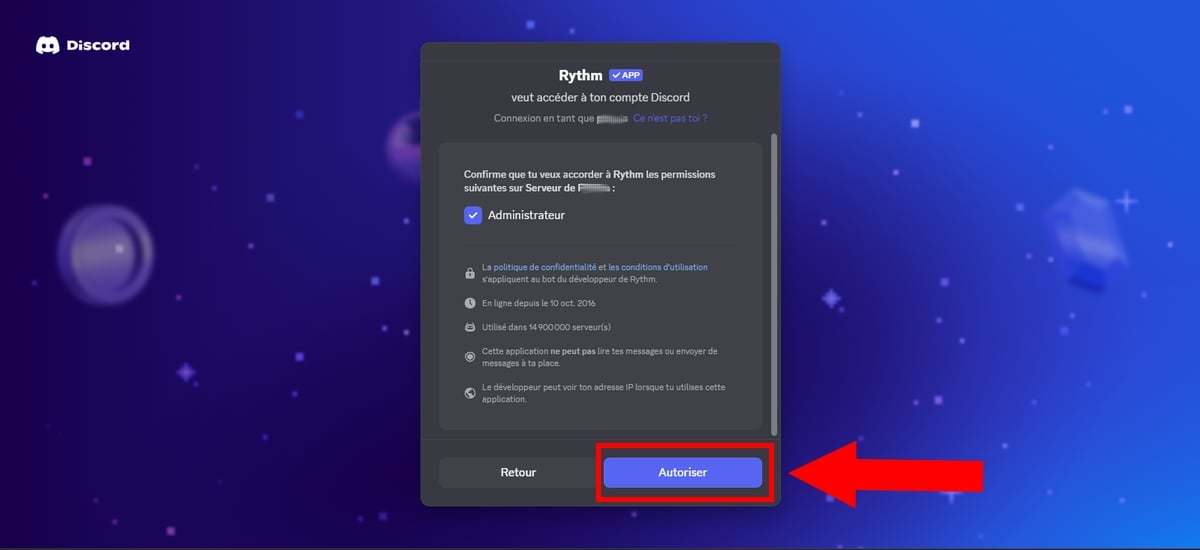
Be administrator the server you want to add Rhythm,
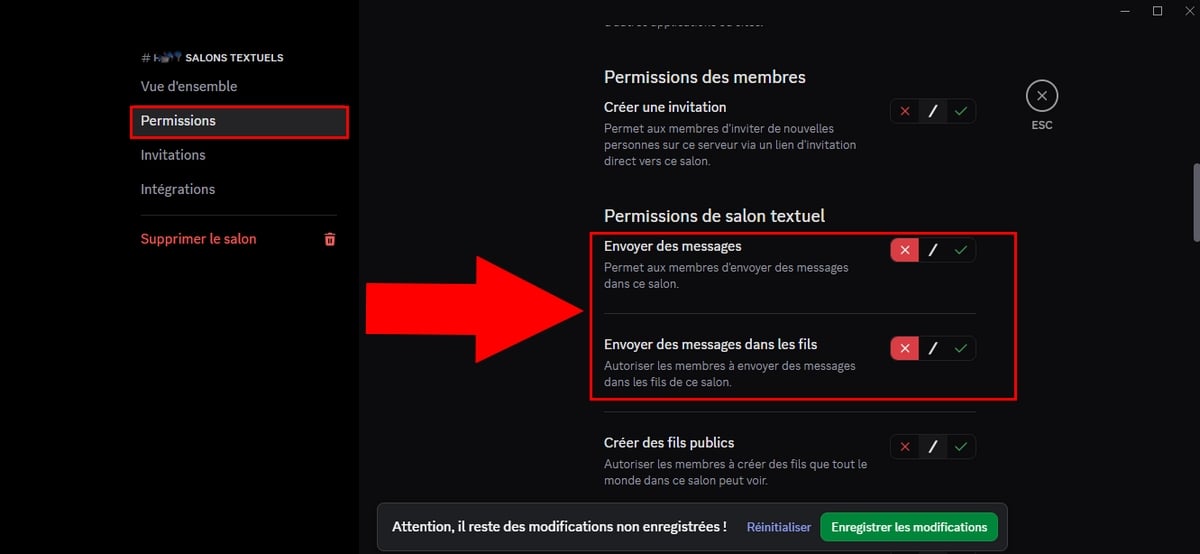
However, if you use the free version, this option is disabled by default. And although you have the right to configure, the setting will not be applied.
With this in mind, you can:
Assign the role to members (or a trusted person) DJ,
Type the ordered/skip to skip to the next track. If multiple members press this command, the unwanted music will automatically skip.
Or ask users to prepare a playlist in advance to better control the content.
e) Maximum number of songs per user
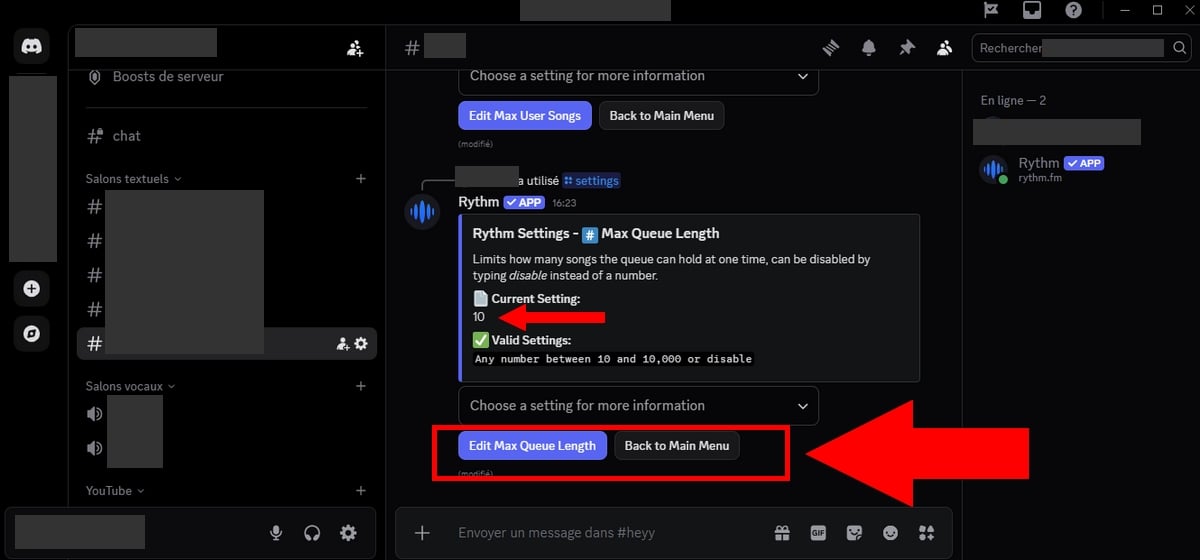
This feature is useful for directors where the DJs may limit the number of songs that users can add to queue at the same time.
Indeed, once Premium Rhythm When enabled, the queue becomes unlimited.
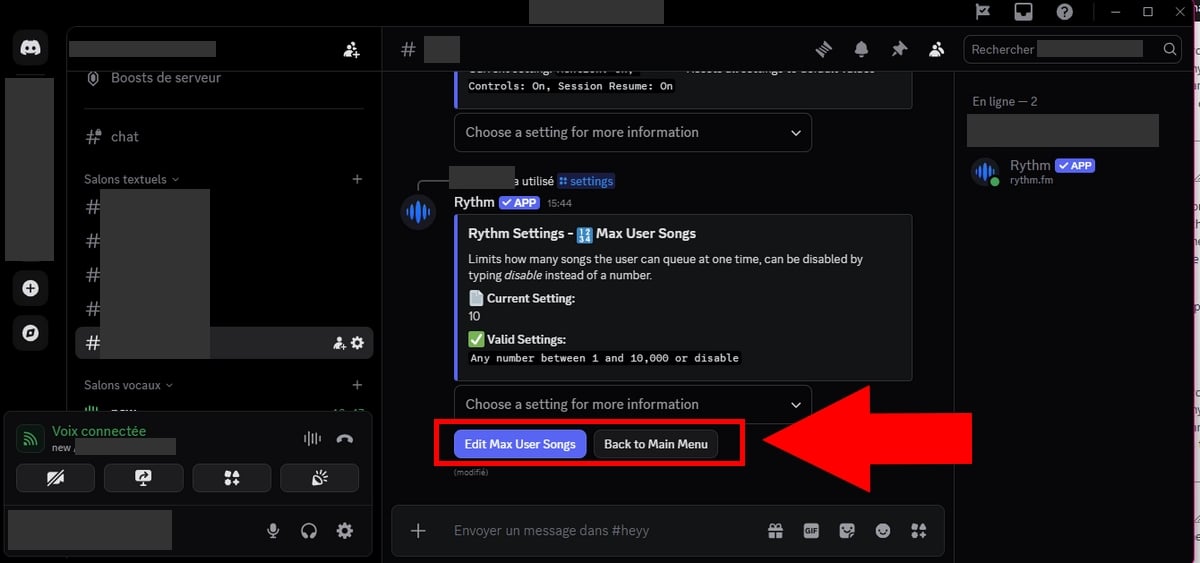
To change the maximum number of songs per user, simply type the command /settings.
Then look for the option Max User Songs (Premium feature).
Select the number of songs you allow per user by clicking on “Edit Max User Songs“.
You can change this setting in the free version, but it will remain without effect. This option is only taken into account for servers or users subscribed to Premium Rhythm.
f) Remove duplicates from the queue
Also among the benefits of a Premium subscription. To prevent users from posting duplicate music In the queue, you can use one of the following commands:
/drm
/rd
/removed duplicates
/rmd
However, you can also follow these steps:
Use the /settings.
Choose Duplicate song Prevention
To activate it, click on We in the drop-down menu that opens.
To disable it, click on Off.
g) Configure the DJ role on the server
To activate the DJ mode, Everything happens in one place!
Type the command /settings to display the different possible options.
1. Define the role of the DJ
If you haven't already done so:
Go to Settings from waiter > Roles
Next, create a new role named DJ, (the role name must be exactly DJ)
Then, assign this role to the members you wish to authorize.
2. Activate DJ mode
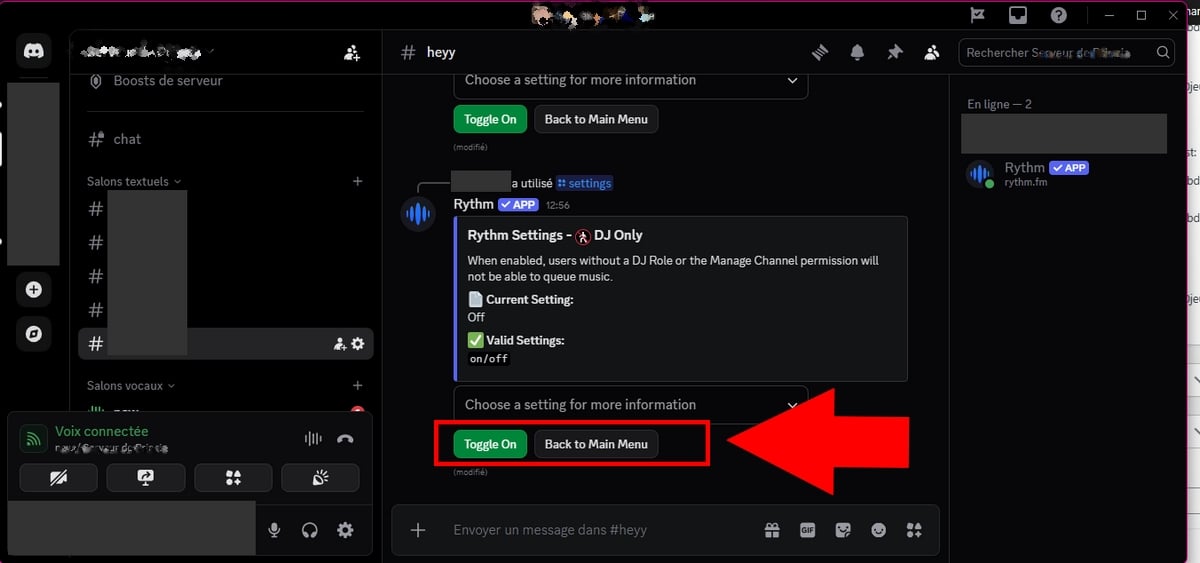
You must use the/settings.
Among the options offered after placing your order, look for the option DJ Only (or similar),
In the image below, the function DJ Only is on Off.
To activate it, switch it to “Turn On“.
In fact, all members who have access to the role of DJ will have access to the cmanagement orders (edit the list, skip music, etc.), even if you have set certain restrictions.
You have now finished configuring Rythm! If you have a problem, check this tutorial, everything is there! You can also come to on our server Discord) !
We invite you to leave a comment if you find the tutorial comprehensive and easy to follow, or if you have any feedback, among other things.
FAQs
Is the Rhythm feature free on Discord?
the Rhythm on Discord offers a free version but is also available in a version Premium.
What is the purpose of the Rythm premium on Discord?
Here are the various advantages of Premium Rhythm :
Change the bass, speed up or slow down the sound.
Create queues unlimited,
Automatic playback without interruption (advertisements),
Best quality audio,
Play music during 24 hours a day, 7 days a week,
Premium Sharing All participants in your session benefit from Premium features.,
Personalized listening Control what you listen to.
What's more, to discover all the benefits available to you when you subscribe to Premium Rhythm, don't hesitate to enter /premium in your chat.
How much does the Rythm Premium bot cost?
Here are the different rates for the Premium offer:
1 single server = 4,99 $ per month
Multiple servers = 6,99 $ per month
Large server = 9,99 $ per month.
Comparison: Free Rythm vs. Rythm Premium
Here are some notable differences between the version free of charge and the version paying of Rhythm :
🌟 Features
Free version
Premium Version
Audio Quality
Standard
Better audio quality (HD)
Advertising
Yes
None
Queue
Limited
Unlimited
Audio Effects
❌ No
✅ Included (speeds, bass, etc.)
24/7 playback
❌ No
✅ Included
Shared benefits
❌ No
✅ Yes (The entire voice chat benefits)
Rhythm and MAC: is it feasible?
Yes, Rythm can be used on Mac and Windows.
Meeting on AppStore Where Google Play !
Lag and games
Nope, If you are a player, Rhythm will not impact your gaming performance if you play games at the same time.
Can moderation change the song list?
Yes, they can delete what they don't like and change the way the songs are played.
Using spotify premium or twitch?
the Rhythm bot on Discord allows you to listen to different tracks from several music streaming platforms, including Spotify, YouTube, Twitch, and others.
However, please note that the activity Rhythm does not allow you to read the entire catalog on these platforms.
How can I see the video and images of the songs?
Now, with the new version of Rhythm, you cannot access video streams. It specializes in audio streaming only.
Any other concerns?
You can visit the official help page for Rhythm If you encounter other difficulties when using Rythm bot on Discord:
This content is originally in French (See the editor just below.). It has been translated and proofread in various languages using Deepl and/or the Google Translate API to offer help in as many countries as possible. This translation costs us several thousand euros a month. If it's not 100% perfect, please leave a comment for us to fix. If you're interested in proofreading and improving the quality of translated articles, don't hesitate to send us an e-mail via the contact form! We appreciate your feedback to improve our content. If you would like to suggest improvements, please use our contact form or leave a comment below. Your feedback always help us to improve the quality of our website Alucare.fr
I'm the entire alucare.fr team.
The purpose of this profile is to put online articles by former authors who no longer work on the site after having improved them.
At alucare.fr, our aim is to provide truthful, up-to-date information. That's why, when we update an article by an author who no longer works with us (or who now occupies a higher position), we place it on this author account.
Social Media and Contact:
Alucare is an free independent media. Support us by adding us to your Google News favorites:
Hello,
I can't manage to configure the bot so that all members of the server can use it completely.
I'm the only one who can put play / pause for example, the others can only put music in the waiting list.
An advice ?
Thanks in advance
yo I wanted to know if it was possible to duplicate the bot, like I'm in another living room and I'm with the bot and I'm listening to my sound, another who wants to listen to music types the same command and another bot pop and don't steal it from someone who already listens to sound
Hello I have a special request, I would like to use the bot in a prison channel. For this, the bot would have to be immutable and the sound could not be modified.
Any ideas ?
Available on :PC, Mac, Linux, Android, iOS, PlayStation, Xbox
Antonin Choplin
How
How to use Rythm on your Discord server? - 👇Alucare
How to use Rythm on your Discord server? Our practical and simple guide will explain everything you need to know! Click here!
Alucare.fr
Tutorial
How to use Rythm on its Discord server?
Alucare
Alucare - video games, tutorial, High-tech AI and Web
ALUCARE INDUSTRY LLP is the company behind alucare.fr. The managing director of ALUCARE INDUSTRY LLP is Antonin Choplin. The alucare.fr website is designed to help website visitors in their research, whether in the world of video games, the web or elsewhere.
I'm the entire alucare.fr team. The purpose of this profile is to put online articles by former authors who no longer work on the site after having improved them. At alucare.fr, our aim is to provide truthful, up-to-date information. That's why, when we update an article by an author who no longer works with us (or who now occupies a higher position), we place it on this author account.
How to use Rythm on its Discord server?
Alucare.fr reviews on Trustpilot
Discord
Discord is the app I use the most. So, if you're looking for a tutorial, the latest news, how to get Discord Nitro, how to change your password, or even how to embellish your texts in Discord, etc., this section is for you! Here you'll find all the articles related to Discord!









80comments on the discussion forum for «How to use Rythm on your Discord server?'