Let's take a look at how to link your Dungeon Crusher account, whether on your phone, your computer or another phone.
Create an account on your PC :
If you have a new account, if you use my link it supports me for free so thanks to those who will do it!
Create a new account by clicking on the button below here on your computer:
Create an account
Once you've created your account, you can link it to your phone.
On your PC, click on Settings :

Then click on Connect device:
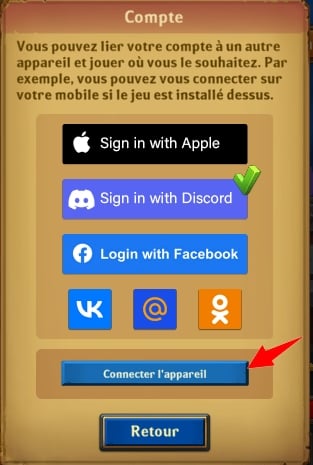
Then you have 15 minutes to enter the code on your phone:
On your phone you have to do almost the same thing:
go to Settings :

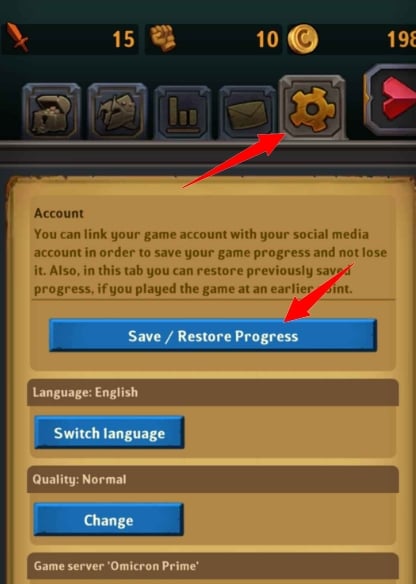
Click on connect a device :

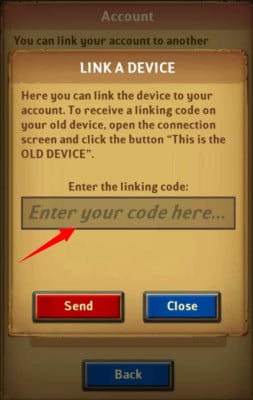
Enter the code we saw earlier.
 If you have any questions, don't hesitate to ask!
To play the game on your PC

This content is originally in French (See the editor just below.). It has been translated and proofread in various languages using Deepl and/or the Google Translate API to offer help in as many countries as possible. This translation costs us several thousand euros a month. If it's not 100% perfect, please leave a comment for us to fix. If you're interested in proofreading and improving the quality of translated articles, don't hesitate to send us an e-mail via the contact form!
We appreciate your feedback to improve our content. If you would like to suggest improvements, please use our contact form or leave a comment below. Your feedback always help us to improve the quality of our website Alucare.fr









 English