
RestedXP has been available in French since November 3, 2026, just before the release of World of Warcraft: Forever. The website, the add-on, and the guides are now available in six languages : English, German, French, Spanish, Portuguese, and Simplified Chinese.
In this article, I'll explain to you How to set the language of the RestedXP guide to French and what to do when the guide is only in English.
Setting 1: Set the game to French
Currently, RestedXP does not have No language button in the game : The add-on uses the same language as your WoW client. To set the game to French, just follow these steps:
- Open the Battle.net app and Choose WoW Forever.
- Go to the «Game Settings».
- Set the text language: French.

- Start the game to make sure the change has been properly implemented.
✅ When you set your game to French, the RestedXP add-on loads the Free chapters of "Forever" in French.
Setting 2: Export the RestedXP guide in French
Please note that the Forever guide you purchased does not match the game's language. Its steps are displayed in the language of the file you're exporting following a purchase on RestedXP.
🎁 Don't forget that when you use our link, you automatically get a 10 % discount on RestedXP :
Buy a Forever guide on RestedXP
Here's what you need to do after your order has been confirmed:
- Log in to your RestedXP account along with the email address associated with your purchase.
- Open the tab for «Guides».
- Click on «Export» next to your Forever guide.
- Choose «French (France)» in the list of languages.
- Valid with «Accept and Download».

- Check that the name of the downloaded file contains "frFR": This proves that your guide is indeed in French.
Once it's downloaded, you'll get a .txt file whose contents you'll need to copy into the game, just like when you need to Install the RestedXP Guide on WoW Forever.
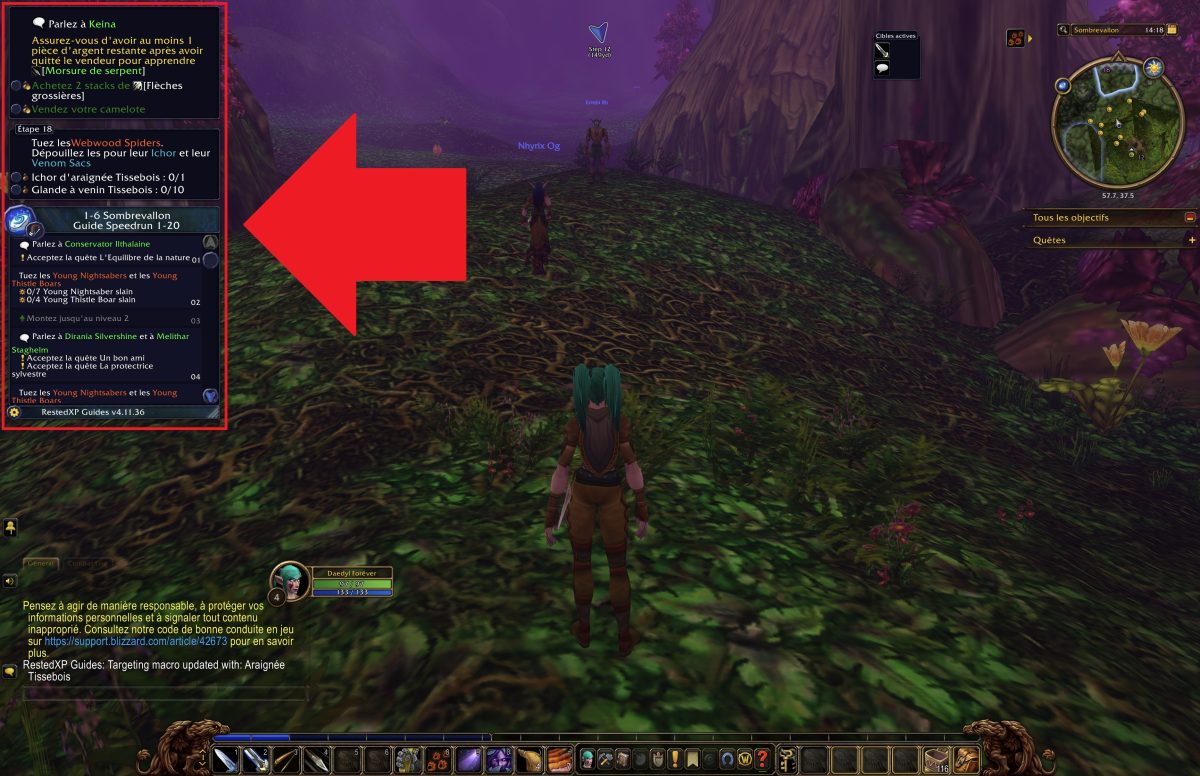
💡Do you already have the guide in English? Don't panic! You don't nothing to buy : All you have to do is re-export the guide in French and then import the new version into your game.
Important information about refunds: Once you start downloading the guide, the purchase is non-refundable. If you're still on the fence, here's my Full Review of RestedXP.
The RestedXP guide remains in English: causes and solutions
💡 In most cases, if your RestedXP guide isn't in French, it's because it was exported in English or because the old exported text hasn't been replaced.
| What You See | Probable cause | Solution |
|---|---|---|
| The free chapters are in French; the purchased guide is in English | ❌ Guide exported in English | ✅ Re-export as «French (France),» then import the new text |
| Everything is in English, including the free chapters | ❌ WoW client in English | ✅ Open Battle.net > Go to «Game Settings» > Change the text language to French |
| You re-exported it, but nothing changed | ❌ Old guide still loaded | ✅ Reimport the new text, then click «Reload» |
| The .txt file does not contain frFR | ❌ Incorrect language selected for export | ✅ Try exporting again and check the language before confirming |
| The import is showing an error | ❌ Text is incomplete or too old for your version of the add-on | ✅ Export the guide text in French again, copy the entire text, and paste it back into the game |
| The English chapter titles are missing | ❌ Normal behavior when dealing with a client who speaks a foreign language | ✅ Search for the chapter by its level range, not by its English name |
| A paid chapter is missing | ❌ It comes from your export, not from the add-on | ✅ Verify your account, then re-export and re-import |

FAQs
Do I have to buy the guide again to get it in French?
Nope. Re-export the guide you already have, selecting «French (France),» and then import it into the add-on.
🎁 Don't forget that with our RestedXP promo code, you can get a 10 % discount on the purchase of a guide.
Can you keep the free chapters in English when playing a game in French?
Nope, there's no setting for that. With a localized client, the add-on only loads the free chapters in your language. To view them in English, you'll need to launch the game in English.
Is the guide refundable after it has been downloaded?
Nope. Once the download has started, purchases made on RestedXP are non-refundable.
Can I try RestedXP for free in French?
Yes. L'The RestedXP add-on is free and the "Forever" chapters for levels 1 through 20 as well. They'll appear in French if your client is set to French.









 FR
 RU
 EN
 ES
 IT
 DE
 ZH
 PT
 ID
 JA
 DA