When we talk about online security, theauthentication two-factor (A2F or 2FA) is one of the most essential protection measures.
This technique adds an extra layer of protection to your accounts by requiring a check beyond the simple password.
In this article, discover how to activate the double authentication on Instagram :
- Access your settings on Instagram
- Opt for "Espace comptes
- Go to "Password and security".
- Enter "Two-factor authentication
- Choose an Authentication method
- Choose Authentication Applications
- Enjoy the benefits of A2F activation
Video tutorial to activate dual authentication on Instagram
Learn activation of A2F on your Insta account through this video made by Alucare.fr.
Explanatory video in French by Alucare, ideal complement to the page. View video (you can use YouTube's automatic translation)

How do I activate dual authentication on Instagram?
A2F on Instagram is an effective way to secure your account by requiring a code when someone tries to access your account from an unrecognized phone, tablet, or computer. If you want to use this feature, follow these steps.
1. Go to settings on Instagram
- To get started, open the Insta app.
- Then log in to your account and access your profile.
- Then press the three horizontal lines in the top right-hand corner of the screen.

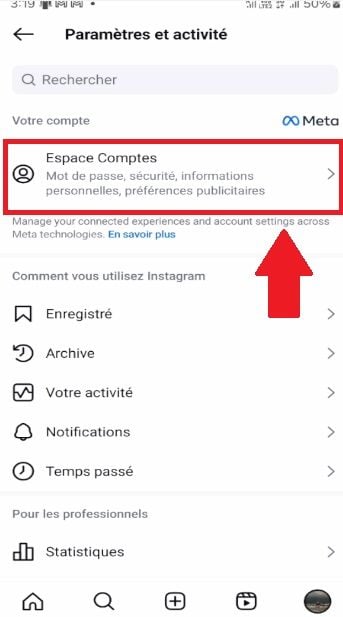
2. Choose "Account space
Once you have access to the settings, go to "Account area".
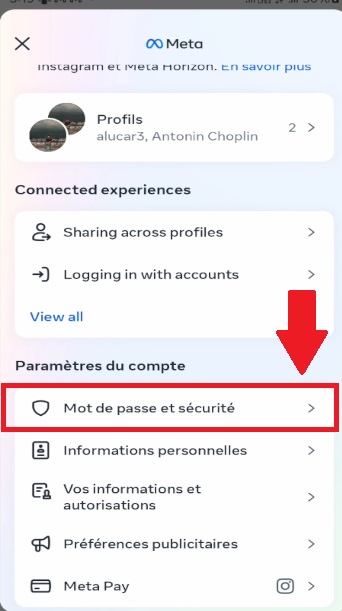
3. Go to "Password and security".
Scroll if necessary, then access "Password and security" on Instagram.
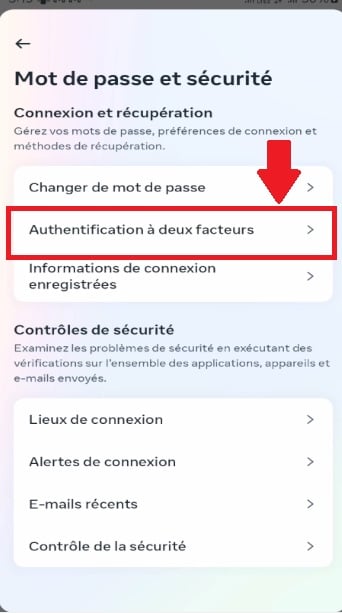
4. Enter "Two-factor authentication
Find and select "Two-factor authentication".
5. Choose an authentication method
Please note that activation of A2F on InstagramYou have a choice of three techniques for obtaining temporary codes to access Insta:
- The use of a authentication application (recommended): Download an app like Duo Mobile Where Google Authenticator.
This technique makes it possible to connect to the same account on several devices. However, this is not the case, 2FA activation via an app can only be done from the Instagram app on Android or iPhone.

- The use of Text messages Instagram will send the code to your mobile number (which you must enter on the platform).
- The use of WhatsApp : Start by activating SMS security, then activate WhatsApp security.
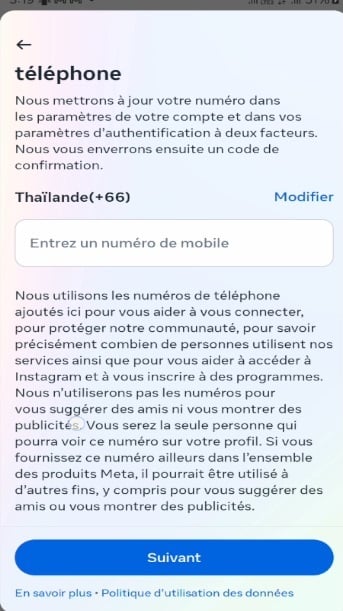
You must configure at least one of these methods to use A2F on Insta.
6. Choose "Authentication Applications".
If you have chosen the first solution, you will need to copy key and paste it into the field to be filled in the application in question.

You can also scan the QR code displayed on the screen using your chosen application.

Following this, the application will generate a six-digit codeEnter it on Insta to confirm that you have enabled 2FA.
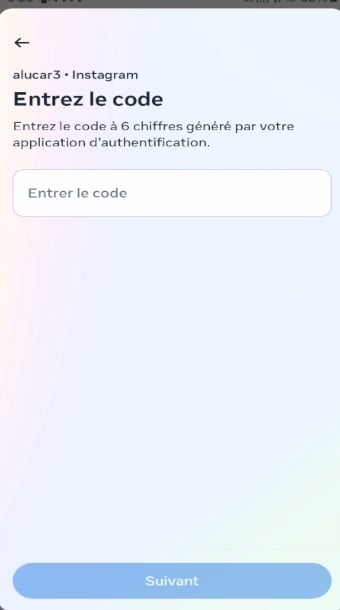
7. Enjoy the benefits of enabling A2F
Once these steps have been completed, Insta will confirm that A2F has been activated successfully on your account.
You can then manage connection requests and delete trusted devices. If you forget your password or e-mail address and can no longer obtain codes to access Insta, a emergency code can be used.
What additional tips should you keep in mind when enabling 2FA on Instagram?
Apart from the steps mentioned earlier in the article, keep these three points in mind in order to secure your Insta account :
- Mark trusted devices that you use to avoid having to enter a code each time you connect.
- Do not mark not public appliances or shared.
- For A2F by text message (SMS), use the mobile number already associated with your account or add a new one.
If you'd like to read more Insta tips, discover How do I see someone's latest subscriptions on Instagram?
Why activate dual authentication on Instagram?
Opt for A2F on Insta strengthens the protection of your account. Once set up, this feature will require a numerical code in addition to your usual login and password.
This code allows you to :
- Protecting and securing your account against cyberthreats.
- Limit who has access.
- Avoid piracy your account.
- Ensuring confidentiality of your data.
To this end, even if your password is compromised, a malicious individual will not be able to not open your account without having access to the device you are using.
Still on the topic of Insta, check out our article: Who's looking at my Instagram profile: find out for free!.
The double authentication on Insta involves simple steps to make your account as secure as possible.
This protective measure will make your account more resistant to unauthorized access attempts, providing a peace of mind online.








 English