On Instagram, it's impossible to see who looked at your reality.
However, you can check out his overall statistics : views, likes, comments, shares, and saves. Here's how to do it.
How can I see who's seen my real Instagram feed?
The answer is clear: this feature never existed for the reels Instagram. Unlike the stories, which display the list of viewers, Reels do not reveal the names of the people who watched them.
This limit applies for all account types : staff, Creator or professional.
No one can access this list, regardless of their offer or subscription level.
Why this choice? There are two main reasons:
- First, the privacy : Users can watch a real Instagram without leaving a trace.
- Next, the volume : A video can reach a very large number of views, which would make a list of individual viewers completely unusable.
The only clue you have is about the interactions. You can see who has liked or commented on your actual Instagram post, but never anyone who just viewed it without reacting. If you want to learn more about the who views your profile Aside from Reels, it's also impossible on Instagram.
View your actual Instagram stats
To view data on your actual Instagram, you need a business account Where Creator. If you still have a personal profile, here's how to convert it:
- Open your profile, then go to Settings and activity.
- Press Account type and tools.

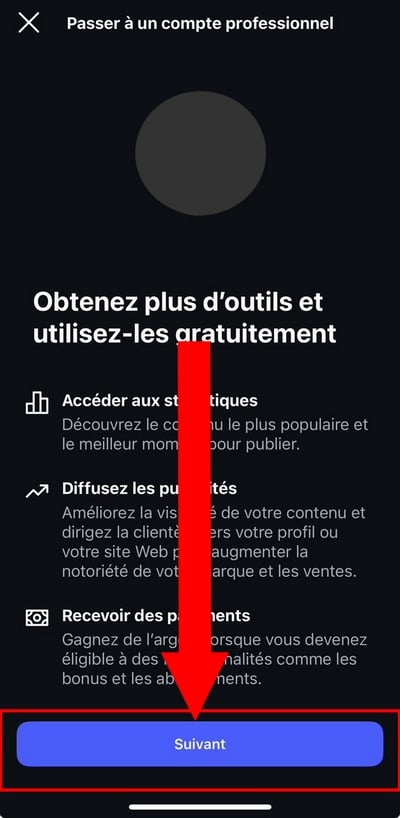
- Choose Switch to a professional account or the option Creator depending on your needs.
- Press Next, then confirm the steps to apply the change.
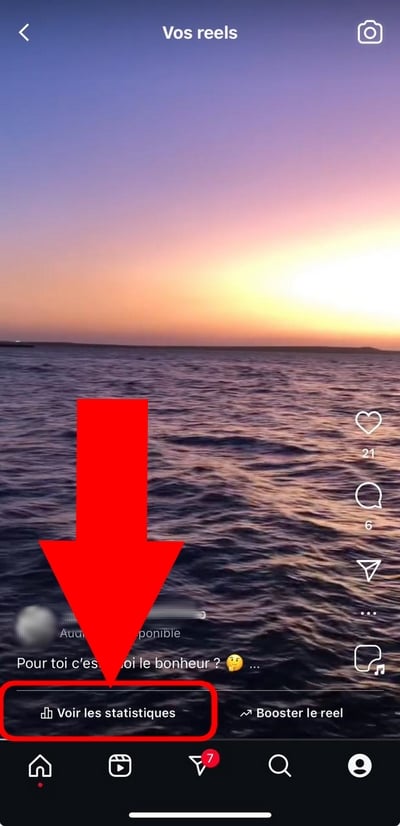
- Press the real whose data you want to view.
- Press View statistics.
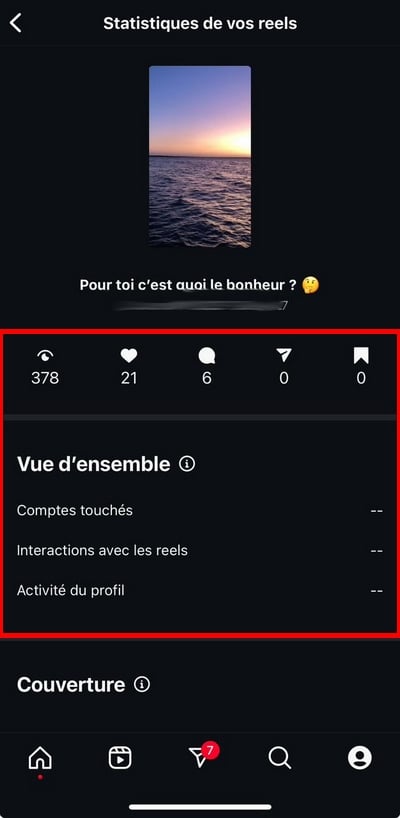
You will then have access to useful information : number of views, likes, comments, shares, and saves. These statistics Instagram users remain anonymous and never reveal the identities of viewers. The insights The data available varies depending on the account type: a business account provides access to more data than a personal account.
Please note : You can always switch your business account back to a personal profile later, without losing your Reels.
How can I see the number of views on my real Instagram account?
There's an even faster way to view the views without going through the Statistics menu. Here's how to do it:
- Access your profile by pressing your profile photo, in the lower-right corner of the screen.
- Tap the tab Reels, right below your bio.
- the number of readings The duration of each video is displayed in the lower-left corner of each thumbnail.
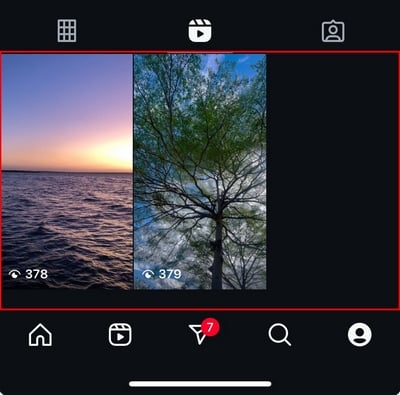
- Tap on one to see more engagement metrics.
You can then check out:
- Under the icon
heart-shaped: the number of likes.
- Under the icon
: THE number of comments.
These figures are still general. You can see the accounts that have liked or commented on the actual audience, but never the viewers who simply watched it without interacting.
FAQs
How can I see the views on someone else's Reels?
You can view certain public data on other users' Reels Instagram. Here's how:
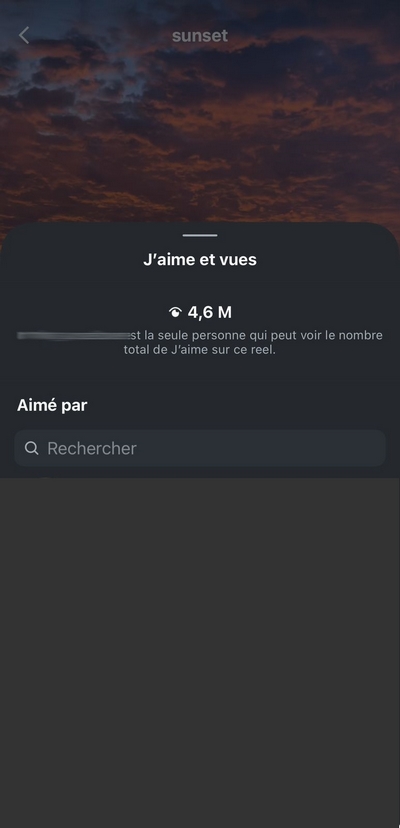
- Open the reality that interests you and press the figure located under the heart-shaped icon.
- You'll see the number of views as well as the list of accounts that have loved the actual number, provided the owner hasn't hidden their likes.
This list includes only those who have loved the video, not the viewers who watched it.
Can I view the statistics for someone else's Reels?
No, you're not checking than the stats for your own Reels. On other people's Reels, you can see:
- the number of likes, unless the person has hidden it.
- the number of comments, unless they are disabled.
- the number of shares, unless the user has hidden it.
How are views on my Instagram Reels counted?
For a view to be counted, the person must view your real Instagram for at least 3 seconds. A real can last up to 3 minutes.
Replays are not not recorded : If the same user views your live stream multiple times, only the first view is counted.
Personal and Business Accounts: What Are the Differences in Terms of Statistics?
A business account Where Creator provides access to detailed statistics on your Reels Instagram : affected accounts, interactions, posts, shares, audience insights, etc. A personal account does not have access to this data.
To switch to a business account, go to Settings, then to the section for account type. You can find the complete steps on the Instagram's official Help Center.
Who can see my Reels on Instagram?
If your account is public, your real name is visible to all users of the platform. The’algorithm ofInstagram This can then help your content reach far beyond your followers, to a wider audience.
If your account is private, you can choose who can see your real profile by adjusting the audience settings: followers or close friends only.
Why doesn't Instagram show who viewed my Story?
This decision is related to the privacy and by volume. The reels Instagram are intended as discovery content, aimed at a broad audience. Displaying each viewer would pose a real privacy issue. This restriction applies to all accounts, without exception.
How do I know who's looking at my real Instagram several times?
That's not possible. Instagram does not provide no information on individual viewers of your Reels, or on repeat views.
How can I get more views and likes on my Instagram Reels?
To boost engagement on your Reels, there are several strategies you can use. First and foremost, make sure to pay close attention to How to Make a Real One that grabs you right from the very first seconds. Next:
- Produce a quality content with a strong hook in the First 3 seconds.
- Check out the trends and the latest trends to gain visibility.
- Use the right ones hashtags to reach a wider audience.
- Share your Reels in your stories to give you a little boost getting started. If you want to add a link to a story or a real-life event, you can do this in the publishing options.
- Interact with your community and Reply to comments.
- Post to account public or professional to expand your reach.
- Analyze Your Instagram Account and those of your competitors to track your performance and refine your content strategy.
- As a last resort, buy likes and views to boost a real one.
For more information, see the section Statistics from your business account to better understand the impact of your Reels Instagram and increase their engagement.








 English