The minimum age to create an account on Snapchat is of 13 years old. It is a legal obligation, not just an internal rule. In Europe, the threshold can even go as high as 15 or 16 years old depending on the country. And in any case, meeting the age requirement doesn't guarantee that the app is safe for your teen.

What is the minimum age to create a Snapchat account?
Like most social networks, Snapchat sets the minimum age at 13 years old. Children under that age are not allowed to open an account or use the app.
This rule is not insignificant: at the UNITED STATES, a law prohibits companies from collecting personal data on users under the age of 13 without parental consent. Snapchat applies this threshold to remain in compliance with this requirement legal.
In Europe, the RGPD allows each state to set its own threshold between 13 and 16 years old. In France, the age of consent digital is set at 15 years : Under this age, a minor needs the consent of a parent or legal guardian. In Ireland, this threshold even rises to 16 years old.
An important note: Complying with this age limit does not automatically make the app safe. The age requirement is primarily intended to legal data requirements. It does not guarantee that the content or the people you meet on the platform are suitable for everyone teenagers.
For more information, check out our guide to Monitor your child's Snapchat account.
Why is Snapchat off-limits to children under 13?
This limit is not arbitrary. According to developmental studies, a child under the age of 13 years old does not yet have the full use of his mental faculties to filter content ...what he sees or set limits for himself. He is more vulnerable to addictive behaviors and outside influences.
Added to this is a legal reason: the collection of personal data Sexual activity with a minor under the age of 13 is strictly regulated. An app such as Snapchat must set a minimum age to protect the privacy the youngest users and remain in compliance with the law.
The risks For young users, the issues go beyond just data. Like many social networks, Snapchat is designed for grab someone's attention and can be addictive. Its use therefore requires great caution, especially among children and adolescents.
To understand the risks in detail, check out why Snapchat is badespecially for teenagers.
A version designed for children under 13, nicknamed " Snapchat for Kids », had in fact been considered. The plan was ultimately abandoned at the request of children’s rights advocates, to protect the child’s still-fragile mental health.
How do kids under 13 manage to open a Snapchat account?
The answer is simple: The app doesn't really verify age upon registration. Snapchat requests a date of birth, but there are no reliable checks to verify the user's actual age. Therefore, there is nothing to prevent a child from to lie about one's age by a few years to create an account without his parents' knowledge.
A young person under the minimum age need only enter a false date of birth to get past the 13 years old. The platform accepts this self-reported information as is, without requiring any identification or supporting documentation. This is the main weakness age-related safety on social media.
Sometimes a child will ask an older friend or older sibling to help open an account in their name. Once they have access, they can use all the features within the app, share photos and videos, and contact any user.
Without adult supervision, a determined teenager will almost always find a way around the restriction. That's why the parental control and dialogue matters far more than the posted age limit.
How can I protect my child on Snapchat?
There are several tools available to help your child navigate this social media platform and strengthen their online security. Here are the most useful ones.
Add Your Child to the Parent Center
If your teen is enrolled in Snapchat, you can add it to the Parenting Center (also known as the Family Center). This tool provides you with information on how to use it without invading your privacy. To set it up:
- Install Snapchat and log in with your own account (You must have one.).
- Make sure you have the latest version of the application.
- Add your teenager as a friend by typing their username in research.
- Go to the Family Center in the parameters.

- On the invitation screen, select your teen's name from your list of recent friends or by using the search function, then tap Send an invitation.
- Your teenager reacts to the invitation as a new message Live Chat. He must accept it to join the Parenting Center.
Like any conversation, this message may disappear immediately or 24 heures after reading it according to his settings. So be sure to remind him in person to accept the invitation.
Good to know: To send an invitation to the Family Center, you must have 25 years of age or older. Users of 18 and over cannot accept an invitation to this parental control feature.
Restrict the content your child sees on Snapchat
As a member of the Parenting Center, you can restrict certain sensitive content that your teen views in the Stories and Spotlight tabs. Some images or captions may not violate the Community Guidelines but are still suggestive. To enable this protection:
- Open the Settings.
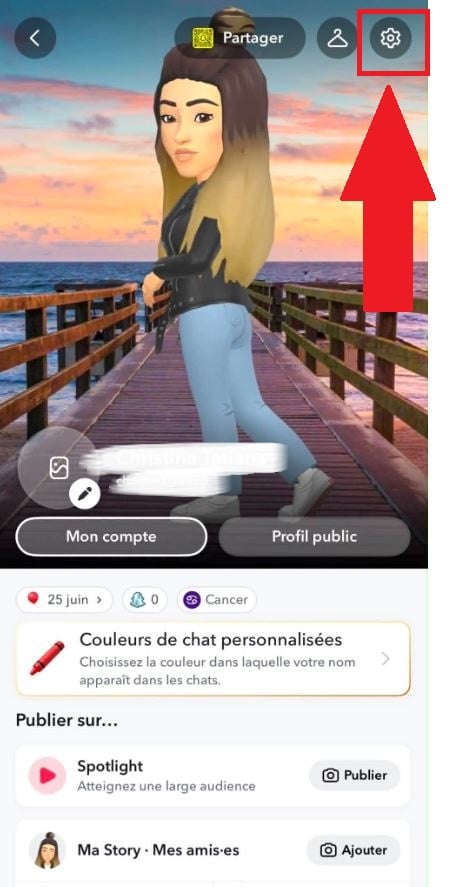
- Scroll down a little further and click Parenting Center.
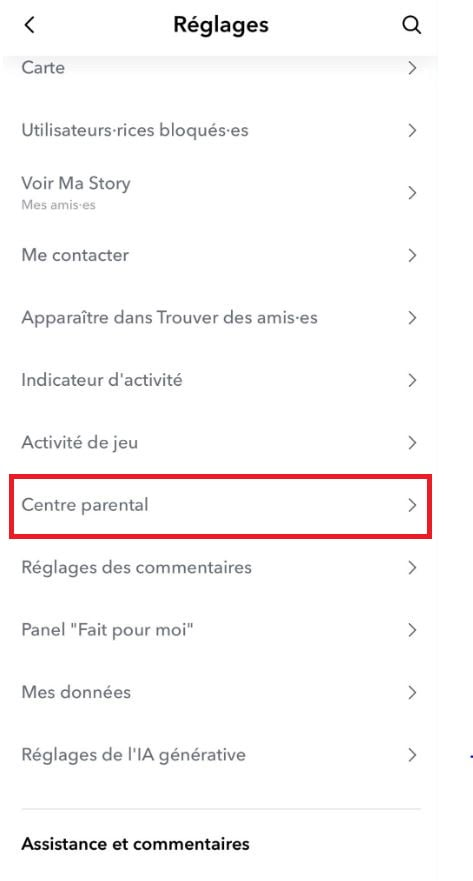
- Enable the option Restrict sensitive content.
Once this setting is enabled, your teenager will be notified.
Beware of a common misconception: the Parenting Center does not give you access to the content of the messages your child's messages, nor to messages that have been cleared or deleted. It is not spyware. Specifically, you will only see:
- there friends list your teenager's contacts and any new contacts added recently; ;
- the possibility of report an account that seems suspicious to you; ;
- the settings for location and monitoring of sensitive content.
This balance is intentional: you keep an eye on who they're interacting with online without reading their private conversations.
In addition to the built-in tool, a few simple habits can help reinforce the security of your child on social media:
- turns off sharing of location on the Snap Map to prevent their location from being visible; ;
- regularly checks its privacy settings (who can contact him, view his stories, or add him as a friend); ;
- Talk to him about the specific risks : cyberbullying, inappropriate content, and contact with strangers online; ;
- Remind him never to share photos, videos or share personal information with strangers.
At a certain age, your child will probably want to sign up for social media despite the dangers. The Parenting Center And these simple steps allow you to support them online while respecting their privacy.









 English