You can Monitor your son's Snapchat for free thanks to Parenting Center integrated into the app since 2022. He gives you access to his contacts, his screen time and a filter for sensitive content.
Be careful, though: Your child can turn it off on their own at any time.
For more robust monitoring, monitoring applications as mSpy Where Eyezy offer options that are much harder to get around.
Best Parental Control Software
Other parental control software
Snapchat's parental controls
First appeared in October 2022, the Parenting Center in Snapchat (the Family Center) lets you monitor your child's account directly from the app, without having to install any third-party software.
It works just as well on android than on iOS, as long as you both have Snapchat accounts.
How to Enable Snapchat's Parental Control Center
To activate this function, follow these steps on your phone:
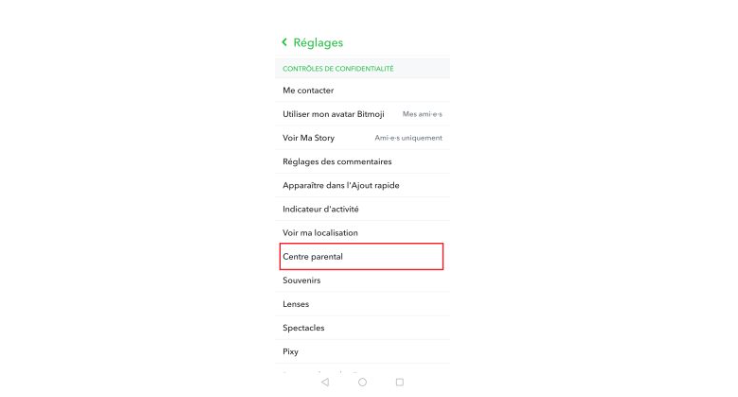
- Open your settings Snapchat, then tap Parenting Center.
- Check out the features from the options provided, then press Continue.
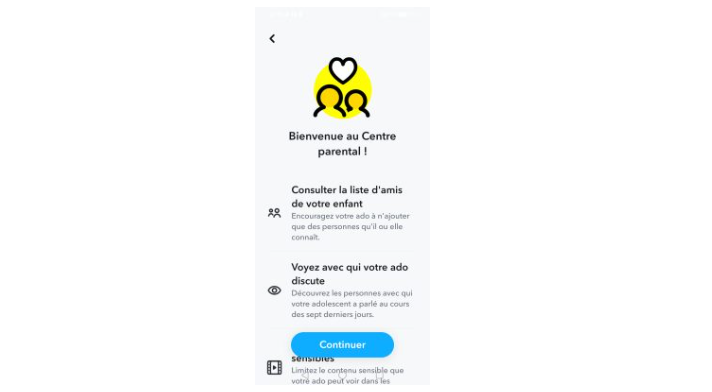
- Send an invitation to your child by searching for their Snapchat account in your contact list.

- Your child receives a notification and must accept the invitation to confirm the parent-child relationship. Without their consent, monitoring will not begin.
- Once the invitation has been accepted, the Family Center It turns on, and you can view its activity.
What You Can See (and What You Won't See)
the Family Center Make a conscious effort to respect the teenager's privacy. Specifically, you can:
- View the list of friends and the people your child has exchanged these with Last 7 days (the names, not the content).
- Consult your screen time : the average time spent each day on Chat, Snaps, Snap Map, and Stories.
- Enable sensitive content filtering to limit what your teen sees in Discover and Spotlight.
- Check your privacy settings on the Snap Mapwhose ghost mode which completely hides its location.
On the other hand, you can't do not read the messages or view snaps sent or received. The conversations that disappear remain private: The Parenting Center provides you with the context, not the content of the conversations.
The Limit You Need to Know
The Parenting Center has a major flaw: Your child can turn it off on their own at any time, based on his own settings, without your consent. He simply receives a notification when the connection is lost. You then lose access to his friends list and to its screen time.
For more robust monitoring that is much harder to circumvent, third-party apps are available.
We'll go over them in detail right after this. If you'd also like to monitor your son's cell phone or your daughter—all in all, the tools listed below also cover the other applications.
Which app should you use to monitor your child's Snapchat?
Before installing this type of tool, here’s an important reminder: Installing monitoring software on someone else’s cell phone without their consent is illegal.
It's often best to talk to your child about it rather than acting behind their back.
That said, if you need to go beyond the Family Center, two apps clearly stand out. To compare other options, check out our selection of Snapchat tracker.
The mSpy app

mSpy is one of the most widely used monitoring programs on the market. It lets you track your child's activity on Snapchat, as well as on all other apps installed on their device, whether on android or on iOS. Its main features are:
- The possibility of read messages sent, received, and deleted on Snapchat, including Snaps.
- A follow-up calls : incoming calls, outgoing calls, duration of each call.
- Access to the emails and the calendar.
- Access to accounts on the social networks : Snapchat, Instagram, Facebook.
- The real-time tracking via Google Maps.
- The definition of safety and danger zones remotely.
- The possibility of block apps not age-appropriate.
- Access to the contacts stored on the cell phone.
- Tracking everything your child types on the keyboard (keylogger).
Create an account on the website, install the app on the target phone, and then set up Snapchat in the social media section. You can then read their messages and view their snaps directly from your dashboard.
To install it and learn how it works, click here how mSpy works !
Want to see mSpy in action?
I'm learning about mSpy and its features
For a detailed overview, check out our mSpy Review.
The Eyezy App
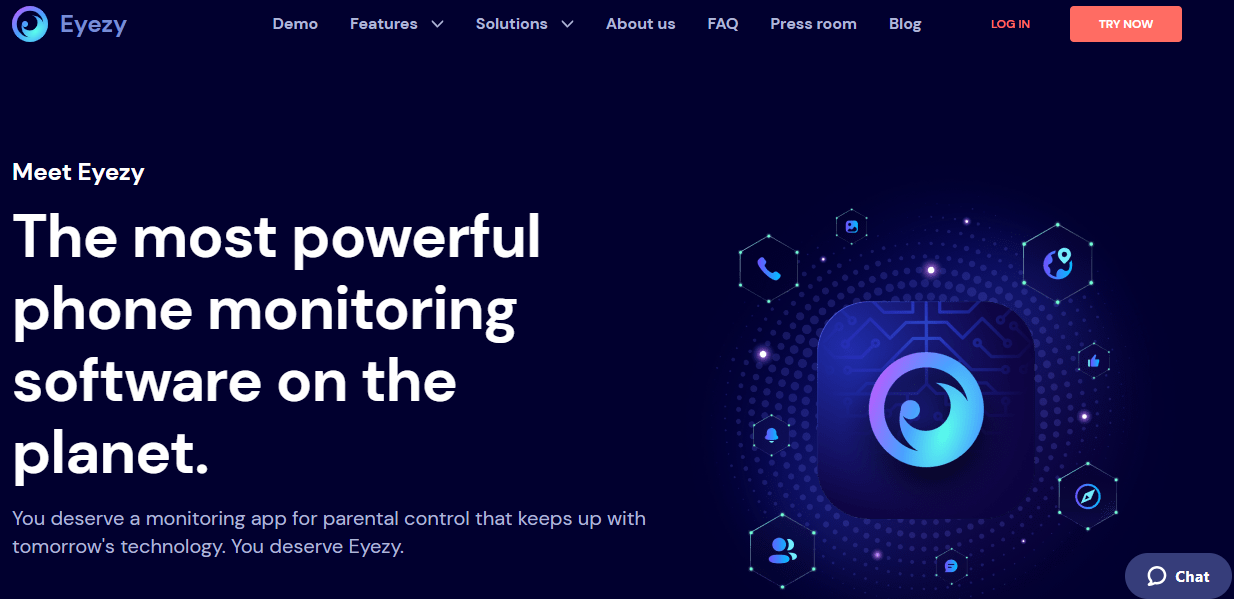
Eyezy takes monitoring even further. You can read the messages sent and received on Snapchat, as well as access photos, videos, and Snaps that disappear or have been deleted.
This involves its role as’screen recording, compatible android and iOS.
To discover Eyezy and its features:
I'm discovering all the things I can do with EyeZy
To use it and monitor your child's Snapchat account, feel free to check out our detailed guide on How to Use EyeZy
Why is it important to monitor your child's Snapchat account?
Young people spend a lot of time on social media, and Snapchat is one of their favorite apps. Several studies highlight the effect of social media on the mental health and well-being of adolescents.
On this type of platform, your child may be exposed to:
- Of cyberbullying between contacts.
- Receipt of messages or content of a sexual nature, including unsolicited snaps.
- A real addiction, with screen time skyrocketing.
- From theanxiety related to self-image.
- A feeling of loneliness or isolation.
Keep an eye on your screen time and his contacts allow you to ensure his security, without invading his privacy. The ideal is still to establish a relationship of trust : Talk to him about how he uses the app before checking everything.
If the Family Center "Free" isn't enough; tools like mSpy Where Eyezy offer much more comprehensive monitoring.
You can actually lower your bill by using the promo code mSpy or to Eyezy discount coupons available.









 English