What is the relationship between Facebook and Instagram?

Author :

React :

Comment

If you have a Facebook account and an Instagram account, please note that you can link them.

In this article, we will look at the link between Facebook and Instagram and how to link them.

What is the connection between Facebook and Instagram?
The Instagram and Facebook logos to illustrate the link between the two platforms
The Instagram and Facebook logos to illustrate the link between the two platforms. ©Antonin for Alucare.fr

We all know now that Facebook and Instagram belong to the same group (Meta), which allows you to link the two accounts.

  • Using Meta Business Suite, you can schedule your post on these two platforms at the same time.
  • This tool is very useful because it is now possible to program your content on Instagram from just one of your accounts.
  • It is also possible to post photos, videos, or stories on Instagram, and you can publish them. at the same time on Facebook by clicking a single button.
  • In your Meta Business Suite space, you can also access statistics accounts. This will allow you to track the performance of your pages easily and simply.

We can therefore say that this link is very practical when you have a Facebook and Instagram account to manage at the same time.

Discover more Which GAFAM does Instagram belong to? through another article on our website to learn more about the link between instagram and Facebook.

How do I link Instagram and Facebook?

The methods are slightly different depending on the device you are using. Here is what you need to do.

From a mobile phone

To Link Instagram and Facebook on mobile, you can proceed as follows:

  • Start by opening your Instagram app. At the far right of the menu at the bottom of your screen, tap your profile icon.

Button to access your Instagram profile
Button to access your Instagram profile. ©Antonin for Alucare.fr
  • Press the three lines at the top right on your screen to access the options.
Button to access Instagram settings
Button to access Instagram settings. ©Antonin for Alucare.fr
  • Then click on “Accounts Area”.
Instagram Account Space Option
Instagram account space option. ©Antonin for Alucare.fr
  • Click on “Add accounts” at the bottom of your Instagram profile.
Add Accounts Option on Instagram
Option Add accounts on Instagram. ©Antonin for Alucare.fr
  • Select “Add a Facebook account”.
Option Add a Facebook account to Instagram
Option to add a Facebook account to Instagram. ©Antonin for Alucare.fr
  • Press on “Continue” to confirm your actions.

Enable connected experiences on Instagram
Enable connected experiences on Instagram. ©Antonin for Alucare.fr
  • complete the process.
Complete the linking of the two accounts on Instagram
Complete the linking of the two accounts on Instagram. ©Antonin for Alucare.fr

Once these two accounts are linked, you can now share content you have posted on your Instagram account on Facebook. All you have to do is select Facebook in the Publish section for each new publication.

Discover also how to separate Instagram from Facebook through another article on our site if you have already linked them in the past.

From a computer

Here are the steps to follow to connect your Instagram account to your Facebook account from a computerr:

  • Open your browser and log in to your Instagram account. Then tap the menu (the three horizontal bars) at the bottom left of the screen.
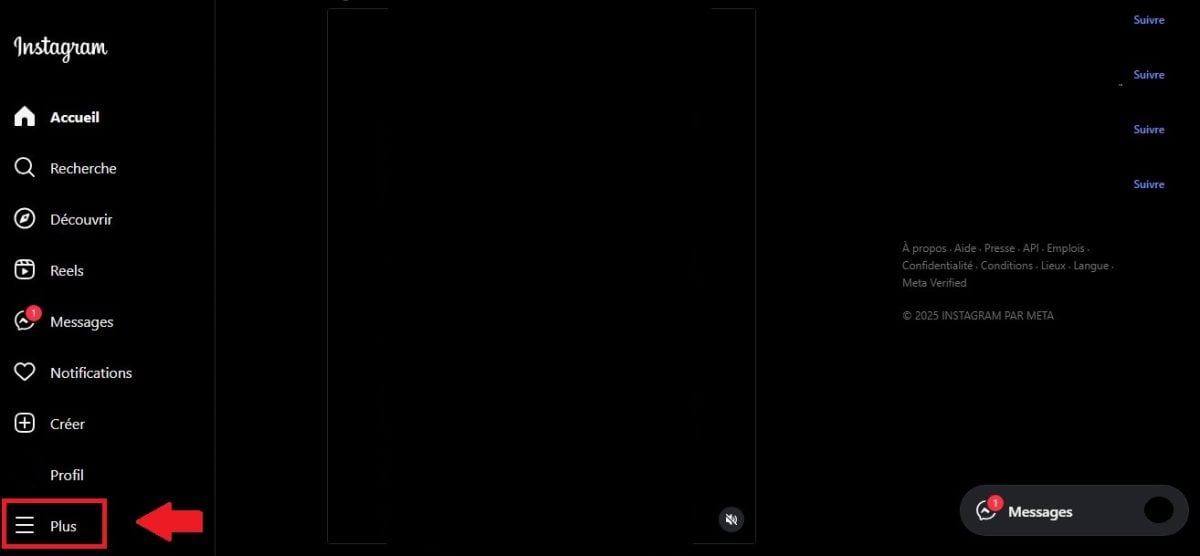
Button to access the menu on Instagram
Button to access the menu on Instagram. ©Antonin for Alucare.fr
  • Click on Settings up.
Settings option in the Instagram menu
Settings option in the Instagram menu. ©Antonin for Alucare.fr
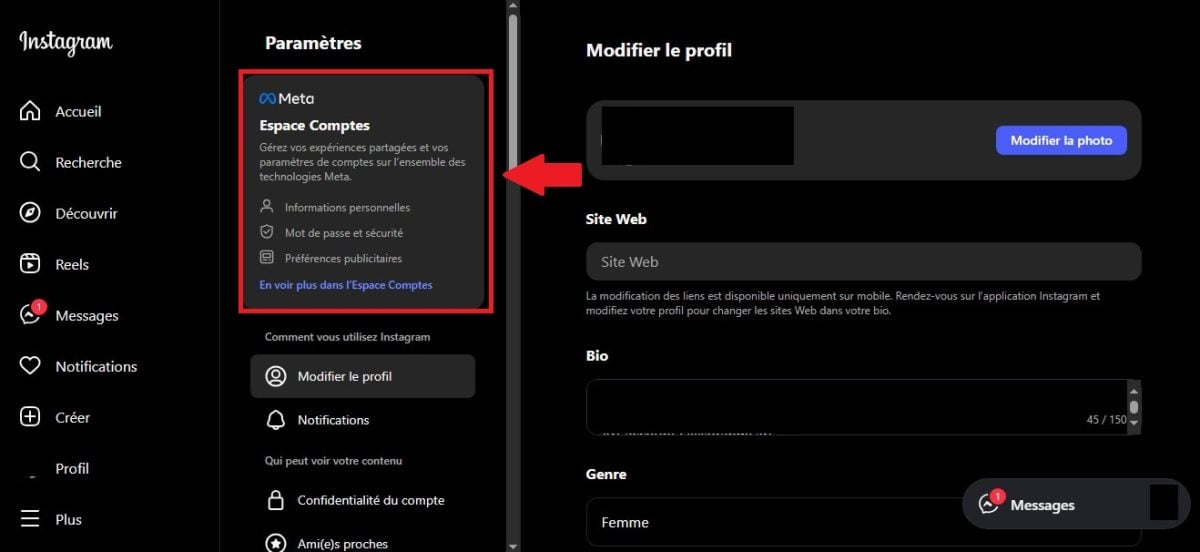
  • Then press “Accounts Area”.
Instagram account space option on computer
Instagram account space option on computer. ©Antonin for Alucare.fr
  • Click on the blue button Add accounts” at the bottom of your Instagram account.
Option Add accounts on Instagram on computer
Option Add accounts on Instagram on your computer. ©Antonin for Alucare.fr
  • Click on Add a Facebook account” in the window that appears.
Add Facebook Account Option
Add Facebook account option. ©Antonin for Alucare.fr
  • A new window will open inviting you to log in to your Facebook accountEnter your login details.
Log in to a Facebook account to link it to Instagram
Log in to a Facebook account to link it to Instagram. ©Antonin for Alucare.fr

If you are already logged in to Facebook, you will only need to confirm that the account displayed is the one to be linked to the Instagram account in question.

Confirm that the account displayed is the one to be linked to the Instagram account.
Confirm that the account displayed is the one to be linked to the Instagram account. ©Antonin for Alucare.fr
  • Once logged in, continue with the following instructions in order to confirm the link between the two accounts.
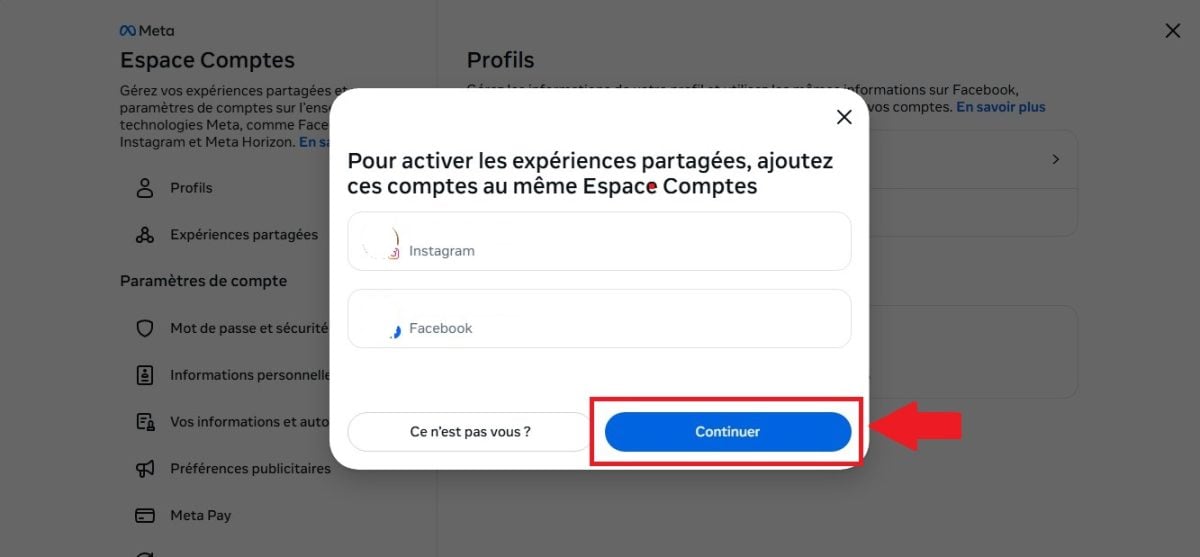
Confirm the link between the two accounts
Confirm the link between the two accounts. ©Antonin for Alucare.fr
  • Press on “Authorize and complete the addition” to finalize the process.
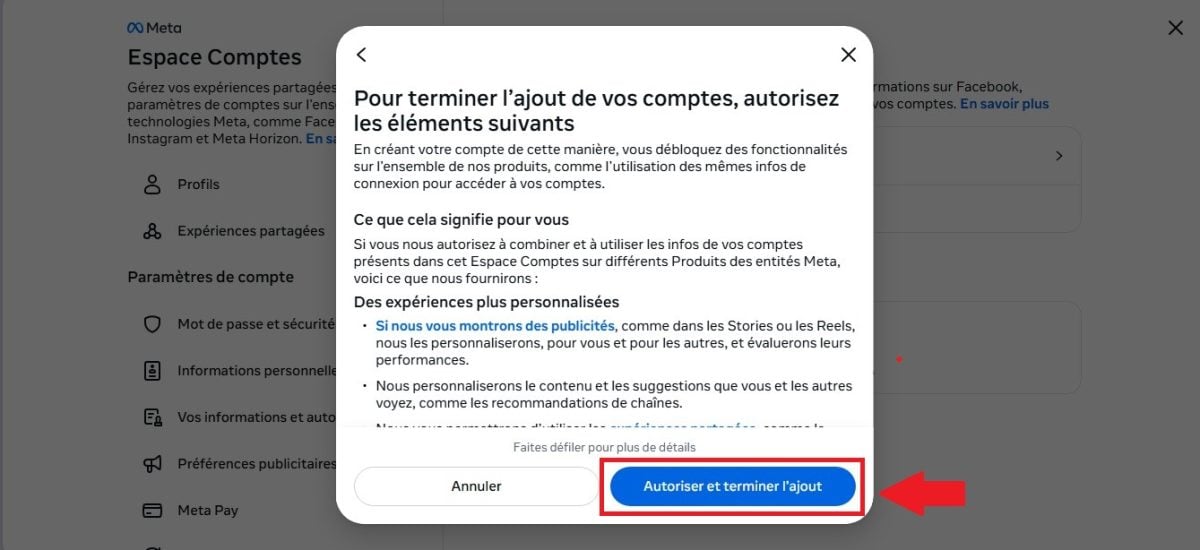
Authorize and complete the linking of the two accounts
Authorize and complete the linking of the two accounts. ©Antonin for Alucare.fr

What are the advantages and disadvantages of linking Instagram and Facebook?

Discover in this section the benefits and the game's disadvantages to link Instagram and Facebook.

Benefits of linking Instagram and Facebook

✅ Benefits of linking Instagram and Facebook 📃 Details
Simpler content sharing
  • When you link your Instagram account to your Facebook account, it becomes possible to post content on both platforms at the same time.
  • Does that make you win of time and avoids having to repeat the process of publishing something twice.
Increased visibility
  • When you link your two accounts and enable cross-posting, your content will be visible to your audience on both platforms.
  • You will thus gain in visibility for the same content.
Unified data analysis
  • Thanks to the linking of the two accounts, you can access more easily Instagram statistics and Facebook on both of your accounts.
  • This makes it easier to analyze your performance on social media and correct what is wrong with your content strategy.
More efficient and easier management
  • You can manage both of your accounts through a single account when you link them.
  • This simplifies your daily use of social media and keeps you from getting lost between multiple accounts.

Disadvantages of linking Instagram and Facebook

❌ Disadvantage of linking Instagram and Facebook 📃 Details
Lack of customization
  • When you publish the same content on both platforms, it can affect your credibility with your audience.
  • Indeed, the audience on Facebook and the audience on Instagram are variousWhat appeals to one person may not appeal to another.
  • It may then be necessary to customize publications in order to respect the audience's needs on every social network.
Public confusion
  • If someone follows you on Instagram and Facebook, your content may appear in their news feed. several times, which may disturb her.
  • This can lead to reduction in commitment or a loss of subscribers.
Risk of impact on the algorithm
  • The algorithm may also consider your content to be repetitive and avoid showing them to the public if you post the same content on both platforms.
  • Fewer subscribers will see so your post, which may affect your performance on the platform.

In conclusion :

  • The link between the two platforms, Instagram and Facebook, lies in the fact that they belong both to the Meta group.
  • By linking your Instagram and Facebook accounts, you can perform various activities at the same time on both accounts.
  • Link the two profiles offers many advantages, but certain details should be considered to avoid the disadvantages of this approach.

If you have any questions about what has been mentioned here, please do not hesitate to leave a comment.

Found this helpful? Share it with a friend!

This content is originally in French (See the editor just below.). It has been translated and proofread in various languages using Deepl and/or the Google Translate API to offer help in as many countries as possible. This translation costs us several thousand euros a month. If it's not 100% perfect, please leave a comment for us to fix. If you're interested in proofreading and improving the quality of translated articles, don't hesitate to send us an e-mail via the contact form!
We appreciate your feedback to improve our content. If you would like to suggest improvements, please use our contact form or leave a comment below. Your feedback always help us to improve the quality of our website Alucare.fr


Alucare is an free independent media. Support us by adding us to your Google News favorites:

Post a comment on the discussion forum

Facebook

Edited by : Meta Platforms, Inc.

Available on : PC, Android, iOS