In brief
Positives
- Powerful keyword analysis
- Suggested content ideas
- Competitive data and SEO
- Video optimization score
Negative points
- Uncomplicated interface
- Pay-per-use versions can be costly
vidIQ at the best price
- VidIQ 16,58 $
VidIQ is one of the two YouTube SEO tools the most popular ones. It helps you find the right ones key words, analyze your competitors and generate video ideas every day.
This comprehensive review is based on several weeks of real-world testing with my home theater system.
Our Review of VidIQ, the Tool to Boost Your YouTube Videos
VidIQ is not just a simple extension Chrome.
It's a certified partner of YouTube, whose goal is clear: to help the content creators to drill on the platform.
It plays a role in every stage of your video, from the brainstorming until the’analysis of the results after publication, via the’search engine optimization.
For creators who want to improve their visibility on YouTube, it is one of the most comprehensive tools on the market.
Here are the main strengths and weaknesses of this tool:
| Highlights | Weak points |
|---|---|
| Powerful keyword analysis | A very feature-rich interface that takes a little time to get used to |
| Daily Content Ideas | Limited free version (Daily Ideas and Outliers (flanged) |
| Comprehensive Competitive Intelligence and SEO Data | Advanced features and AI available only on paid plans |
| Video Optimization Score |
Explanatory video in French by Alucare, ideal complement to the page. View video (you can use YouTube's automatic translation)

Why use VidIQ for your YouTube channel?
The content strategy on YouTube is becoming increasingly competitive. Without performance analysis and a good command of YouTube SEO, it's hard to stand out.
VidIQ meets this need by centralizing all relevant data in a single interface.
Compared to TubeBuddy, its main competitor, VidIQ stands out for the richness of its artificial intelligence features and the depth of its sound competitive analysis.
It's a real tool for digital marketing For creators—not just a tag extension.
Whether you're just starting out or your channel is already generating revenue, VidIQ adapts to your level thanks to its various levels.
The free version allows you to get started without any investment, and the paying plans open opportunities much broader optimization efforts.
VidIQ's main features
VidIQ combines several features Tips for YouTube creators. Here are the ones you'll use most often in your day-to-day work.
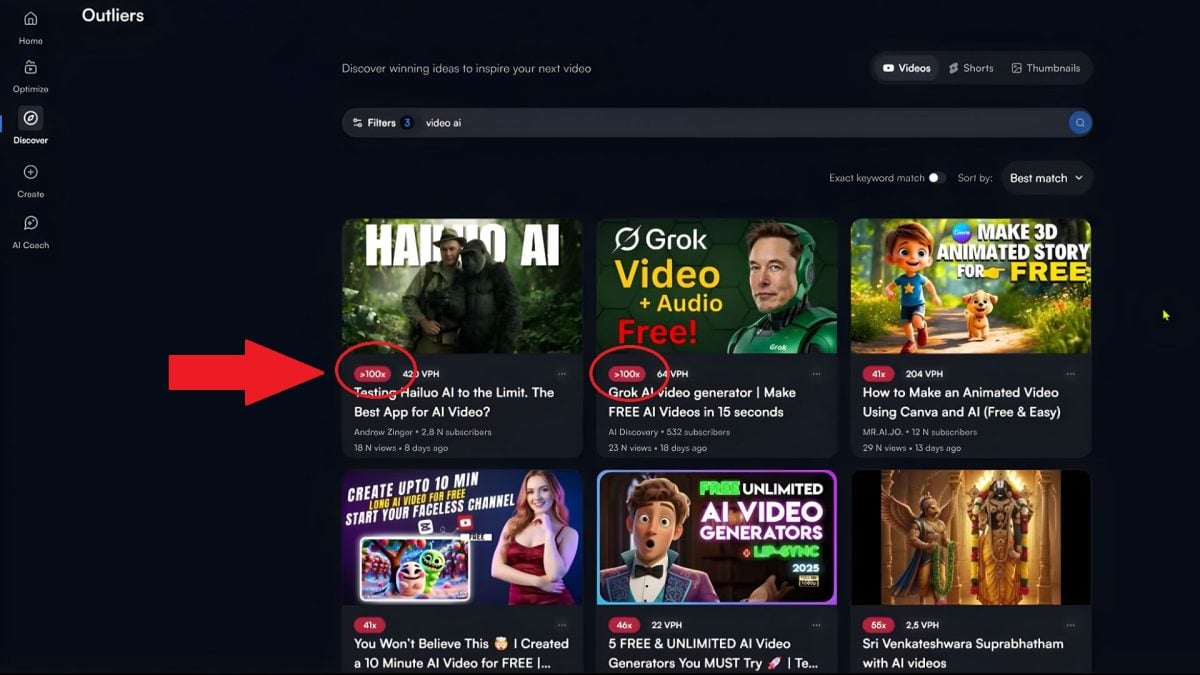
Outliers: View a Video's Performance
Thanks to analysis data from VidIQ, you quickly figure out what works:
- You identify the videos that perform above average from their channel.
- You'll understand which topics generate the most views and followers.
Just type a keyword to see trending videos. For example, when searching for «AI video,» some videos appear higher 100 times the average from their channel.
In free version, the analysis is capped at 6 results by search, versus unlimited access to Boost Plan and above.
Keyword Research
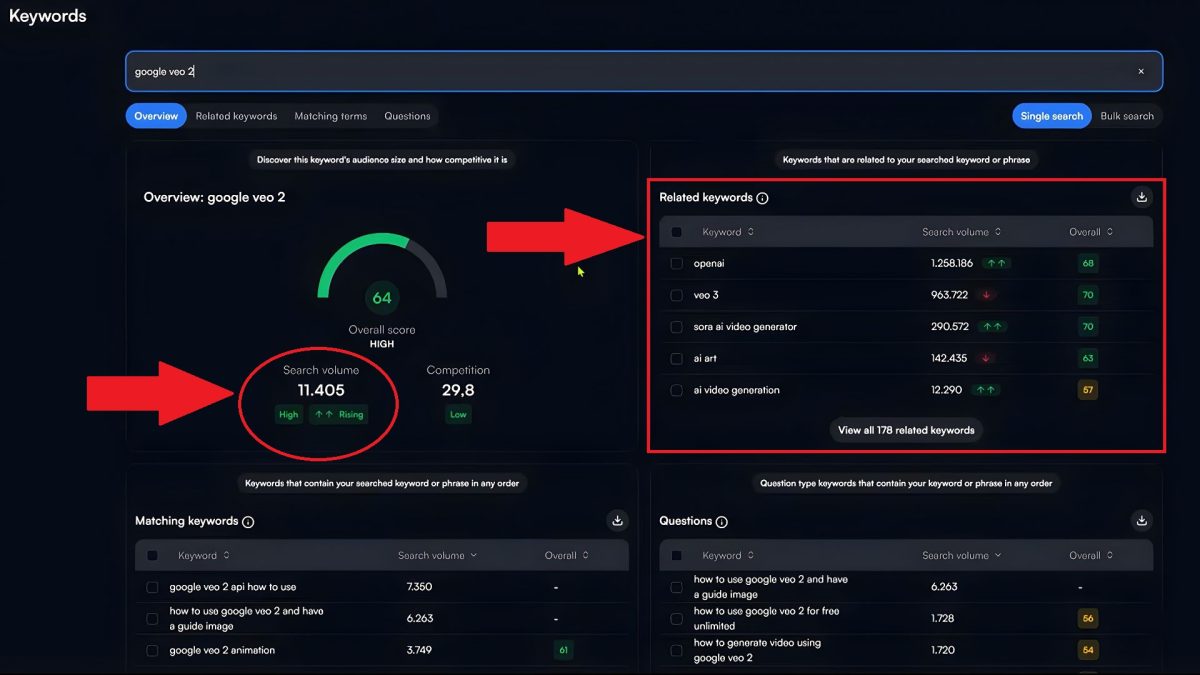
The keyword search is one of the most powerful features of VidIQ. Specifically, the tool:
- identifies the Keywords searched for on YouTube,
- evaluates the competition and the potential for each keyword,
- offers tags, suggestions, and trends to strengthen your SEO.
You'll also find the questions actually asked by internet users, which are very useful for your titles and descriptions. In the example below, you can see the research volume the keyword «Google Veo 2» and related keywords.
Daily Ideas: Video Ideas Every Day
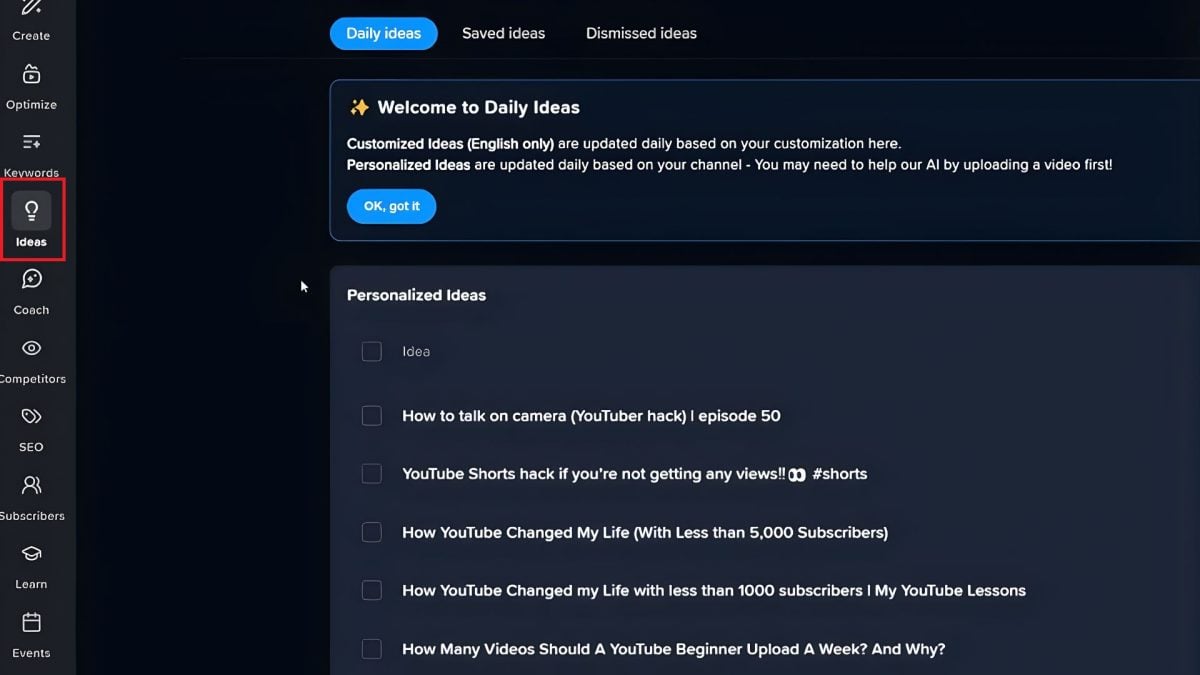
With this feature, you'll never run out of’content ideas. VidIQ offers you every day:
- of the personalized suggestions based on your channel and current trends,
- a potential score for each idea, to prioritize the best ones.
Just click on «Ideas of the Day» or « Daily Ideas«. The free version provides only a few ideas per day; the paid plans unlock a much larger quota.".
Competitors: Competitor Analysis
One of the biggest advantages of VidIQ, it's access to advanced competitive intelligence directly on YouTube, without having to open each channel one by one.
Select your competitors and review:
- their number of subscribers,
- their number of views,
- their Top-performing videos in your topic,
- their average daily views and their growth rate.
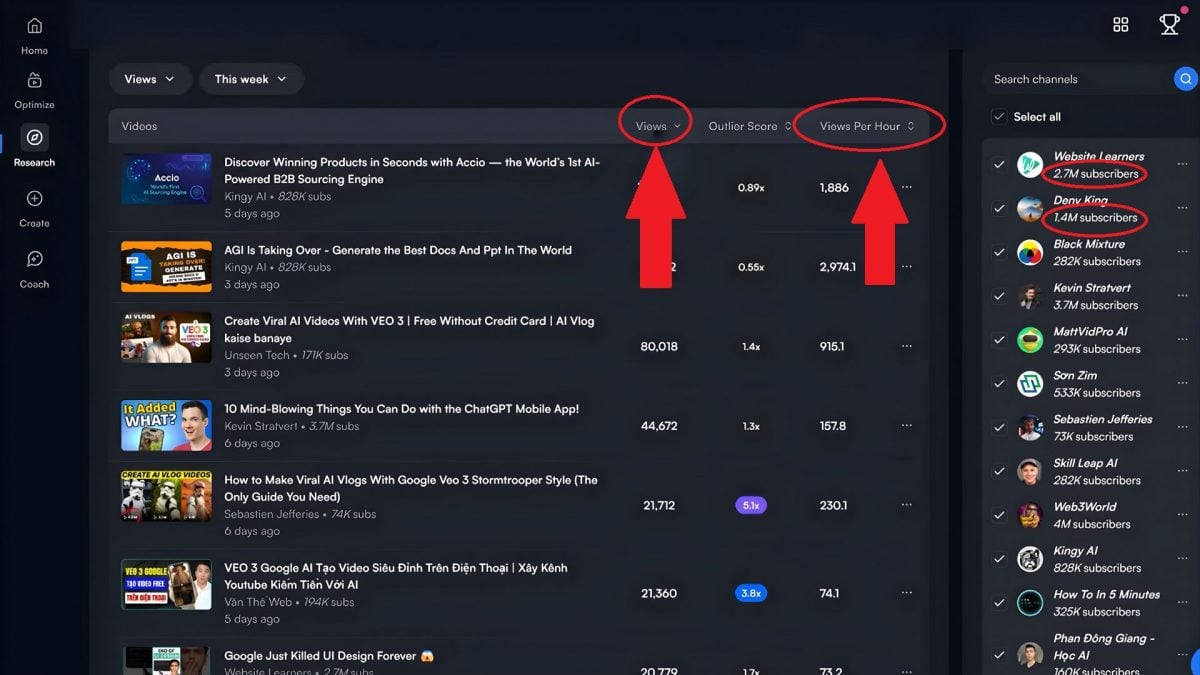
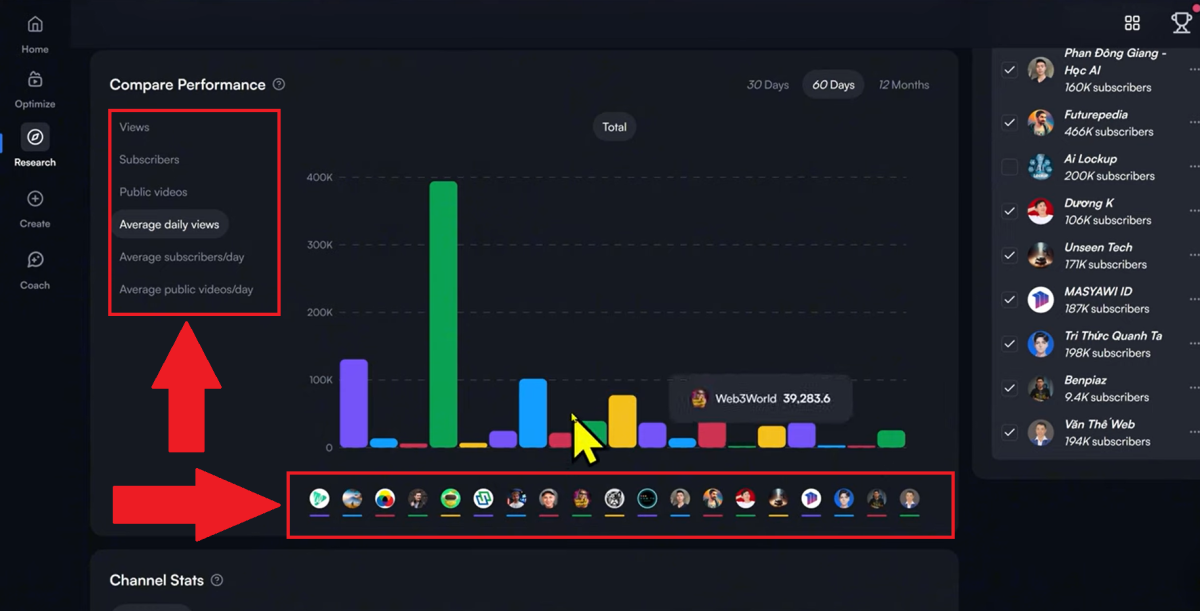
In practice, this feature lets you save a lot of time by analyzing your competitors' performance for you.
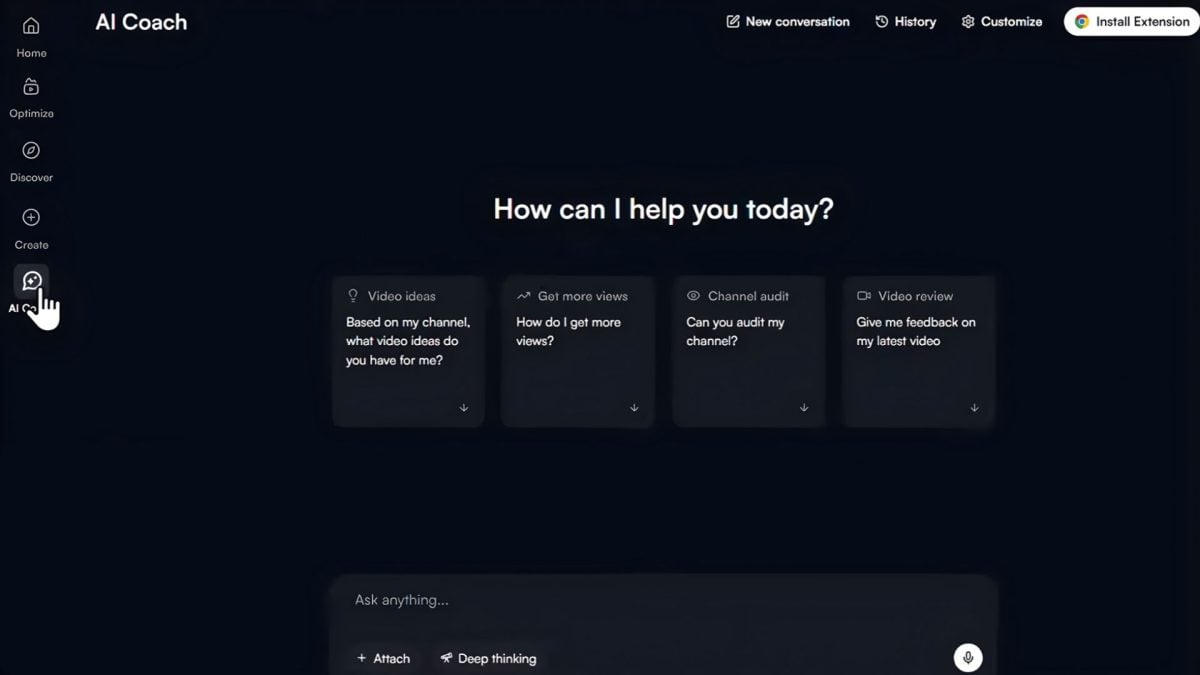
AI Coach
L'artificial intelligence from VidIQ analyzes your channel and provides you with:
- of the personalized advice depending on your content,
- of the strategic recommendations on the type of videos, posting frequency, and SEO optimization.
It's like having a dedicated YouTube coach on your channel. You type in your question, and the AI answers you right away. With the free version, you get about 150 AI credits per month, which runs out fairly quickly. For heavy use, a paid plan becomes necessary.
Other VidIQ features
VidIQ doesn't stop at SEO analysis. The tool also includes a series of AI-based features To help you create and optimize your videos faster:
- Title Generator : Generates optimized titles to improve your click-through rate.
- Optimize : assigns a optimization score clear for each video, with specific recommendations.
- AI Thumbnail Maker : creates more attractive thumbnails, a real plus for visibility in the suggestions.
- Script Writer : helps you structure your scripts quickly using AI.
- AI Shorts Clipping : Turn your long videos into Short stories ready for publication.
- Channel Audit : gives you an overview of your supply chain's strengths and weaknesses, along with suggestions for improvement.
You use them based on your skill level and your current needs.
Some remain limited in free version and are fully unlocked on the paying plans.
How much does VidIQ cost?
the VidIQ pricing starts at 0 $ It starts with a free version, then the price increases depending on the features you unlock.
Here is an overview of the three available plans:
| Formula | Price | Target profile |
|---|---|---|
| Free | 0 $ / month | Beginners who want to try out the basic tools |
| Boost | 16.58 $ / month | Startups Aiming for Accelerated Growth |
| Max | 39 $ / month | Professional creators looking for unlimited AI coaching |
Which plan should you choose based on your profile?
For your first test, stick to the plan Free : You can figure out the interface without spending a single euro.
If you post regularly and want to optimize your SEO Seriously, the plan Boost to 16.58 $ per month offers the best value for money for most creators.
The plan Max 39 $ per month is designed for professional creators who use the’artificial intelligence are fully committed and want unlimited support.
It's an investment that makes sense especially when your channel is already generating revenue.
FAQs
Is VidIQ authorized by YouTube?
Yes, VidIQ is totally authorized by YouTube and recognized by the platform.
It's a legal extension and service designed to improve your SEO and the visibility of your videos.
Is the VidIQ extension available in French?
The tool offers a French version for most menus. Some advanced features, particularly the new features related to the’AI, can remain in English.
Does VidIQ really help you get more views?
VidIQ improve your YouTube SEO through better keywords, optimized titles, and a detailed analysis of trends and your competitors.
That way, you're more likely to be discovered.
Please note that this is not an automatic guarantee.
Without quality content If you don't publish regularly, no tool will make a difference. VidIQ is a accelerator, not a magic button.
How do I install the VidIQ extension on Chrome?
It couldn't be easier to add the extension to your browser:
- Visit the official website VidIQ.
- Click «Add to Chrome ".
- Click «Add extension» in the pop-up window.
- The extension installs and redirects you directly to YouTube.
Does VidIQ slow down the browser?
In practice, the impact on performance is minimal. The extension adds data directly to the interface YouTube, which may slightly slow down page loading.
Is VidIQ available on mobile?
Yes, VidIQ offers a mobile version. There, you can track your channel, the Daily Video Ideas and some of the analytics features.
Which VidIQ plan should I choose?
To start, the free version is more than enough to test the keyword search and basic monitoring.
If you want to take it to the next level, with a significantly larger number of ideas, the’AI Coach comprehensive overview and in-depth analysis of competitors, a paid plan becomes a truly profitable investment.
VidIQ is one of the most comprehensive tools for making serious progress in YouTube.
The free version lets you get started without spending a dime, and the paid plans are worth the price as soon as you really want to optimize your channel.
Feel free to leave a comment with your results before and after using it!
And if you want more YouTube tips, check out:









 FR
FR  RU
RU  EN
EN  ES
ES  IT
IT  DE
DE  ZH
ZH  PT
PT  ID
ID  JA
JA  DA
DA