Game Passes on Roblox are one of the easiest ways to add bonuses to your players and earn a few Robux in the process.
In this article, we explain step-by-step how to create a Game Pass on Roblox easily over the phone.
Need Robux? Go here to get them:

Video tutorial on how to create a Game Pass on Roblox using a phone
Would you rather follow the steps in a video? This tutorial shows you how to create a Game Pass using a phone :

Requirements for creating a Game Pass on cell phones
1. Have an active Roblox account
To create a Game Pass, you must :
- Have an account on Roblox ;
- Log in to your account ;
- Access to an experience (game).
It's in this experience (game) that you'll be able to add your Game Pass.
2. Access a web browser on your phone
⚠️ You cannot create a Game Pass on the Roblox application.
You must use a mobile browser such as :
- Google Chrome ;
- Safari ;
- Or any browser that can open the Roblox site.
Steps for creating a Roblox Game Pass on cell phones
Here are the general steps for create a Game Pass from your phone.
1. Open Roblox in your browser
Go to Roblox official website in your mobile browser and log in to your account.
2. Access your creations
- Go to your profile menu.
- Find the “Create” button.
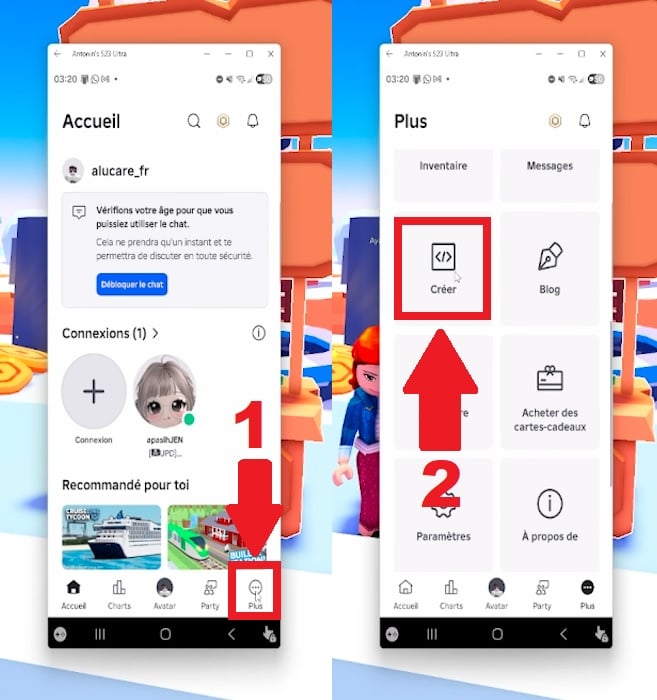
- You don't need to download Roblox Studio. Just click directly on your “Experiments”.
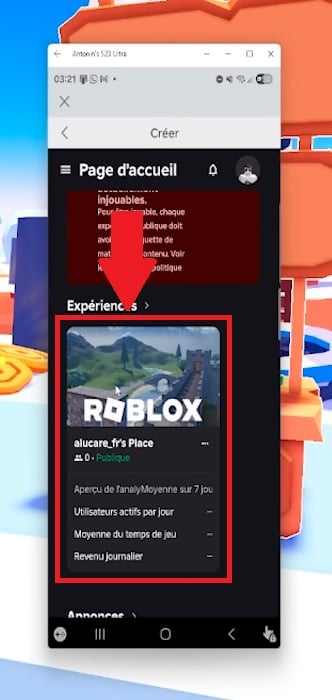
3. Find the Pass section
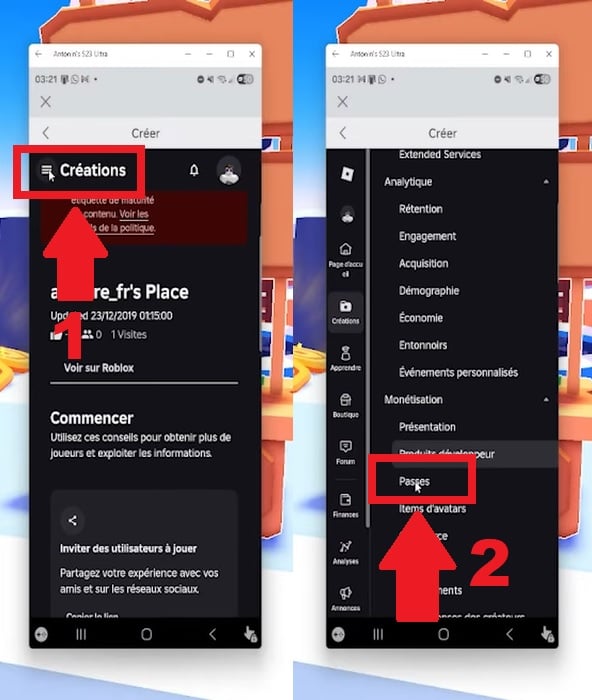
Once in the “Creations” tab :
- Click on the menu at the top left of the screen.
- Scroll down to “Monetization” and click on “Passes”.
- Press “Create a Pass”.
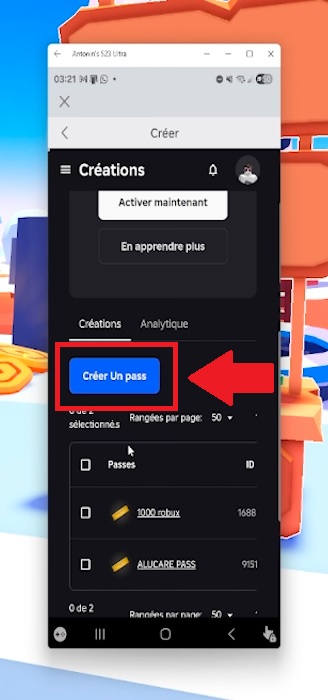
4. Create Game Pass
When you create a Pass, you will generally have to :
- Add an image,
- Give Game Pass a name,
- Write a description (optional),
- Then confirm the creation of the Pass.
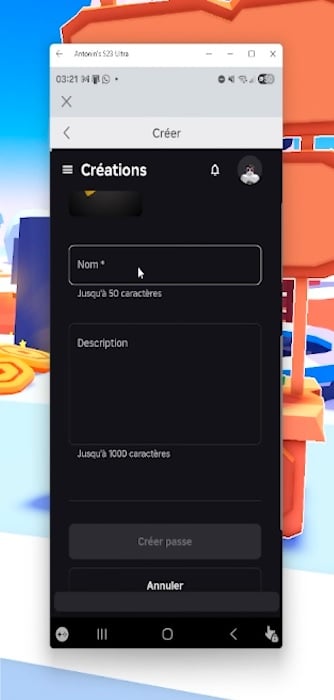
A word of advice: Create inexpensive Passes, for example starting at 2 Robux. Avoid creating Passes at 1 Robux, because you won't earn anything in return.
5. Put Game Pass on sale
Once the Pass has been created, you still need to :
- Return to the Pass you've just created.
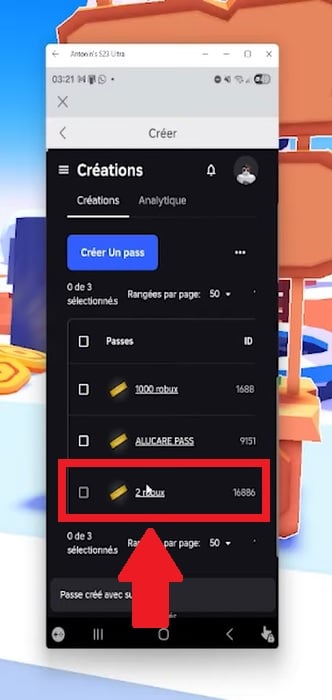
- Click on the top-left button to access “Sales”.
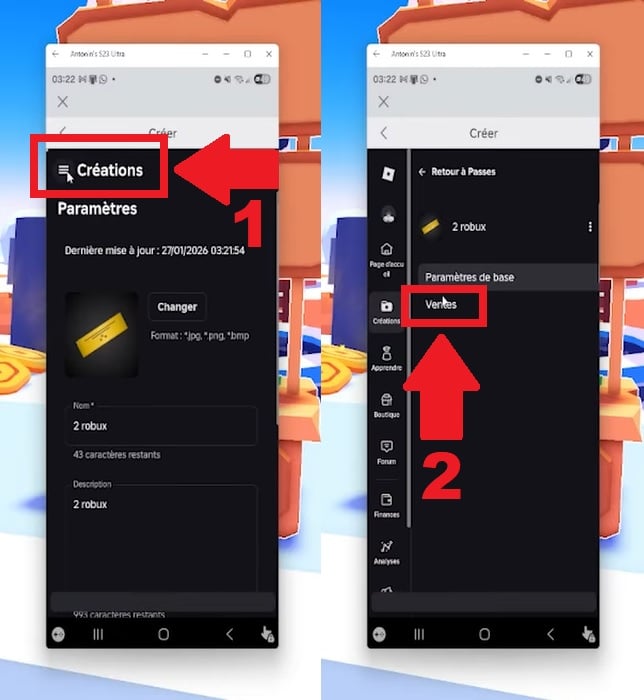
- Activate the “Item for sale” button.
- Set the price in Robux.
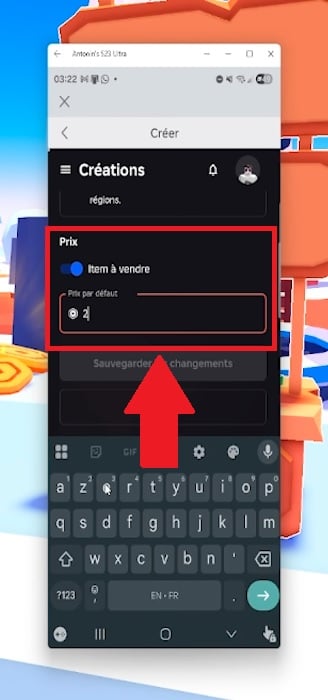
- Deactivate the “Activate regional prices” button before confirming.

- Then click on “Save changes” to validate everything.
Once registered, your Game Pass is ready! Players will be able to buy it in your game.
Need Robux? Go here to get them:
Why create a Game Pass on Roblox?
Creating a Game Pass allows you to :
- Add premium content
- Offer exclusive bonuses
Game Passes are therefore used to monetize the game.
When a player buys a Game Pass :
- He pays in Robux
- You receive a part of these Robux
This is one of the most widespread monetization systems in Roblox games.
Some important points to remember about Game Passes in Roblox
🎮 A Game Pass is linked to a single game (experience).
🚫 A Game Pass purchased in one game therefore does not work in other games.
❌ To create a Game Pass, you can't do it from the Roblox application.
✔️ You need to go to the Roblox website to access the experiment configuration section.
💰 Game Pass revenues are distributed after a processing period (pending) before being added to your balance. This may take a few days.
FAQs
I can't find the Game Pass creation option
Make sure that :
- You are using the Roblox website and not the application.
- You are now in your experience (game) page.
- You are the creator of the game or have permissions.
Otherwise, don't forget to activate desktop mode in your mobile browser.
My Game Pass does not appear in my game
There are several reasons for this:
- Game Pass sales are not activated.
- The price is not defined.
- The game does not yet use Game Pass in its scripts.
Also check that your experience has been updated and published.
Why do I earn less Robux than the Game Pass price?
When you sell a Game Pass on Roblox :
- A commission is charged by the platform.
- So you don't get 100 % of the prize.
- The designer receives around 70 % of the prize in Robux.
So for a Game Pass sold at 100 Robux, you receive around 70 Robux after commission.
This is normal for monetization on Roblox.
Need cheap Robux?
You can therefore create a Game Pass EASILY on your phone provided you use the Roblox website rather than the application.
What benefits and bonuses do you plan to add to your Roblox games thanks to Game Pass? Tell us all about it in the comments!
And for even more Roblox articles and tutorials :







 English