Google Maps allows you to Find a loved one for free, provided that the person agrees to share one's position with you. The location is then determined in real time, right on the map, from your Google account.
Without its consent, it's impossible to track a phone number without the owner's knowledge. Here's the complete guide, plus the best alternatives for locating a device android Where iPhone.
Discover the best alternative to Google Maps:
How can I geolocate a phone for free?

It is the person to be located who must Enable location sharing from his own cell phone. Without this action on his part, geolocation won't work. Here are the steps to follow.
1. Set up the phone you want to locate using Google Maps
There are a few prerequisites you must meet before you begin:
- L'Google Maps app must be installed on the phone to be tracked, and the device must be connected to a Google account active.
- The person to be located must agree to share one's position with you.
- the localization service (GPS) must be turned on on their phone.
Here's how to enable location services depending on the device:
- On android : go to Settings then Location, and make sure the option is enabled for Google Maps.
- On iPhone (iOS) : go to Settings then Privacy and security, and check that the localization service is enabled for the application. This step is the same on iOS 16 and subsequent versions.
2. Enable location sharing on Google Maps
This step is done on the phone of the person to be located. She's the one who initiates the sharing with you:
- Open the’Google Maps app linked to the device's Google account.
- Press the profile photo, the small circle in the upper-right corner of the screen.
- Select Position sharing.
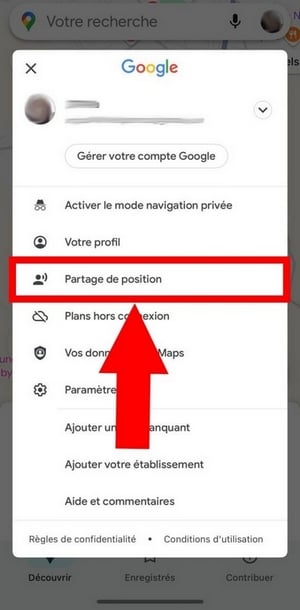
Then confirm the action by pressing Share my position.

3. Select the contact and the duration of the share
Find your name or select your contact from the available options to send them the location-sharing link. Scroll to the right to see all the options.
You can also set the duration during which the position will be shared. The options range from’one hour until it is manually deactivated.
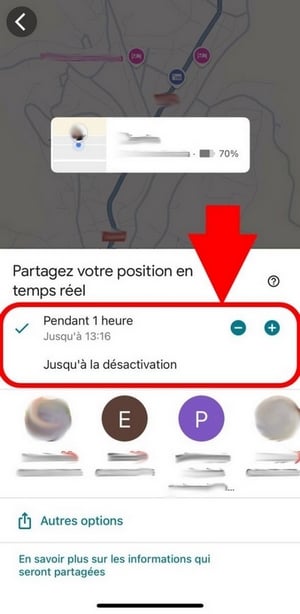
All that's left to do is press To share. The position is then sent to the selected contact.
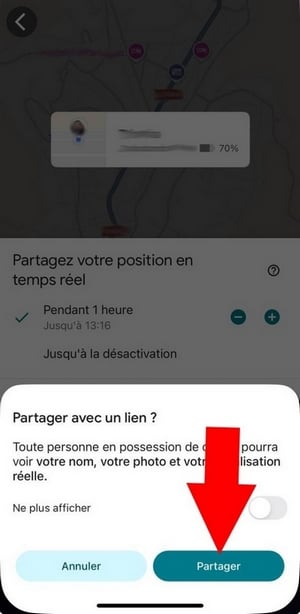
4. Track the location on your phone
As for you, open the SMS, email (such as WhatsApp) or by email, depending on the option you selected. There you'll find the link that displays the location of the mobile device on the map.
You can also find the person directly in Google Maps, section Position sharing, as long as sharing remains enabled. Whether you use a iPhone or one android, the steps and conditions remain the same.
What are the advantages and disadvantages of Google Maps?
Here is a table to weigh the strengths and the game's limits from Google Maps before using it.
| Advantages | Disadvantages |
|
|
Google Maps remains the best solution convenient and free to find a loved one who is willing to share their location. To locate a number that hasn't enabled this feature, you'll need to use other tools.
Do you have the phone number you want to track?
Locating a Smartphone Using Its Phone Number
Alternative to Google Maps for locating a device online
Google Maps not your thing? There are other options that let you locate a cell phone for free or at lower cost. Here are the best alternatives, along with their real limitations.
1. Google Find My Device or Find My
Google Find My Device (on android) And Find My (on iPhone) are already built into your phone, with no installation required. They're mainly used to find your own lost or stolen device, by displaying its location on a map. This is a security feature that is enabled by default.
Important note: These services only track the phone linked to your Google account or your Apple ID—not someone else’s, using their phone number.
Want to learn more? Find out if Google Find My Device is free.
2. GEOFinder.mobi
GEOFinder lets you start a location search from a simple phone number, without access to the Google account or to iCloud of the targeted device.
It works seamlessly: GEOFinder send a text message to the target number, which contains a link. The person must click it yourself Click this link to have their location sent to you. The location is therefore not silent : Unless they click, no data is sent.
Another thing to keep in mind: GEOFinder is not free. The service offers a trial version at 1.$ for one day, then switches to a paid subscription.
Here are the steps to use it:
- Go to the website of GEOFinder.
- Enter the phone number to be entered in the designated field.
- Choose the text message to be sent to the target phone.
- As soon as the person clicks on the link, you'll receive the location information in your user area.
3. Parental control software
More comprehensive than simple location-tracking apps, the software for parental control also indicate where a device is located. They are primarily intended for parents who want to ensure the security of their children.
Applications such as EyeZy Where mSpy provide the camera position and let you define “safe” or “dangerous” zones. You receive a alert as soon as the phone enters a high-risk area. These features real-time tracking are particularly useful for the safety of minors.
Please note: these tools require a strict legal framework. Any monitoring requires the consent of the person concerned, except in the case of a minor under your care.
Would you like to try out these two applications?
FAQs
Is it legal to locate a phone with Google Maps?
Yes, on one condition: the person must agree to share one's position with you. Location sharing relies entirely on the consent the user's. Always let your loved one know before you track their location, and get their permission.
What should I do if the location doesn't show up on Google Maps?
If the location shown is inaccurate or doesn't appear, try these steps in order:
- Refresh the map using the button at the top of the page.
- Please wait a few minutes, while the phone updates its location.
- If the device is turned off or the battery is low, the last known position remains displayed: this alone is helpful for narrowing down the search area.
- Make sure your Google Maps app is up to date.
- Check your internet connexion.
Do you need a phone number to track a phone using Google Maps?
No. To locate a mobile device using Maps, you don't need its phone number. All you have to do is log in to the associated Google account on your device to enable location sharing. This method is especially useful if you have lost your phone, or if you want to keep an eye on a loved one who's gone to an unsafe place.
Does Google Maps work without an internet connection?
No, not in real time. Without an internet connection, the app displays only the last saved location from the phone.
Is the location shared on Google Maps up to date?
Generally, the position is updated in real time, or every few minutes if the device has a stable connection. If you see the note “Location updated one hour ago”, this means that the user has turned off sharing, or that their phone is no longer connected to the internet.
How reliable is Google Maps?
Yes. Google Maps is rated 4,7/5 by users on review platforms such as Capterra. If Maps isn't right for you, apps like mSpy allow you to track a mobile device in real time, with additional security features.
Is it possible to locate a number without the person's consent?
No, not legally. In France, locate an unauthorized phone is prohibited. Tracking a person's location without their consent is punishable by Penal Code (Section 226-1, (3)). You must always request authorization If the device isn't yours: it's a matter of respecting privacy, but also a matter of the law.
What's the best alternative to Google Maps?
GEOfinder.mobi is a well-known alternative. It is a paid service which allows you to track a phone number by sending a text message to the person.
Want to learn more? Read our full review of GEOfinder.mobi.
To stay on the free and legal, Google Maps location sharing is still the best method, as long as your loved one turns it on from their cell phone.







 English