You can't create a arena directly into Pokémon GO. The process takes place in two steps: first, you propose a PokéStop via Niantic Wayfarer, available starting on Level 37, and then that PokéStop can be automatically converted into an arena depending on the number of verified points of interest around it. Here’s the complete tutorial on how to turn your favorite spot into new battleground.
Create a PokéStop
To get an arena near you, the location must first become a PokéStop. The proposal is submitted via Niantic Wayfarer, in three steps.
Step 1: Find the ideal location
For a location to be eligible, it must meet at least one of these criteria:
- a public place
- a cultural or historical site
- a historic monument
- a park
The point of interest must be within walking distance and permanent, not temporary. A city hall, a church, or a school are good examples. Conversely, a private location or a house has no chance of being approved by Niantic.
Step 2: Use the proposal tool
Your account must have at least Level 37 to access the proposal tool. Here are the steps to follow in the game.
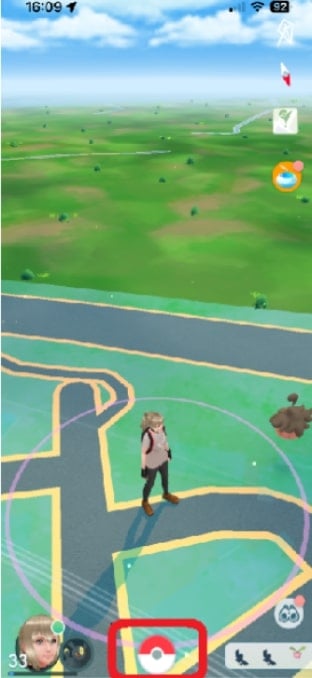
1. Click on the Poké Ball at the bottom of your screen
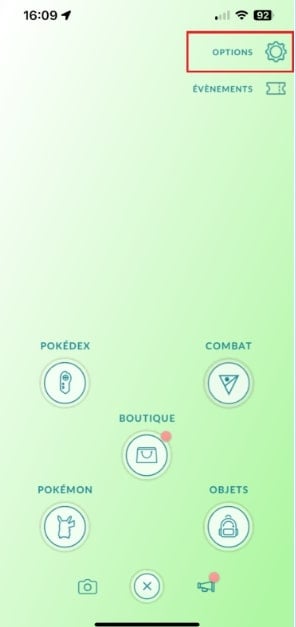
2. Open the options in the upper-right corner
3. Select access to proposals
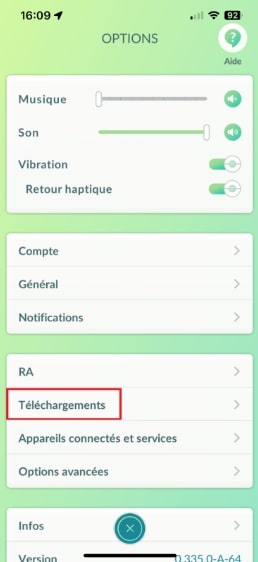
This menu opens directly Niantic Wayfarer.
4. Click “New PokéStop”
A form opens. There, you outline your proposal and explain why this place deserves to become a PokéStop. Remember to take a picture the location and its surroundings, then pinpoint it on the map.
Step 3: Submit your proposal
Once you've filled out the form, all you have to do is confirm your shipment to Niantic. Your proposal is then sent to validation, reviewed by the gaming community via Niantic Wayfarer.
The answer may take a few days to several months. You can have up to 40 proposals simultaneously pending.
A few tips to increase your chances of creating a PokéStop in Pokémon GO
Do you really want your proposal to be approved? Here are some practical tips to maximize your chances.
1. Polish Your Proposal
Niantic tends to approve requests clean and well-kept. Take some nice Pictures clear and well-composed, of day preferably.
Add a description detailed and honest, clearly explaining why this place deserves to be on the map.
Choose your location carefully, too. If your location is far from other PokéStops around here, you'll probably get a faster response. An area that is already saturated with proposals will naturally be more difficult to handle.
2. Participate in the community
Find out how other trainers earned their PokéStop. The forums and the groups Discord designed for gaming Niantic are full of useful information to help you fill out your applications more effectively and correct any mistakes before submitting them.
Your friends can also play a key role. Encourage other trainers in your area to submit proposals in the same zone: the more of you who contribute to the map, the faster you’ll reach the threshold to convert it into an arena.
How do you turn a PokéStop into a Pokémon arena?
There's no magic button to turn a PokéStop in arena. Contrary to popular belief, it is not the “I like”in the photo that trigger the conversion.".
The real mechanics are based on the PokéStop density within a specific geographic area. Niantic divides the map into invisible cells—the famous cells S2 Level 14. The more validated points of interest there are in a single cell, the more likely an arena is to appear.
Here's how it works in practice:
- As soon as a cell S2 reaches a certain number of PokéStops Once approved, one of them is automatically promoted to arena.
- A second conversion point is triggered when the number of points of interest rises even higher in the same area.
- It is the system of Niantic who decides on his own, without you having to do anything.
The best strategy, therefore, is to have it validated several PokéStops in the same area. Identify nearby monuments, murals, schools, or playgrounds, then suggest them via Niantic Wayfarer.
And the “I like”So? They’re only used to choose the featured photo on the PokéStop. To add one, click on the PokéStop, then tap the “>” in the upper-right corner, then tap the icon in the lower-right corner of the photo.
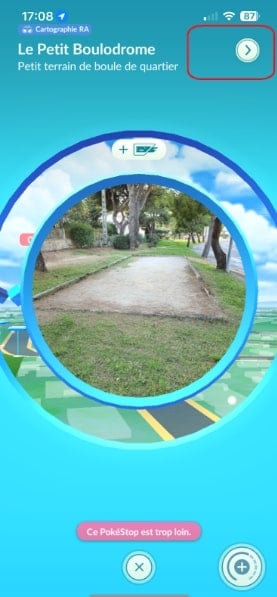
You can also send and receive gifts share this PokéStop with other Trainers. Once you’ve received the gift, tap the image to “I like”It's your turn.".
FAQs
Can I offer more than one PokéStop?
Yes. You can have up to 40 proposals simultaneously pending on Niantic Wayfarer. Once a proposal has been processed, you free up a slot to submit a new one.
How long does it take to create an arena?
There is no set deadline. A PokéStop automatically becomes an arena when there are enough validated points of interest in the same cell S2 Level 14. Depending on how many PokéStops are near you, it might take several months.
What should I do if my proposal is rejected?
Find another one public place landmark nearby (mural, plaque, statue, point of interest), then try your request again. A sharp photo and an precise description significantly increase your chances of approval.
How do you keep the arena active?
Stop by regularly to battle the Pokémon there or leave your own. The more Trainers visit the arena, the more lively it stays.
How can I get a PokéStop in my home?
That's impossible. A residence is a private place, and Niantic systematically rejects this type of proposal. Only the public and accessible places are validated.
Creating an arena takes patience, but now that you understand how the system works, you have everything you need to give it a try. Good luck on Pokémon GO !
These articles might also help you:










 English