On Tinder, a like is used to say, «I’m interested in this profile.».
You press the heart or you swipes to the right to send it. If the person likes you back, that means match and the conversation can begin.

What are the features of "Likes" on Tinder?
The likes on Tinder are used to indicate that you're interested in a profile. The icon shaped like a heart represents the "like" button in the app. You tap it (or you swipes to the right) on the profiles you like.
For a conversation to start, the person whose profile you've liked must like yours back: that's the principle behind the match. As long as there is no game, no messages can be sent.
Behind this system, the’Tinder algorithm assigns each account a desirability score (the former Elo rating). The more high-quality likes your profile receives, the more the app shows you to other highly rated profiles.
So your likes directly influence your visibility in the application.
A tip: Don't go on a "like" spree just to rack up matches. Your profile is what really matters. Pay attention to your photos and bio, that's where you really make a difference.
How do Super Likes work?
the Super Like allows you to show a stronger interest than a typical "like". As soon as you send one, the person receives an immediate notification and sees a blue star on your profile, even before she came across it while swiping. So she knows you've noticed her.
According Tinder, the Super Like Triple your chances of winning a match and generates conversations whose duration increases by about 70 %. It's up to that person whether or not to like your post back.
- In the version free of charge : 1 Super Like per day.
- With a subscription Gold Where Platinum : You get more of it every day.
Here's a quick comparison between the regular "Like" and the "Super Like":
| Criteria | Classic Like | Super Like |
|---|---|---|
| Notification | No, only when there's a game | Yes, immediately |
| Profile Visibility | None | Blue Star displayed |
| Toll-free number | About 50 every 12 hours | 1 per day |
| Impact on the game | Standard | Triple the odds |
The exact number may vary by country and current offers. Check the app directly for the most up-to-date information.
What does swiping on Tinder mean?
When you open Tinder, the app suggests profiles based on your criteria: age, distance and interests. The swipe is the basic step for sorting them.
- Swipe left : You're skipping a profile that doesn't interest you.
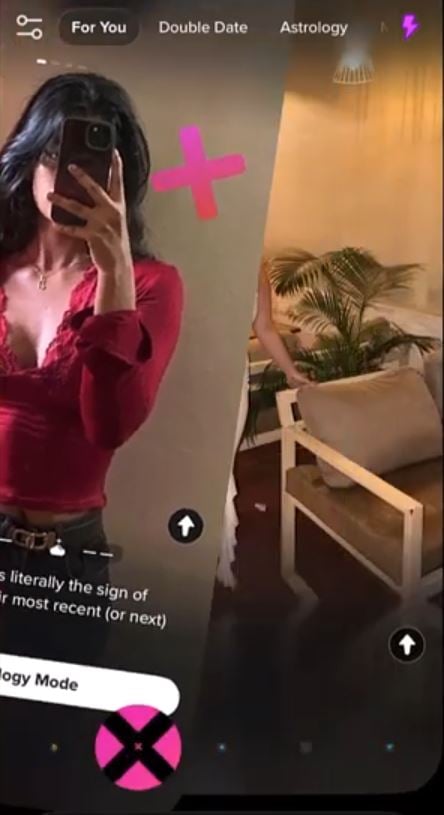
- Swipe right : You send a "like.".
- Swipe up : You send a Super Like to set yourself apart from just a "like.".
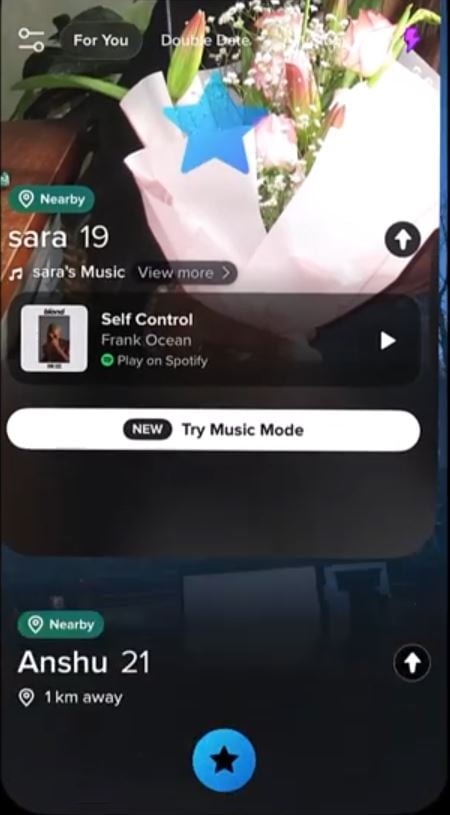
Before you swipe, take a moment to look at the Pictures and read their profile. That's what helps you like people who are really a good match for you.
How many likes per day on Tinder?
In the version free of charge, you can send about 50 likes every 12 hours, or roughly 100 likes per day. Once you've reached that limit, you have to wait for the countdown to end.
To remove all limits, you can upgrade to a subscription:
- Tinder Plus : unlimited swipes, the ability to go back to a profile you missed, and no ads.
- Tinder Gold : everything Tinder Plus, plus a list of profiles that have liked you and access to «Favorites.».
- Tinder Platinum : everything Tinder Gold, with additional features to boost your visibility.
The number of likes you receive also depends on How Tinder showcases your profile. The application is still based on a logic of’algorithm : The more people like your profile because of your Pictures and your bio—the more it's shown to other profiles, the more you get matches.
FAQs
Does the person know that I liked their post?
No, not for one like simple. The person is not notified. However, in the case of a Super Like, she receives a notification and sees a blue star on your profile.
Can you undo a "like"?
Yes, thanks to the feature Rewind. It lets you go back to your last swipe.
This feature is available only to subscribers Tinder (Plus, Gold Where Platinum).
What happens when I "like" someone?
If the person follows you back, that's a match and you can send her a message. If she doesn't like you back, nothing will show up on your end. Your like remains invisible as long as there isn't a game.
How can I see who liked my post?
The list of profiles that have liked you is available only to subscribers Tinder Gold Where Platinum. Without a subscription, you'll discover these profiles as you swipe.
We explain all the methods in detail in our guide: How to see who has liked you on Tinder.
Looking for other dating apps? Check out our article on alternatives to Tinder.







 FR
FR  RU
RU  EN
EN  ES
ES  IT
IT  DE
DE  ZH
ZH  PT
PT  ID
ID  JA
JA  DA
DA