Whether for hunting Where defend yourselfThe bow is a very useful piece of equipment in Minecraft. You've just got one, but it's broken? Don't worry, it can be repaired!

Thanks to the “Object Repair” feature you'll be able to patch up your precious bow in no time. This practical feature allows you to refurbish a variety of durable items: tools, armour and, not least, weapons such as bows.
In this tutorial, discover how to repair a Minecraft bow with step-by-step instructions.
Step 1: Get an anvil

The anvil is an essential item in the world of Minecraft. It has several uses:
- Repairing tools and armor
- Enchanting objects with enchanted books
- Renaming objects and blocks.
You need an anvil to repair your bow. If you don't have one yet, find how to make an anvil Minecraft in our article dedicated to this precious block.
Step 2: Place the damaged bow on the anvil
- The next step is to Go to the interface of your anvil Minecraft
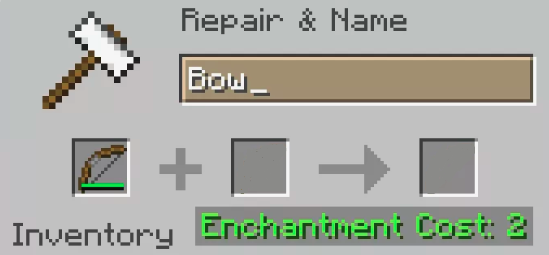
- Then place the bow to be repaired on the first box of the interface
Step 3: Add repair materials
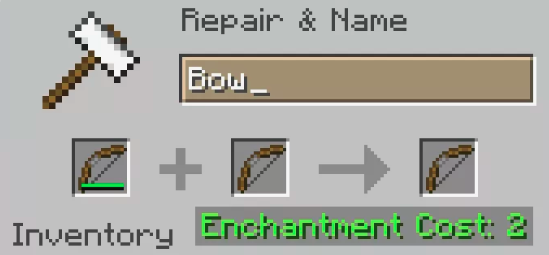
- To repair your bow Minecraftyou need an identical bow
- Place it on the second box on the interface of your anvil
- Once placed on the anvil, the two arcs will combine to form a new one!
Step 4: Pay the cost of repair
In addition to refurbishing your bow, the anvil also preserves enchantments of your precious weapon.
But all these advantages don't come free of charge!
Indeed, repairing a Minecraft bow costs experience points. You will therefore have to give up experience points to validate the repair of your bow and get it back.
Step 5: Validate your bow repair
Have you placed your bows correctly on the anvil? Paid the experience points?
The repairing your bow is validated! A brand new bow will appear in the third slot of the interface. All you have to do is collect it and send it to your inventory.
Which enchantments are best for a Minecraft bow?
There are several enchantments available to make your Minecraft bow even more useful and efficient. Here's a small table of best enchantments for a bow :
| ✨ ENCHANTING | 🌟 DESCRIPTION |
|---|---|
| Power | Increases the damage of your arrows by up to 5 levels |
| Flame (Flame) | Enemies hit by your arrows catch fire |
| Infinity | You can shoot as many arrows as you like |
| Repair (Mending) | Use your experience orbs to repair your bow. |
| Unbreakable (Unbreaking) | Increases the durability of your bow |
| Punch | Repel enemies with your shots |
| Curse of Vanishing | When the player dies, his bow disappears with him |
And now you know how to repair your bow in Minecraft. As a reminder, you need :
- An anvil
- Your broken bow + another identical bow
- Experience points
The result is a brand-new bow that retains all its enchantments!
If you have any other tips for mending a bow in Minecraft, please feel free to let us know in the comments.
And for even more tips on the game's handy tools, check out how to make a Minecraft axe in our full tutorial.








 English