To Download a TikTok video without a watermark, the easiest way is to use an online tool such as SnapTik (snaptik.app) or SSSTikTok (ssstik.io).
Copy the video link, paste it into the field provided, and download the file by HD quality, for free, without having to install anything, on both mobile devices and PCs.

What does «watermark» mean?
A watermark (Where watermark (in English) is a symbol that indicates that content belongs to someone. On TikTok, that's the little one logo and the username from the creator that appear in a loop in the video.
This watermark scrolls continuously and remains visible on all videos downloaded directly from the app.
What are watermarks used for on TikTok?
The watermark is primarily used to protect the author of the video. He proves that he owns the content and points out that it was created on TikTok. That's why any video downloaded through the official app almost always has this logo superimposed on it.
Can you repost a video downloaded from TikTok?
TikTok prohibits any duplication or reproduction of content belonging to a creator. However, you may download and save a video for a strictly for personal use, as provided for in its terms and conditions.
In France, copyright law permits the private copying : Keeping a video for yourself—on your smartphone or computer—is still allowed. However, the republish, editing or sharing it as if it were your own requires the’permission from the creator. Removing the watermark does not change this rule.
How to get rid of watermarks on videos downloaded from TikTok?
Before you get started, keep this common-sense rule in mind: don't reuse these videos for commercial purposes; the content remains the property of its creator.
Here are the three methods available, depending on your device.
Method 1: An online downloader (SnapTik or SSSTik)
Online download sites such as SnapTik and SSSTik are currently the most widely used tools for recovering videos TikTok.
They are free of charge, without an account, and compatible with all browsers (Safari, Chrome, Firefox…), whether you're on Windows, Mac, Android Where iPhone.
Here are the steps to download a video TikTok without a watermark:
- Open the app TikTok and play the video you want to download.
- Press the arrow To sharethen on Copy link.

- Go to snaptik.app Where ssstik.io from your browser.
- Paste the video link into the field provided, then click the download button.
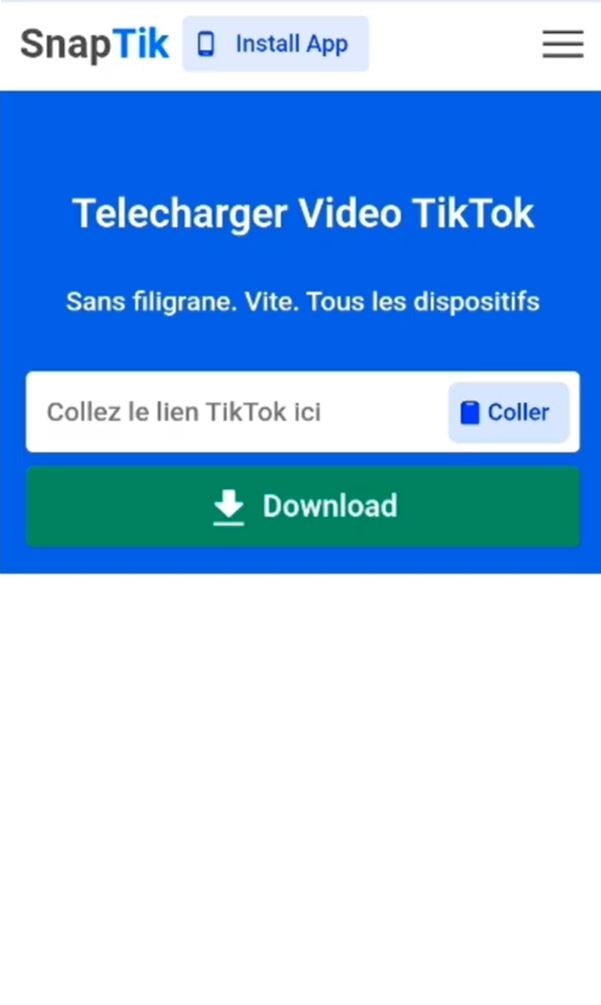
- Select the format HD MP4, then save the file to your device.
You get a high-quality MP4 file, without the logo scrolling across the corner of the image. These downloaders also offer an option MP3 If you just want to extract the audio from the video TikTok.
Method 2: Crop the watermark (Android and iOS)
If you've already downloaded the video from TikTok, you can hide the main watermark by cropping the image. This is a simple solution, but it slightly reduces the frame.
On Android with Google Photos :
- Open the video, press Edit then on Trim.
- Adjust the frame to crop out the lower-right corner where the watermark appears.
- Approved by Finish.
On iPhone Using the Photos app:
- Open the video, go to Edit then Resize.
- Zoom in slightly on the image to move the watermark outside the frame, on each side if necessary.
- Press Finish to validate.
Method 3: Record a Live Photo (iPhone)
On iPhone, the tip from the Live Photo allows you to upload a short video TikTok without a watermark. The result may vary depending on the version of TikTok It's installed, so check the final result.
- Open TikTok and select the video you want.
- Press the arrow key share.
- Choose Live Photo Where Animated photo in the options.
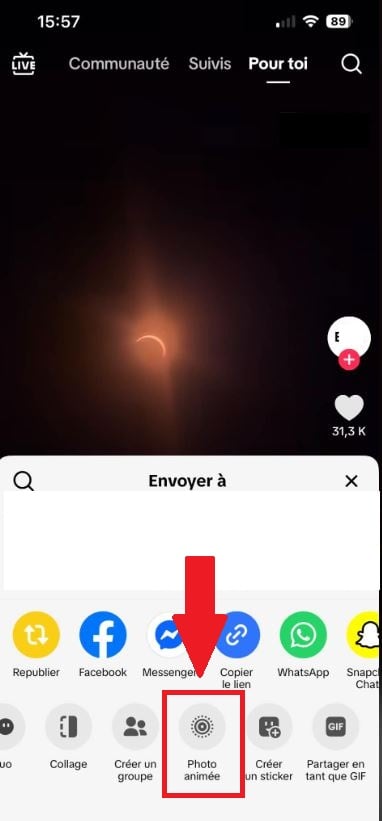
- Save the Live Photo, then convert it to a video using the Photos app.
Which tool or app should I choose?
There are also several tools that can do the job on Android and iOS. Here's a quick comparison:
| Tool | Devices | Free | Sizes |
|---|---|---|---|
| SnapTik | Web (PC, Mac, mobile) | Yes | MP4, MP3 |
| SSSTik | Web (Windows, Mac, Android, iOS) | Yes | MP4, MP3 |
| Video Eraser | iOS | Yes | MP4 |
| Remove & Add Watermark | android | Yes | MP4 |
FAQs
Do you need a TikTok account to download?
No. Online downloaders work with just the video link, unrelated to TikTok.
Is the download free?
Yes, SnapTik and SSSTik are completely free.
Can I download TikTok videos on an iPhone, Windows, or Mac?
Yes. These tools work in any web browser, on all devices, without the need to install an app.
Is it possible to recover private videos?
No. A private account blocks access to the link, and no legitimate tool can bypass this restriction.
Can I extract just the audio?
Yes, select the option MP3 on the website to download the music without a watermark.









 English
Thanks for the tips! I didn't know about the third-party apps option. I can't wait to try it out and finally save those TikTok videos without the watermark!
Great tips! I didn’t know that using certain apps could help me download TikTok videos without the watermark. I can’t wait to try them out!
Great tips! I didn't realize there were so many ways to download TikTok videos without watermarks. I can't wait to try them out! Thanks for sharing!
Thanks for sharing these tips! I've always wanted to save some TikTok videos without the watermark, and your step-by-step guide is super helpful. Can't wait to try it out!
Great tips! I've always wanted to download TikTok videos without the watermark for easier sharing. Thanks for providing such a clear guide!