The Monopoly GO ID is very important, and you need to know where to find it to avoid problems in the future.
You may be wondering what the ID is on Monopoly GO... It's what will allow you to retrieve your Monopoly GO account in the event of loss In this article, I will explain how to find your Monopoly GO ID and why it is useful to save it. And don't forget that the Alucare.fr website shares lots of information about Monopoly GO, including our Monopoly GO guide and learn how to use the boost Monopoly GO money grab.
Where can I find my Monopoly GO login?
I sincerely believe that few people are aware of what the Monopoly GO ID is (I'll explain later). However, it is it is essential to know and safeguard your ID. Monopoly GO because it's sure to come in handy.
There are two different ways to find your Monopoly GO ID. I recommend that you use both methods and take a screenshot of both locations of your ID to be 100% sure %.
First method: the loading screen
You can find your Monopoly GO login at starting the game (while loading). Simply take a screenshot of your screen so that you can clearly see your ID. To take a screenshot on your phone, press the Power button and the Volume button simultaneously.
Your Monopoly GO login can be found right here:
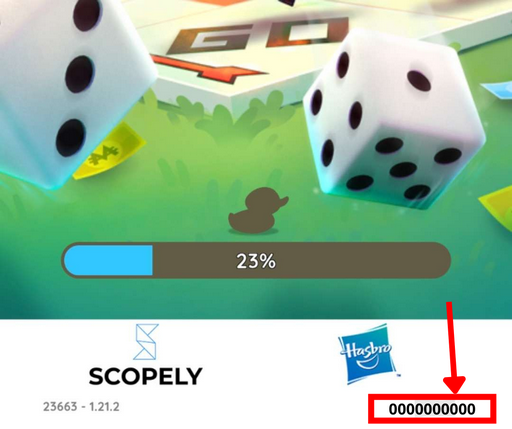
Perfect, you now have a screenshot of your ID for the first time. Of course, don't delete the screenshot, keep it on your phone!
Second method: go to Monopoly GO settings:
You have just saved your username for the first time, which is a good thing. However, I recommend that you also save it by taking a screenshot somewhere else in Monopoly GO. Here's how to find it:
- Step 1: Click on the three dashes in the top right-hand corner:
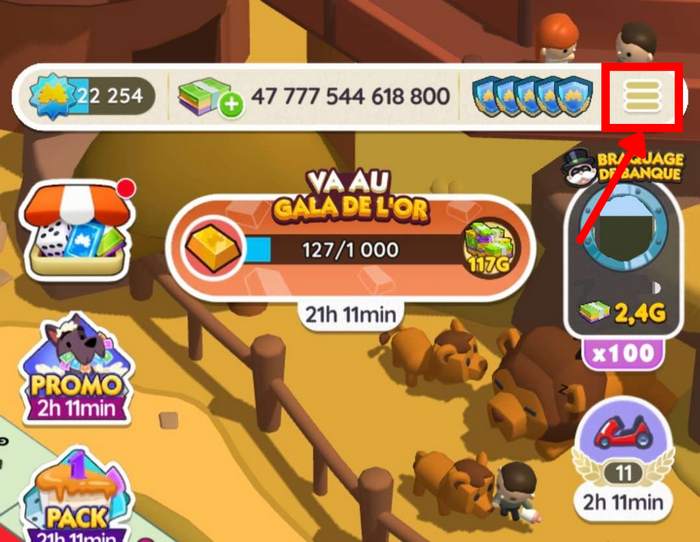
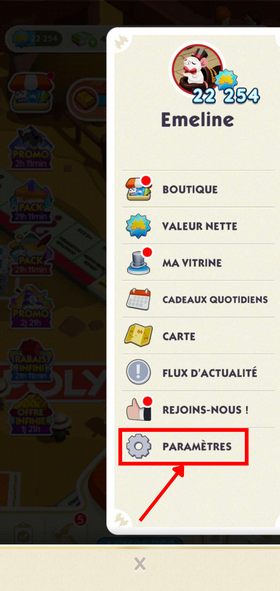
- Step 2: Click on "Settings" at the very bottom:
- Step 3: Take a screenshot of the following page: (you can see your user ID in the red box)
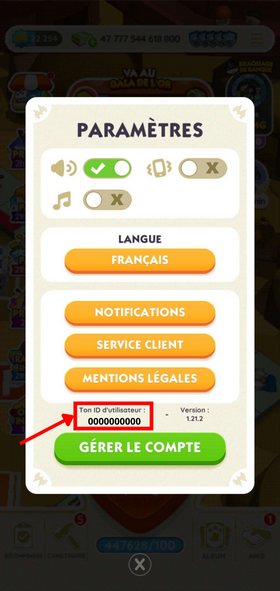
You now have both screenshots on your phone, clearly showing your Monopoly GO user ID. Be sure to keep both images on your phone.
What is the Monopoly GO ID used for?
Now that you have saved your Monopoly GO ID, you are probably wondering what it is used for. Well, the answer is simple: the ID allows you to in the event of loss of your Monopoly GO account, to recover your account. The ID is unique to each person (do not share your ID), so Monopoly GO will be able to try to recover your account and restore your access to itThat's why it's important to keep these two images showing your ID, as they will be useful if you lose your Monopoly GO account.
☑️Rejoins our server discord☑️
How do I contact the Monopoly GO customer server?
You may need to contact Monopoly GO customer service because you encounter a problemFrom the beginning, I've been talking about losing your Monopoly GO account: it's something that can happen to anyone. So I'm going to explain how to contact Monopoly GO customer service if you lose your Monopoly GO account.
Firstly, to recover a lost Monopoly GO account, you need to be logged in with Facebook or Apple.
- Step 1: Click on the three dashes in the top right-hand corner:
- Step 2: Click on "Settings" at the bottom:
- Step 3: Click on the "Customer service" section:
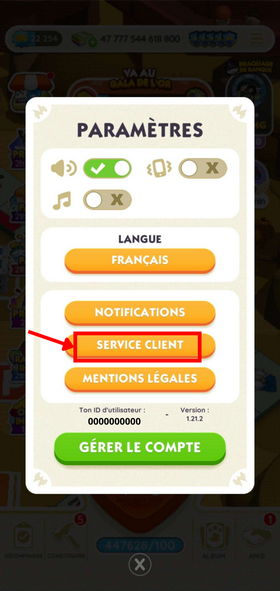
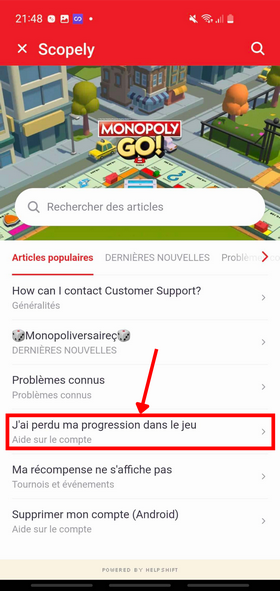
- Step 4: Click on "I lost my progress in the game":
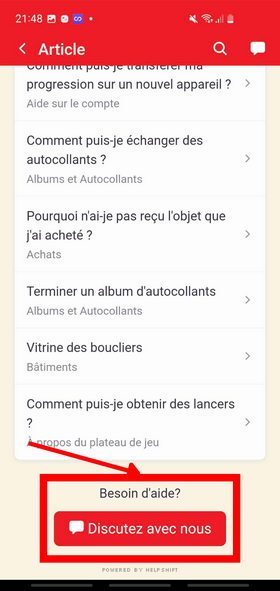
- Step 5: Scroll down to the bottom of the page until you find "Chat with us":
- Step 6: Here you are in a discussion with Monopoly GO:
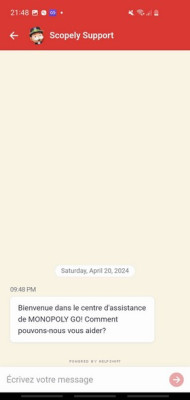
You can now explain your problem and say that you have lost your Monopoly GO account. You can give your user ID straight away, as Monopoly GO will ask for it in any case. That's why it's important to save your ID.
See also..:
Alucare.fr is the expert on Monopoly GO, and as passionate experts on the game, we're here to share with you our infallible tips and methods that have enabled us to have accounts with over 400,000 dice and how to advance very quickly in the game. We've helped hundreds of thousands of players with our articles, Youtube videos and Discord/Facebook support - now it's your turn!









 English