Simplify your MP Instagram by opting for focus groups.
This article is your guide to creating Instagram groups, while offering other practical information on the subject.
How do I create an Instagram group?
In the next few lines, we'll take you step by step through the process of creation of an Instagram discussion group :
- Open the Instagram app on your device (Android or iOS) and tap theDirect message icon located at the top right of the screen.

Messaging button in the main Instagram interface. ©Mia for Alucare.fr - Click on the icon in the upper right corner to initiate a new discussion.

Option to add a new post on Instagram. ©Mia for Alucare.fr - Explore the list of suggestions and choose from the names displayed to add them, whether they are subscribers or simply Instagram users.
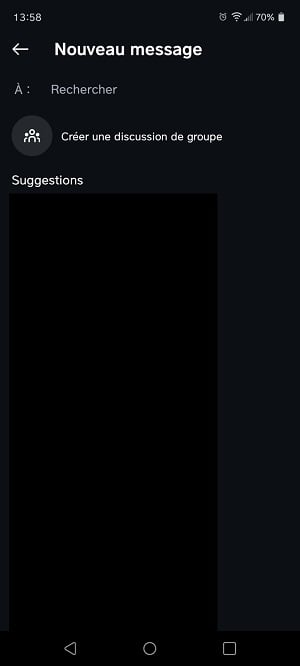
Adding members to a group discussion on Instagram. ©Mia for Alucare.fr - Once you have added the members, press the "Your message" to write a message in the group. The group will be created as soon as the first message is sent.

Create a discussion group by adding a message. ©Mia for Alucare.fr
This group allows you to share varied content with your subscribers such as posts, profiles, a guide, or simply to create interaction.
How do I set up a group chat on Insta?
An Insta group offers multiple possibilities and settings, including the following.
Adding members
To personalize your group and add membershere's what you need to do:
- Open your Instagram app, then go to Direct Messages and choose the desired chat group. Click on the group name to display options.
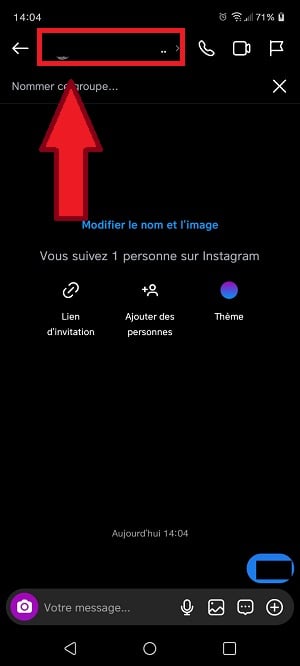
View chat settings on Instagram. ©Mia for Alucare.fr - Press the large icon on the left indicating “Add” .

Add a member to an Instagram discussion group. ©Mia for Alucare.fr - Finally, add new users according to your needs.
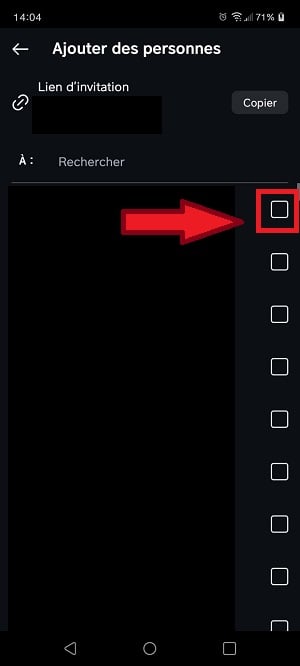
Choosing who to add to an Instagram discussion group. ©Mia for Alucare.fr
The mute
Explore the various options provided on the group discussion settings page, including the ability to disable notificationsto manage members individually and to leave or end the group discussion.
- To do this, simply click on the group in question and press the user names then click on Mute and you're done.
- You can also slide your finger to the right to access the mute and delete options.
The "Shared" tab
Under the tab “Shared”Here you'll find all the media shared with the group, including images, videos and the real thing.
administration
Members can add other people to the group, unless you enable prior approval to join the group. As an administrator, you have the option to review the profiles of new members before they are added.
Speaking of profile exams, there are simple tips for find out who owns an Instagram account.
FAQs
What are the interesting options in Insta group chat?
You know how to make a group on Instagram and set up an Insta group chat. Now, discover the options that present themselves to you:
- You can share content such as audio messages, videos, documents, stickers and photos.
- The group video calls are possible, but less recommended for large groups due to the need for a stable and fast Internet connection.
- You can see members who have viewed your messages, subject to an Internet connection.
- It is also possible to remove a message conversation.
It should be noted that in some countries, Instagram and Messenger are interconnected, allowing access to the same discussions on both applications.
How do I leave an Instagram discussion group?
Want to leave an Instagram discussion group you're in? It's easy to leave a discussion group on the platform in just a few clicks. Here are the steps to follow:
- Open the newsgroup, then click on the conversation name at the top.
View chat settings on Instagram. ©Mia for Alucare.fr - Scroll down, then click on “Exit,” then confirm.

Leaving a group conversation on Instagram. ©Mia for Alucare.fr
Members of the group discussion will be able to see that you have left the conversationInstagram will send you a notification when you've completed the process.
You will only be able to rejoin the discussion after receiving an invitation from a member, as mentioned above.
It is therefore important to think before proceeding, to avoid any subsequent problems between members.
How to host a group chat on Instagram?
If you want to get the best results from your Instagram discussion group, you need to use a few simple techniques to keep it active. The aim here is to increase the level of participation of group members. Here's our advice:
| ⭐ Tip for keeping an Insta group chat active | 📃 Details |
|---|---|
| Mail regularly updated content |
|
| Create a theme for discussion |
|
| Plan your live sessions |
|
| Create rules that govern the discussion |
|
Why can't I create an Instagram group?
Here are a few solutions to help you :
- Make sure you keep your updated Instagram application, whether on Android via the Google Play Store or on iPhone via the Apple App Store, for an optimal experience.
- Also check your connection, because that could be where the problem lies.
- You can also contact Instagram support if the problem persists.
How do you name a group on Instagram?
To name a group on Instagramyou can choose a name:
- Description Include keywords that clearly describe the group's purpose or theme.
- Original Use puns and creative expressions to make your name unique and memorable.
- Based on an area of interest Think about what unites group members.
- With a hashtag integrating a hashtag can help make the group more visible and easily identifiable
- Committed If the group is focused on a specific cause or objective, reflect this in the name.
- Humorous A little humor can make the name appealing and engaging.
What's the limit for the Instagram group?
The limit for an Instagram group is 250 peopleIt is therefore a very broad communication channel that can offer numerous online opportunities.
In conclusion,
- Although Instagram groups are not well known due to their sometimes unobtrusive location, once found, their easy to use.
- The features offered by this option on Instagram are quite interesting and help enormously in the communication on the platform.
Now you know how create a group on Insta and how to set it up. The steps are simple and accessible to all.
We have other articles about the social network Insta on our page. instagram. Feel free to consult them. If you have any questions, you can ask them in the comments.








 English