Do you want to track a cell phone discreetly? There are several options: the position sharing native support built into Android and the iPhone, Google tools such as Family Link, or a spy apps as mSpy for more comprehensive monitoring.
Discover the best monitoring software in 2026 :
How can I secretly track a cell phone?
To monitor a phone, spy apps and parental control apps allow you to track a device in real time and keep track of its activity. The best-known one remains mSpy, compatible android and iOS.
If you're just looking to Find your own lost or misplaced phone, you don't need that kind of tool. The location services The features built into your smartphone are all you need. Here's how locate a phone for free.
Using mSpy: A Discreet Tracking App
mSpy is a tool that lets you monitor a phone's activity from a online dashboard. Specifically, you follow the GPS location From your device, you can view its messages and access the stored information—all remotely.
There is a important prerequisite to know.
- On android, the installation requires a physical access on the target phone during 5 to 10 minutes to install the app.
- On iPhone, you can go through the iCloud credentials, but occasional access is often still necessary to validate the’two-factor authentication. Without this access, monitoring is not possible.
To note : mSpy is not completely free. There is a limited trial to try out the tool, but full access requires a paid subscription.
Track a Cell Phone for Free with Mspy
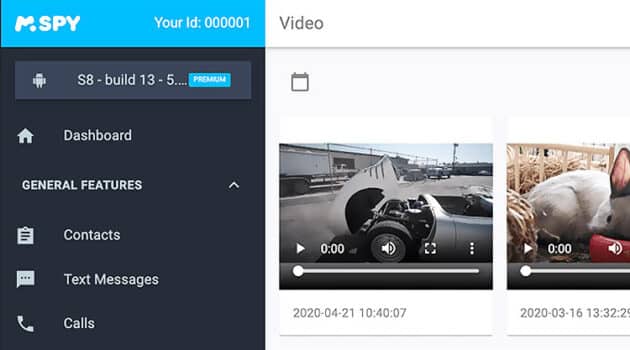
To give you a concrete idea of what you can track, here's a demo of the dashboard for mSpy on video.

Side features, the tool covers the essentials of mobile device monitoring:
- Follow the real-time location of the child from his phone.
- Show pitches on a map via Google Maps.
- Consult thelocation history and past trips.
- Access to data directly online from the child's phone.
- Define safety zones thanks to georeferencing : An alert is sent to parents as soon as the child crosses the boundaries.
Is mSpy reliable?
Yes, mSpy is a reliable and well-known app used by many people to monitor their minor child's smartphone or other devices. The service secures the personal data collected, which reduces the risk of fraud.
One thing you should never overlook: legality.
In France, Monitoring an adult's phone without their knowledge is illegal and exposes you to prosecution (Article 226-1 of the Penal Code, up to one year in prison and A fine of 45,000 euros).
mSpy is legal only under specific circumstances: when a parent installs the app on their minor child’s device. For any other use, it’s best to rely on built-in location services and share your location only with consent.
What are the pros and cons of mSpy?

Before you sign up for a subscription, check out the strengths and the game's weak points of this monitoring app. That way, you won't have to pay for a feature you don't need.
Benefits
mSpy remains one of the most highly recommended apps for monitoring a device within a legal framework. Here’s what it actually offers:
- A lot of’follow-up options all in one place.
- A quick installation, in just a few minutes once you have the target phone in your hand.
- None jailbreak No root access required, on both Android and iOS.
- A hidden mode which runs discreetly, with no visible icon on the screen of the monitored smartphone.
- Reading the instant messaging, even without root access.
- A function of georeferencing which alerts you when the device enters or leaves a defined zone.
- Monitoring the GPS location, to locate the phone on a map.
- Compatibility with the Android devices and the game's iPhone on iOS.
Want to try all this out to track a cell phone the right way?
Track a Cell Phone for Free with Mspy
The inconvenients
mSpy isn't perfect. Before you make your decision, keep these limitations in mind:
- One account covers only one single device at a time.
- Data recovery may take a little time after configuration.
- On iPhone, tracking is limited to information synced to the iCloud account, with no real-time access.
- The photos and videos Those that are already present do not synchronize directly.
- It's a paid service : mSpy offers a limited trial, but no 100 % free version.
Locate a device for free: built-in tools
Before switching to a paid app, check to see if the free tools built into your phone are enough.
Find an iPhone with Find My
On iPhone, Apple offers the feature Locate (formerly Find My iPhone). It can be accessed through the app of the same name or through icloud.com with your username Apple.
It allows you to:
- See the real-time location your iPhone's location on a map.
- Display the last known position if the battery is empty or if the device is turned off.
- Ring the device remotely, even in silent mode.
- Lock the screen or delete all remote data.
- Share your location with trusted loved ones from the "Share" tab.
Function Locate must first be enabled in the account settings Apple.
Locate an Android device with Google
On android, Google offers Locate my device (formerly Find My Device). You can access it from android.com/find or directly in the device's security settings, while connected to your Google account.
Available features:
- Locate the phone lost or misplaced on a map.
- See the last known position in case of battery low.
- Ring Run the appliance at full power for 5 minutes.
- Lock the screen with a new password.
- Erase all data remotely as a last resort.
The device must be connected to a Google account and location services must be enabled in the settings for this to work.
Monitor a Child's Phone with Google Family Link
Google Family Link is the free parental control tool from Google for devices android. It lets you:
- See the real-time location from your child's phone.
- View the history of travel.
- Manage installed apps and set screen time limits.
- Supervise the Google account of your child.
Installation is done through the app Family Link on your own phone. The child must have a Google account linked to your family account. It's an ideal solution before upgrading to a paid app.
Share Your Location with Friends and Family
For a position sharing For agreements between family members, there are two simple options:
- Google Maps : Share your location in real time from your profile menu, either for a specific duration or continuously.
- Locate On iPhone: Share your location with your close from the dedicated tab, displayed on a shared map.
These methods require the consent for the user. They are free and require no additional installation.









 English