ExpressVPN It only takes a few minutes to get started: sign up, install the app, click a button, and your connection is secure.
Your IP address is hidden, your traffic is encrypted, and no technical expertise is required.
Check out ExpressVPN's offers:
How do I launch ExpressVPN and choose a location?
Once the’application Once installed, run ExpressVPN It takes a few seconds. You open the software, then choose a waiter, then click the power button to turn on the VPN connection.
Here's what you see when you open the main interface:
- The launch button Turns the VPN on and off.
- Default location appears right below this button.
- In the upper-left corner, you'll find the options : list of servers, help, and support.

Change Server and Country
To change locations, click on “VPN locations” in the options. For this example, we'll choose the UNITED STATES.

A long list of available servers in the United States appears. Select the one you want. Here, we'll choose Chicago. A star-shaped icon appears in the corner of the server: it lets you add it to your favorites so you can log in faster next time.

Start the connection
Click on “Chicago” to display it in the window, then press the launch button. The VPN displays “connected” when everything is working. Your IP address and your location is then hidden, and your traffic goes through a tunnel quantified.

You can change server at any time by clicking on the three small dots at the edge of the chosen location.
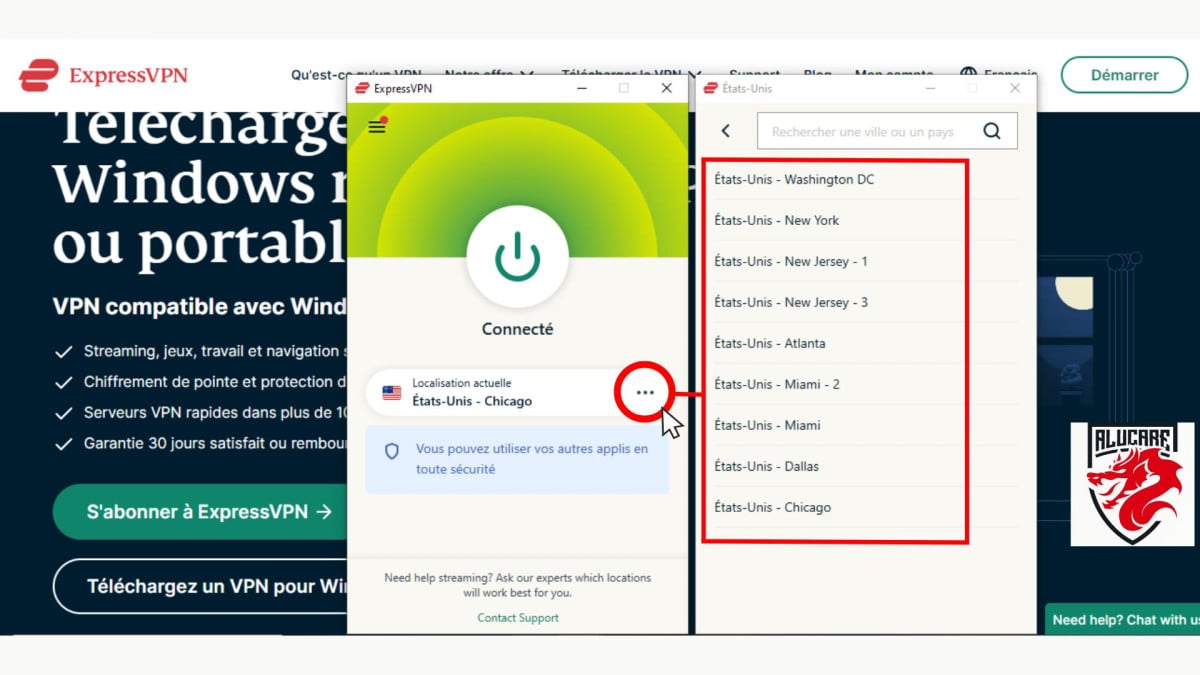
To you log out, press the power button again. You can then exit the app by tapping the X or the options in the upper-right corner.

What features are available with ExpressVPN?
The ExpressVPN features are on par with those of the best VPNs on the market. In addition to a secure connection, the app includes features that are truly useful in everyday life, whether on a computer or a mobile device.
As for protocols, you get to use our in-house protocol Lightway, designed for a fast and stable connection. Traditional protocols such as OpenVPN are also available depending on whether you prioritize speed or safety.
| Functionality | Details |
|---|---|
| Number of servers available | ExpressVPN covers up to 105 countries with approximately 3,000 servers, for a reliable connection anywhere. |
| A wide range of’devices compatible | Windows, Mac, Linux, Chromebook, Android, iOS, Apple TV, Smart TV, PlayStation, Xbox, Nintendo Switch, and even routers. |
| A strong encryption | Encryption 256-bit AES automatically hides your IP address and secures all your internet traffic. |
| Function Proxy | ExpressVPN can also act as a proxy, allowing you to browse the web without leaving a trace. |
| the split tunneling | You choose which apps go through the VPN and which ones use your regular connection, while still accessing devices on your local network. |
| The technology TrustedServer | The servers run entirely in RAM and clear all data on every reboot, which significantly reduces the risk of data leaks. |
| The circuit breaker Network Lock | If your VPN connection drops (due to a Wi-Fi switch, sleep mode, or a power outage), traffic is automatically blocked. As a result, no data a leak. |
| A Private, encrypted DNS | ExpressVPN operates its own encrypted DNS. It does not log any online activity and bypasses all blocks and filters, resulting in faster queries. |
You can install the app on a unlimited number of devices. Only eight supports However, they can be connected to the VPN at the same time, across all platforms (Android, iOS, Windows, Mac, virtual machines).
In practical terms, these features guarantee you a real PRIVACY POLICY : Your IP address and location remain hidden, and the provider has a clear policy of failure to retain data.
To take advantage of all these ExpressVPN features:
Other services have also been making a name for themselves lately. Discover the best VPNs for everyday use in our dedicated article.
How to subscribe to ExpressVPN
Sign up for a ExpressVPN subscription It takes just a few minutes. Go to the official website, choose your plan, pay, and your account will be active right away.
You get a 30-day money-back guarantee, available only to new customers and not valid via the’App Store Where Google Play.
Here are the steps to follow:
- Open the website ExpressVPN, then click on “Try ExpressVPN” (the big green button on the home page).

- Choose your subscription. The supplier offers three durations : The longer the term, the lower the monthly price. Choose the plan that fits your budget.
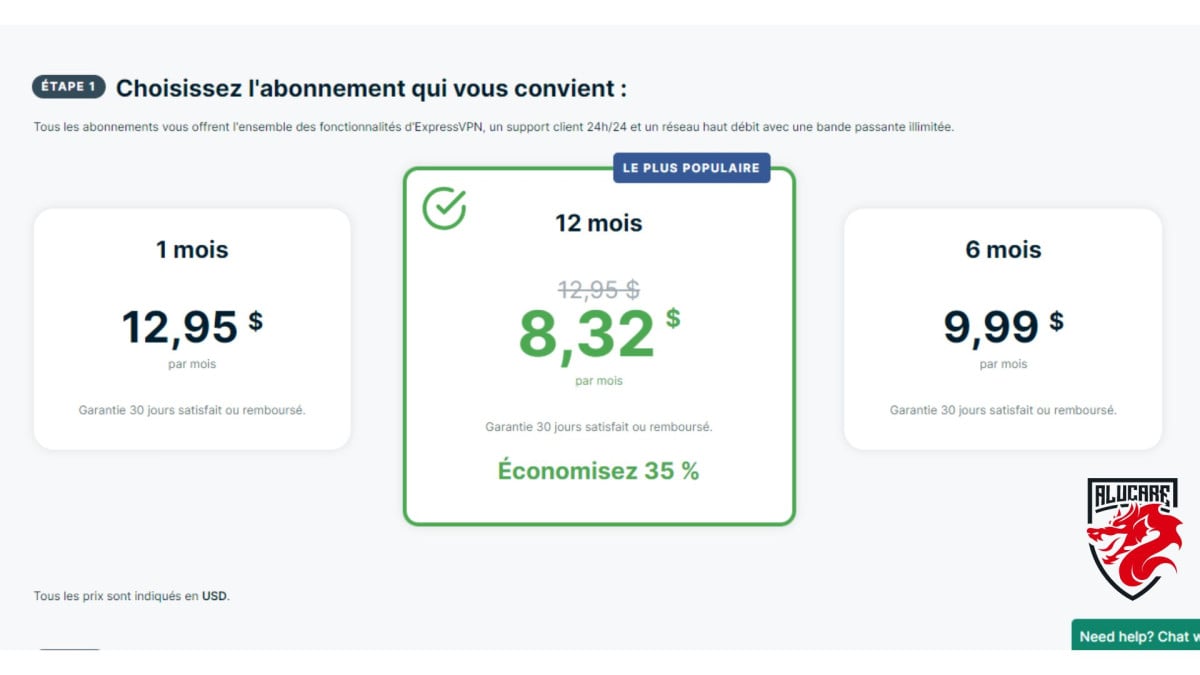
- Enter your email address in the designated field. It is used to create your account and receive your activation code, which you'll need to log in to the app later.

- Select your payment method and click "Submit" to complete your subscription.

Once your payment has been confirmed, you'll receive your activation code directly to your account. Keep it handy—you'll need it to sign in to the app on each of your devices.
Sign up for an ExpressVPN subscription
How do I download and install the software?
You can download ExpressVPN directly from its official website. The app is available on almost all devices: Windows, Mac, Linux, Android and iOS. Here's how :
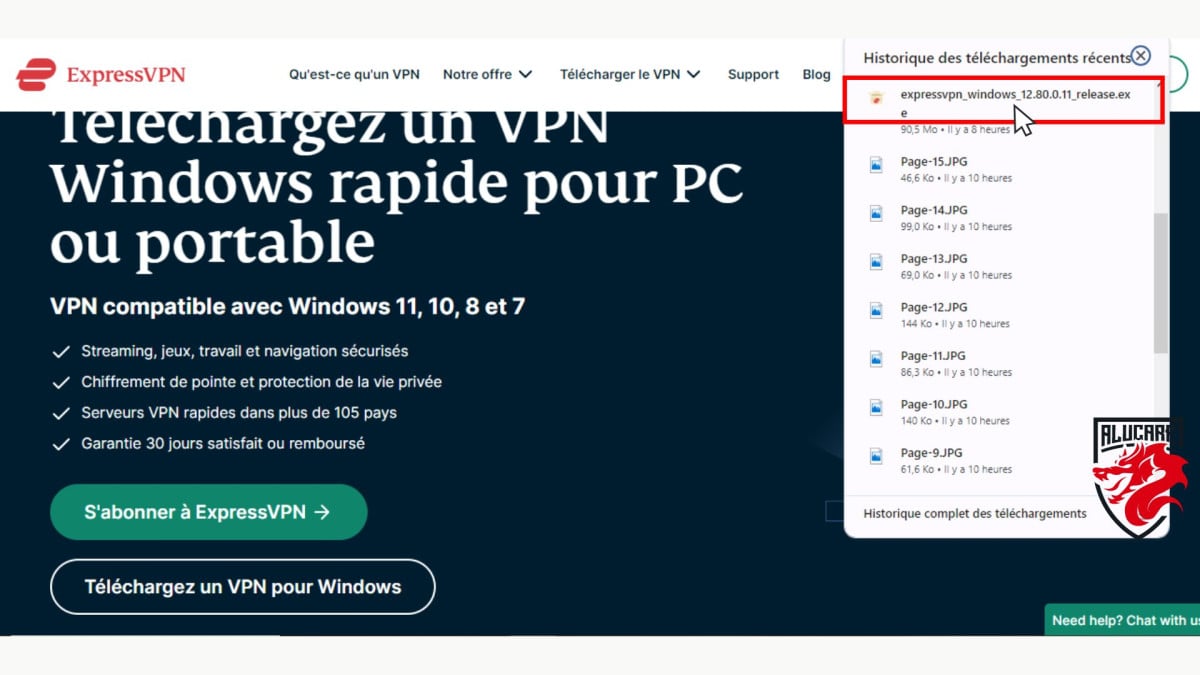
- Select the option “download VPN” in the drop-down menu bar at the top of the page, then click on it to see the available versions. If you're on a PC, choose the version Windows.

- A new page opens showing compatible versions. If you don't have a subscription yet, click on “Subscribe”. Otherwise, click directly on “Download VPN for Windows” to start downloading.

- The download only takes a few minutes. Then double-click the file in your Downloads folder to Start the installation.
- A small window asks you to Paste your activation code, which you received by email after subscribing. Paste it and click on “Continue”.
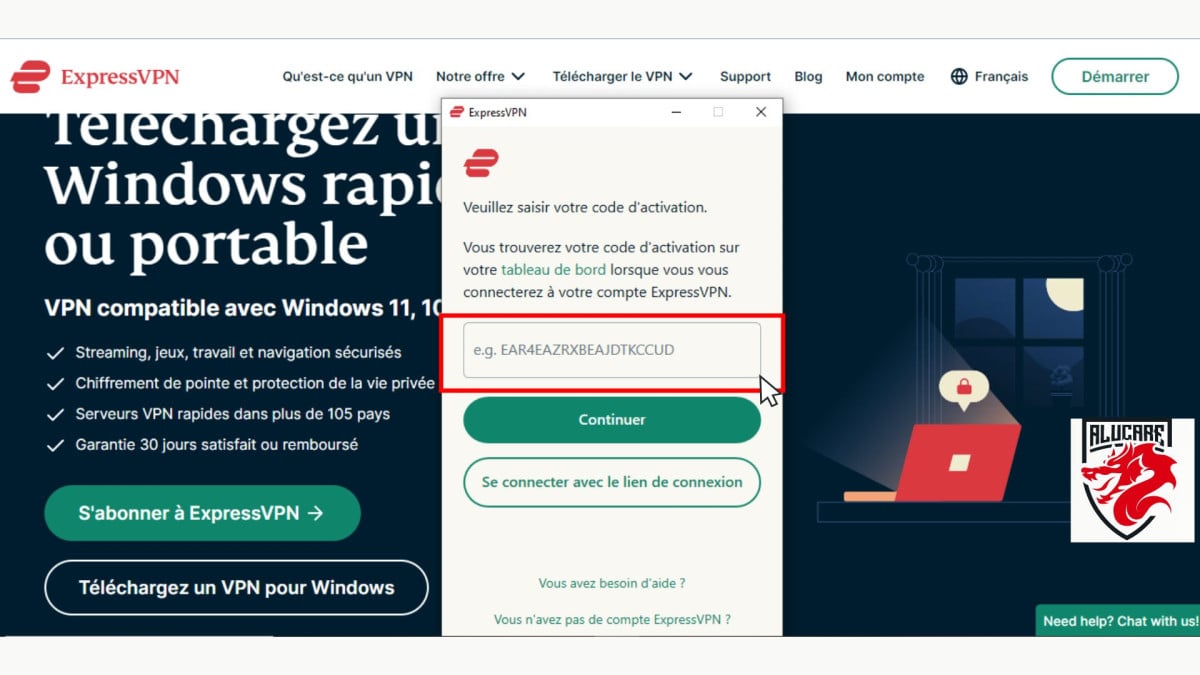
Good to know: You can always find this activation code in your customer portal. This is handy if you want to log in ExpressVPN on a second device.
- The app then suggests other options : automatic startup, incident reporting, etc. It's up to you to choose the ones that work best for you.

- Once you've made these settings, you'll be taken directly to the app. All you have to do is Choose a server and log in.
On Android and iOS, it's even easier: download the app from your phone's app store, log in with your account, and you're all set.
For a router or a Smart TV, configuration is done through the customer portal, with dedicated guides provided by the supplier.
FAQs
Is ExpressVPN easy to use?
Yes, even if you're new to VPNs. No network configuration is not required, and the interface remains easy to use. You install the app, log in, and then choose a one-click server.
Is it legal to use ExpressVPN?
The use of’ExpressVPN is completely legal. The service is reliable and has never experienced any known security vulnerability. You can use it without any problems in any country that doesn't ban the use of VPNs.
What can I do with ExpressVPN?
You can use’ExpressVPN for a wide range of online uses:
- Hide your IP address and browse anonymously and securely.
- Protect your sensitive data (bank credentials, passwords) through encryption, especially on a network Public Wi-Fi unsecured.
- Bypass the geographical restrictions and access streaming platforms such as Netflix Where Disney Plus.
- Avoid the bandwidth throttling imposed by your internet service provider to improve the stability of your connection.
- Download and stream securely, without exposing your traffic.
What is ExpressVPN's privacy policy?
ExpressVPN agrees not to retain no activity log or log files. Your digital life therefore remains as private as possible. The provider also regularly uses external auditors to review this policy.
Specifically, the service never records:
- The IP addresses (personal or VPN) ;
- L'browsing history ;
- The destination of the traffic nor the metadata; ;
- The DNS queries.
In the event of a data breach or an official request for data, ExpressVPN cannot transmit anything, because That data simply does not exist. The only information collected is the login date, the application versions used, and the choice of VPN location and the total amount of data transferred per day.
How can I use ExpressVPN for free?
ExpressVPN does not offer a permanent free version : This is a paid service only. The only way to try it risk-free is to 30-day money-back guarantee. Here's how to take advantage of it:
- Go to the official website ofExpressVPN.
- Sign up for the subscription of your choice.
- Install the app, then open it.
- Use the service for 30 days maximum.
- Request a refund through the live chat of the site.
This warranty is limited to new users and does not apply to purchases made through the’App Store ofApple where the Google Play Store.
Does ExpressVPN work for torrenting?
Yes. Unlike other VPNs, ExpressVPN does not limit downloads torrent files. Four key advantages stand out for this use:
- Regarding the high-performance servers, fast and reliable, suitable for torrenting.
- A foreign jurisdiction not subject to requests DMCA.
- High-quality apps that secure your data and prevent leaks.
- No restrictions bandwidth or traffic.
Why isn't ExpressVPN connecting?
There are several possible causes of a connection problem:
- the VPN server The system in question is currently undergoing maintenance.
- Your antivirus or your security software is blocking the VPN connection.
- Are you using a obsolete version of the application.
The most common concern is still your internet connexion. To check, log out of’ExpressVPN, open your browser and try to visit a website. If the page loads, the problem isn’t with your connection—check the server, your antivirus software, or a missing update instead. If the page doesn’t load, your first step should be to reset your internet connection.
If nothing works, contact the Customer Support available 24 hours a day, 7 days a week on the website of’ExpressVPN.
Other articles about VPNs are available on our page. Guides & How-To's. Feel free to check them out.
In just a few minutes, you can sign up, install the app, and connect to a server in more than 105 countries. ExpressVPN It remains one of the most reliable VPNs on the market for browsing securely, protecting your data, and bypassing geographic restrictions.
The comments section is open if you'd like to share your thoughts on this VPN.







 English