Do you want to Go live on TikTok without having reached the 1,000 subscribers Required? There is a way to request early access through the app's support section.
It's not guaranteed, but it's worth a try. If it doesn't work, there are other options for live stream on TikTok faster.
Official Requirements for Hosting a Live Stream TikTok
Before trying to bypass Regarding the subscriber limit, here are the official rules set by TikTok to do a live stream on your account :
- Have At least 16 years old to start a live stream.
- Have 18 years and over to send or receive Gifts during the broadcast (19 years old (in South Korea).
- Reunite 1,000 subscribers on your profile (this threshold may vary by region).
That's good. 1,000 subscribers that apply today, not 500. TikTok raised this threshold several years ago. The feature Live will remain locked until you reach that level, unless you use the support method described below.
Why TikTok Why does it impose this limit? The platform wants to ensure that creators who stream already have a audience and some basic experience with social media. It's a way to maintain the quality live performances offered to users.
Go live TikTok Without the 1,000 subscribers: method via customer support
The only real way to Host a TikTok Live If there aren't enough subscribers, the solution is to report a problem in support of TikTok to request early access. This trick works by getting worse and worse in 2026, but it remains the only direct option. Here are the steps from the app, screenshot by screenshot.
- Open the’application TikTok on your telephone, then click in the lower-right corner on ME to access your profile.
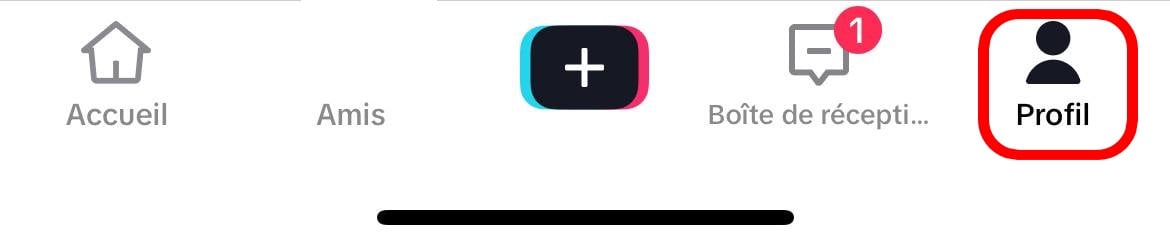
- Open the menu represented by the 3 horizontal bars, in the upper-right corner of the screen.

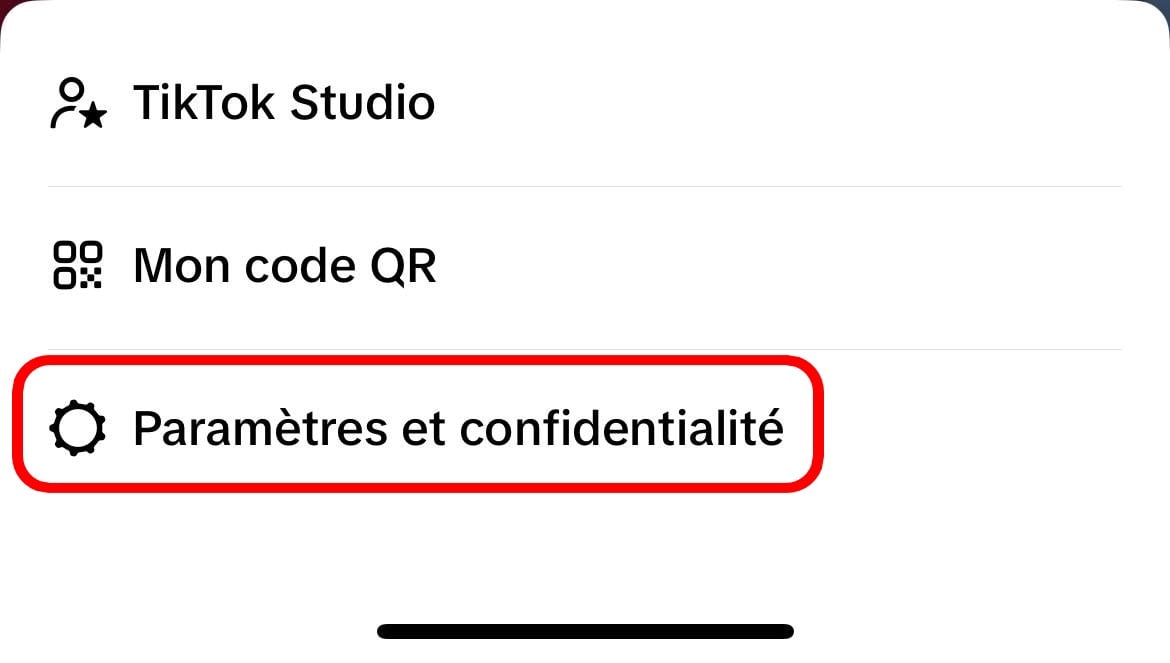
- Click on Settings and privacy.
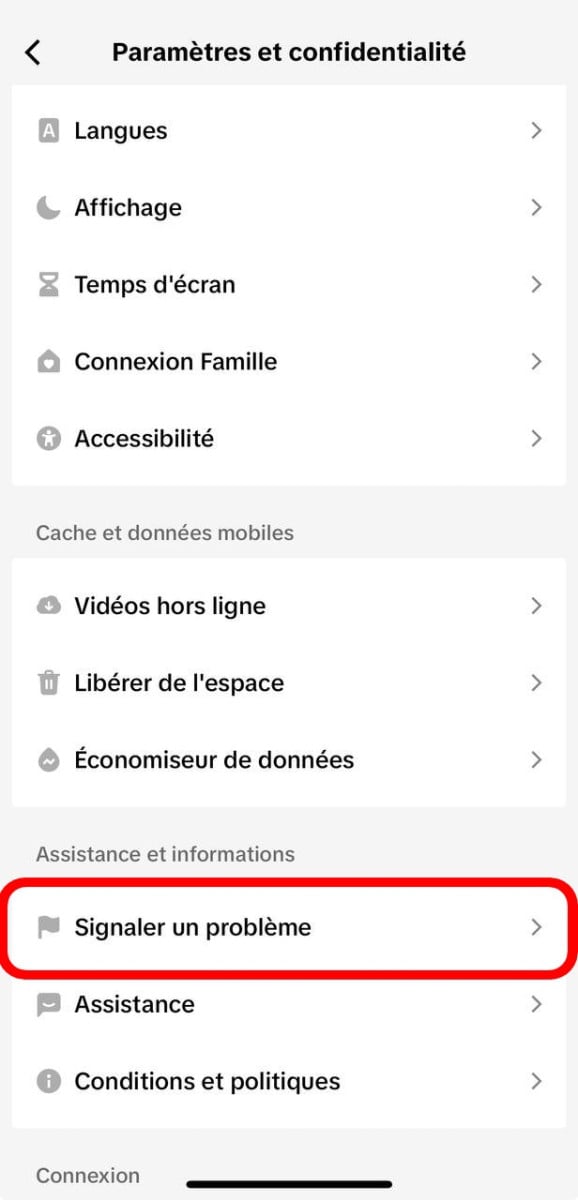
- Scroll down to the section Assistance, then click on to report a problem.
- Scroll through the list of topics until you find LIVE.

- Select Host a Live.

- Choose LIVE is suspended.
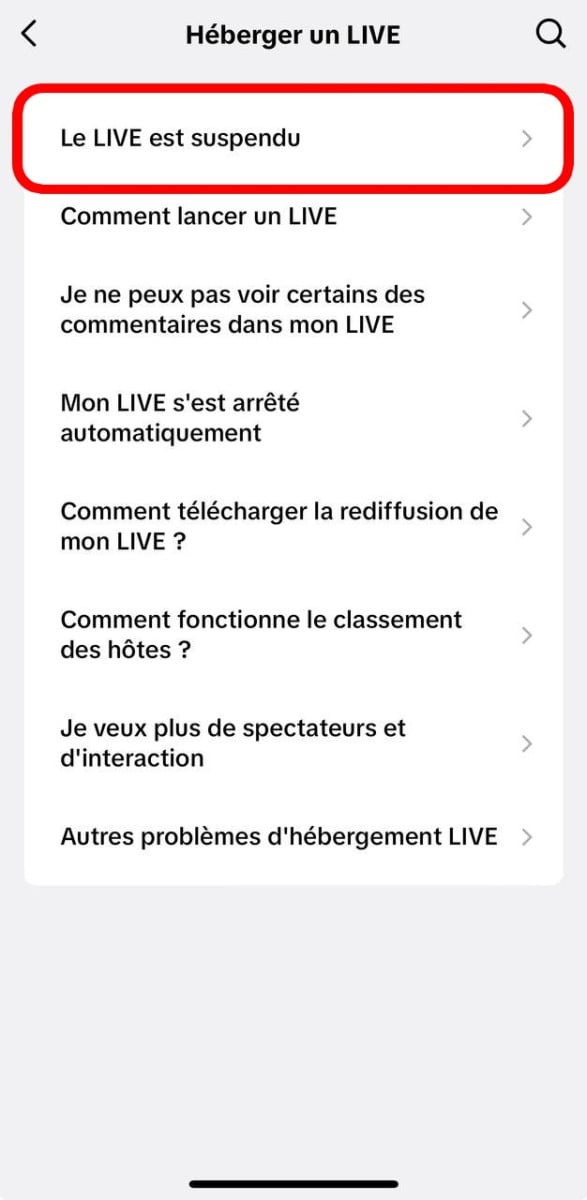
- Click on Nopethen on I still have a problem. A message is then sent to the support team at TikTok.
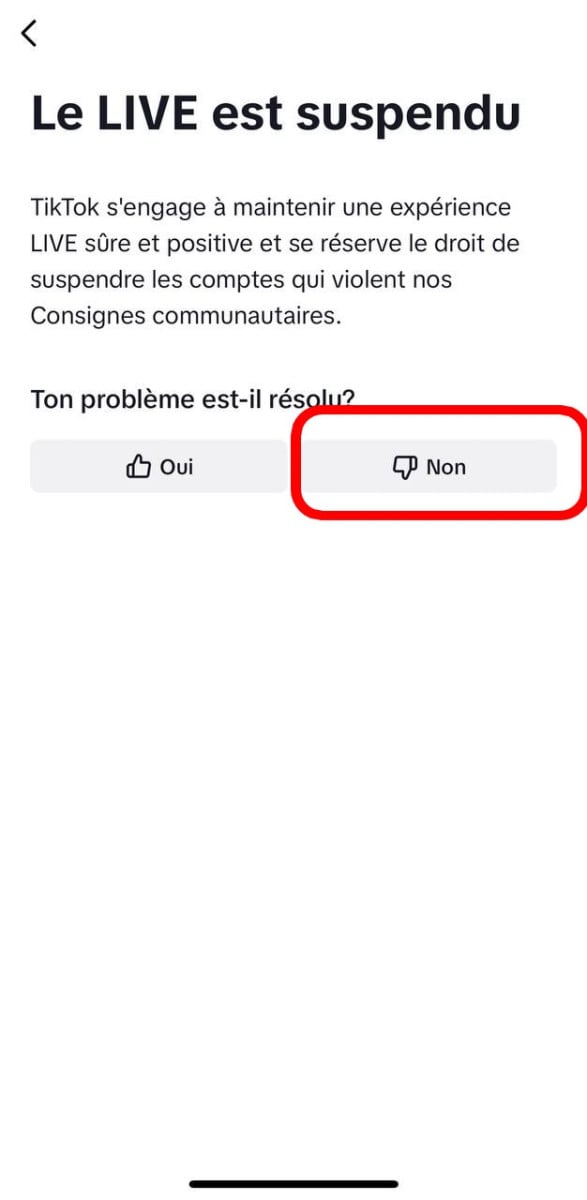
Arm yourself with patience Next. Support can address your request, and in some cases, Unlock access to the live stream before reaching 1,000 subscribers.
Nothing is guaranteed: this trick is becoming less and less effective. The most reliable method is still to build a real audience on your account.
Join a live stream TikTok as a guest with fewer than 1,000 subscribers
You can also host a live stream without reaching the subscriber threshold by being invited by another creator. If you know someone who already has access to live streams on TikTok, he might invite you to co-host with him.
To accept an invitation, simply join their live stream from your account, and then click on the button the invitation that appears.
You'll then appear live alongside the host, in front of his spectators, without needing the 1,000 subscribers yourself.
It's a great way to get started, try out the live format, and attract new subscribers toward your profile before start a live stream on their own.
How to Start a Live Stream TikTok once access has been granted
Once you have access, here's how to get started your live broadcast in 4 steps :
- Open the’application TikTok on your phone.
- Click on the + button at the bottom of the screen.
- Select the option Live.
- Enter the title from your live stream, then click on Start the live stream.
Your live stream TikTok is now visible in real time to your subscribers and the game's users who discover you on social media.
Go live TikTok on PC
You can also broadcast a live performance TikTok since your computer by using screen capture software such as OBS Studio Where Streamlabs. This option is available only to creators who already have access to the feature live on their account.
Here are the steps to broadcast for a computer :
- Visit the official website of TikTok (tiktok.com) and log in to your account.
- Click on the button + in the upper-right corner to create a content.
- Select Live from the available options.
- Enter a title and a cover image.
- Get your stream key and the server URL displayed.
- Open OBS Studio on your computer, go to the Settings, then in Broadcast.
- Paste the server URL and your stream key into the corresponding fields.
- Start streaming from OBS : your live stream TikTok starts in real time.
Stream from a computer allows for better quality video and audio. This is a feature widely used by creators who are into gaming or music.
Tips for a Successful Live Stream TikTok
Access the live stream TikTok isn't enough. To attract spectators and keep your audience in front of the screen, here are the tips that make a difference.
Announce your live stream in advance
Post a video or a story to let your subscribers from moment exact time of your broadcast. The earlier you announce it, the more you can to participate to the promotion on the social networks.
Creators who announce their live streams at least 24 hours in advance generally get more spectators from the very first minutes.
Give your live stream a catchy title
the title is the first thing that users in the live stream thread. Be specific and to the point. “Q&A on the guitar,” “Live gaming” Fortnite ”Evening“ and ”Live Cooking" work better than a vague title.
Interact with your audience in real time
L'interaction is the highlight of the live performance compared to the videos. Answer the Questions in the comment, cites the spectators by their usernames, thank those who send gifts.
This interaction sprout TikTok at broadcast your live stream to more’users.
Pay attention to the duration of your broadcast
Short live streams (less than 10 minutes) aren't prominently featured by the algorithm. Aim for at least 30 minutes of broadcast so that TikTok start recommending you to new people spectators audiences. The longer you stay live, the more the’audience has the time to get to know you and to to participate.
Promote it after your live stream
Once your live stream is over, post a short content to thank your spectators and announce the next live stream. It's a way An easy way to build customer loyalty audience on the social networks and to encourage your subscribers See you later.
How to Quickly Reach 1,000 Subscribers TikTok
If the workaround doesn't work, you'll need to reach the official threshold to Go live on TikTok. Here are the two most effective ways to do this quickly.
The Free Method: Posting Content Regularly
The best approach is to post content consistent and appealing in tone account. It takes longer, but you get real subscribers that will come to participate on your live stream.
Here are the tips Practical steps to make faster progress:
- Post at least 3 to 5 videos per week on your account to remain visible in the algorithm.
- Choose a specific niche (cooking, gaming, humor, sports) helps with attract of the subscribers who are genuinely interested in your content.
- Treat the the beginning of each video : THE First 3 seconds determine whether the users stay or leave.
- Vary the formats : You can create videos with photos or collaborations with other creators to diversify your presence.
- Collaborate with creators from your niche: a simple collaboration can bring you dozens of new subscribers quickly.
Be wary, however, of miracle solutions. The follower generators TikTok promise a lot but deliver nothing. None subscriber generator TikTok free There are no legitimate ones: in the vast majority of cases, they are scams.
The Quick Method Using Discord Alugift
If you want to go faster, you can go through the server Discord Alugift. The idea is simple: you complete tasks (testing games, giving your opinion) to earn points, and then you exchange those points for subscribers.
- Join the server by clicking the button below.
- Claim your roles and read the instructions to receive your prize.
Join our server Discord Alugift
Approximately 8 hours of activity, ideally from a computer, to reach your goal of’subscribers. Keep in mind that these subscribers may not necessarily come to participate at your live show TikTok : They're mainly used to unlock the feature of broadcast live on your account. When it comes to a lively live broadcast, nothing beats a audience earned thanks to your content.
Frequently Asked Questions About Live Streams TikTok
How many subscribers do you need to host a live stream? TikTok ?
It's necessary 1,000 subscribers on your account to access the feature live on TikTok. The previous official threshold was 500 subscribers, but TikTok noted this. This threshold may vary by region.
Can we do a live stream? TikTok on a PC?
Yes. You can broadcast a live performance TikTok since your computer via the official website of TikTok combined with software such as OBS Studio. You still need the 1,000 subscribers required on your account to access this option.
The Support Method TikTok Does it still work?
Less and less. Support for TikTok Sometimes grants early access to live streams, but this trick is becoming rare.
It's a request Worth a try, but no guarantees. The safest approach is still to reach the 1,000 subscribers by publishing content regular.
Can we do a live stream? TikTok Can I use it as a guest without subscribers?
Yes. If another designer invites you to co-broadcast, you can host a live stream on TikTok without having reached the 1,000 subscribers yourself. It's a good way to get started and to gain new subscribers on your profile.
Are the live streams available on other platforms such as Instagram Where Facebook ?
Yes. Live streams are available on other social media platforms such as Instagram Where Facebook, with different rules. On Instagram For example, there is no subscriber threshold required for start a live stream on his account.










 English
100k followers
Buona sera a tutti forza anche io faccio live su tik tok Italia
I wanted followers on TikTok, but my account doesn't have any followers. Please help me.
Followo tiktok 🙏🙏🙏🙏🙏🙏🙏