There is no app that lets you see who visits your Instagram profile. This information doesn't exist anywhere: neither Instagram nor third-party developers have access to it. However, 5 free native indices, right in the app, help you identify people who are genuinely interested in your account.
Want to see who's viewing your profile? Here's what really works.
The 5 Built-in Instagram Metrics to Spot Who's Interested in Your Profile
Instagram doesn't give you a list of visitors, but it does give you concrete signs. You just have to know where to look. Here are the 5 indicators the most reliable ones, ranked from the most noticeable to the most discreet.
1. Story views
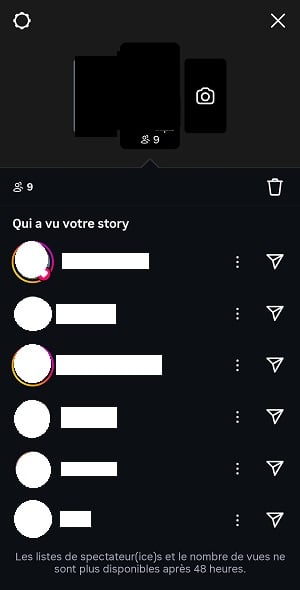
This is the most useful index Available directly in the app. After posting a story, you can see a list of all the users who have viewed it, whether or not they follow you.
What most people don't know: Instagram sorts this list using its algorithm as soon as a story exceeds approximately 50 views. But be careful of the myth that’s going around. It’s not the interest of the people watching you that determines the order. It’s your own conversations with these profile interactions (private messages, likes, profile visits) that push them to the top.
Julian Gutman, Head of Product for Instagram Home, publicly confirmed this, and that statement has never been denied since. In practice, the two often overlap: we naturally interact with people who interact with our content.
So don't jump to conclusions. A user at the top of your list isn't necessarily someone who's “stalking” you. First and foremost, they're someone with whom you, you chat a lot in the app. On the other hand, if a The same name appears in every story, that's a strong sign of interest in your profile.
Important limitation: You can only see the views on the most recent stories 24 heures. “Silent” profile visits remain invisible.
2. Recurring likes and comments
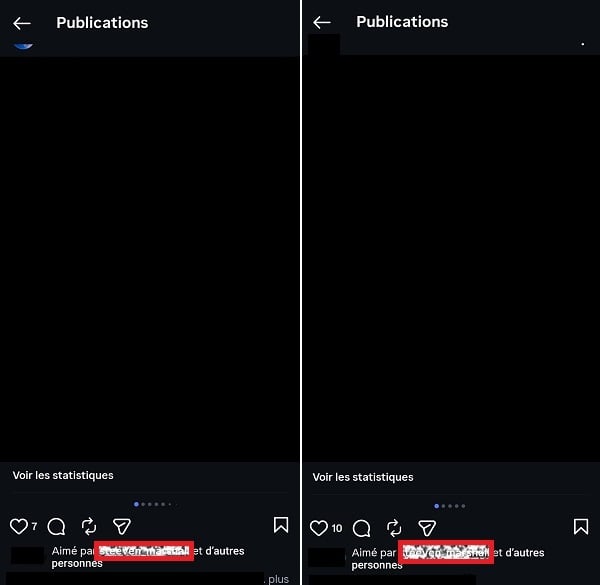
Check out your latest publications and take note of which followers show up most often in the likes and comments. The person who reacts to every photo or video you post is one of your declared fans.
It's basic, but it's a accurate and reliable data. These followers actively engage with your content, whether it's photos, videos, or Reels.
3. Message requests
Check your message requests regularly in the folder “Invitations” from your Instagram inbox. These are non-subscribers who have tried to contact you and who may have viewed your profile without following you.
Each user's name and profile picture are clearly displayed. So you can quickly identify them who is interested in your account without being a subscriber. This is a clear sign of interest.

4. Close friends“ suggestions”
When you create or edit your close friends list, Instagram offers suggestions based on your actual exchanges in the app. The profiles featured are the ones you interact with most often, and the ones that interact with you the most.

5. Statistics (Pro and Creator accounts only)
If you switch your account to Professional or Designer mode (It's free), you can access audience statistics. There you'll find, among other things:
- there scope of your posts; ;
- them prints ;
- the number of’subscribers won or lost per period.
It's impossible to know by name, who consults your profile. However, you can see the number of people who have visited your profile over a given period, as well as detailed information about your audience: age group, location, and the types of content that most appeal to your followers. It’s also useful for refining your marketing strategy and guide your content creation.
It's a valuable tool that's available directly in Instagram's settings.

Now that you know what really works for See who's viewing my Instagram profile, let's see what's not working—and what could end up costing you a lot.
Scams and Legal Risks: Why You Should Avoid Fake Apps
There are many videos circulating on social media, and they all follow the same pattern. A voiceover shows you a fake “Instagram screen” filled with usernames and asks you to search for a specific term on Google, then redirects you to a site that asks for your login credentials or a payment. These apps exist on both android than on iOS, and none of them live up to their promises.
The possible results are:
- account theft ;
- fraudulent subscription ;
- malware installation.
To avoid these pitfalls, here are 3 Warning Signs which are unmistakable:
- We're asking you to log in to Instagram via a third-party site.
- We promise you data which Instagram does not provide to either its users or its partners.
- We'll redirects to a payment page, or where you're prompted to download an unknown app.
If you notice any of these signs, closes the tab immediately. Apps to avoid often have names like Profile Tracker and all their variations.
Beyond phishing, some of these apps claim to access private data: messages, private accounts, or location information. The legal risks are real:
- For the person who creates these apps: Capturing or transmitting this data without consent constitutes an invasion of privacy, punishable by the’article 226-1 of the French Penal Code (1 year in prison and 45,000 fine).
- For those of you who use them: The immediate risks remain account theft and fraudulent subscriptions. If you use the app to spy on a loved one (spouse, adult child), you may also face criminal charges.
Before installing an app like this, make sure to 30 seconds to read reviews on the app store. Most of them describe forced payments, stolen accounts, or data theft. It’s a simple habit that can help you avoid most scams.
If your needs go beyond simply finding out “who’s viewing my profile”—for example, monitoring a minor’s Instagram activity in the context of parental control, this is a different approach. It involves a dedicated solution such as mSpy and requires a clear legal framework. For more details, see our article on parental control.
FAQ: questions we all have about Instagram visitors
Are the accounts at the top of my list of story views stalking me?
No, not necessarily. The order depends on your own conversations with them, not the other way around. A user at the top of the list mainly means that you Whether you send him messages, visit his profile, or like his posts, that doesn't mean he's constantly watching you.
Does Instagram send a notification when I view a profile?
No. You can view any public profile without leaving a trace. Only the stories viewed, read receipts and screenshots of ephemeral DMs trigger an alert. Profile visits, photo views, and Reel views remain completely anonymous.
Why doesn't Instagram list visitors?
It's a Meta's choice of confidentiality, which also owns Facebook. Exposing this data would harm the user experience: people would be reluctant to browse profiles freely. It would also lead to obvious abuses, such as harassment or surveillance. That’s why no mainstream social media platforms (Facebook, Instagram, TikTok) does not officially offer this feature. Not on Facebook, not on Instagram, and not on TikTok : It's still impossible to see exactly who has viewed your profile.
Do the “Profile Tracker” or “Who Viewed My Profile” applications work?
No. These apps don't no access based on this data, whether on android or on iOS. They make their money through phishing, deceptive subscriptions, or the resale of login credentials. Avoid them at all costs to protect your account security and your personal information.
Is there a free way to see who's viewing my Instagram profile?
Yes, but only through the 5 native indices as seen above: story views, likes, and comments; message requests; close friend suggestions; and Instagram Insights for Pro accounts. These features are built into the app and 100 free %. No third-party app can do better.
How can I find out which of my followers have viewed my Instagram profile?
The most reliable way is to cross-reference native indices. Check out the views on your Stories, the reactions and comments on your posts, and then your Business Account. This combination gives you a clear picture of your most engaged followers, without having to use any external apps. It's the only way to see who's viewing your profile with reliable data.








 English