The banner YouTube must do 2560 × 1440 pixels, with a maximum weight of 6 MB. You can create it yourself in just a few minutes at Canva, or have a graphic designer do it: both options are described below.
What will be the size of a YouTube banner in 2026?
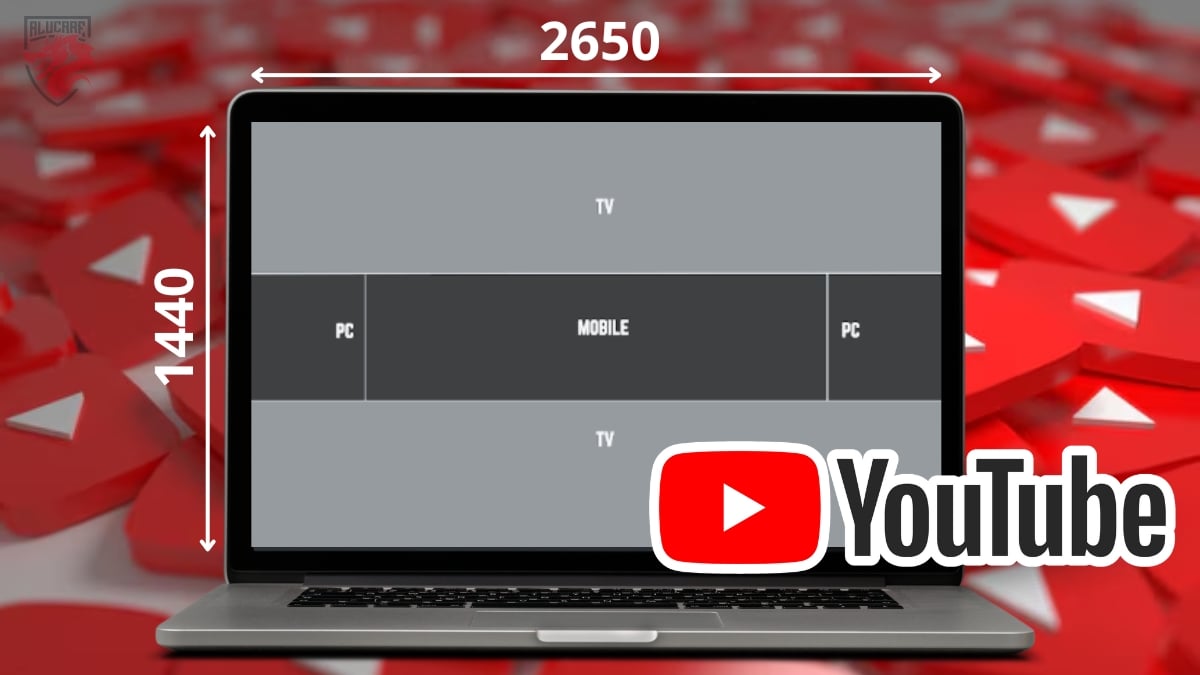
To make sure your banner YouTube displays correctly and complies with the standards set by the platform:
- Recommended size: 2560 x 1440 pixels
- Minimum size: 2048 x 1152 pixels
- Maximum file size: 6 MB
- Safety Zone (text and logo): 1546 x 423 pixels
Here's how the banner appears on different devices:
- On TV : 2560 x 1440 pixels
- On computer : 2560 x 423 pixels
- On a tablet: 1855 x 423 pixels
- On a smartphone: 1546 x 423 pixels
Your audience visits your channel YouTube from a wide variety of media. A well-designed banner around the safety zone remains readable anywhere, from the telephone to the television.
File format for YouTube channel banners

YouTube supports four image formats: JPG, PNG, BMP and GIF. In practice, the PNG and the JPG are the two best options for creating a YouTube banner in the vast majority of cases. Here's how to choose based on your needs.
1. JPG
the JPG is a format compressed, so it's lighter, but with a slight loss of quality.
- Ideal for reduce weight of the file and stay well below the limit of 6 MB.
- Avoid this if your banner contains a lot of gradients or with subtle colors: you might end up with a slight blur.
For whom? This is for you if you want a small file and don't mind a slight drop in quality.
2. PNG
the PNG retains the quality of the image, but remains more bulky than JPG.
- The sharpness of the text, of the logos and the graphic elements are perfectly preserved.
- This is the safest format for rendering readable on both mobile devices and TVs.
For whom? For you, if your banner contains a logo, detailed text or visuals, and that quality is paramount.
3. BMP
the BMP isn't really recommended for a YouTube banner.
- The file is not compressed, so it quickly becomes very heavy.
- This weight can slow down the loading process and cause you to exceed the permitted limit.
For whom? Only if you want a maximum image quality without worrying about the weight. This is rare in practice.
4. GIF
YouTube accepts the GIF, but only non-animated for banners. This format is often larger than PNG, without offering any advantage in terms of quality. You might as well stick with PNG.
In summary, for your YouTube banner: choose the PNG for quality, the JPG for a smaller file. If you'd rather have a pro handle the design:
Hiring a graphic designer to create my YouTube banner 🖼️
How do I resize an image for a YouTube banner?
The method varies slightly depending on the device. Here are the steps for computer then on smartphone.
On computer
- Open YouTube Studio from your account.
- In the menu on the left, click on Personalization.
- Select your banner tab, then click Import Where Edit.
- To resize the photo, select a thumbnail and crop the visible area.
- Make sure your text and logo stay within the security zone power plant.
- Once you've made your changes, click Completed.
On your mobile
- Launch the’YouTube app on your device.
- Tap the tab on your chain.
- Tap the button Modify chain, then your banner image on the right.
- You can import an image from your gallery or by take a new one.
- Adjust the framing, then confirm by pressing Completed.
Cropping on mobile devices is more limited. For a sharp image in 2560 × 1440 pixels, Instead, prepare your graphic on the computer before importing it.
How do I create a good YouTube banner?

Creating a banner is one thing; designing one is another really eye-catching Here's another one. A good visual strikes a balance between tone logo, your colors, and a clear message. When it comes to the message, keep it simple: limit the text to your channel name and a short tagline. The more it’s minimalist, the more readable your banner will be on mobile.
Here are some practical tips for creating your YouTube banner:
- Uses high-quality images and photos, without pixelation.
- Make sure she reflects your channel's identity and the content of your videos.
- Gathers the essential information in the security zone to prevent them from being cut off.
- Choose the good file format (PNG or JPG) for fast loading and crisp rendering.
- Stay consistent with your other posts social networks (Instagram, Facebook…) to strengthen your Mark.
How to Design an Effective YouTube Banner
To create your YouTube banner, you have two options depending on how much time you have and what you'd like to design.
- Do It Yourself : Use free tools such as Canva Where Adobe Express, which offer models already in the right format. You can customize everything and download your image in just a few minutes.
- Delegate to a professional : Perfect if you want a polished look without spending a lot of time on it.
More and more designers are also using AI tools to quickly create a YouTube banner. Tools like Canva now include AI features that generate visuals from plain text. This is a good option for creating a basic design that you can then customize.
For the second option, the platform Fiverr includes graphic designers from around the world, rated by the community. You can filter by service, price, and turnaround time, compare reviews, and then entrust your banner to the graphic designer who’s the best fit for you.
I'm finding a graphic designer to create my YouTube banner 👌
FAQs
How big is a YouTube banner in cm?
The recommended size is 21.67 × 12.19 cm, which corresponds to the 2560 × 1440 pixels once they have been converted.
Why are the quality and size of a YouTube banner important?
Comply with the dimensions specified by YouTube ensures that your banner is not subject to automatic cropping or loss of quality when importing. A sharp, well-composed image also enhances the’Your channel's identity : This is the first image your visitors see when they arrive on your page.
Why put essential information in the safe zone?
The security zone refers to the central part of your banner, that is 1546 × 423 pixels. This is the only area visible on all devices. So put your text and logo there: your key information will remain readable on computers, mobile devices, TVs, and tablets alike, without ever being interrupted.
What happens if I don't comply with YouTube's size requirements?
If you upload a banner that doesn't meet the specifications, expect a poorly cropped image and key elements trimmed Depending on the device. Always check how your content looks on multiple devices (computer, smartphone, TV) before finalizing it.
Who can help me design a quality YouTube banner?
Canva and Adobe Express offer free templates already in the right format, perfect for getting things done quickly. These tools also include features for’AI to generate visuals automatically. If you'd rather delegate, there are experienced designers on Fiverr will design your banner for you at affordable prices.
What size should my profile picture, thumbnail, and YouTube videos be?
Here are the other formats YouTube to know :
- The ideal size for the YouTube logo is of 800 × 800 pixels, in JPG, PNG, GIF, or BMP format, with a maximum file size of 2 MB.
- For your videos, you can import files from 426 × 240 pixels to 3840 × 2160 pixels, at a ratio of 16:9, with a maximum weight of 256 GB (or about 12 hours).
- The recommended size for miniatures is of 1280 × 720 pixels (max weight 2 MB), with a minimum width of 640 pixels.
The size of a banner YouTube holds no secrets for you. To learn more, check out our guide on YouTube logo dimensions.








 English