MP on Instagram means private message. This is the built-in messaging service of’Instagram, also known as Instagram Direct Where DM (Direct Message).
It lets you chat one-on-one or in a group, away from prying eyes, without using the public feed. It's one of the tools for direct communication the most commonly used on the social networks.
What does MP mean on Instagram?
A private message remains confidential: only you and your recipient You can read the conversation. No one else has access to it, unlike the public comments or to disclaimers under a post.
Since your inbox, you can send and receive several types of content:
- A text message or one voice message
- A photo or a video saved on your phone
- A photo or a video taken directly from the app
- the profile other users Instagram
- Regarding the publications, of the posts or some stories
- Regarding the hashtags and pitches found on the platform
The feature is available on both the mobile app and the web version ofInstagram. It's a real channel for communication directly, without going through email or Facebook.
New to Instagram ? Check out our Instagram glossary which explains all the terms you need to know to use the platform effectively.
How do I send a PM on Instagram?
Send a private message on Instagram takes just a few seconds, whether on a mobile device or a computer.
Send a text message on Insta
Do you want to send a private message to someone on Instagram ? Follow these steps in the app:
- Find the private messaging button in the upper-right corner of the home screen.
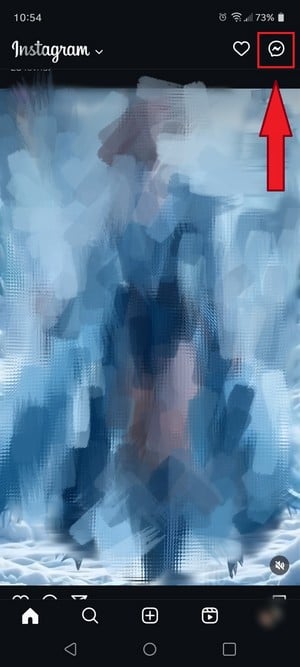
Messaging button in the Instagram main interface. ©Antonin for Alucare.fr - Click the button that lists your recipients.

Button to access the list of recipients on Instagram. ©Antonin for Alucare.fr - Choose the person or group you want to write to.

Choose who you want to chat with on Instagram. ©Antonin for Alucare.fr - Press the input field and write your message.

Enter the message you want to send. ©Antonin for Alucare.fr - Press the button "Send to send your message.
Messaging isn't limited to text. You can also enhance your conversations in several ways:
- Send stickers to set the tone for the conversation.

Sending stickers on Instagram. ©Antonin for Alucare.fr - Share your location on Instagram through your contact.

Send a location on Instagram. ©Antonin for Alucare.fr - Send a voice message, until five minutes per recording.
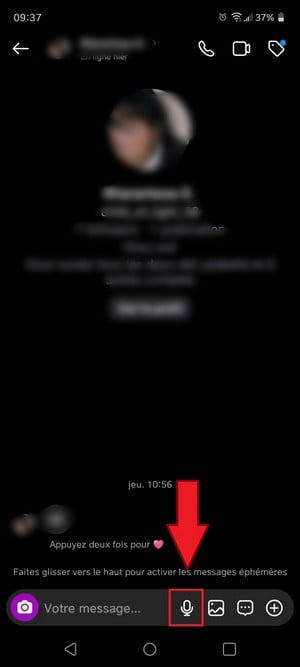
Send a voice message on Instagram. ©Antonin for Alucare.fr
Not sure how to reply to a message you received? Check out our article: How do I reply to an Instagram message?
Send a message from the Instagram web version
Don't have your phone handy? You can also use the messaging service on a computer at instagram.com.
- Log in, then click the’email icon at the top right of the page.
- Select an existing conversation, or start a new conversation by searching for a recipient by their username.
- Type your message in the field below, then click "Submit" to send it.
On the web version, you can attach a photo or send a voice message. However, some features are still more comprehensive on the mobile app.
Send a photo or video as a private message
Do you want to send a photo or video to a specific person, without posting it as a Story or a post? You have two options.
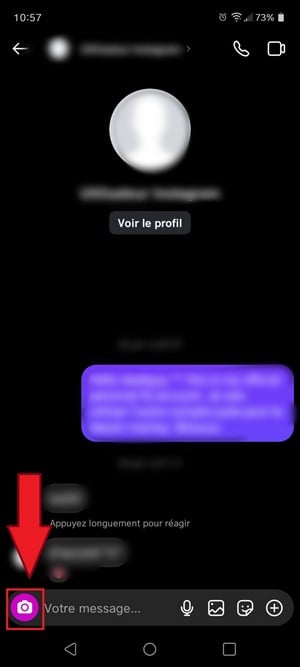
To take a photo directly : Select the recipient, then click the’camera icon in the discussion. Take your photo.
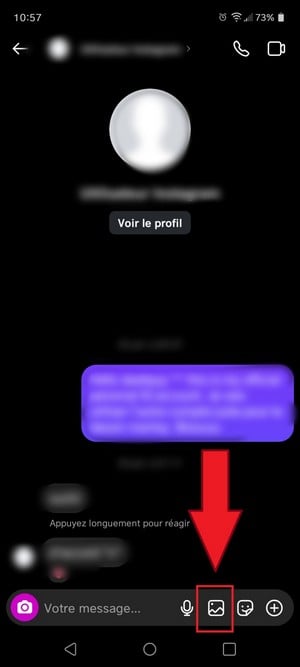
To send a file from your gallery : Press the small photo icon In the lower-right corner of the screen, open your library, select the image or video, and then click the send button.
Two tips to keep in mind:
- To cancel To take a photo, press the X then start over.
- To add text On top of your photo or video, tap Aa, enter your text, then click on "Finished".
FAQs
Where can I find private messages on Instagram?
All your messages arrive in your inbox. The icon in top right the screen turns on highlighted in red as soon as a new message is waiting for you to read it, whether it's a regular PM or an invitation.
Where can I find message invitations on Instagram?
When a user that you don't subscribe to When someone sends you a message, it doesn't appear in your main chats. It stays in a separate section and is waiting for your approval before incorporating your conversations.
Here's how to manage these invitations from the app Instagram :
- Go to the "Messaging" tab in the upper-right corner, then click on "Invitations.
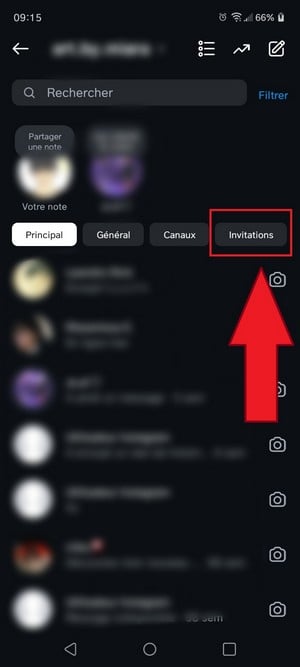
Option to access invitations via Instagram messages. ©Antonin for Alucare.fr - The list of invitations is displayed.

List of invitations by Instagram post. ©Antonin for Alucare.fr - Tap the message and choose between «Accept» and "Delete.
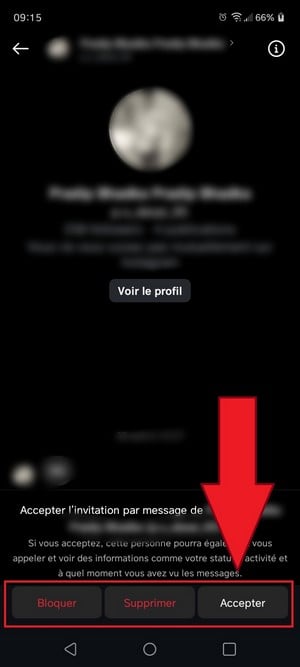
Accept or decline an invitation via Instagram message. ©Antonin for Alucare.fr - Want to reject everything at once? Press «Delete All» at the bottom of the list.
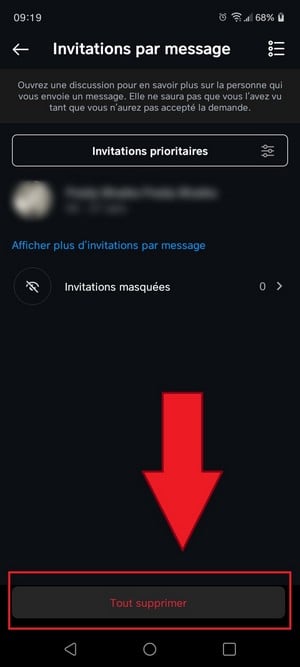
Delete all invitations via Instagram messages. ©Antonin for Alucare.fr
Are message invitations marked "viewed" when opened?
Good news: the invitations are not marked "seen until you accept them. So the person who messaged you won't know that you've already read it.
What is Instagram Direct?
Instagram Direct is simply the official name of the private messaging service of’Instagram, also known as DM. Same thing, different label. You can send text, a photo, a video, or a voice message there, and chat with a specific person or a group, away from public comments. It's a tool for communication Designed for direct communication, without cluttering the’audience of your followers or the page of a Mark. Unlike Facebook Messenger, Instagram Direct It remains integrated into the app; there's no separate app to install.
How do I manage notifications and create a private group chat?
To adjust your alerts, open a conversation, tap the recipient's name at the top, then turns on or off the notifications depending on your preferences.
To create a group, tap the icon new message In the upper-right corner, select several people, then start the conversation. This is a convenient way to organize a group discussion without creating multiple separate threads.
Can I delete my Instagram private messages?
Yes. Press and hold the message in question, then select the option «Remove». Please note: the person does not receive No deletion alerts, but if she's already read the message or seen the notification before you cancel it, she'll know what it said.
Can you take a screenshot of Instagram DMs?
Yes. You can capture a conversation without any restrictions. The only exception is for ephemeral content : if the message was sent in ephemeral fashion, or if it's a photo or video sent as a «View Once,» the other person will be notified that you took a screenshot.
What can you do with Instagram's ephemeral mode?
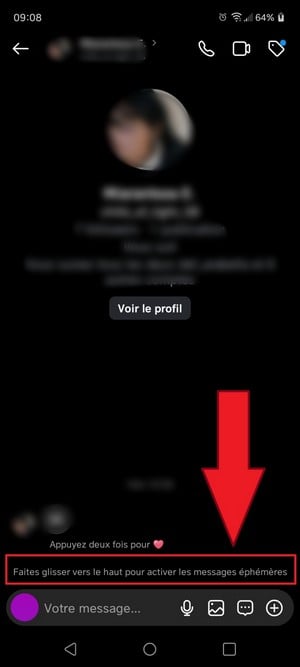
the mode Vanish (or "ephemeral mode") automatically deletes messages as soon as one of the participants leaves the conversation. This is ideal if you don't want to keep any record of the conversation.
To enable it, Swipe the conversation up.
Now you know everything there is to know about MP Instagram. Have a question? Ask it in the comments, and we'll answer it.






 FR
FR  RU
RU  EN
EN  ES
ES  IT
IT  DE
DE  ZH
ZH  PT
PT  ID
ID  JA
JA  DA
DA