The Instagram bio, that's the short one description visible on your profile, right below your username. You have 150 characters to explain who you are, what you do, and to encourage people to take action. It’s often the first thing people read before deciding to subscribe: make sure it’s well-written to gain visibility and in commitment.
Instagram Bio: Definition and Location
The Instagram bio briefly describes a user or a brand on their profile. You'll find it right below the username, above the featured stories.
It is limited to 150 characters, including spaces, symbols, and emojis. In addition to text, it can contain emojis, of the hashtags and an clickable URL.

The character limit doesn't get in the way of creativity. For example, you can use special fonts to make your Instagram bio easier to read and more original. Here's a quick tutorial to help you:
Explanatory video in French by Alucare, ideal complement to the page. View video (you can use YouTube's automatic translation)

What is a link in an Instagram bio?
the link in bio is a clickable URL located below your profile description on instagram. It can redirect your visitors to a website, a blog, a sales page, a chain YouTube or your latest post.
How to Add a Link to Your Instagram Bio
It's easy to use:
- Open the app, go to your profile, and tap Modify profile.
- Find the section Links, then press Add an external link.
- Paste your text URLs, add a clear title if you want, and save.
The link in your bio will immediately become clickable for your followers.
Add multiple links to your bio
This feature allows you to display up to 5 links in your Instagram bio. It's a handy way to link to both your website and your social networks and your newsletter.
To take it a step further, a tool like Linktree Brings all your links together under a single URL. Your visitors can access each destination with just one click, all from a single page. It’s the ideal solution when you have a lot of content to share and want to generate traffic to multiple destinations at once.
How to write an effective biography?
A well-written bio turns your visitors into followers—or even customers. Before writing your Instagram bio, ask yourself these questions:
- Who am I, and what sets me apart from others?
- What do I have to offer (content, products, services)?
- What can my visitors do next?
- How can you contact me?
Once you have those answers, you can write your bio step by step.
a) Use a strategic name
The field Last name is different from your username. This is the name that appears in Instagram search results, so be strategic. Add the name of your Mark, your profession or the service you offer, along with relevant keywords related to your niche.
To make the text easier to read, separate your name and your profession with a period, an emoji, or a vertical bar. Examples:
- Julien | Videographer YouTube
- Léa, New Mom
b) A catchy opening line
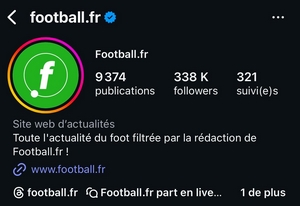
This is the heart of your bio. Be clear, be yourself and avoid being too general. Explain what you're offering and your added value. Use keywords that people type when they're searching for a service like yours: this helps you attract the right audience on Instagram. Examples:
- Get inspired for your next trips…
- Your friend who helps you "glow up" in the editing room
c) A call to action (CTA)
A call to action, that's the phrase that gets your visitors to click. It generates’commitment and traffic to your other destinations. Depending on your business, you can ask them to subscribe or follow you on your other social networks or visit your website. Examples:
- Buy your tickets here
- Subscribe to my channel YouTube
d) A link to your website
Set your clickable link in the bio to redirect your audience to your website, page, or blog. If you want to share multiple destinations at once, use Linktree to consolidate everything under a single URL. This way, you avoid having to change your main link every time you launch a new promotion.
e) Location
This is an optional choice. Enter your location or the address of your business if it helps build your brand or attract collaboration opportunities. You can also simply add the’flag emoji from your country.

f) A way to contact us
Insert a way to contact in your Instagram bio: a WhatsApp, an email address, or an invitation to send you a Instagram direct message. It makes communication and collaboration easier.
Tip: Break up your text with a vertical bar, relevant emojis, or line breaks to make your bio more inviting to read.
FAQs
How to write your Instagram bio?
- Go to Instagram and log in to your account.
- Click on Modify profile.
- Fill in the field bio.
- Under your Instagram bio, add a external link if you'd like.
- Click on Completed to validate.
How many characters are allowed in an Instagram bio?
The Instagram bio is limited to 150 characters, including spaces and emojis. There is no official workaround to exceed this limit.
What is the difference between an Instagram username and a username?
the name appears in search results when someone searches for a product or service on Instagram. The username matches the name of your account or page.
Who can see my Instagram bio?
If your account is public, your Instagram bio is visible to everyone. If your account is private, only your followers can see it.
How to write an Instagram bio in one line?
Check out our guide on how to start a new line in your Instagram bio to help you with that.
Why can't I add a bio to Instagram?
This may be due to a technical problem or a violation of the platform's rules. In that case, open the app up-to-date or try again later.
How do I open a link in the bio?
- Log in to your Instagram account.
- Go to the profile in question.
- The link in the bio is located below the featured stories: click on it to open it.
How do I change the font on my Instagram bio?
Check out this article to Change the font in your Instagram bio and make it look more stylish.
How to add a clickable link to your Instagram bio?
- Log in to your Instagram profile and click on Modify profile.
- Select Links.
- Click on Add an external link and enter your URL.
To group several links under a single address, Linktree is the right solution.
Should you include hashtags in your Instagram bio?
It depends on your preferences. Since Instagram bios have a character limit, if you add more, make sure to strategic and choose them carefully.
How do you include your profession in your Instagram bio?
Add your profession right after your name, using the right keywords and separators (emojis, vertical bars). To change your name:
- Click on Modify profile.
- Enter your name followed by your occupation in the field Last name.
- Save the changes.
Why is it important to curate your Instagram bio?
Your bio is the first impression that visitors have of you on Instagram. It plays several key roles, whether you're a content creator or business :
- It gives an overview of your business, your personality and your brand.
- It is used to promote your offer and boost your sales.
- It facilitates the communication through a visible means of contact.
- With a link in bio, you can easily direct your visitors to your landing page and gain visibility and in traffic.
Need to know more terms? Find all the definitions in our Instagram glossary.
Do you have any questions? Feel free to ask them in the comments!









 English
7