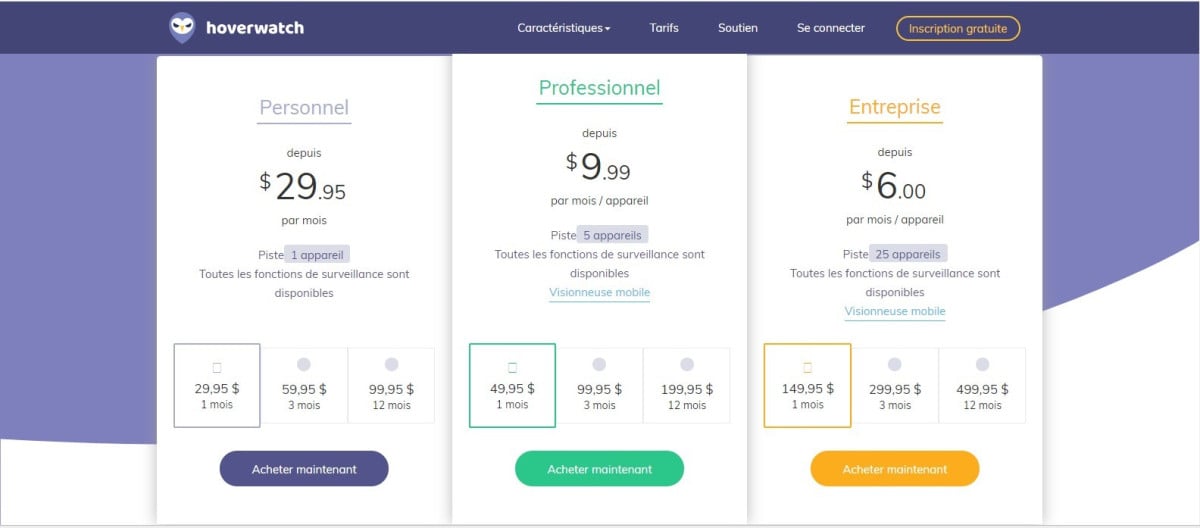
Hoverwatch offers three subscription plans To monitor one or more devices: the plan Personal (1 unit), the plan Professional (5 devices) and the map Business (25 units).
This software runs on Android, Windows and Mac, but not on iOS.
Here are the details of the price and features to choose the right plan based on the number of devices you want to monitor.
I'm checking out the Hoverwatch app
How much do Hoverwatch subscriptions cost?
Hoverwatch offers 3 plans depending on the number of devices to monitor. Each plan is available at 1, 3, or 12 months. All the features of the software parental control are included regardless of the plan you choose.
The Personal Plan
This offer lets you control a single device. It's the right choice for personal use—for example, a parent who wants to track their child's phone. The’software installation on the target device takes a few minutes.
- 29,95 $ for one month
- 59,95 $ for 3 months
- 99,95 $ for 12 months
The Professional formula
The formula Professional allows you to monitor up to 5 devices at the same time. Over the course of the year, the rate comes out to 9.99 $ per month per device. This plan is ideal for business use or for families with multiple phones to manage.
- 49,95 $ for one month
- 99,95 $ for 3 months
- 199,95 $ for one year
The Business formula
The formula Business can cover up to 25 devices. The rate then drops to about 6 $ per month per device, making it the most cost-effective option if you manage a large fleet of devices.
- 149,95 $ for one month
- 299,95 $ for 3 months
- 499,95 $ for one year
With each plan, you get all functions Software: Tracking of SMS, calls, real-time GPS tracking and social media, with no restrictions under the plan. The activity logs are available on your dashboard as soon as the data is synced.
As for payment, you can pay by credit or debit card, via PayPal, by phone order, by fax, by bank transfer, or through other methods specific to certain countries. Depending on your location, not all of these options may be available online.
I'll choose my Hoverwatch plan
What is Hoverwatch?
Hoverwatch is a parental control software developed by Refog. Its purpose is simple: to help you monitor a phone or computer so you can keep an eye on your kids.
It works on Android, Windows and Mac, but not on iOS.
It can cover multiple devices at once, depending on the plan you choose.
Once installed on the’target device, the software runs on stealth mode, in the background. It discreetly records all activity without the person being monitored realizing it. Here’s what it captures on a daily basis:
- them SMS and messages sent and received
- them calls and their history
- keyboard strokes on a computer
- messaging services and social networks
- l'search history and the sites visited
- there real-time GPS tracking and the schedule
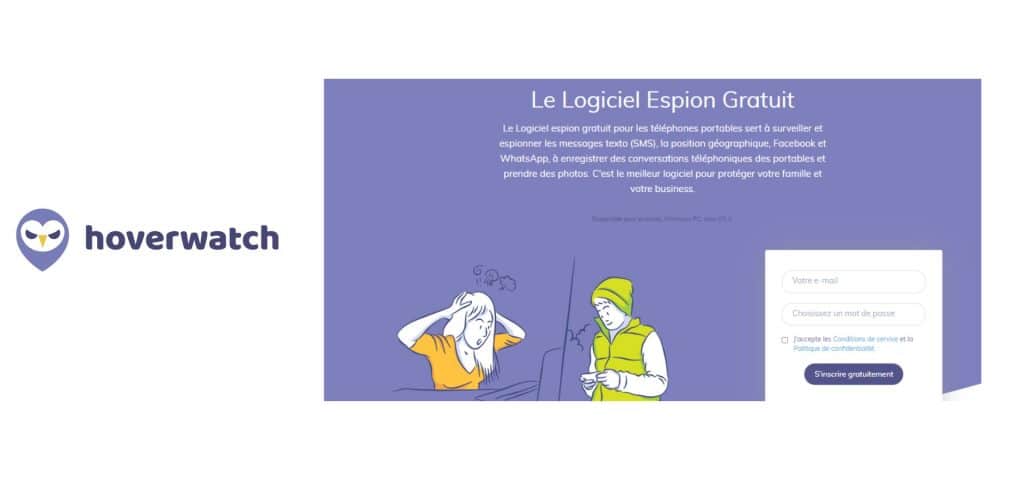
The app is running 24 hours a day, 7 days a week. All the data collected is transferred to the service's server, and you can view it from your online dashboard, at any time and remotely.
How does the software work?
According to the publisher, Hoverwatch is located in 196 countries. It is, above all, a tool for parental control, but parents aren't the only ones who can use it: someone in a relationship or someone who's worried about having their device stolen can use it, too.
You can get started with the software in three stages :
- Create Your Account : Registration is free of charge on the website using the button below.
- Install the software : download Hoverwatch on the target phone from your online account. On Android, installation is performed outside the Google Play Store. A physical access The device must be turned on.
- Switch to monitoring mode : since your dashboard, select the activities to track, and view all the data remotely, in real time.
What are the pros and cons of Hoverwatch?
Before signing up for a subscription, it's a good idea to weigh the pros and cons. Want the full scoop? Check out our Full Review of Hoverwatch.
Benefits
- A surveillance system of the target phone's environment, with the ability to record the calls spent on the device.
- the Instant Messaging Monitoring : WhatsApp, Snapchat, Telegram and Facebook.
- Reading the SMS, MMS messages, and emails directly from the online dashboard.
- Monitoring the GPS localization of the device in real time.
- A free registration to test the dashboard before choosing a plan.
You can access all of these data remotely, without having to pick up your smartphone. Handy for a parental control Be discreet on your children's social media accounts.
Monitor a Cell Phone with Hoverwatch
The inconvenients
- the subscription prices remains somewhat high, even though the many features make the investment worthwhile.
- In versions of’Android not rooted, you won't have access to all the monitoring features.
- Like any monitoring software, using it can pose problems ethical and legal. Be sure to check the laws in your country before installing it.
- The tool is not compatible with the iPhone. To monitor a device under iOS, you should try an app like mSpy, which supports Apple devices.
What are the different Hoverwatch functions?
Hoverwatch combines numerous monitoring features into a single device. These features remain useful even in the event of theft or loss on the phone. Here are the details for each use of parental control or monitoring.
Undetectable
the stealth mode ensures that the software remains invisible on the target device—neither on the screen nor in the list of apps.
This feature is particularly useful for parents who want to monitor their children's activities discreetly, even when their children know their phones inside and out.
Access to messages and calls
Hoverwatch is part of best spy apps through comprehensive monitoring of communications:
- The calls incoming and outgoing calls, their duration, and the number dialed
- The SMS and MMS messages sent and received (text and media)
- The posts shared on major messaging apps and social media platforms
Geolocation
By combining the signals Wi-Fi, cell towers, and the GPS, the software determines the exact location of the monitored device in real time.
Ideal for a parental control : You know where your child is at all times, and the position data are recorded in the logs.
Keylogger for Windows and Mac
Available on Windows and Mac, the keylogger records all keystrokes entered on the monitored computer's keyboard.
This way, you can see the messages sent, the searches performed, and even the passwords typed.
Internet browser search history
Monitoring the’browser history lets you view the websites you've visited, the searches you've performed, and the open tabs. It also identifies the most frequently visited sites and their categories.
This is especially useful for making sure your kids don't come across inappropriate content.
Spying on all social networking activities
On Instagram, Telegram, WeChat, Snapchat, Facebook and WhatsApp, the software provides a detailed overview of the target's activities: multimedia files, voice calls, status updates, and reactions to posts.
Other features complement the monitoring: the screenshots at Android, contact tracking, and the’Alert in the event of a SIM card change.
The logs All of these activities are accessible from your dashboard.








 English