Want to give your bio, caption or anything else on Instagram a whole new look, but don't know how? This article is for you!
To personalize your texts on InstagramThere are several techniques to help you!
You don't need to be a web expert to make your profile attractive, because this blog post reveals all the ways to change the font on Instagram !
Explanatory video in French by Alucare, ideal complement to the page. View video (you can use YouTube's automatic translation)

How do I change the font on Instagram?
Customizing the font on Instagram is a great way to make your profile stand out and put more originality to your post to make it stand out from the crowd. How do you do it?
1. Change the font of your Instagram bio and caption
Here's how to change the font of your description or Instagram bio easily. To do this:
- Go to your instagram account,
- Go to Google and visit a site that lets you change the font on the platform. For example, type Instagram Font or Lingojam in the search bar.
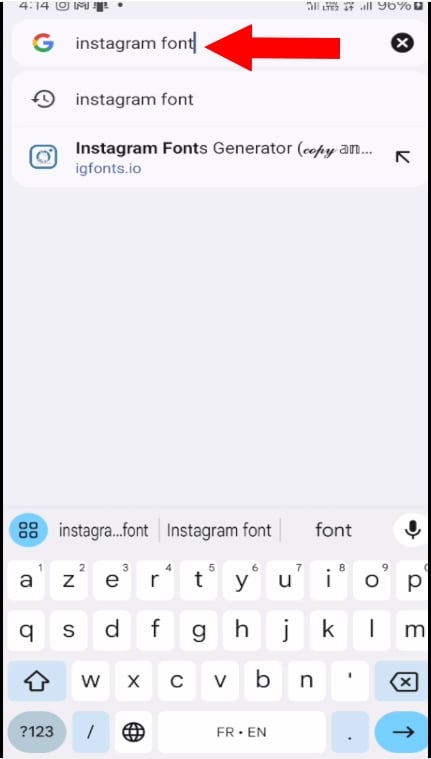
- In the text area of this free font generator, insert text to change the font on Instagram.

- Now select the writing style who speaks to you, scrolling if necessary.
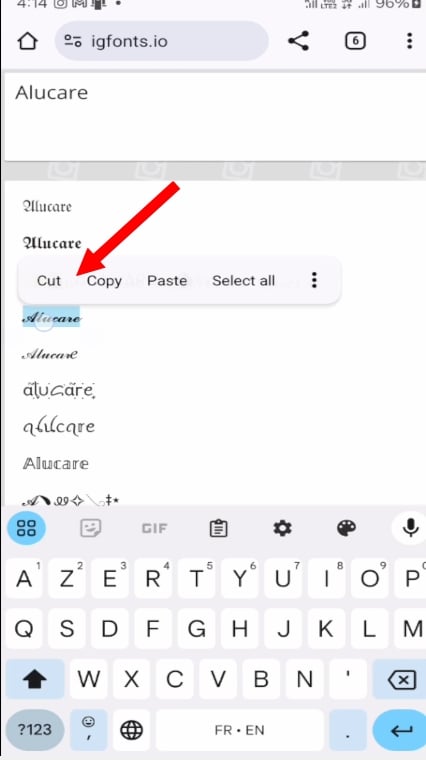
- Next, copy it to the clipboard.

- Then go to Instagram and click on Modify profileand paste the text into the Bio,
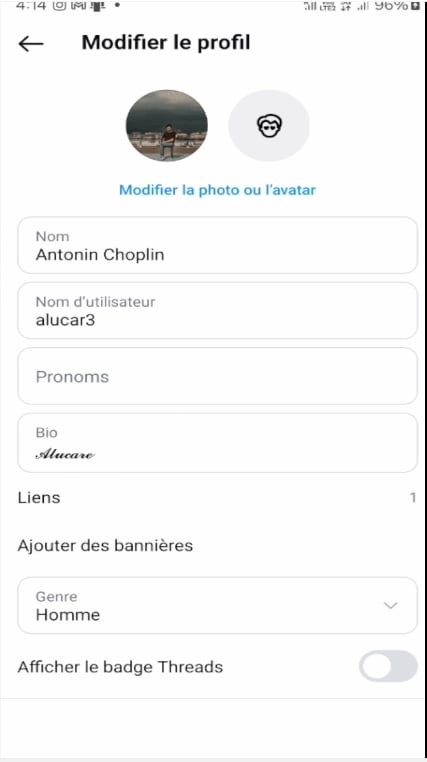
And if you want to change the writing style in your caption, the steps remain the same:
- All you have to do is select photo type you want to share with this style of writing.
- Make the settings you wish to apply to the photo and paste text from clipboard in the "add a caption" field!
- Then click on to share and congratulations! You've succeeded in creating a unique text on the platform!
2. Change the font of your Instagram story
It exists various options to change the font of your Instagram text in your story, such as using bold, italics or other typographic styles you like.
By the way, here's a little tutorial on how to change the Instagram font in a story in 2026 :
Since the application
- Log in to your Instagram account.
- Then select the Story and create one with a photo or video.
- Type the text you wish to add to the story, then click on the Aa which appears at the top of the menu.
- You can thenelect font type you want.
- Now you can apply a filter to your Instagram story before sharing it with your friends or the whole world!
From a free online font generator
You can also use the technique mentioned earlier to change the fonts in your stories.
- After inserting and copying the text in the text box of the online font generator, paste it into the content of your story.
There you go, now you know how to change the font on your Instagram content!
In fact, having a distinct writing style allows your followers to recognize you easily when they come across your content. So if you want to add more touches to your posts or simply improve their visibility, you'll be able to customize your font on Instagram!








 English