Create an account Twitch takes only a few minutes. You fill out a quick form, verify it with a code, and you're done. The platform gives you access to thousands of live streams, of the streamers video games, a variety of content creators, and a community active.
Here are the steps, one by one.
Create an account: Go to the website
Start by going to www.twitch.tv. Enter this address directly into your browser's address bar, whether you're on computer or on mobile.
1. Sign up on the website
Once you're on the home page of Twitch, click the button Register located in the top right corner. The registration form opens immediately.

You can sign up using a Google, Amazon, or Apple account.

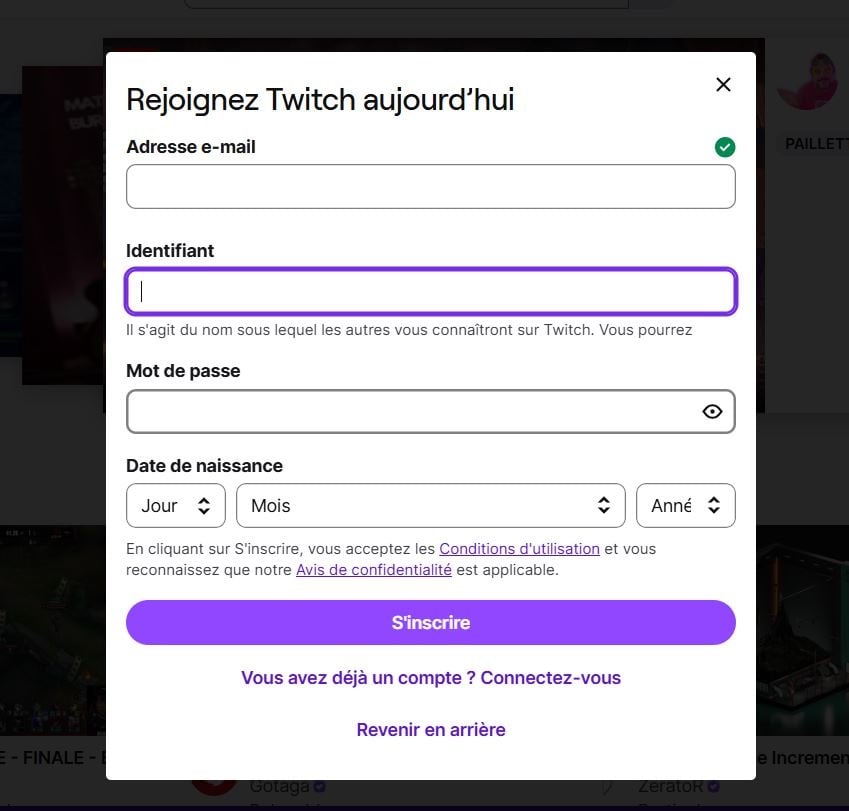
2. Fill out the registration form
The form asks for some basic information. Here's what you need to fill out, in this order:
- A phone number or a e-mail address : Both options are available; click the one you prefer. The phone number will still be useful later to secure your connection.
- A username (username): This is the name that will appear on your channel, so choose it carefully. It must be between 4 and 25 characters. You can always change your username Twitch later, if necessary.
- A password.
- Your date of birth : Twitch uses it to verify that you are of legal age to use the platform.
Verify your Twitch account
Once the form has been submitted, Twitch sends you a confirmation code. If you signed up with a phone number, he arrives via SMS. If you've chosen the’e-mail, it will be sent to your email inbox. In either case, just enter the code in the appropriate fields, then confirm.
Your account Twitch is now active. You can track your streamers favorites, join live discussions, and start your own chain whenever you want.
And if one day you want to start over, you'll know how Delete your account Twitch.
What should you do after creating your Twitch account?
Once you're logged in, you can start exploring the platform right away. Here are the first things to do:
- Follow Channels : Search for your favorite video games and follow the streamers you're interested in.
- Watch live streams : Live streams appear on your home page as soon as you follow content creators.
- Join the chat : Each stream has a live chat where the community can interact in real time.
- Install the mobile app : available at iOS and Android, it lets you watch your streams from anywhere.
- Start Your Own Stream : All you need is your account to start streaming—no paid subscription required.
FAQs
Can you create a Twitch account on a mobile device?
Yes. You can sign up directly from your mobile browser at twitch.tv, or through the official app Twitch available on iOS and Android.
The process is the same as on a PC.
Do you need an email address to sign up for Twitch?
No, it's not required. Twitch accepts both a e-mail address that a phone number to confirm your registration. Both options are available on the form.







 FR
FR  RU
RU  EN
EN  ES
ES  IT
IT  DE
DE  ZH
ZH  PT
PT  ID
ID  JA
JA  DA
DA
Dan aku pergi KS PT