Get started with Twitch, it takes some preparation. The equipment, the streaming software, your schedule and your niche: every choice counts, starting with your very first live.
Here's everything you need to know to stream your first stream and develop your community.
Getting ready to stream on Twitch
A little preparation is all it takes to stack the odds in your favor. The account, the equipment, the software and your choice of content : Here's what you need to know before you get started.
Create a Twitch account and customize your profile

- Create your Twitch account: there Create Your Account is the essential first step to start streamer. Take the time to choose your username carefully.
- Choose a catchy name: your pseudo is your identity on the platform. It should be easy to remember, easy to pronounce, and ideally reflect the type of content that you share.
- Write a short bio: Be concise. Put your stream schedules and gives you a good reason to come back.
- Add a high-quality photo and banner: your profile picture and your Twitch banner These are the first images people see. Make sure they're high-quality so they reflect your style.
Choosing the right streamer equipment
Good equipment really makes all the difference. Here are the essentials for a Streaming Setup :
- A fairly powerful PC to run the game and the streaming software at the same time.
- A decent webcam to record your video. You don't need a high-end model to get started.
- A good microphone For clear audio: this is the most important point. A headset with a built-in microphone will do for now.
- Streaming software as OBS Studio, free and comprehensive.
- A stable internet connection : Essential for streaming your video without interruptions.
There's no need to buy everything on the first day. Your equipment will improve over the months, depending on your actual needs.
Define your content and target audience
Before you get started, ask yourself two simple questions: What are you going to share, and who is your audience? The answers to these two questions will help you Find Your Niche and to create content that truly resonates with your audience.
Aim for the right audience from the start. Look for an audience of more than 60 years on Fortnite, that won't work. Instead, focus on emerging games whose community matches your profile. To find your niche, keep these points in mind:
- Start with your passions. What do you like to do? What could you talk about for hours?
- Analyze trends On Twitch. Which games and categories are trending right now?
- Watch other streamers. What do you like—or dislike—about their content?
Also keep in mind the age and interests of your future viewers. The clearer your target is, the easier it is to build a loyal community.
Broadcasting your first stream on Twitch
Is your setup ready? It's time to get started. Here's how to choose your software, set the right settings, and get off to a good start with your community.
Choosing streaming software
the streaming software is the heart of your setup. It captures your video and audio, encodes them, and streams them live on Twitch. Here’s what you need to know about the three main options:
- OBS Studio : It's free and open-source—the gold standard. Very flexible, with a ton of customization options, but a little technical for beginners.
- Streamlabs : based on OBS, it directly integrates the donation alerts, overlays, and a visible chat window. It's easier to get started with, making it ideal if you want a clean look without having to configure everything manually. Streamlabs is often recommended for beginners because of its intuitive interface.
- Twitch Studio : Twitch's built-in tool, designed for beginners. It automatically detects your hardware and walks you through the setup process. Perfect for getting your first live stream up and running in just a few minutes.
In practical terms, start with Twitch Studio Where Streamlabs If you're just starting out, move on to OBS Studio when you want more control over your stream.
Stream settings
Once you've chosen your software, you need to configure it properly. One wrong setting and your video will stutter or the video quality will drop. Here are the initial values to know :
- Resolution: refers to 1280×720 (720p) minimum. This is the best compromise for most internet connections.
- Video bitrate: account 3,000 to 4,500 kbps in 720p, and up to 6,000 kbps in 1080p if your internet connection can handle it.
- Frames per second: 30 FPS are enough to have a conversation, 60 FPS are best for fast-paced games.
- Audio bitrate: Twitch recommends 160 kbps, with 128 kbps as the minimum acceptable bitrate. Your voice must remain clear and audible.
- Overlays: Add your graphic elements (logo, webcam frame, donation alerts) for a professional and dynamic look.
- Music: Be mindful of music rights. Use royalty-free music to prevent your VODs from being muted.
In OBS, go to the video settings to adjust the resolution and bitrate. Before you start, make a Recording Test a few minutes. This way, you can check the sound, video, and stability of your internet connection without an audience.
Launch your first stream and interact with your audience
The big moment has arrived. A few tips will help you put your spectators at ease right from the start:
- Write a short introduction. Welcome your viewers and explain what they'll be seeing today.
- Stay energetic. Your passion must be contagious, even in the face of zero viewers at the beginning.
- Interact with your cat. Respond to comments and ask questions. That’s the key to building a community and keeping your audience engaged. Some viewers also practice lurk : They watch without saying a word, and that's perfectly normal.
- Thank those who stay. A simple "thank you" makes people want to come back, and that's what makes them want to stick with you in the long run.
The most important thing is to have fun: that's what comes across on screen and keeps your audience coming back.
Developing your Twitch channel and community
Reaching a an average of 3 spectators on Twitch is a key step toward becoming affiliate streamer and start earning’silver through subscriptions. Here are some practical tips to help you do that, day after day.
Create a regular streaming schedule

Consistency is the real key to success on Twitch. By setting a regular streaming schedule, you get your viewers used to seeing you at specific times, and they're much more likely to be there during your live streams.
Many streamers start their live streams between 9 p.m. and 11 p.m.. That's exactly the niche you should avoid when you're just starting out: you'll find yourself in direct competition with channels that are already well-established. It's better to Choose a time slot that suits your target audience, for example:
- Are you targeting people who are bossing and want entertaining content after work? Plan a live stream in late afternoon and early evening.
- Do you create ASMR or relaxation content? You might want to stream on late evening, when people want to relax before going to sleep.
One point that should definitely not be overlooked: your own availability. Choose days and times that really work for you. It's better to maintain a consistent schedule over the long term than to stream 7 days a week and then disappear for 2 months.
After a few months of regular streaming, your viewers will be there because they know when to tune in. The right schedule is one that fits your lifestyle and when your audience will be online.
Promoting your Twitch channel on social networks
Don't limit your presence to Twitch. Make use of social media to promote your channel and reach a wider audience around the world. Specifically, you can:
- Share your live streams elsewhere: on Facebook, Instagram, Twitter Where YouTube, post clips from your streams, live announcements, and your best moments. Post your VODs on YouTube lets you reach an audience outside of Twitch and repurpose your best streaming moments.
- Creating engaging content: photos, short videos, memes, and posts related to your channel. Respond to comments from your community.
- Use relevant hashtags: They help interested people find your posts.
- Collaborate with other streamers: launches raids, co-streams or participates in collaborative events to reach a new audience in the streaming world.
By generating enough buzz around your channel, you'll give yourself the best possible chance to become a popular streamer. Some viewers can also subscribe via Subscribe with Prime, which is a good way to generate’silver without them spending a single euro.
Interact with your community and create special moments
Interaction is at the heart of the Twitch experience. Take the time to Reply to your viewers' comments, ask questions, and start discussions. Knowing how to interact naturally with your chat is what sets a good streamer apart from just another live gamer. Also, encourage interaction among viewers with games, polls, and Q&As.
You can create highlights in:
- Organizing special events: contests, tournaments, or Q&A sessions with guests. These events attract new viewers to your community.
- Celebrating milestones : A new subscriber milestone, a big win in-game… share these moments with your community.
- Offering rewards: promo codes, exclusive content, or early access, for example.
By interacting regularly and sincerely, you create a sense of belonging that makes your viewers want to come back stream after stream.
Analyze your performance and adapt
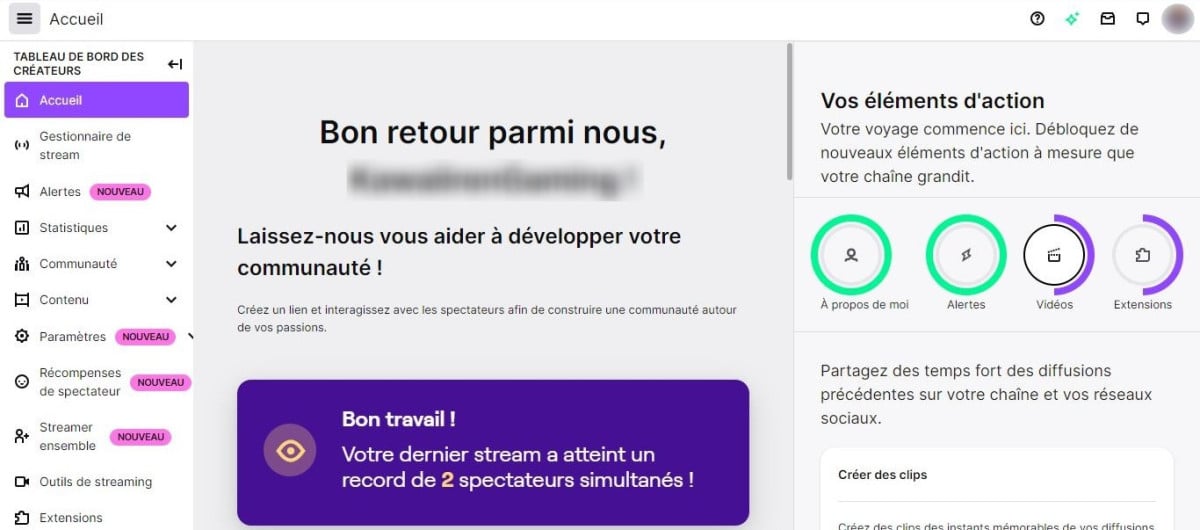
Twitch offers you analytical tools to track your channel's performance. Use this data to identify your strengths, better understand your audience, and improve your content. Here's what you need to know about these metrics:
- Analyze your viewer statistics: Number of viewers, average watch time, retention rate. These figures show how your audience responds to your streams.
- Identify your most popular content: Which live streams attracted the largest audiences? Which topics generate the most engagement?
- Adjust your strategy: Refine your schedule, choose games based on your audience's preferences, and test out new content ideas.
By regularly analyzing your metrics, you'll grow your channel at the right pace. After a few months of regular streaming, you'll have enough data to figure out what really works.
The hardest part is getting started: with a little preparation and a lot of regularity, you'll eventually make a real name for yourself on the platform!









 English