The thumb-up emoji 👍 has always been considered as a character expressing a approval. It is frequently used in online communication.
In this article, we show you how make a thumbs-up with the keyboard. Follow the guide!

How do I use the thumbs-up keyboard on Windows?
You can access thethumbs-up emoji with a simple technique you can use online or offline. Follow these instructions:
- Press the Windows + dot on your keyboard.

Photo of Windows keys and dot (.) on a PC keyboard. Mia for Alucare.fr - Select the thumbs-up emoji among those displayed.

The thumb-up emoji in the emoji viewer on Windows. ©Mia for Alucare.fr
How do I use the thumbs-up keyboard on the Mac?
To display thethumbs-up emoji on the Mac, you need to use the Character Viewer. To access the character viewer :
- Press on Fn + E.

Fn and E keys on a Mac keyboard. Mia for Alucare.fr - Once the viewer is displayed, you can click on the emoji you wish to insert into your text.
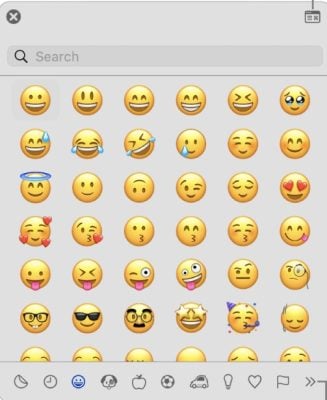
The emoji viewer on the Mac. Mia for Alucare.fr
Remarks :
- You can go to Edition then in Emoji and symbols to display the character viewer.
- You can use the search bar to type emoji name if you don't want to search for it manually.
- The variations of an emoji, such as skin color, can be displayed by clicking on the emoji and holding down the mouse button.
Discover also the meaning of the pointing finger emoji to spice up your conversations on social networks.
FAQs
Is it possible to do a thumbs-up 👍 with the keyboard?
It is not possible to make a thumbs-up 👍 with the keyboard. There is no no keyboard shortcuts for this. Only the list of emojis provides this character.
If you don't have access to emojis on your computer, simply copy and paste the thumbs-up to integrate it into your text. Here are the steps to follow:
- Open a new Google tab or other search engine and look for the thumbs-up symbol.

- Several proposals will be displayed, select the thumbs-up symbol 👍, then copy it.

- Paste the symbol in your text and it's all good!
How to add the thumbs-up emoji to Outlook e-mail?
The technique for insert a thumbs-up emoji in an e-mail on Outlook is easy and accessible to everyone. Here's what you need to know about it.
Inserting the thumbs-up emoji in Outlook with a computer
Giving a thumbs up with the keyboard may not be feasible, but inserting the smiley thumbs-up in your e-mails is perfectly possible. Just follow our instructions:
- LLaunch the application Microsoft Outlook and click on new e-mail.
- Click on the Windows + dot (.) on your keyboard to display emojis.
- Select emoji a thumbs-up and voilà!
For Mac devices, press the keyboard keys : Fn + E and the character and emoji viewer will appear.
Inserting the thumbs-up emoji in Outlook with a mobile device
Want to add a thumbs-up emoji in your message with your mobile devices, but you don't know how? Start by opening the app, then log in to your account and follow these instructions:
- Click on " E-mail "Then write your message.
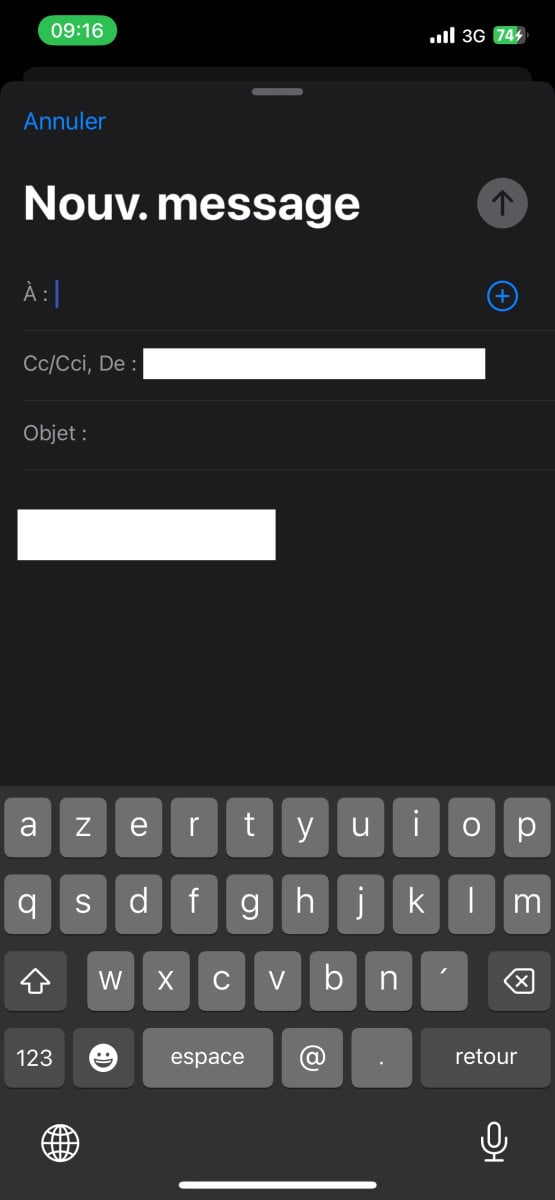
- On your keyboard, press the key to access the emojis and symbols.

- Choose thethumbs-up emoji and that's it!
Please note that the insert an emoji in Outlook is the same, whether you're using Android or iPhone!
What does the thumbs-up emoji mean and how do I use it?
On most platforms, this emoji is displayed in the form of a closed fist seen from the frontwith thumb raised. Sometimes, the hand is also shown from behind.
Unlike the thumbs-down emoji, this symbol expresses a priori the positive. Here's what this emoticon is for, corresponding to the Unicode code: U+1F44D.
To say "OK", "okay" or "understood".
It is generally used in digital conversations to mark approval :
- This symbol can replace the word " OK "This can be interpreted as confirmation and acceptance of a request.
- It can also be used in response to a given explanation to say that one has well understood.
To congratulate someone
By reacting with this symbol, you are encouraging someone for a a job well doneIt is therefore a way of congratulating someone and encouraging them to continue on their path. It is thus a sign of appreciation.
To translate admiration
For example, a thumbs-up (like click) on a post (text or photo) or comment featuring a film, advertisement, book or other content we like on the Internet.
To express an insult
It is important to know that this gesture can be translated as a gestural insult particularly vulgar, like a middle finger, in some countries, while in most it expresses benevolence and respect.
To discover other articles similar to this one, visit our page Guides & How-To's !
All in all,
- The thumbs-up emoji 👍, corresponding to the Unicode code U+1F44D, is used for express approval.
- It is omnipresent in digital communication to testify an agreement or congratulations.
- He is impossible to create the 👍 emoji via a conventional keyboard.
- To insert it into texts, use the emoji viewer on a PC or Mac. If it is not available, copy and paste the symbol from a web search.
- Although it generally indicates positivity, this gesture can be perceived as insulting in certain cultures.
- HTML character encoding is constantly evolving. Adding a thumbs-up emoji to your discussions can liven up your messages. You can also use this character to like online content!
- The use of thethumbs-up emoji isn't just limited to social networks and messaging platforms, because even in games like Monopoly Go, we can use this character.
Do you often use this emoji in your daily tasks? Share your answer with us in the comments !








 English
I often use emojis and didn't know there was a simple way to type the thumbs-up symbol on the keyboard. Very handy!