To make a bucket in Minecraft, you need to 3 iron ingots and a craft table.
It's one of the most versatile items in the game: it lets you to carry water, of the washer, of milk or the powder snow, put out a fire, capture aquatic creatures, and much more.

How to Make a Bucket on Minecraft ?
Making a bucket requires only two things: a craft table and 3 iron ingots.
| Craft table | 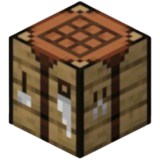 |
| 3 iron ingots | 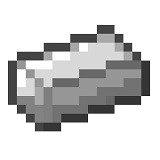 |
The instructions are clear: place the 3 V-shaped ingots in the grid. One bar on the left in the center, one at the bottom in the center, and one on the right in the center. It’s this exact shape that gives you a empty bucket.
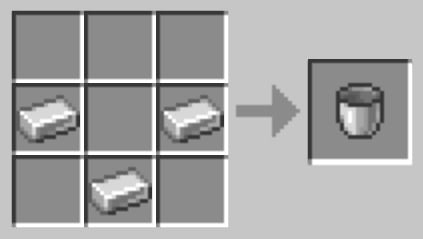
This manufacturing process is the same across all game versions (Java and Bedrock), so there won't be any unpleasant surprises, depending on your platform.
Where can I find iron to make a bucket?
the iron is the basic material for beginners in Minecraft. You mine it as ore, then smelt it in a furnace to obtain iron ingots.
All you have to do is 3 ingots to craft a bucket. Iron is also useful for tools, armor, and rails, making it a resource you should always have on hand.
The recipe works the same way on all versions of Minecraft, whether it be Java Edition Where Bedrock Edition.
Where can I find an empty bucket in Minecraft ?
If you don't want to craft it, you can find one empty bucket directly into the coffers of certain structures built around the world. Here are the main locations:
- Villages : chests in blacksmiths' houses or savanna houses
- Woodland Mansions : chests scattered throughout the various rooms
- Dungeons : chests at the base of the monster spawners
- Test Chambers : loot chests in the new underground structures
- House of the Savannah : one of the most accessible chests early in the game
A village or manor chest is often the best option if you're short on iron early in the game. But crafting is by far the most reliable way to always have buckets on hand.
How to fill a bucket in Minecraft ?
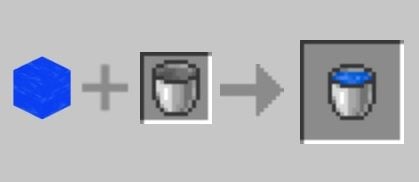
Your bucket is removed from the crafting table empty. To fill it with’water, the process is immediate:
- Get closer to a water source, with your empty bucket in hand
- Make a right click in the source block
- The bucket fills up and becomes a water bucket
A The bucket of water contains a water source block entire. So you can place it elsewhere to create as many new sources as you like, which is handy for generating endless water sources.

There are two ways to fill your empty bucket with water:
- Right-click directly on a natural water source
- Right-click on a a pot filled with water

What are the different types of buckets in Minecraft ?
The same right-click action works with various types of content. Here are all the bucket types available in Minecraft :
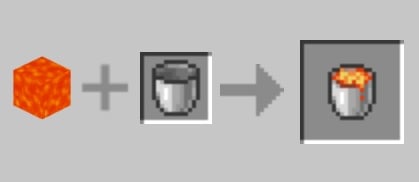
| Lava bucket
|
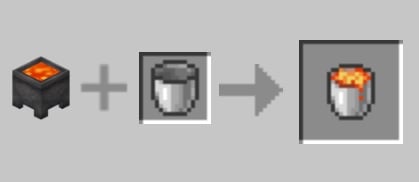
Empty bucket + right-click on a lava source block. The lava bucket contains a lava source block that can be used as fuel.
Or right-click on a lava cauldron.
|
| Powder snow bucket
|
Empty bucket + right-click on a block of powder snow in a snowy biome. The bucket of powder snow contains a block of powder snow that you can place wherever you want.
|
| Milk pail
|
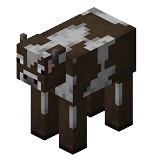
Empty bucket + right-click on a cow or a champimeuh.
|
| Fish bucket | Empty bucket + right-click on a fish in the water. The bucket catches the fish along with the water. You can then release it wherever you want. |
| Axolotl bucket | Empty bucket + right-click on a axolotl. Useful for transporting and releasing this animal into another body of water. |
| Tadpole bucket | Empty bucket + right-click on a tadpole. Handy for carrying frogs before they metamorphose. |



the bucket of powder snow can only be retrieved from the snow-covered biomes. Powder Snow contains a block of powder snow that slows down entities and can be used as a trap.
the lava bucket, on the other hand, contains a lava flow very useful as fuel in a blast furnace : It's one of the best fuels in the game.
How to Milk a Cow in Minecraft ?
the bucket of milk It is not collected from a source; it is obtained directly from an animal. The procedure is simple:
- Keep a empty bucket by hand
- Get closer to a cow or a champimeuh
- Make a right click on the animal
- Your bucket immediately fills up with milk
You can also milk a goat in the same way to get milk. The bucket of milk has a valuable use in battle: drinking it cancels all potion effects as they occur, both good and bad. After use, the bucket is empty again and ready to be reused.
How to Use a Bucket in Minecraft ?
The bucket is one of the most versatile items in Minecraft. Here's everything you can do with it:
- Create endless water sources by placing water in two adjacent squares
- Putting out a fire or a player on fire with a bucket of water
- Cushion a fall by pouring water just before landing (an essential survival technique)
- Empty or fill a cauldron with water or lava
- Recover a lava flow to use it as fuel
- Catching aquatic creatures: fish, axolotl, tadpole, using an empty bucket
- Place a full bucket in a distributor to release its contents via a Redstone signal
- Transporting powder snow from a snow-covered biome to create traps
the distributor is particularly useful in automation: it activates the bucket and automatically empties its liquid contents. It is a valuable aid for lava or water farms.
Finally, the duo bucket of water + bucket of lava is essential for building a Nether Portal. You pour in the lava, then pour water over it to form’obsidian.
The water contains a source block that comes into contact with the lava source block, creating the obsidian needed for the portal. The bucket of lava contains exactly what is needed to trigger the reaction.
What kinds of things can you make with a bucket in Minecraft ?
The bucket is a key ingredient in several recipes. It also lets you to empty a cauldron With a simple right-click using an empty bucket: the bucket collects the contents, and the cauldron is empty again.

the bucket of milk For this cake recipe, you'll need: 3 buckets of milk, sugar, an egg, and wheat. The bucket of milk contains everything needed to bind the ingredients together. All the details are in the tutorial for to bake a cake in Minecraft.
the lava bucket is also very effective as a fuel in a blast furnace : A single bucket of lava can melt up to 100 items, making it one of the best sources of fuel in the game. Once used, the bucket becomes empty again and can be used once more.
The powder snow, which is collected using an empty bucket in a snowy biome, can be used to transform certain creatures upon contact.
Powder Snow contains a block of powdery snow that traps anything that falls into it, making it an excellent defensive tool around a house or base.









 English