To delete your Instagram account, Go to:
- Settings and privacy
- Account Area
- Personal information
- Account ownership and control
- Deactivation or deletion
The procedure works on iPhone, android and computer. Before you get started, remember to download your data : Once the account has been deleted, it's irreversible. And if you just want to take a break, the temporary deactivation That's all you need—and it lets you come back whenever you want. We'll explain everything to you!
How do I permanently delete an Instagram account?
Good to know: the permanent deletion isn't instant. Instagram lets you 30 days to change your mind. During this time, all you have to do is log in again to get everything back. Once this 30 days, your profile and information will be permanently deleted.
1. On iPhone
To delete your account from the app, you must:
- Be connected to the account to be deleted,
- To have one's own password.
Next, follow these steps:
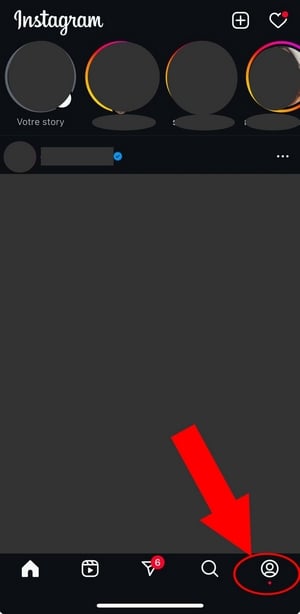
- Open the app Instagram and press your profile lower right,
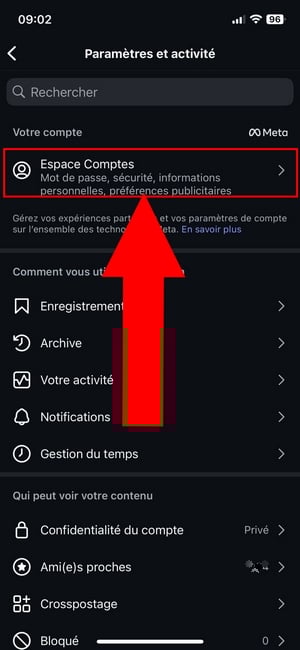
- Press the top right menu,

- Go to Account Areathen on Personal information,

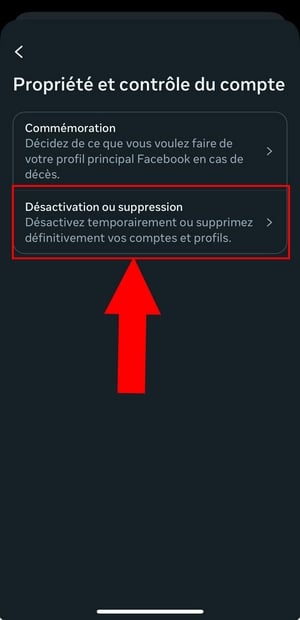
- Click on Account ownership and controlthen on Deactivation or deletion,

- Select the profile that you want to delete,
- Press Delete accountthen on Continue,
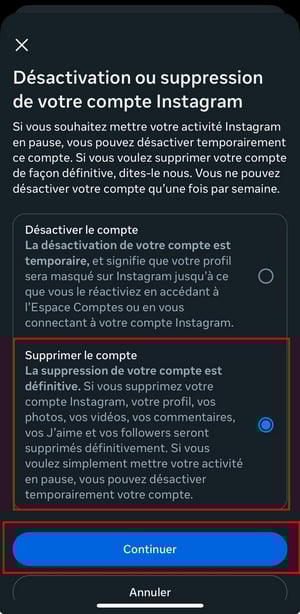
- Select the reason Select the reason why you want to delete your account, then tap Continue,
- Fill in your password to confirm deletion.
2. On Android
The procedure is almost identical to that of the’iPhone. Only the layout of the menu changes slightly on the screen.
- Log in on your own Instagram,
- Open your profile via your profile picture in the lower right corner,
- Press the menu (more options) in the upper-right corner of the screen,
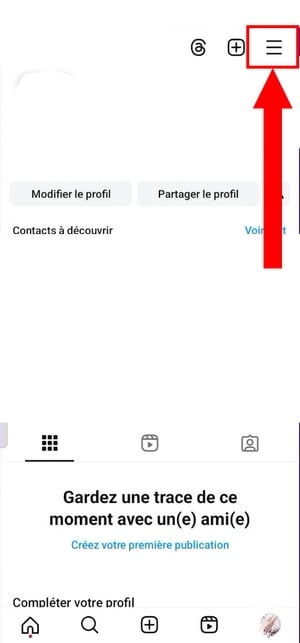
- Click on Account Areathen on Personal information,

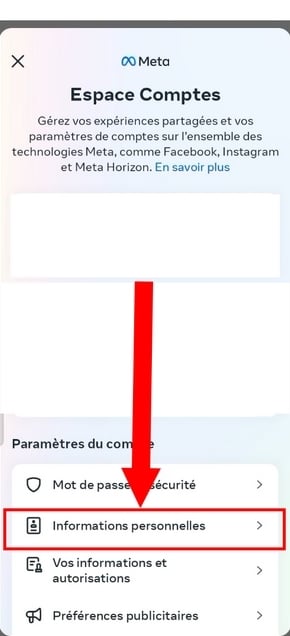
- Press Account ownership and controlthen on Deactivation or deletion,

- Select the account that you want to delete (Instagram Where Facebook (related),
- Press Delete accountthen on Continue,
- Fill in your password to confirm the permanent deletion.
3. How do I delete an Instagram account on a PC?
You can also Delete your account from a web browser, without using the mobile app. Here are the steps to follow.
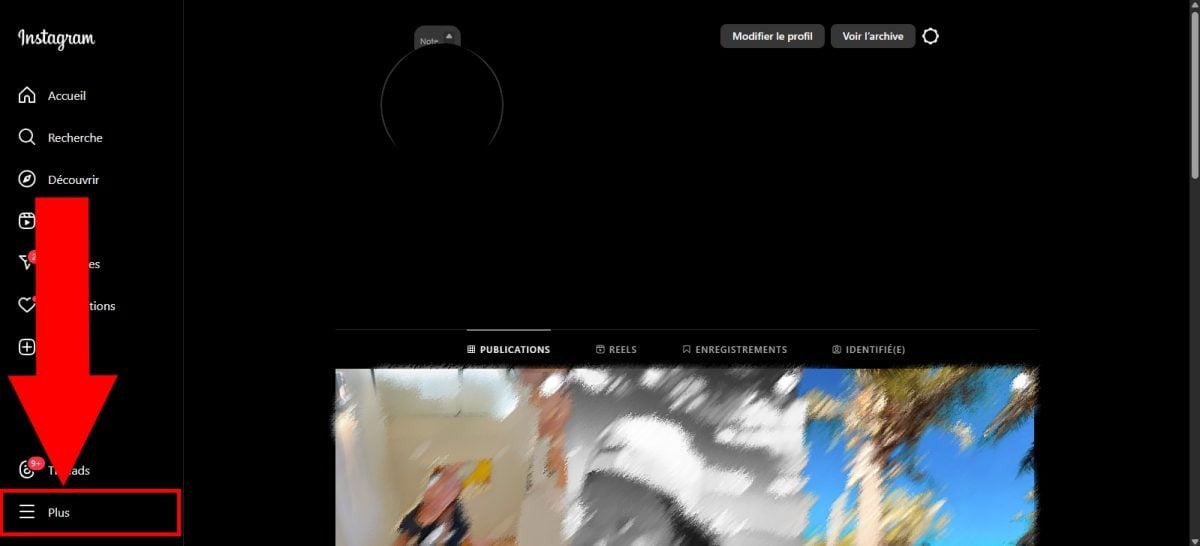
- Log in on your account, then click on the 3 horizontal lines in the lower-left corner to open the Settings and Privacy,
- In theAccount Area, click on Personal informationthen on Account ownership and control,
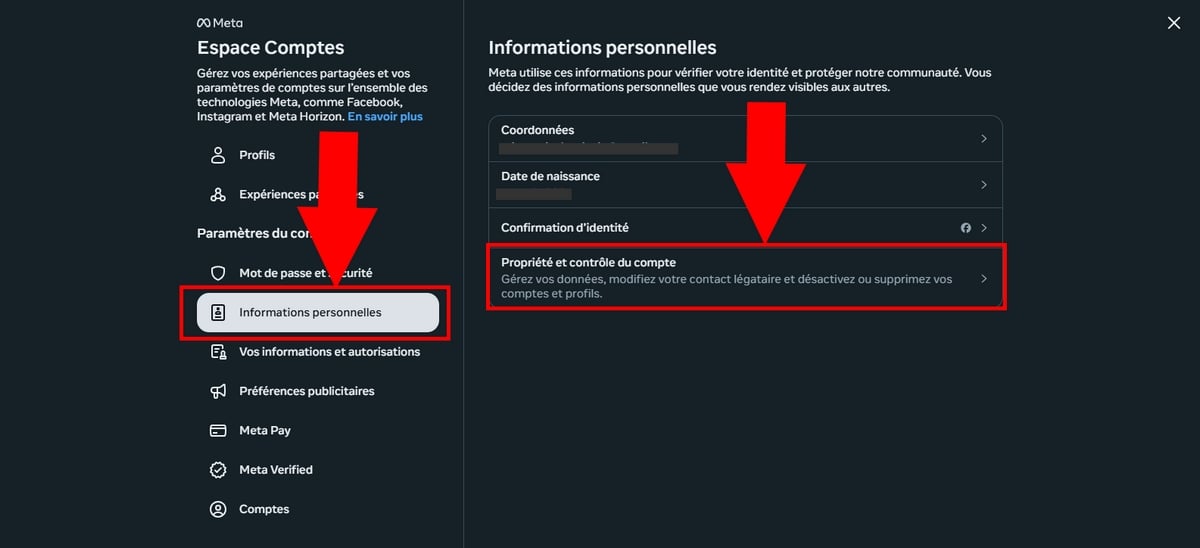
- Select the option Deactivation or deletion.
Before deleting your account: download your data
Before Delete your Instagram account, take two minutes to back up whatever you want to keep. Once the permanent deletion validated, your Pictures, videos, and posts are lost and cannot be recovered. This is also a good time to think about delete photos that you don't want to leave lying around online.
Instagram leaves you download a copy of your information directly on your device. You choose the format, the time period, and the data you want to keep.
To start the backup from the app Instagram :
- Log in on your own Instagram.
- Open the menu, then go to Your business.
- Select Upload your information, then Request a download.
- Choose what you want to restore (Pictures, messages, comments) and valid.
Please note: Depending on the version of the app, this setting can also be adjusted via the’Account Areain Your Information and Consents. Instagram then sends you a download link via email.
How do I deactivate my Instagram account?
The deactivation is the perfect solution if you just want to take a break without permanently deleting your profile. Unlike deleting your profile, this option is temporary : Your account will become invisible, but your Pictures, videos, and personal data remain intact.
To deactivate your account, follow the exact same steps as for deleting it. Go to Settings and Privacy > Account Center > Personal Information > Account Ownership and Control > Deactivation or Deletion. The procedure is the same on iPhone, android and computer to this page.
Once you're on this menu, select the account in question, then choose Deactivate account instead of Delete account.

Here is how this option appears on mobile devices:
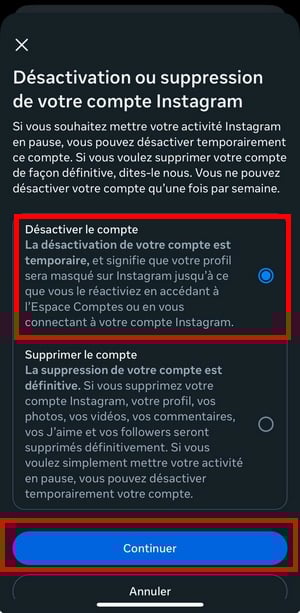
Just like with deletion, you must enter your password to confirm. The temporary deactivation Nothing is deleted: Your account will be reactivated as soon as you log back in with your username and password.
FAQs
Deleting an Instagram account without a password: is it possible?
No, it doesn't matter which device you use (iPhone, Android or PC), you I can't delete an account Instagram without password. If you've forgotten it, you must first reset it, then start the deletion process.
- Open the app Instagram or the login page in your browser.
- On the login screen, click Forgot your password?
- Fill in your username, your email address or phone number.
- Follow the link you received to create a new one password.
For reasons of privacy, Instagram Never delete an account unless you're logged in with your credentials.
Deleting an account VS deactivating an account: what's the difference?
If you want to leave Instagram For real, go with the permanent deletion. If you just want to hide temporarily your profile during a break, the deactivation is the right choice. The table below summarizes the differences.
| Information | Delete an Instagram account | Deactivate an Instagram Account |
|---|---|---|
| Account and Data | Permanently deleted | Temporarily hidden |
| Data Recovery | Possible, but not for more than 30 days | Possible at any time |
| Account recovery | Yes, within 30 days of the request for deletion | Yes, just log back in with your username and password. |
| Consequences | Your profile, photos, videos, comments, and latest instagram followers are permanently deleted. | Your profile, photos, videos, comments, and subscriptions are temporarily hidden until you reactivate your account. |
Will deleting my Instagram account also delete my Meta account?
No. Delete your account Instagram does not result in the removal of from your other accounts Meta, as Facebook.
If you've selected only your Instagram profile When you complete this process, only this account will be deleted. Your account Facebook and the other related accounts in the’Account Area remain intact.
The Accounts Facebook and Instagram are quite distinct: each has its own deletion procedure in the Settings and Privacy of the app in question.
Explanatory video in French by Alucare, ideal complement to the page. View video (you can use YouTube's automatic translation)

How do I reactivate my Instagram account?
a) After a deletion
If you've started the process of deleting your account Instagram, you You have 30 days to reactivate it. After this period, your personal data can no longer be recovered. To go back, just Sign in to your account using your usual login credentials during this period.
Please note: If your account was deleted due to a violation of the Community rules, you may not be able to re-register with the same username.
b) After deactivation
If you've chosen to temporarily disable your account, just reconnect at any time to reactivate it. No additional steps are required.
I can't delete my Instagram account: what should I do?
On Instagram, you must be the account owner so you can delete it. Once you're logged in, you'll need to re-enter your password to confirm deletion or deactivation. If the option remains grayed out, check the following:
- Are you logged in to the good deal in the app.
- Your password is correct (reset it if you have any doubts).
- Your Instagram is up to date, or is attempting the procedure from a web browser on a PC.
- If the problem persists, you can report the problem directly from the app via Settings and Privacy > Help > Report a Problem.
If nothing works, you can also check out our guide on How to close an account for other ideas.
Can I delete another Instagram account?
To delete another account, you must first log in to it. Here's how:
- Click on your username to access your profile.
- Press the three small points next to «Edit Profile.».
- From the drop-down menu, select Logout to log out of your current account.
- Once you've logged out, log back in the account you want to delete, along with its username and password.
- Then follow the same steps until you reach the page Delete your account, choose a reason, then enter your password to confirm.
Make sure you're on the good deal before confirming, because this action is irreversible.
How long does it take to delete an Instagram account?
An account Instagram is not deleted immediately. It takes 30 days after the request, before it disappears. After this period, the account and all your personal information are permanently deleted.
Some useful information to know:
- During these 30 days, your content remains subject to Terms of use and at the Instagram Privacy Policy, but it is no longer visible to other users.
- The process may extend up to 90 days : Backup copies may remain on the servers in the event of a system failure or software error.
- Instagram reserves the right to retain certain data for legal or security reasons, in accordance with its Privacy Policy.
If you're sure about your decision, consider download your data before confirming the deletion. Once the account has been deleted, there is no way to recover it.








 English